Vigtige sikkerhedsoplysninger
Forsigtighed: Use only with the recommended voltage. Do not use this device as a toy. Improper handling may lead to electric shock. Excessive use of this noise machine may lead to potential noise exposure risks. Always follow safe usage guidelines. This product is CE & FCC Certified for safety.
Produkt overview
The Hotmoon White Noise Machine is designed to provide a soothing environment for sleep and relaxation for babies, kids, and adults. It combines sound therapy with customizable lighting features, all controllable via a dedicated mobile application.

Image: Hotmoon White Noise Machine with its mobile application interface.
Opsætningsvejledning
1. Udpakning og placering
- Tag forsigtigt enheden ud af emballagen.
- Place the device on a stable, flat surface, away from water or excessive heat sources.
- Ensure the power cable is securely connected to the device and a suitable power outlet.
2. Appinstallation og forbindelse
- Download the official Hotmoon companion application from your device's app store.
- Open the application and follow the on-screen instructions to pair your device. This typically involves ensuring Bluetooth is enabled on your mobile device and the Hotmoon machine is powered on.
- Once paired, the app will provide full control over the machine's functions.

Image: The mobile application interface for controlling the Hotmoon White Noise Machine.
Betjeningsvejledning
Basic Operation (Device Controls)
- A gentle tap on the top of the device can activate or change the light and music settings.
- Double-tapping the top can cycle through different colors and sounds.
Video: Demonstration of the Hotmoon White Noise Machine's features and app control.
App-kontrolfunktioner
- Lydvalg: Choose from a variety of natural sounds, white noise, and lullabies.
- Lydstyrkejustering: Control the sound volume precisely using the app's slider.
- Lysstyrkekontrol: Adjust the light brightness with stepless dimming from 5% to 100%.
- Farvetilpasning: Select from 16 million RGB color options or tune white light from 3000K to 6500K.
- Timerindstillinger: Set timers for automatic shut-off.
- Scheduled Routines (Sleep Trainer): Create customized schedules for sound and light combinations to act as sleep-wake hints, promoting healthy habits.
- Red Night Light: Utilize the built-in red LED bead to emit a dim, soothing red glow, which may stimulate melatonin production and help promote sleeping quality.
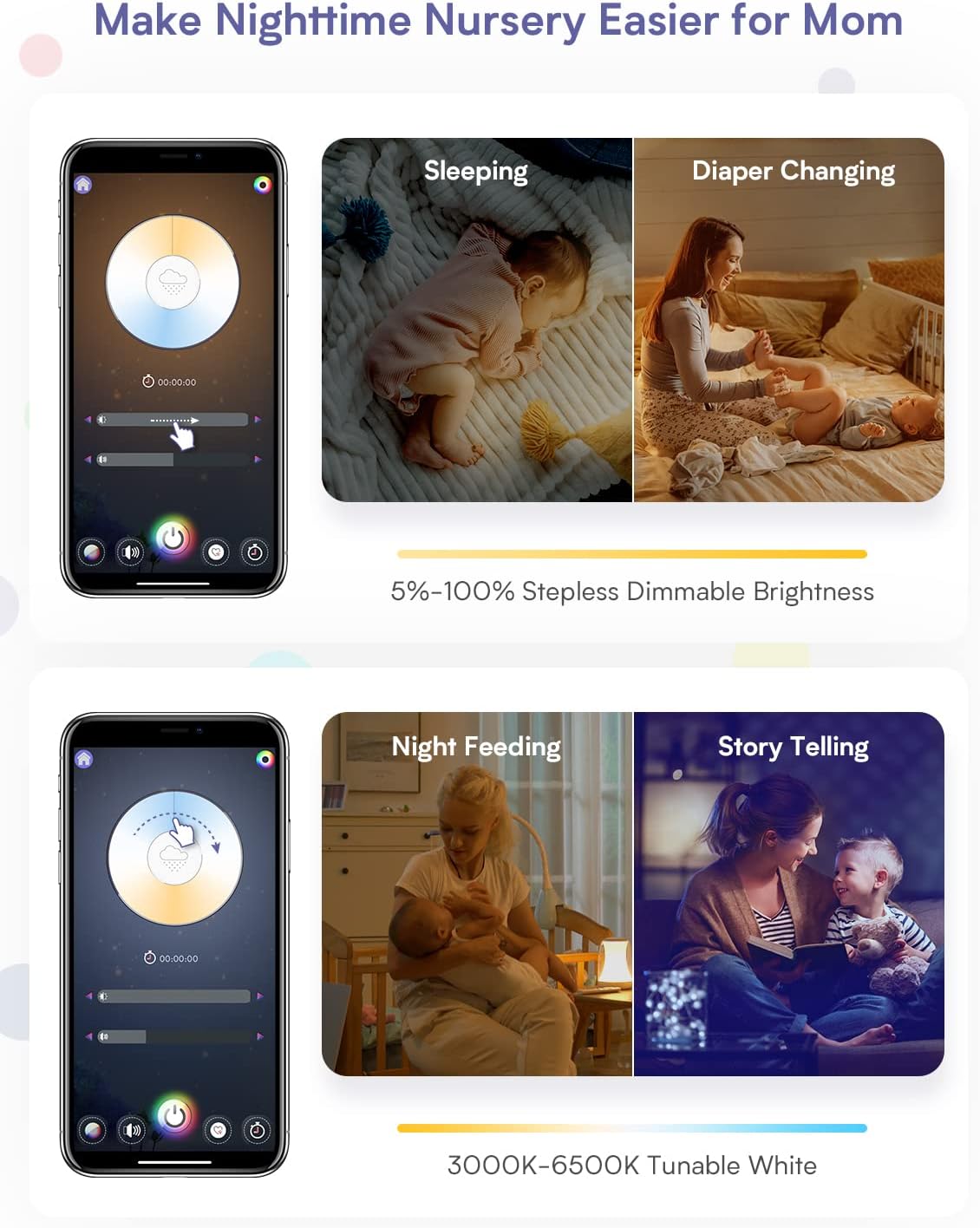
Image: App interface showing dimmable brightness settings for various nursery activities.

Image: App interface displaying options for nature sounds, white noise, and lullabies.

Image: App interface for setting custom schedules and timers for daily routines.

Image: App interface showing the color selection wheel for 16 million RGB options.

Image: The device emitting a red light, highlighting its sleep aid feature.
Opretholdelse
- To clean the device, wipe it with a soft, dry cloth.
- Brug ikke slibende rengøringsmidler, og nedsænk ikke enheden i vand.
- Sørg for, at enheden er taget ud af stikkontakten før rengøring.
Fejlfinding
| Problem | Mulig årsag/løsning |
|---|---|
| Device not producing sound. |
|
| App control is unresponsive or "funky". |
|
| Device needs frequent resets (unplugging). |
|
| Cannot connect to multiple devices. |
|
Specifikationer
- Model: HMNL02-RGB-1-US
- Mærke: Varmmåne
- Farve: Hvid
- Materiale: Acrylonitril Butadien Styren (ABS)
- Varens vægt: 1.25 pund
- Produktdimensioner: 4 x 4 x 6 tommer
- Strømkilde: Battery Powered (Note: The device is primarily powered via an external adapter, as shown in product images, despite being listed as 'Battery Powered' in some specifications.)
- Skift stil: App kontrol
- Særlige funktioner: Dimmable, App Control, Sound Machine, Night Light, Time-to-Rise Sleep Trainer
- Fabrikant: Shenzhen ZhiLong Electronic Technology Co., Ltd
- Første tilgængelige: 19. maj 2022
Garanti og support
For warranty information or technical support, please refer to the official Hotmoon webwebstedet eller kontakt deres kundeservice direkte. Kontaktoplysninger findes typisk på produktemballagen eller producentens webwebsted.