Indledning
This manual provides comprehensive instructions for the installation, operation, and maintenance of your Alpine iLX-507 7" Multimedia Receiver. Please read this manual thoroughly before using the product to ensure proper and safe operation. Keep this manual for future reference.
The Alpine iLX-507 is a state-of-the-art digital multimedia receiver designed to enhance your in-car entertainment and connectivity. It features a 7-inch capacitive touchscreen display and offers seamless integration with modern smartphones through wireless Apple CarPlay and wireless Android Auto.
Opsætning og installation
Korrekt installation er afgørende for optimal ydeevne og sikkerhed. Det anbefales, at installationen udføres af en kvalificeret fagmand.
Udpakning og komponenttjek
Før installationen påbegyndes, skal du kontrollere, at alle komponenter er til stede i emballagen:
- Alpine iLX-507 Multimedia Receiver Unit
- Ledningsnet
- GPS antenne
- Mikrofon
- Monteringshardware
- Brugervejledning (dette dokument)
Ledningsforbindelser
Connect the wiring harness to the vehicle's power, ground, speaker, and accessory wires according to the wiring diagram provided with the unit. Ensure all connections are secure and properly insulated to prevent short circuits.
The iLX-507 supports various inputs and outputs, including USB for media playback and smartphone connectivity, and HDMI for external video sources.

Figur 1: Forside view of the Alpine iLX-507 multimedia receiver displaying the radio interface with frequency selection and current song information.
Første opstart og grundlæggende indstillinger
After installation, turn on your vehicle's ignition to power the unit. The initial setup wizard will guide you through basic configurations such as language, time, and region settings. Ensure the GPS antenna is positioned correctly for accurate time synchronization and navigation assistance.
Betjeningsvejledning
Touchscreen Interface Navigation
The iLX-507 features a responsive 7-inch capacitive touchscreen. Navigate through menus and select functions by tapping icons. Swipe gestures may be used for scrolling lists or changing screens.
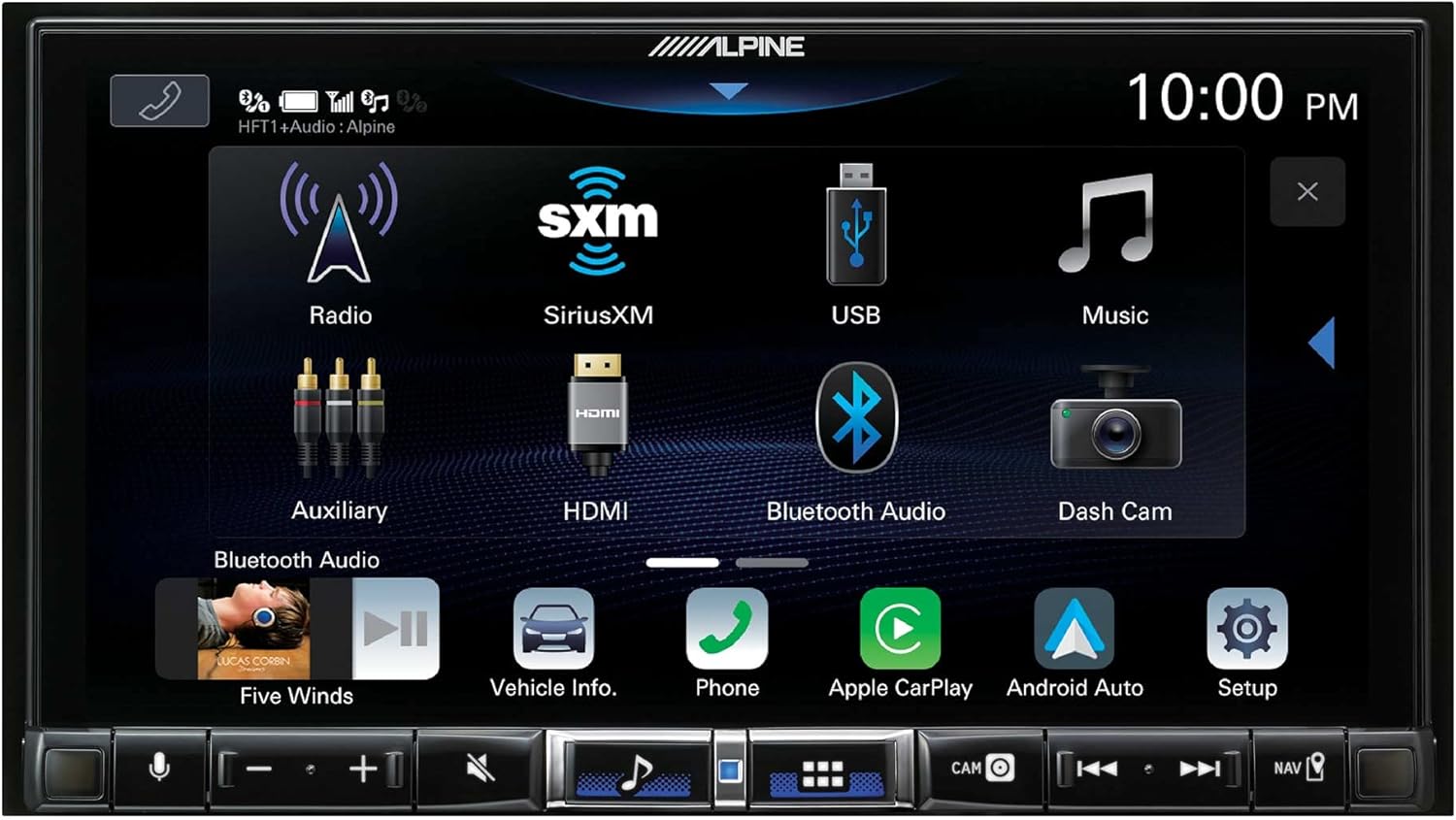
Figure 2: The main menu screen of the iLX-507, showing icons for Radio, SiriusXM, USB, Music, Auxiliary, HDMI, Bluetooth Audio, Dash Cam, Vehicle Info, Phone, Apple CarPlay, and Android Auto.
Trådløs Apple CarPlay og Android Auto
The iLX-507 supports both wired and wireless Apple CarPlay and Android Auto. To connect wirelessly, ensure Bluetooth is enabled on your smartphone and pair it with the receiver. Once paired, select the respective CarPlay or Android Auto icon on the receiver's screen to initiate the connection.
- Apple CarPlay: Access navigation, make calls, send and receive messages, and listen to music directly from your iPhone.
- Android Auto: Utilize Google Maps, make calls, send messages, and control music from your Android device.

Figure 3: A visual comparison demonstrating the user interfaces for both Apple CarPlay and Android Auto as displayed on the Alpine iLX-507 screen.
Bluetooth håndfri opkald og lydstreaming
Pair your smartphone via Bluetooth for hands-free calling and wireless audio streaming. Access your phone's contact list, dial numbers, and manage calls directly from the receiver's screen. Stream music from your device's library or supported apps like Pandora, Spotify, and Tidal.
Audio Settings and Equalizer
The iLX-507 offers extensive audio customization options. Access the audio settings menu to adjust bass, treble, balance, fader, and subwoofer levels. Utilize the built-in equalizer for precise sound tuning to match your preferences and vehicle acoustics.

Figure 4: The audio settings screen of the Alpine iLX-507, showing options for MediaXpander, battery voltage display, sound presets, bass/treble adjustments, and time correction settings.
Opretholdelse
Rengøring af skærmen
To clean the capacitive touchscreen, gently wipe it with a soft, lint-free cloth. For stubborn smudges, dampen the cloth slightly with water or a screen-safe cleaner. Avoid using abrasive materials or harsh chemicals, as these can damage the screen coating.
Softwareopdateringer
Alpine periodically releases software updates to improve performance, add features, or address issues. Check the official Alpine website for the latest firmware updates for your iLX-507 model. Follow the provided instructions carefully when performing updates, typically involving a USB drive.
Fejlfinding
This section addresses common issues you might encounter with your Alpine iLX-507. For problems not listed here, please contact Alpine customer support.
| Problem | Mulig årsag | Løsning |
|---|---|---|
| Enheden tænder ikke. | Forkert ledningsføring, sprunget sikring, bilens tænding afbrudt. | Check power and ground connections. Inspect vehicle fuses. Ensure ignition is on. |
| Ingen lydudgang. | Speaker wires disconnected, volume too low, mute activated, incorrect source selected. | Kontroller højttalertilslutninger. Øg lydstyrken. Kontroller lydløs status. Vælg den korrekte lydkilde. |
| Trådløs CarPlay/Android Auto opretter ikke forbindelse. | Bluetooth off on phone/unit, phone not paired, interference. | Ensure Bluetooth is on and paired. Forget device on both ends and re-pair. Move phone closer to unit. |
| Touchscreen reagerer ikke. | Midlertidig softwarefejl, ekstrem temperatur. | Restart the unit (turn vehicle off and on). Allow unit to reach normal operating temperature. |
Specifikationer
| Feature | Detalje |
|---|---|
| Modelnummer | ILX-507 |
| Vise | 7" kapacitiv berøringsskærm |
| Forbindelse | Wireless Apple CarPlay, Wireless Android Auto, Bluetooth, USB, HDMI |
| Lydudgangstilstand | Stereo, mono |
| Surround Sound Kanalkonfiguration | 5.1 eller 7.1 |
| Dimensioner (produkt) | 12 x 12 x 12 tommer |
| Vægt (vare) | 5 pund |
| Dato først tilgængelig | 18. marts 2022 |
Garanti og support
For garantioplysninger henvises til garantikortet, der følger med dit produkt, eller besøg den officielle Alpine-side. website. Alpine provides customer support for technical assistance, troubleshooting, and service inquiries.
For de mest opdaterede supportressourcer, herunder ofte stillede spørgsmål og kontaktoplysninger, kan du besøge Alpine supportside.


