1. Introduktion
The AMOCAM 10-Unit Apartment Intercom System is a wired video door phone solution designed for multi-unit dwellings. This system allows residents to see, hear, and speak with visitors at the outdoor station, enhancing security and convenience. It supports one outdoor camera unit and up to ten indoor monitor units, enabling communication between the outdoor station and individual households.
2. Sikkerhedsoplysninger
- Elektrisk sikkerhed: Ensure all power connections are made by a qualified electrician and comply with local electrical codes. Disconnect power before performing any installation or maintenance.
- Vandeksponering: While the outdoor unit is weatherproof (IP65 rated), avoid direct high-pressure water spray. Ensure all connections are sealed properly.
- Kabelstyring: Route all cables securely to prevent tripping hazards and damage.
- Driftstemperatur: Do not expose the units to extreme temperatures outside the specified operating range.
3. Pakkens indhold
Kontroller venligst, at alle nedenstående varer er inkluderet i din pakke:
- 1 x Outdoor Camera Unit
- 10 x Indoor Monitor Units (7-inch)
- 10 x Monitor Hanging Plates
- 10 x strømadaptere til indendørs skærme
- 10 x 4-core/5-core Connection Cables (for monitors)
- 1 x 2-core Connection Cable (for electric lock)
- 1 x Bag of Screws and Wall Plugs
- 1 x brugermanual

Image 3.1: AMOCAM 10-Unit Apartment Intercom System components, showing one outdoor camera unit and ten indoor monitor units.
4. Produktet er slutview
4.1 Outdoor Camera Unit
The outdoor unit features a durable aluminum alloy casing and is designed for outdoor installation with an IP65 weatherproof rating. It includes a 700TVL color CMOS camera with a 60/35/70/70 degree viewing angle (U/D/L/R), built-in microphone and speaker for two-way audio, and 5 LED lights for night vision. It has 10 call buttons, allowing visitors to directly contact specific indoor units.

Billede 4.1: Forside view of the AMOCAM outdoor camera unit, featuring the camera lens, speaker grille, and ten call buttons for individual apartment units.

Image 4.2: Labeled diagram of the AMOCAM outdoor camera unit, pointing out key components such as the microphone (MIC), camera lens, LED lights for night vision, aluminum panels, speaker, and call buttons.
4.2 Indoor Monitor Unit
Each indoor monitor features a 7-inch TFT LCD color screen with an 800x480 resolution, providing a clear view of visitors. The monitor has touch-sensitive keys for various functions including ring cancel, volume/brightness adjustment, monitoring, unlocking, and intercom. It is constructed from ABS engineering plastics and designed for surface mounting.

Billede 4.3: Forside view of a single AMOCAM 7-inch indoor monitor, displaying its sleek design and touch-sensitive control icons at the bottom.
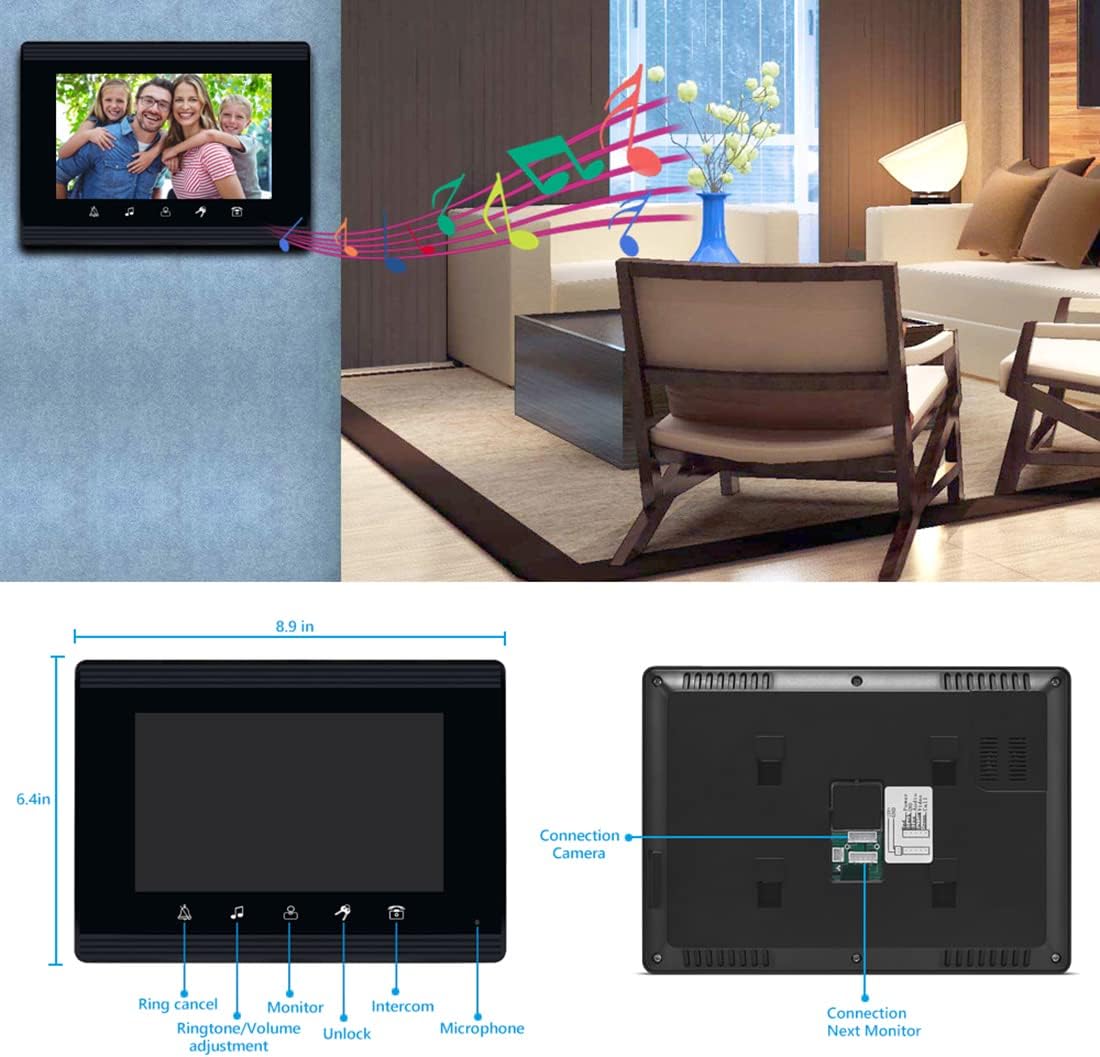
Billede 4.4: Detaljeret view of the AMOCAM 7-inch indoor monitor, highlighting its dimensions (8.9 inches wide, 6.4 inches high) and connection ports for the camera and additional monitors on the back.
5. Opsætning og installation
Proper installation is crucial for optimal performance. It is recommended to have a qualified technician perform the installation.
5.1 Montering af udendørsenheden
- Choose a suitable location near the entrance, ensuring the camera has a clear view of visitors. The standard installation height for the camera lens is between 145cm and 160cm from the ground.
- Secure the mounting bracket (set iron) to the wall using the provided screws and wall plugs.
- Fastgør udendørsenheden til monteringsbeslaget.
5.2 Montering af indendørsskærme
- Select a convenient location inside each apartment unit, typically near the entrance or in a common area.
- Secure the hanging plate to the wall using screws and wall plugs.
- Hæng den indendørs monitor på hængepladen.
5.3 Ledningsdiagram
The system uses 4-core or 5-core wiring for connecting the outdoor unit to the indoor monitors, and a 2-core cable for an optional electric lock. Ensure all connections are firm and correctly aligned according to the diagram below.

Image 5.1: Diagram illustrating the AMOCAM apartment video door phone intercom system installation in a multi-unit building, showing connections between the outdoor unit, indoor units, and an optional E-lock.

Image 5.2: Comprehensive installation guide for the AMOCAM intercom system, including a diagram for mounting the outdoor station at a standard height and a detailed wiring diagram showing connections for the outdoor camera, multiple indoor monitors, power adapters, and an electric lock.
5.4 Strømtilslutning
Connect the provided power adapters to each indoor monitor and plug them into a standard AC 100-240V outlet. The outdoor camera unit receives its power from the indoor monitors (DC15V).
6. Betjeningsvejledning
6.1 Modtagelse af et opkald
When a visitor presses the call button on the outdoor unit corresponding to your apartment, your indoor monitor will ring and display the visitor's image. Press the 'Answer' icon (typically a phone receiver symbol) on the monitor to establish two-way communication.
6.2 Tovejskommunikation
After answering, you can speak with the visitor through the built-in microphone and speaker on the indoor monitor. The outdoor unit also has a microphone and speaker for the visitor.
6.3 Overvågning
Til view the outdoor area without a visitor initiating a call, press the 'Monitor' icon (typically an eye symbol) on your indoor monitor. This will activate the outdoor camera and display the live feed on your screen.
6.4 Oplåsning af døren
If an electric lock is connected to the system, you can unlock the door remotely by pressing the 'Unlock' icon (typically a key symbol) on your indoor monitor during a call or while monitoring.
6.5 Justering af indstillinger
The indoor monitor allows adjustment of various settings:
- Bind: Adjust the ringtone and communication volume using the dedicated icon (speaker symbol).
- Lysstyrke og kontrast: Juster skærmindstillingerne for optimal viewing.
- Ringetone: Select from 16 different doorbell chimes.

Image 6.1: Close-up of the AMOCAM indoor monitor's touch keys, displaying a live video feed on the screen. The image emphasizes the modern design and ease of operation.
7. Vedligeholdelse
- Rensning: Use a soft, dry cloth to clean the indoor monitors. For the outdoor unit, a damp klud kan bruges. Undgå slibende rengøringsmidler eller opløsningsmidler.
- Kabelinspektion: Periodically check all wiring for signs of wear or damage. Ensure connections remain secure.
- Rengøring af linser: Gently clean the camera lens on the outdoor unit with a soft, lint-free cloth to maintain clear video quality.
8. Fejlfinding
| Problem | Mulig årsag | Løsning |
|---|---|---|
| No image on indoor monitor | Løs ledningsforbindelse No power to monitor Faulty camera | Check all wiring between outdoor unit and monitor. Ensure power adapter is plugged in and working. Contact support if wiring and power are confirmed. |
| Ingen lyd under kommunikation | Mikrofon/højttaler blokeret Lydstyrken indstillet for lavt Løse ledninger | Check for obstructions on microphone/speaker. Adjust volume settings on indoor monitor. Kontroller ledningsforbindelserne. |
| Door unlock function not working | Electric lock not connected or faulty 2-core cable loose | Ensure electric lock is properly installed and functional. Check the 2-core cable connection to the electric lock. |
| Indoor monitor not ringing | Ringtone volume too low Call button on outdoor unit faulty | Increase ringtone volume on the indoor monitor. Test other call buttons or contact support. |
9. Specifikationer
| Komponent | Specifikation |
|---|---|
| Outdoor Camera Unit | |
| Kameraopløsning | 700 TV-linjer |
| Kamerasensor | 1/3 farve CMOS |
| Nattesyn | 5 LED-lys |
| Lyd | Indbygget mikrofon og højttaler |
| Strømkilde | From Monitor, DC15V |
| Viewing Angle (U/D/L/R) | 60/35/70/70 grader |
| Forbindelse | 4-core/5-core wire (max support 12 monitors) |
| Materiale | Aluminium |
| Vejrbestandig vurdering | IP65 |
| Dimensioner | 4.8 x 10.8 x 1.7 tommer |
| Indoor Monitor Unit | |
| Vise | 7 inch TFT LCD screen (16:9) |
| Opløsning | 800 x 480 |
| Indgangseffekt | AC 100-240V 50 Hz-60 Hz |
| Udgangseffekt | DC 15V/1500 mA |
| Etui materiale | ABS Engineering Plastics |
| Installation | Overflade montering |
| Kontrolmetode | Tryk på Taster |
| Dimensioner | 8.9 x 6.4 x 1.0 tommer |
| Generel | |
| Forbindelsesteknologi | Kablet |
| Modelnummer | 520-70W-10 |
| UPC | 721927699978 |
10. Garanti og support
AMOCAM products are designed for reliability and performance. For specific warranty details, please refer to the warranty card included with your purchase or contact AMOCAM customer support. If you encounter any issues not covered in this manual, please reach out to our support team for assistance.
Fabrikant: AMOCAM
Kontaktoplysninger: Please visit the official AMOCAM website or your point of purchase for the latest support contact details.


