Indledning
Welcome to the user manual for your new CERAGEM M2 Arc Massage Chair. This chair is designed to provide optimal relaxation and a personalized massage experience within the comfort of your home. Featuring a premium SL frame, 6 automatic massage modes, thermal heating, a built-in Bluetooth speaker, and a convenient USB port, the M2 is crafted for both therapeutic benefits and modern convenience.

Image: The CERAGEM M2 Massage Chair in a stylish brown and beige finish, accompanied by its matching ottoman, showcasing dens elegante design.
Vigtige sikkerhedsoplysninger
Please read all instructions carefully before using the CERAGEM M2 Massage Chair. Retain this manual for future reference. Improper use can lead to injury or damage to the product.
- Always ensure the chair is placed on a stable, level surface.
- Do not use the chair if the power cord is damaged or if the plug is loose.
- Keep children and pets away from the chair during operation.
- Consult a physician before use if you have pre-existing medical conditions, are pregnant, or have a pacemaker.
- Do not attempt to disassemble or repair the chair yourself. Contact authorized service personnel.
- Tag stikket ud af stikkontakten, når stolen ikke er i brug, eller før rengøring.
Opsætning og montering
The CERAGEM M2 Massage Chair requires minimal assembly. Follow these steps to set up your chair:
- Udpakning: Carefully remove all components from the packaging. Ensure all parts are present: main chair unit, ottoman, power cord, and remote control.
- Placering: Position the chair in a desired indoor location, ensuring sufficient space around it for reclining. The chair dimensions are 44.1"D x 25.6"W x 39.7"H.
- Strømtilslutning: Connect the power cord to the chair's power input port, then plug it into a standard electrical outlet.
- Ottoman Assembly (if separate): If the ottoman base is separate, attach it securely according to the included quick-start guide.
Betjeningsvejledning
Familiarize yourself with the chair's functions using the remote control.
Tænd/sluk
Tryk på Magt button on the remote control to turn the chair on or off.
Automatiske massagetilstande
The M2 offers 6 automatic modes, each designed for specific relaxation needs. Select your desired mode using the corresponding buttons on the remote:
- Whole-body concentration mode
- Neck and shoulder concentration mode
- Hip and pelvis concentration mode
- Back and hip concentration mode
- Upper body concentration mode
- Deep massage mode
Liggende funktion
Adjust the chair's recline angle up to 120° for optimal comfort. Use the recline buttons on the remote control to find your perfect position.

Image: A woman comfortably reclined in the CERAGEM M2 Massage Chair, demonstrating the chair's ability to adjust to an optimal angle for relaxation.
Thermal Heating
Activate the thermal heating function to enhance your massage experience. The heat helps loosen tight muscles and promote blood circulation, particularly around the waist and hips. The temperature can be controlled up to 140°F (60°C).

Billede: Et nærbillede view of the lumbar area of the CERAGEM M2 chair, highlighting the integrated warming function for enhanced relaxation.
Bluetooth Speaker & USB Port
Enhance your relaxation with integrated multimedia features:
- Bluetooth-højttaler: Pair your device with the chair's built-in Bluetooth speaker to enjoy music or guided meditations during your massage.
- USB-port: Use the convenient USB port to charge your mobile devices while you relax.

Image: A composite image illustrating the CERAGEM M2's convenience features: a Bluetooth speaker, a USB charging port, and the intuitive remote control.
Vedligeholdelse og pleje
Proper maintenance ensures the longevity and optimal performance of your CERAGEM M2 Massage Chair.
- Rensning:
- Tør stolens overflade af med en blød, tør klud.amp klæde.
- Brug ikke slibende rengøringsmidler, opløsningsmidler eller stærke kemikalier.
- For leather parts, use a specialized leather cleaner if necessary, following the product instructions.
- Opbevaring: When not in use for extended periods, unplug the chair and store it in a cool, dry place away from direct sunlight and extreme temperatures.
- Inspektion: Kontroller jævnligt netledningen og stikket for tegn på beskadigelse.
Fejlfinding
If you encounter any issues with your CERAGEM M2 Massage Chair, refer to the following common problems and solutions:
| Problem | Mulig årsag | Løsning |
|---|---|---|
| Stolen tænder ikke. | Netledningen er ikke korrekt tilsluttet; problem med stikkontakten. | Sørg for, at strømkablet er korrekt tilsluttet både stolen og en fungerende stikkontakt. Kontroller afbryderen. |
| Massagefunktionen virker ikke. | Chair is not powered on; mode not selected. | Turn on the chair and select an automatic massage mode or manual setting. |
| Bluetooth-højttaleren opretter ikke forbindelse. | Bluetooth on device is off; chair not in pairing mode. | Ensure Bluetooth is enabled on your device. Refer to your device's manual for pairing instructions. Restart the chair. |
| Thermal heating not felt. | Varmefunktionen er ikke aktiveret. | Activate the thermal heating function via the remote control. Allow a few minutes for the heat to build up. |
Hvis problemet fortsætter efter at have forsøgt disse løsninger, bedes du kontakte kundesupport.
Specifikationer
Detailed specifications for the CERAGEM M2 Massage Chair:
| Mærke | CERAGEM |
| Modelnummer | M2 |
| Produktdimensioner | 44.1" D x 25.6" B x 39.7" H |
| Varens vægt | 80 pund |
| Inkluderede komponenter | Premium SL Frame, Thermal Heating, Bluetooth Speaker, USB Port |
| Fyldningsmateriale | Skum |
| Tilbagelænet Position Tæl | 2 (op til 120°) |
| Anbefalede anvendelser | Afslappende |
| Indendørs/Udendørs brug | Indendørs |
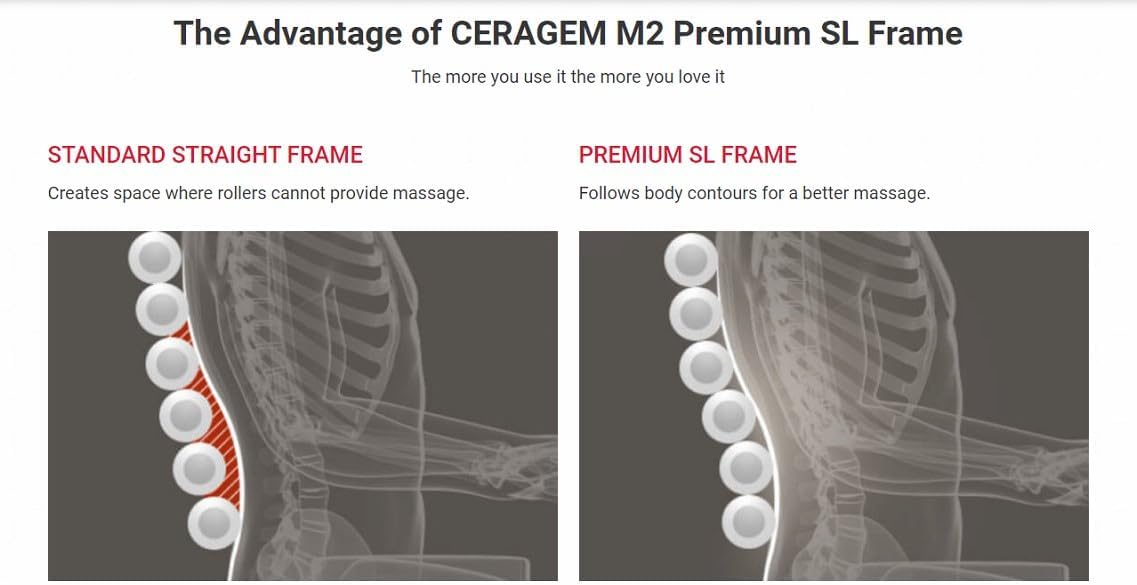
Image: A diagram illustrating the advantage of the CERAGEM M2's Premium SL Frame, showing how it follows body contours more effectively than a standard straight frame for a better massage.
Garanti og support
CERAGEM stands behind the quality of its products. Your CERAGEM M2 Massage Chair is covered by a limited warranty against defects in materials and workmanship from the date of purchase. Please refer to the warranty card included with your product for specific terms and conditions.
For technical support, warranty claims, or service inquiries, please contact CERAGEM customer service:
- Webwebsted: Visit the official CERAGEM webwebsted for supportressourcer og kontaktoplysninger.
- E-mail: [Indsæt kundeservice-e-mail her, hvis tilgængelig]
- Telefon: [Indsæt kundeservicetelefonnummer her, hvis tilgængeligt]
When contacting support, please have your model number (M2) and proof of purchase readily available.


