1. Introduktion
This manual provides detailed instructions for the installation, operation, and maintenance of your Thinkbee Wireless Light Switch Kit. Please read this manual thoroughly before installation and use to ensure proper function and safety.
2. Sikkerhedsoplysninger og advarsler
- ADVARSEL: Always turn off power at the circuit breaker before installing or servicing the receiver. Failure to do so may result in serious injury or death.
- The receiver requires both live and neutral wires for power. Do not install in a single-pole switch box that lacks a neutral wire.
- It is not recommended to install the switch on a metal surface or the receiver in a metal cover. Metal can block the wireless signal and reduce the remote control distance.
- Ensure all wiring connections are secure and comply with local electrical codes. If you are unsure about wiring, consult a qualified electrician.
- Do not exceed the maximum load capacity of 1000W or 10A for the receiver.
- This product is IP66 waterproof, suitable for damp locations, but avoid submerging it in water.
3. Pakkens indhold
Bekræft at alle varer er til stede i din pakke:
- 1x Wireless Switch (Transmitter)
- 1x Mini Receiver
- 2 x klistermærker
- 2x Wiring Connectors
- 1x Brugermanual (dette dokument)

Image 3.1: Components of the Thinkbee Wireless Light Switch Kit, including the switch and receiver.
4. Produktspecifikationer
| Komponent | Specifikation |
|---|---|
| Transmitter (Wireless Switch) | |
| Vandtæt vurdering | IP66 |
| Dimensioner | 8.6 x 8.6 x 1.1 cm |
| Arbejdstemperatur | -30°C ~ +75°C |
| Batteri model | 3V CR2032 (inkluderet) |
| Modtager | |
| Voltage | AC 80-275V |
| Composite Load | 1000W |
| Maksimal belastning | 10A |
| Dimensioner | 3.9 x 2.3 x 2.2 cm |
| Fjernbetjeningstilstand | Radiofrekvens |
| Common Attributes | |
| Følsomhed | -116 dB |
| Radiofrekvens | 433.932 MHz |
| Materiale | Fire protection ABS (refractory PC Chimei) |
| Fjernbetjening afstand | Outdoor 600M (1969ft), Indoor 40M (130ft) (through-wall) |
| Certificeringer | CE, FCC, RoHS |

Image 4.1: Detailed dimensions and specifications for the wireless switch and receiver.
5. Installationsvejledning
5.1. Modtagerledningsføring
- Sluk for strømmen: Før du påbegynder noget elektrisk arbejde, skal du sørge for, at strømforsyningen til kredsløbet er afbrudt ved hovedafbryderen.
- Identificér ledninger: The receiver has input and output wires.
- Input Live Line (Red)
- Input Neutral Line (Blue)
- Output Live Line (Brown)
- Output Neutral Line (Blue)
- Tilslut indgang: Connect the Input Live Line (Red) and Input Neutral Line (Blue) of the receiver to the corresponding live and neutral wires from your power source.
- Tilslut udgang: Connect the Output Live Line (Brown) and Output Neutral Line (Blue) of the receiver to the corresponding live and neutral wires of the light fixture or appliance you wish to control.
- Sikre forbindelser: Use the provided wiring connectors or appropriate wire nuts to ensure all connections are secure and insulated.
- Monter modtager: The mini receiver is designed to fit into control boxes such as canopy, distribution box, or electrical box. Ensure it is placed in a location where the signal will not be obstructed by metal.
- Gendan strøm: Når alle forbindelser er sikre, og modtageren er sikkert placeret, skal strømmen genoprettes ved afbryderen.
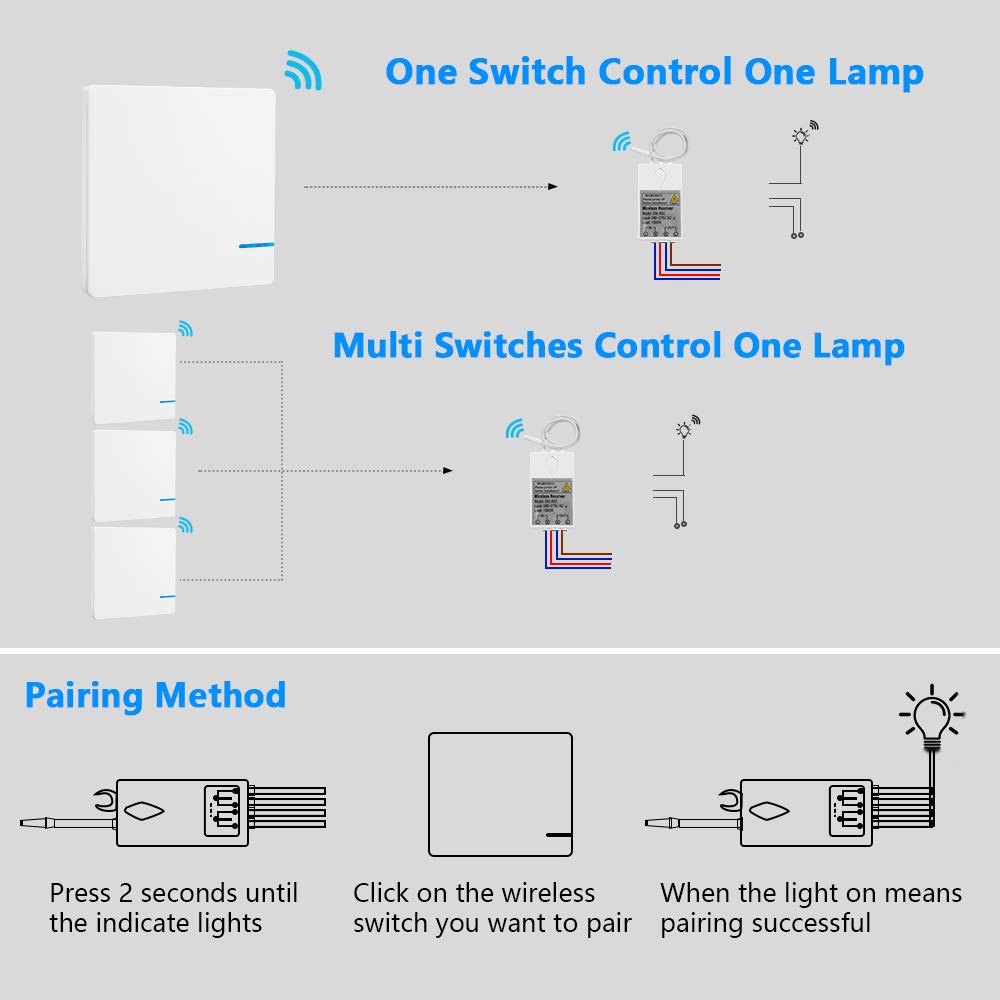
Image 5.1: Wiring diagram for connecting the receiver to a power source and a light.

Image 5.2: Visual comparison of traditional wired switch setup versus the simplified wireless switch installation.
5.2. Wireless Switch Mounting
The wireless switch does not require wiring and can be mounted in various locations:
- Klæbende montering: Use the provided self-adhesive stickers to attach the switch to any flat, clean surface. Ensure the surface is dry and free of dust or grease for optimal adhesion.
- Skrue montering: The switch can also be mounted using screws (not included) through designated holes if a more permanent fixture is desired.

Billede 5.3: Eks.ample of the wireless switch mounted on a wall.
6. Betjeningsvejledning
6.1. Pairing the Wireless Switch with the Receiver
Follow these steps to pair your wireless switch with the receiver:
- Aktivér parringstilstand på modtageren: Press and hold the pairing key on the receiver for approximately 2 seconds until the indicator light on the receiver begins to flash. This indicates the receiver is in pairing mode.
- Aktiver kontakt: Within 10 seconds of the receiver entering pairing mode, click the wireless switch you wish to pair.
- Bekræftelse: The light connected to the receiver will turn on, indicating successful pairing.
- Multiple Switches: One receiver can be paired with up to 8 wireless switches. Repeat the pairing process for each additional switch.

Image 6.1: Step-by-step guide for pairing the wireless switch with the receiver.
6.2. Grundlæggende betjening
Once paired, simply press the wireless switch to toggle the connected light or appliance ON/OFF.

Image 6.2: Demonstrating the simple operation of the wireless switch.
7. Vedligeholdelse
7.1. Rensning
Wipe the surfaces of the wireless switch and receiver with a soft, dry cloth. Do not use abrasive cleaners or solvents.
7.2. Battery Replacement (Wireless Switch)
The wireless switch is powered by a 3V CR2032 lithium battery. The battery has a lifespan of approximately 10 years. When replacement is needed:
- Carefully pry open the switch casing for at få adgang til batterirummet.
- Fjern det gamle CR2032-batteri.
- Insert a new 3V CR2032 battery, ensuring correct polarity.
- Snap the switch casing forsvarligt sammen igen.
8. Fejlfinding
| Problem | Mulig årsag | Løsning |
|---|---|---|
| Lyset tænder/slukker ikke. | Ingen strøm til modtageren. Modtageren er ikke parret med kontakten. Interferens i trådløst signal. Defekt ledningsføring. | Check circuit breaker and receiver power connections. Re-pair the switch and receiver (refer to Section 6.1). Ensure receiver is not in a metal enclosure; move switch closer to receiver. Kontroller, at alle ledningsforbindelser er korrekte og sikre. |
| Reduced remote control distance. | Obstruction by metal surfaces. Excessive distance. | Relocate the receiver or switch away from metal. Ensure the distance is within the specified indoor (40m) or outdoor (600m) range. |
| Switch indicator light does not illuminate when pressed. | Low or dead battery in wireless switch. | Udskift CR2032-batteriet (se afsnit 7.2). |
9. Garanti og support
Thinkbee provides a no-hassle 36-month warranty for this product. For technical support, troubleshooting assistance, or warranty claims, please contact Thinkbee customer service. You can typically find contact information on the product packaging or the official Thinkbee webwebsted.
Kundeservice: Available 24 hours.


