Indledning
This manual provides comprehensive instructions for the Black Shark Sixgill K2 RGB Mechanical Gaming Keyboard. It covers setup, operation, maintenance, and troubleshooting to ensure optimal performance and longevity of your device. Please read this manual thoroughly before using the keyboard.

Image: The Black Shark Sixgill K2 RGB Mechanical Gaming Keyboard, showcasing dens fulde layout og levende RGB-belysning.
Pakkens indhold
Bekræft, at alle nedenstående varer er til stede i din pakke:
- 1 x Black Shark Sixgill K2 Mechanical Keyboard
- 1 x Keycap aftrækker
- 1 x Brugermanual (dette dokument)
Opsætningsinstruktioner
Follow these steps to set up your Black Shark Sixgill K2 keyboard:
- Pak tastaturet ud: Tag forsigtigt tastaturet og alt tilbehør ud af emballagen.
- Tilslut til pc: Plug the USB connector of the keyboard cable into an available USB port on your desktop PC.
- Driver installation: The keyboard is plug-and-play and typically does not require additional drivers. Your operating system (Windows 7 / 8 / 10 / XP) will automatically detect and install the necessary drivers.
- Valgfri softwareinstallation: For advanced customization of lighting effects and macro programming, download the official Black Shark software from the manufacturer's webwebsted.

Image: The Black Shark Sixgill K2 keyboard in a typical desktop PC setup, demonstrating its wired connection.
Betjeningsvejledning
RGB lysstyring
The Sixgill K2 keyboard features extensive RGB lighting customization:
- Baggrundslyseffekter: Choose from 12 different backlight effects.
- Pre-set Gaming Modes: Utilize 5 pre-set gaming lighting modes, which can be re-customized.
- Sidelight Effects: Activate 3 distinct sidelight effects.
- Farvemuligheder: Select from 8 optional single colors.
- Lysstyrke og hastighed: Adjust the backlight brightness across 7 levels and modify the movement speed of dynamic effects.
Specific key combinations (often involving the Fn key) are used to cycle through modes, colors, brightness, and speed. Refer to the keyboard's keycap legends for these combinations.

Image: Illustration of the various RGB lighting effects available on the Black Shark Sixgill K2 keyboard, including backlight and sidelight options.
Nøglefunktioner og egenskaber
- 104-tasters layout: The keyboard features a full 104-key layout, including a numeric keypad.
- Anti-ghosting og N-nøgleovergang: All 104 keys are conflict-free, ensuring accurate registration of simultaneous key presses, crucial for gaming and fast typing.
- Lineære røde kontakter: Equipped with Black Shark mechanical red switches, providing a linear, quiet click sound and responsive feedback. These switches are rated for up to 50 million keystrokes.
- Multimedia Key Combinations: Access 12 multimedia functions using the Fn key in combination with specific F-keys (e.g., Fn+F1 for media player, Fn+F2 for volume down).
- Win-Lock-funktion: The Win-Lock function (often Fn+Win key) disables the Windows key to prevent accidental presses during gameplay.

Image: The Black Shark Sixgill K2 keyboard, emphasizing its full anti-ghosting capability for all 104 keys.

Billede: Et nærbillede view of the linear red mechanical switches, demonstrating their design and placement beneath the keycaps.
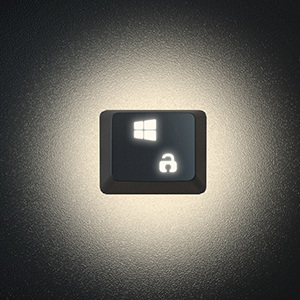
Image: A close-up of the Win-Lock key, indicating its function to disable the Windows key.
Programmerbare taster og makroer
The Black Shark Sixgill K2 keyboard supports full programmability and macro creation:
- Key Reassignment: All keys can be reassigned to perform different functions.
- Makrooprettelse: Create complex macros for effortless execution of multiple commands with a single key press.
- Software kontrol: Utilize the dedicated Black Shark software for comprehensive lighting effect control and micro programming.

Image: The Black Shark software interface, illustrating options for lighting effect control and macro programming for the Sixgill K2 keyboard.
Design og byggekvalitet
- Ergonomic Arc Layout: Designed with an ergonomic arc layout and suspended keys for comfortable typing.
- Foldable Stands: Integrated foldable stands allow adjustment of the typing angle.
- Holdbart metalpanel: Features an aluminum alloy panel with a matte-finish texture, ensuring sturdiness and extended product lifespan.

Billede: Et nærbillede view of the durable aluminum alloy panel, highlighting the premium build quality of the keyboard.

Billede: Side view of the keyboard demonstrating its ergonomic angle, adjustable via foldable stands.
Opretholdelse
Korrekt vedligeholdelse sikrer dit tastaturs levetid og ydeevne:
- Regelmæssig rengøring: Brug en blød børste eller trykluft til at fjerne støv og snavs mellem tasterne.
- Rengøring af tastatur: For deeper cleaning, use the provided keycap puller to carefully remove keycaps. Clean them with a mild soap solution and a soft cloth, then ensure they are completely dry before reattaching.
- Overflade rengøring: Wipe the keyboard's aluminum alloy panel with a damp, soft cloth. Avoid abrasive cleaners or solvents.
- Forebyggelse af spild: Avoid spilling liquids on the keyboard. In case of a spill, immediately disconnect the keyboard from your PC and allow it to dry completely before reconnecting.
Fejlfinding
If you encounter issues with your Black Shark Sixgill K2 keyboard, refer to the following common solutions:
- Tastaturet reagerer ikke:
- Ensure the USB cable is securely connected to both the keyboard and the PC.
- Prøv at tilslutte tastaturet til en anden USB-port på din pc.
- Genstart din computer.
- Keys Not Registering or Sticky:
- Clean around and under the affected keycap using compressed air or a keycap puller to remove debris.
- If a specific key is consistently unresponsive, it may indicate a switch issue.
- RGB-belysning virker ikke/forkert:
- Sørg for, at tastaturet er korrekt tilsluttet.
- Cycle through lighting modes using the designated key combinations (e.g., Fn + specific keys).
- Check the Black Shark software for lighting settings and ensure they are correctly configured.
- Software registrerer ikke tastatur:
- Reinstall the Black Shark software.
- Sørg for, at dit operativsystem er opdateret.
- Deaktiver midlertidigt al antivirus- eller firewallsoftware, der muligvis forstyrrer.
Specifikationer
| Modelnummer | K2 |
| Mærke | Sort Haj |
| Forbindelsesteknologi | Kablet (USB) |
| Switch Type | Mekaniske røde kontakter |
| Nøgleantal | 104 nøgler |
| Anti-Ghosting | Fuld N-Key Rollover |
| Baggrundsbelysning | RGB (12 effects, 5 gaming modes, 3 sidelight effects, 8 single colors) |
| Kompatible enheder | PC (Windows 7 / 8 / 10 / XP) |
| Materiale | Aluminum Alloy Panel, ABS Keycaps |
| Varens vægt | 2.44 pund (ca. 1.11 kg) |
| Dimensioner (L x B x H) | 17.72 x 4.96 x 1.46 tommer (ca. 450 x 126 x 37 mm) |
| Anbefalet brug | Spil |

Image: Technical drawing showing the dimensions of the Black Shark Sixgill K2 keyboard.
Garanti og support
For garantioplysninger og teknisk support henvises til den officielle Black Shark-side. website or contact their customer service directly. The product typically comes with a manufacturer's warranty covering defects in materials and workmanship.
Additional resources, including an electronic version of this manual, may be available on the Black Shark support page.
For yderligere hjælp kan du besøge Black Shark Store on Amazon eller konsultere Brugervejledning (PDF).


