Indledning
This manual provides detailed instructions for the setup, operation, and maintenance of your PUSAT One Shot Pro Wireless Gaming Mouse. Please read this manual thoroughly before using the product to ensure optimal performance and longevity.
Pakkens indhold
Kontroller venligst, at alle nedenstående varer er til stede i din pakke:
- PUSAT One Shot Pro trådløs gamingmus
- USB trådløs modtager
- USB-C til USB-A opladerkabel
- Additional Side Buttons (interchangeable)
- Brugervejledning (dette dokument)

Figur 1: PUSAT One Shot Pro mouse, charging cable, and interchangeable side buttons, displayed with its retail packaging.
Produkt overview
Familiarize yourself with the various components and controls of your PUSAT One Shot Pro Wireless Gaming Mouse.
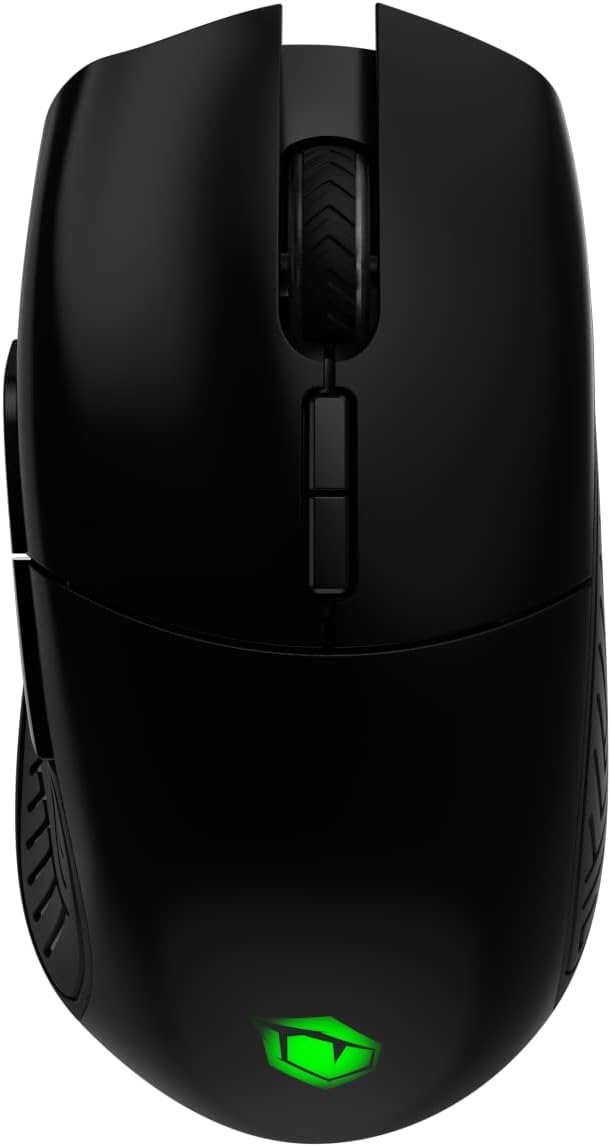
Figur 2: Top view of the PUSAT One Shot Pro mouse, showing the left and right click buttons, scroll wheel, and DPI switch buttons.

Figur 3: Venstre side view of the PUSAT One Shot Pro mouse, highlighting the two programmable side buttons and textured grip.

Figur 4: Bund view of the PUSAT One Shot Pro mouse, showing the optical sensor, ON/OFF switch, user profile switch, and the compartment for the USB receiver.
Knap funktioner:
- Venstreklikknap: Standard primær klikfunktion.
- Højreklik-knap: Standard sekundær klikfunktion.
- Scrollhjul: Scrolls content up/down, also functions as a middle click button.
- DPI Switch Buttons: Adjusts the mouse's sensitivity (DPI) on the fly.
- Programmable Side Buttons (8 total): Customizable buttons for various functions, often used for macros or in-game actions.
- Bruger Profile Switch (Bottom): Allows switching between different user-defined profiles.
- ON/OFF Switch (Bottom): Powers the mouse on or off.
Opsætning
Tilslutning af musen:
- Locate the USB wireless receiver. It is typically stored in a compartment on the underside of the mouse (refer to Figure 4).
- Remove the USB wireless receiver from its storage slot.
- Plug the USB wireless receiver into an available USB port on your computer (PC or Notebook).
- Flip the ON/OFF switch on the bottom of the mouse to the "ON" position.
- Din computer burde automatisk registrere og installere de nødvendige drivere. Musen vil være klar til brug, når installationen er fuldført.
For optimal wireless performance, ensure the USB receiver is placed in a location with minimal interference and a clear line of sight to the mouse.
Betjeningsvejledning
Grundlæggende brug:
- Bevæg musen på en flad overflade for at styre markøren på skærmen.
- Use the left and right click buttons for primary and secondary actions.
- Rotate the scroll wheel to navigate through documents or web sider.
DPI-justering:
The PUSAT One Shot Pro mouse features adjustable DPI (Dots Per Inch) settings, allowing you to change cursor sensitivity. Use the dedicated DPI switch buttons, usually located near the scroll wheel, to cycle through preset DPI levels (1,000 to 16,000 DPI). Each change typically corresponds to a visual indicator, such as an RGB lighting color change, though specific indicators may vary.
Programmerbare knapper:
The mouse is equipped with 8 programmable buttons. To customize these buttons, you will typically need to download and install the official PUSAT software from the manufacturer's website. This software allows you to assign macros, keyboard functions, or other commands to each programmable button.
Opladning
The PUSAT One Shot Pro mouse is equipped with a rechargeable Lithium Ion battery (700 mAh) and supports both wired and wireless charging.
Kablet opladning:
- Tilslut USB-C-enden af opladningskablet til porten på forsiden af musen.
- Tilslut USB-A-enden af opladningskablet til en ledig USB-port på din computer eller en USB-vægadapter.
- The mouse's RGB lighting or an indicator light will typically show the charging status.

Figur 5: The PUSAT One Shot Pro mouse connected via its USB-C charging cable.
Trådløs opladning:
The PUSAT One Shot Pro supports wireless charging. To charge wirelessly, place the mouse on a compatible wireless charging pad. Ensure the mouse is correctly positioned on the charging pad for the charging process to initiate. The mouse's indicator lights will typically confirm that wireless charging is active.
Note: A wireless charging pad is sold separately and is not included with the mouse.
Opretholdelse
Rensning:
- Sørg for, at musen er slukket, inden rengøring.
- Brug en blød, fnugfri klud lidt damprengøres med vand eller en mild rengøringsopløsning til at tørre musens overflade af.
- Undgå at bruge skrappe kemikalier, slibende rengøringsmidler eller opløsningsmidler.
- Use compressed air to remove dust and debris from crevices and around buttons.
- Rengør den optiske sensor på undersiden af musen med jævne mellemrum med en vatpind for at sikre nøjagtig sporing.
Batteripleje:
- Undgå at aflade batteriet helt ofte.
- Opbevar musen et køligt og tørt sted, når den ikke er i brug i længere perioder.
- Hvis batteriet opbevares i længere tid, bør det oplades til ca. 50% for at forlænge dets levetid.
Fejlfinding
| Problem | Mulig årsag | Løsning |
|---|---|---|
| Musen reagerer ikke |
|
|
| Forsinket eller uregelmæssig markørbevægelse |
|
|
| Buttons not working or programmable features not active |
|
|
| Trådløs opladning virker ikke |
|
|
Specifikationer
| Feature | Detalje |
|---|---|
| Mærke | CENTRUM |
| Model | One Shot Pro |
| Forbindelse | 2.4 GHz trådløs (USB-modtager) |
| DPI rækkevidde | 1,000 - 16,000 dpi |
| Antal knapper | 8 (Programmerbar) |
| Sensortype | Optisk |
| Batteritype | 1 Lithium Ion Battery (Included) |
| Batterikapacitet | 700 mAh |
| Opladning | USB-C Wired, Wireless Charging Compatible |
| Dimensioner (L x B x H) | 12.5 x 6.6 x 4.2 cm |
| Vægt | 110 g |
| Farve | Sort |
| Hardware platform | PC, bærbar computer |
Sikkerhedsoplysninger
- Udsæt ikke musen for ekstreme temperaturer, fugtighed eller direkte sollys.
- Undgå at tabe eller udsætte musen for kraftige stød.
- Do not attempt to disassemble or modify the mouse. This may void the warranty and cause damage.
- Keep the mouse away from liquids. If liquid enters the device, discontinue use immediately and contact support.
- Dispose of the battery according to local regulations. Do not dispose of batteries in general household waste.
Garanti og support
For warranty information and technical support, please refer to the warranty card included with your product or visit the official PUSAT website. If you encounter any issues not covered in this manual, please contact PUSAT customer service for assistance.


