1. Introduktion
This manual provides comprehensive instructions for the setup, operation, and maintenance of your REACHER Small Digital Rainbow LED Alarm Clock, Model N188C-Black. Please read this manual thoroughly to ensure proper use and to maximize the functionality of your device.
2. Produktet er slutview
Nøglefunktioner:
- Large, colorful LED numbers for clear visibility day or night.
- Compact design (5.6" x 2.9" x 1.9") suitable for various spaces.
- Full range 0-100% brightness dimmer slider for personalized display intensity.
- Adjustable alarm volume from 30dB to 85dB.
- Easy-to-use snooze function by pressing any part of the top surface.
- Outlet powered with included DC adapter.
- Battery backup (2x AAA batteries, not included) to retain time and alarm settings during power outages.
Hvad er der i æsken:
- Small Colorful LED Alarm Clock
- USB kabel
- Strømadapter
- Brugermanual

Figur 2.1: Forside view of the REACHER Small Digital Rainbow LED Alarm Clock.

Figure 2.2: The alarm clock's compact size, shown held in a hand.
3. Opsætning
3.1 Strømtilslutning
- Connect the provided USB cable to the DC 5V port on the back of the alarm clock.
- Plug the other end of the USB cable into the included power adapter.
- Insert the power adapter into a standard electrical outlet. The clock display will illuminate.
3.2 Installation af batteribackup (valgfrit)
For battery backup functionality, which retains time and alarm settings during a power outage (display will be off to conserve power):
- Find batterirummet i bunden af uret.
- Åbn batterirummets dæksel.
- Insert two (2) AAA batteries (not included), ensuring correct polarity (+/-).
- Luk batterirummets dæksel forsvarligt.
4. Betjeningsvejledning

Figure 4.1: Rear controls of the alarm clock.
4.1 Indstilling af klokkeslæt
- Tryk og hold på TIDSINDSTILLING button located on the back of the clock. The hour digits will begin to flash.
- Brug + or - knapperne til at justere timetallet. Vær opmærksom på PM-indikatoren, hvis du bruger 12-timers format.
- Tryk på TIDSINDSTILLING button again to confirm the hour and move to minute adjustment. The minute digits will flash.
- Brug + or - knapper for at justere minutterne.
- Tryk på TIDSINDSTILLING knappen én gang til for at gemme tidsindstillingen.
4.2 Indstilling af alarmen
- Tryk og hold på ALARM SÆT button on the back of the clock. The alarm hour digits will begin to flash, and an alarm icon will appear on the display.
- Brug + or - knapper for at justere alarmtiden.
- Tryk på ALARM SÆT button again to confirm the alarm hour and move to alarm minute adjustment. The alarm minute digits will flash.
- Brug + or - knapper til at justere alarmens minutter.
- Tryk på ALARM SÆT button one more time to save the alarm setting.
4.3 Turning Alarm On/Off
Tryk kort på ALARM TIL / FRA button on the back of the clock to toggle the alarm function. The alarm icon on the display indicates if the alarm is active.
4.4 Justering af skærmens lysstyrke
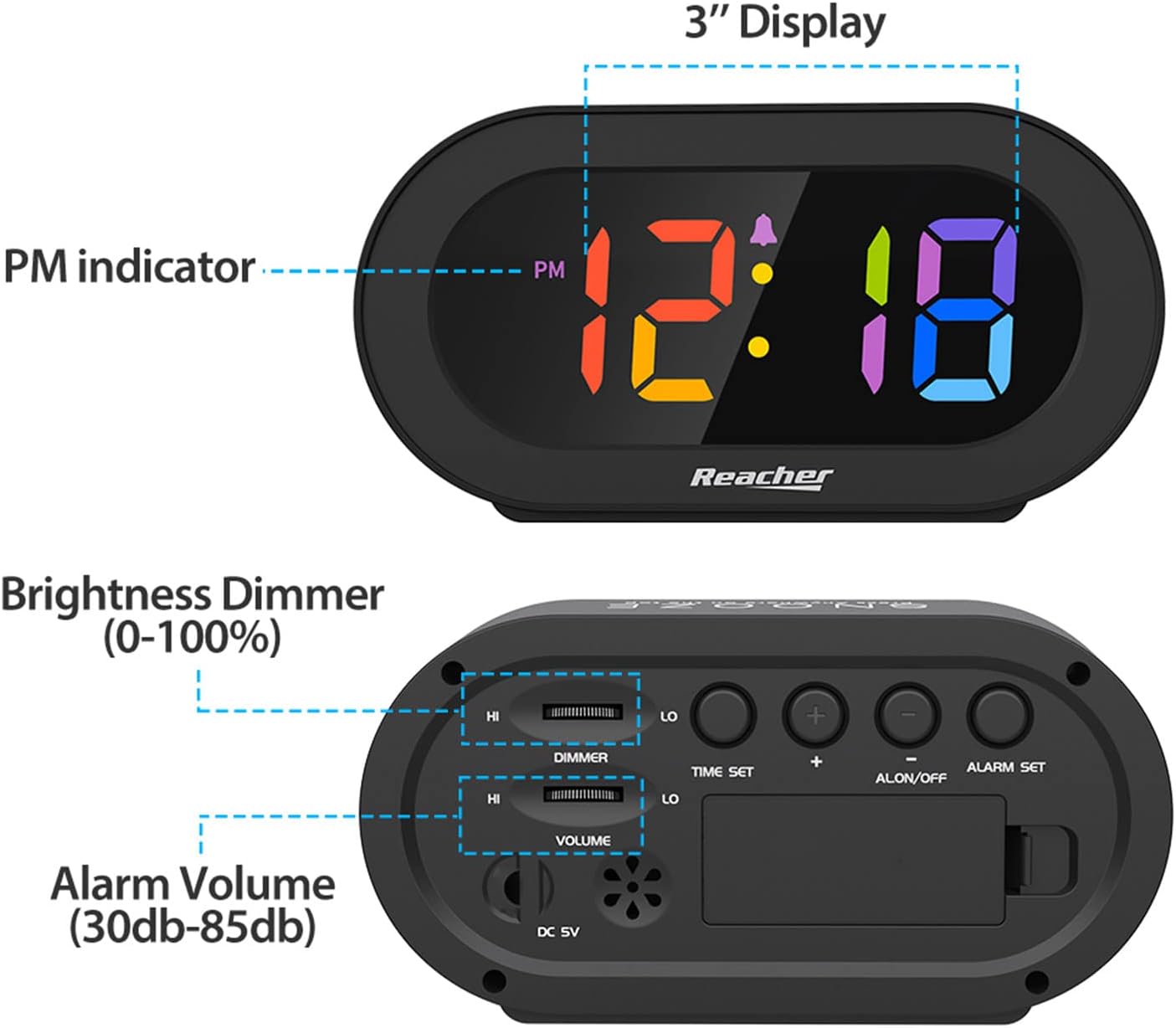
Figure 4.2: Dimmer slider control.
Brug DIMMER slider located on the back of the clock to adjust the display brightness from 0% (off) to 100% (maximum brightness). Slide towards 'HI' for brighter, and 'LO' for dimmer.
4.5 Justering af alarmlydstyrke

Figure 4.3: Volume slider control.
Brug BIND slider located on the back of the clock to adjust the alarm sound level from 30dB (low) to 85dB (high). Slide towards 'HI' for louder, and 'LO' for quieter.
4.6 Snooze -funktion
When the alarm sounds, press any part of the top surface of the clock to activate the snooze function. The alarm will temporarily pause and sound again after a set interval (typically 9 minutes).
4.7 Stop af alarmen
To stop the alarm completely after it sounds (not just snooze), press the ALARM TIL / FRA button on the back of the clock. The alarm icon will disappear from the display.
5. Vedligeholdelse
To maintain your alarm clock in optimal condition:
- Tør urets overflade af med en blød, tør klud.
- Undgå at bruge slibende rengøringsmidler eller opløsningsmidler, da disse kan beskadige overfladen.
- Keep the device away from excessive moisture, direct sunlight, and extreme temperatures.
- If using battery backup, replace AAA batteries annually or if the clock frequently experiences power outages.
6. Fejlfinding
| Problem | Mulig årsag | Løsning |
|---|---|---|
| Urdisplayet er slukket eller svagt. | No power, dimmer set to 0%, or battery backup active during power outage. | Ensure power adapter is securely plugged in. Adjust the DIMMER slider. If on battery backup, the display is intentionally off; it will return when main power is restored. |
| Alarmen lyder ikke. | Alarm is not set, alarm is turned off, or volume is too low. | Verify alarm time is set correctly. Ensure the alarm icon is visible on the display (alarm is ON). Adjust the VOLUME slider to an audible level. |
| Time/Alarm settings are lost after power outage. | No battery backup installed or batteries are depleted. | Install two fresh AAA batteries for battery backup. |
| Knapperne reagerer ikke. | Midlertidig softwarefejl. | Unplug the power adapter, remove backup batteries (if installed), wait 30 seconds, then reconnect power. |
7. Specifikationer
- Model: N188C-Black
- Skærmtype: Digital LED (Rainbow Digits)
- Produktdimensioner: 5.6 cm (bredde) x 2.9 cm (højde) x 1.9 cm (dybde)
- Strømkilde: Corded Electric (DC 5V adapter included)
- Batteri-sikkerhedskopi: 2 x AAA batterier (medfølger ikke)
- Materiale: Acrylonitril Butadien Styren (ABS), Akryl
- Varens vægt: 5.5 ounce
- Værelsestype: Bedroom, Bedside, Desk, Shelf
8. Garanti og support
REACHER is committed to providing high-quality products and excellent customer service. While specific warranty periods may vary by region, we strive to address any product-related concerns promptly.
For technical support, warranty inquiries, or any questions regarding your REACHER Small Digital Rainbow LED Alarm Clock, please contact our customer service team:
- E-mail: kunde@reachershop.com
Please provide your model number (N188C-Black) and a detailed description of the issue when contacting support.


