1. Introduktion
The ORDRO EP8 is an advanced 4K head-mounted video camera designed for hands-free recording of your experiences from a first-person perspective. Featuring a Sony Starlight level sensor, 2-axis gimbal stabilization, and a compact, ergonomic design, it captures high-quality video and photos with ease. This manual provides essential information for setting up, operating, and maintaining your EP8 camera.
2. Hvad er der i æsken
Carefully unpack your ORDRO EP8 Combo. The package should contain the following items:
- EP8 Camera
- 64G Micro Memory Card
- Charge Cable (Type-C)
- Adapter
- Remote Control (W1 Wrist Remote Control)
- Hovedbånd
- Brugermanual
- Screw Head (2x)
- Blødt gummi ærme
- Krog
- Headband Bracket (2x)

Image: The ORDRO EP8 Combo package contents, including the camera, headband, remote, memory card, and charging accessories.
3. Nøglefunktioner
3.1. High-Resolution 4K 60FPS Recording
The EP8 is equipped with a Sony Starlight level sensor, significantly enhancing image quality in low-light conditions. It supports a maximum resolution of 4K 60FPS (3840x2160), with additional options for 1080P 60FPS and 720P, ensuring clear and detailed footage.

Image: The ORDRO EP8 camera, highlighting its hands-free wearable design.
3.2. Ergonomic Wearable Design & 2-Axis Stabilization
The camera features a stable, lightweight, and ergonomic design for comfortable head-mounted use, allowing for first-person view recording. The integrated 2-axis gimbal stabilization system minimizes shaking, resulting in smoother and more stable images.

Image: A man wearing the ORDRO EP8 camera, demonstrating its head-mounted application.

Image: A visual comparison showing the effectiveness of the 2-axis anti-shake stabilization, with a clear difference between 'No Stabilization' and 'Anti-Shake On' footage.
3.3. Type-C Charging & Long Battery Life
The EP8 supports Type-C charging, significantly reducing the full charging time to approximately 70 minutes. Its 950mAh high-capacity battery provides up to 150 minutes of continuous recording time.

Image: A graphic illustrating the extended battery life of the ORDRO EP8 camera.
3.4. Horizontal & Vertical Screen Switching with Wi-Fi APP Control
The exclusive "OD CAM" app allows users to remotely control the camera, switch between horizontal and vertical screen interfaces for better visual experience, and manage recordings. Videos can be edited and saved directly to a local album on your phone.

Image: A smartphone displaying the "OD CAM" application interface, demonstrating remote control and video management features.
3.5. Distortion Correction
The EP8 includes a distortion correction function that can switch the original 130-degree wide-angle screen to 90 degrees, preventing image bending and providing a more natural perspective.
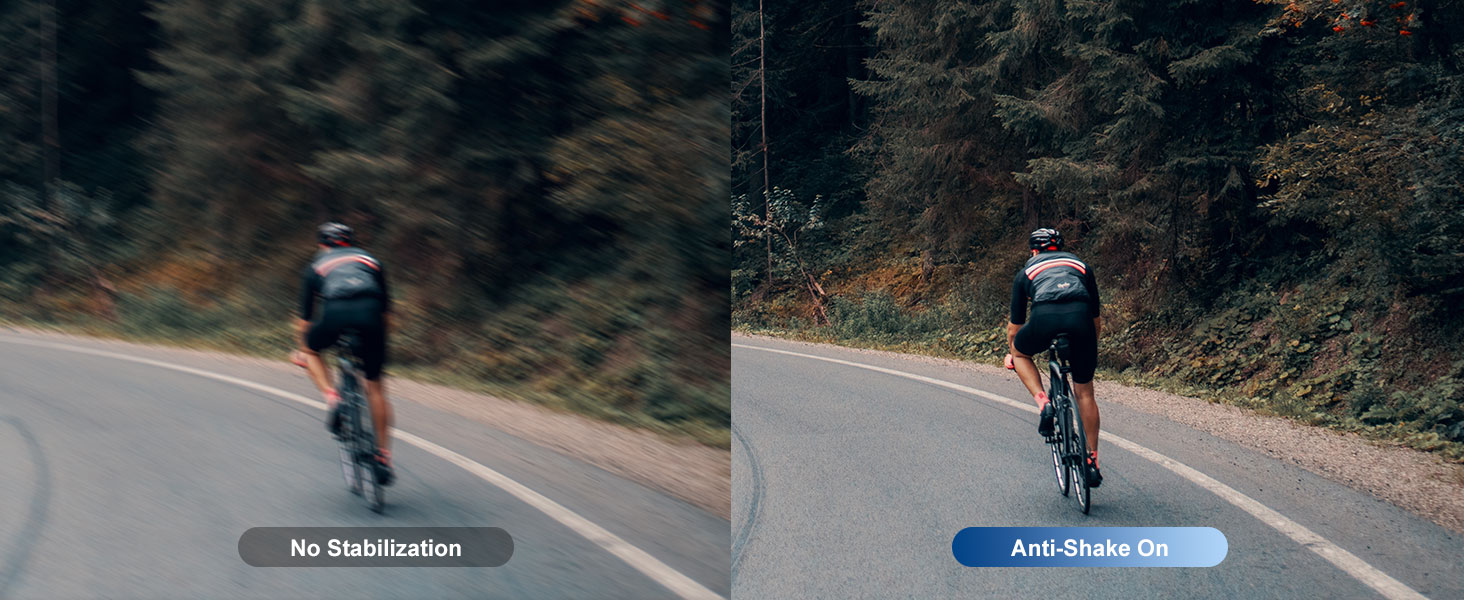
Image: A visual comparison demonstrating the effect of distortion correction, showing a 130-degree wide-angle view next to a 90-degree corrected view.
3.6. W1 Wireless Remote Control
The included W1 wrist remote control allows for convenient filming and photographing with a single press, enabling hands-free operation without needing to touch the camera directly.

Image: A close-up of a wrist wearing the W1 wireless remote control, indicating its ease of use for capturing moments.
Officiel produktvideo
Video: En officiel produktvideoasing the features and usage of the ORDRO EP8 camera, including its hands-free operation, 4K recording, stabilization, and app connectivity.
4. Opsætning
4.1. Opladning af batteriet
Before first use, fully charge the camera battery. Connect the provided Type-C charge cable to the camera's Type-C port and the other end to the adapter, then plug into a power outlet. The status light will indicate charging status and turn off when fully charged. A full charge takes approximately 70 minutes.
4.2. Inserting the Micro Memory Card
Locate the Micro SD card slot on the camera. Gently insert the 64G Micro Memory Card (included) into the slot until it clicks into place. Ensure the card is inserted in the correct orientation to avoid damage.
4.3. Fastgørelse af pandebåndet
Attach the camera to the headband using the provided headband brackets and screws. Ensure the camera is securely fastened and positioned for optimal first-person view recording. The headband is two-way adjustable to fit different head shapes.
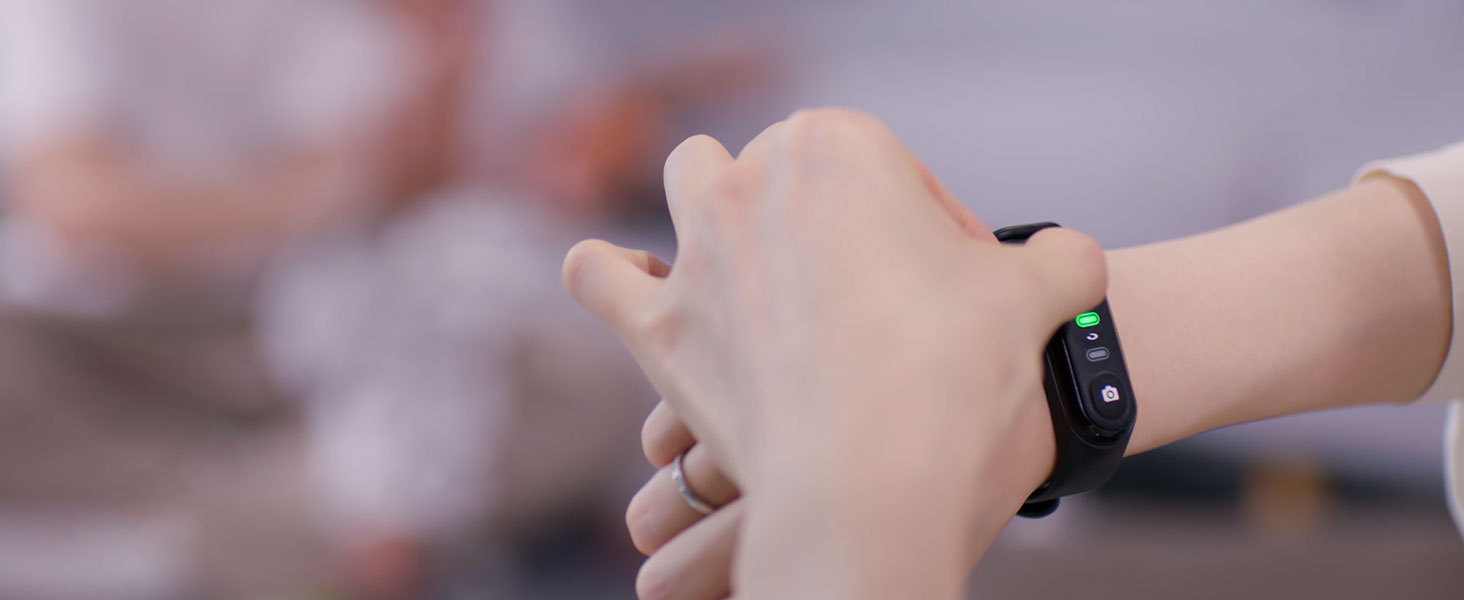
Image: A detailed diagram of the ORDRO EP8 camera, labeling its buttons, ports, and the two-way adjustable headband.
5. Betjeningsvejledning
5.1. Tænd/sluk
Tryk og hold på Power/Wi-Fi knap to turn the camera on or off. The status light will illuminate when the camera is powered on.
5.2. Optagelse af video
Tryk på Video knap once to start video recording. Press it again to stop recording. The status light will change to indicate recording status.
5.3. Tage billeder
Tryk på Foto knap once to take a still photograph.
5.4. Using the W1 Wireless Remote Control
Ensure the W1 remote is paired with your camera. Press the video icon on the remote to start/stop video recording, or the camera icon to take a photo. Refer to the remote's specific instructions for pairing if needed.
5.5. Connecting to the OD CAM App
- Download the "OD CAM" app from your device's app store.
- Turn on the camera's Wi-Fi by briefly pressing the Power/Wi-Fi knap.
- On your smartphone, go to Wi-Fi settings and connect to the camera's Wi-Fi network (SSID and password usually found on the camera or in the app).
- Open the OD CAM app to control the camera, view live footage, and manage files.
5.6. Justering View Angle (Distortion Correction)
Within the OD CAM app, you can activate the distortion correction function to switch between the 130-degree wide-angle view and a 90-degree corrected view, which reduces fish-eye distortion.
6. Vedligeholdelse
6.1. Rensning
Brug en blød, tør klud til at rengøre kamerahuset. Brug en specialklud og -opløsning til objektivet. Undgå slibende materialer eller barske kemikalier.
6.2. Opbevaring
Opbevar kameraet et køligt og tørt sted væk fra direkte sollys og ekstreme temperaturer. Hvis det opbevares i længere perioder, skal du sørge for, at batteriet er delvist opladet (ca. 50%) for at forlænge dets levetid.
6.3. Batteripleje
To maintain battery health, avoid fully discharging the battery frequently. Recharge the battery regularly, even if the camera is not in use.
7. Fejlfinding
| Problem | Mulig årsag | Løsning |
|---|---|---|
| Kameraet tænder ikke. | Batteriet er afladet. | Charge the camera using the provided Type-C cable and adapter. |
| Video footage er rystet. | 2-axis stabilization not active or extreme movement. | Ensure the camera is securely mounted. While the 2-axis gimbal reduces shake, extreme movements may still affect footage. |
| Cannot connect to OD CAM app. | Wi-Fi not enabled on camera; incorrect Wi-Fi password; app issues. | Ensure camera Wi-Fi is on. Double-check Wi-Fi password. Restart camera and phone. Update the OD CAM app to the latest version. |
| Micro SD-kort genkendes ikke. | Card inserted incorrectly; card is faulty; card needs formatting. | Reinsert the card correctly. Try a different compatible Micro SD card. Format the card (this will erase all data). |
| Fjernbetjening virker ikke. | Remote battery low; not paired. | Check remote battery. Re-pair the remote control with the camera according to its specific instructions. |
8. Specifikationer
| Feature | Specifikation |
|---|---|
| Mærke | ORDRO |
| Modelnummer | EP8 |
| Varens vægt | 1.19 pund |
| Produktdimensioner | 3.7 x 1 x 1 tommer |
| Farve | Sølv |
| Batterier | 1 Lithium Polymer batteri (medfølger) |
| Særlige funktioner | Fast Charging, Lightweight, Waterproof (IPX5) |
| Fotosensorteknologi | CMOS (Sony Starlight level sensor) |
| Videooptagelsesopløsning | 4K (3840x2160) at 60FPS, 1080P, 720P |
| Maksimal brændvidde | 1000 millimeter |
| Maksimal blænde | 1.8 f |
| Flash-hukommelsestype | Micro SD |
| Videooptagelsesformat | MP4 |
| Understøttet lydformat | AAC, MP3 |
| Skærmstørrelse | 0.1 tommer |
| Forbindelsesteknologi | Wi-Fi |
9. Garanti og support
For warranty information and technical support, please refer to the warranty card included in your product packaging or visit the official ORDRO website. You may also contact ORDRO customer service directly for assistance with product issues or inquiries.
Besøg ORDRO Store on Amazon for yderligere produktinformation og supportressourcer.


