1. Introduktion
This user manual provides detailed instructions for the LiNKFOR UHF Handheld Rechargeable Microphone System. This all-metal dual cordless microphone system is designed for various applications including karaoke, conferences, parties, and public speaking, offering clear sound and reliable wireless performance.

Figure 1: LiNKFOR UHF Handheld Rechargeable Microphone System
2. Pakkens indhold
Kontroller venligst pakken omhyggeligt for at sikre, at alle varer er til stede og i god stand:
- 1 x modtager
- 2 x trådløse mikrofoner
- 1 x 6.35 mm lydkabel
- 2 x RCA Cables
- 1 x 6.35 mm til 3.5 mm adapter
- 1 x 2-in-1 Charging Cable
- 1 x strømadapter
- 1 x brugermanual
- 2 x Microphone Sponges
- 2 x Microphones Anti-Rolling Rings
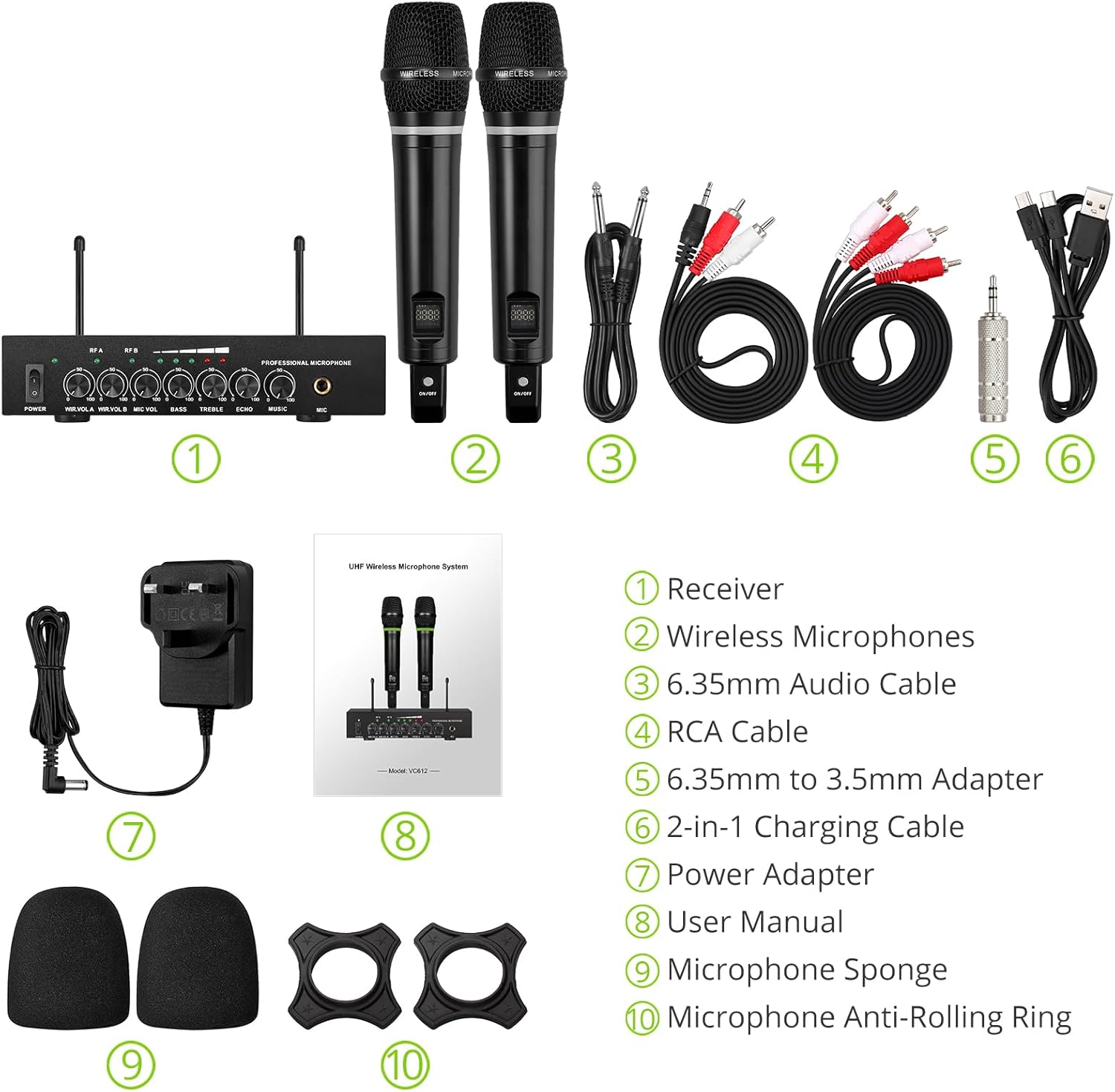
Figur 2: Komplet pakkeindhold
3. Opsætningsvejledning
3.1 Tilslutning af modtageren
- Strømtilslutning: Connect the included power adapter to the DC 12V INPUT port on the receiver and plug it into a power outlet.
- Lydudgang:
- For RCA connection: Use the provided RCA cables to connect the "OUTPUT" ports (L/R) on the receiver to the audio input (e.g., AUX, PC) of your sound system (soundbar, amplifier, mixer, or speakers).
- For 6.35mm connection: Use the 6.35mm audio cable to connect the "6.35mm MIC Output" on the receiver to a 6.35mm microphone input on your sound system.
- External Audio Input (Optional):
- For RCA input: Use RCA cables to connect external audio sources (e.g., DVD player, TV) to the "INPUT" ports (L/R) on the receiver.
- For Bluetooth input: Enable Bluetooth on your mobile device (smartphone, tablet) and search for "X168" to pair and connect.

Figure 3: Receiver Connections (RCA Input/Output, 6.35mm MIC Output)

Figur 4: Opsætning af Bluetooth-forbindelse
3.2 Preparing the Microphones
- Opladning: The microphones are rechargeable. Use the provided 2-in-1 charging cable to charge both microphones simultaneously. The LED light ring on the microphone will turn red when charging and green when fully charged or in use. A full charge takes approximately 3-4 hours and provides up to 10 hours of play time.
- Tænd/sluk: Locate the ON/OFF switch on each microphone and slide it to the "ON" position to power on. The display screen on the microphone will light up.
- Anti-Rolling Rings & Sponges: Attach the anti-rolling rings to the base of the microphones and place the microphone sponges over the mesh heads for protection and improved sound quality.

Figure 5: Charging the Microphones
4. Betjeningsvejledning
- Tænd for systemet: Ensure the receiver is powered on (POWER switch on the front panel). The indicator lights for RF A and RF B should illuminate when the corresponding microphone is turned on and connected.
- Justering af lydstyrke: Use the "WIR.VOL A" and "WIR.VOL B" knobs on the receiver to adjust the individual volume levels of Microphone A and Microphone B.
- Lydkontrol: The receiver features independent controls for BASS, TREBLE, and ECHO to customize the sound output. Adjust these knobs to achieve your desired audio effect.
- Musiklydstyrke: The "MUSIC" knob controls the volume of the external audio input (e.g., Bluetooth, RCA input).
- Trådløs rækkevidde: The UHF wireless range for the microphones is approximately 165 feet (50 meters). The Bluetooth range for audio input is approximately 32 feet (10 meters).

Figure 6: Wireless Range Overview

Figure 7: Sound Control Features
4.1 Officiel produktvideo
Video 1: LiNKFOR Rechargeable UHF Wireless Microphone System Overview. This video demonstrates the setup, features, and usage of the microphone system, including connections and sound adjustments.
5. Vedligeholdelse
- Keep the receiver and microphones clean by wiping them with a soft, dry cloth.
- Undgå at udsætte enhederne for ekstreme temperaturer, fugtighed eller direkte sollys.
- Store the system in a dry, cool place when not in use.
- Ensure microphones are fully charged before extended use to maximize battery life.
6. Fejlfinding
| Problem | Mulig årsag | Løsning |
|---|---|---|
| Ingen lydudgang. |
|
|
| Microphone not charging. |
|
|
| Problemer med Bluetooth-forbindelse. |
|
|

Figure 8: Compatibility and Common Questions
7. Specifikationer
| Feature | Detalje |
|---|---|
| Mærke | LiNKFOR |
| Modelnavn | S-105 |
| Varemodelnummer | ULKVC613us-US |
| Forbindelsesteknologi | UHF Wireless, Bluetooth 5.0 |
| Mikrofon formfaktor | Håndholdt |
| Materiale | Metal |
| Strømkilde | Batteridrevet (genopladeligt litium-ion) |
| Spilletid | Up to 10 hours (after 3-4 hours charge) |
| UHF Wireless Range | Ca. 165 fod (50 m) |
| Bluetooth rækkevidde | Ca. 32 fod (10 m) |
| Signal-støjforhold | 95 dB |
| Impedans | 600 Ohm |
| Frekvensrespons | 1 KHz (Min/Max) |
| Antal kanaler | 2 |
| Varedimensioner (L x B x H) | 16.54 x 12.99 x 3.31 tommer |
| Varens vægt | 4.84 pund (2.2 kilo) |
| Kompatible enheder | Amplifier, Audio Mixer, Karaoke Machine, TV, Laptop, Smartphones (not Bluetooth Speakers) |

Figur 9: Produktmål
8. Garanti og support
For warranty information or technical support, please refer to the contact details provided in your product packaging or visit the official LiNKFOR webwebsted. Gem din købskvittering for garantikrav.
LiNKFOR is committed to providing innovative products and reliable connectivity solutions. For further assistance, please contact customer service.


