1. Introduktion
This manual provides essential information for operating your DOOGEE S98 rugged smartphone. Please read it carefully to ensure proper use and to maximize the device's features and longevity.

Figur 1.1: For og bag view of the DOOGEE S98 Rugged Smartphone. The front features a display, while the rear showcases the camera module with a circular secondary display and rugged design elements.
2. Enhed overview
The DOOGEE S98 is a rugged smartphone designed for durability and performance. Key features include:
- Processor: MediaTek Helio G96 Octa-core chipset.
- Hukommelse og opbevaring: 8GB RAM + 256GB ROM (expandable up to 512GB).
- Operativsystem: Android 12.
- Vise: 6.3-inch FHD+ with Corning Gorilla Glass.
- Kameraer: 64MP main camera, 20MP night vision camera (with 4 infrared lights), 8MP wide-angle camera.
- Batteri: 6000mAh with 33W fast charging and 15W wireless charging.
- Holdbarhed: IP68/IP69K and MIL-STD-810G certified for water, dust, and shock resistance.
- Forbindelse: Dual 4G SIM, NFC, OTG, GPS, Glonass, Beidou, Galileo.
- Unik egenskab: Circular rear display for quick access to time, notifications, music control, and alarms.
3. Opsætning
3.1. Inserting SIM Cards and SD Card
- Find SIM-kortbakken på siden af enheden.
- Brug det medfølgende SIM-kortudløserværktøj til at åbne bakken.
- Carefully place your Nano-SIM cards and/or microSD card into the designated slots. Ensure the gold contacts face downwards.
- Skub forsigtigt bakken tilbage i enheden, indtil den flugter.
3.2. Guide til første opstart og opsætning
- Tryk på tænd/sluk-knappen (placeret på siden), og hold den nede, indtil DOOGEE-logoet vises.
- Følg instruktionerne på skærmen for at fuldføre den indledende opsætning, herunder valg af sprog, Wi-Fi-forbindelse, login til Google-konto og sikkerhedsindstillinger.
4. Betjeningsvejledning
4.1. Grundlæggende navigation
- Power knap: Tryk for at vække/sætte skærmen i dvaletilstand. Tryk og hold nede for at slukke eller genstarte.
- Lydstyrkeknapper: Juster medielydstyrke, opkaldslydstyrke og notifikationslydstyrke.
- Brugerdefineret knap: A programmable button for quick access to specific functions or apps. Configure this in Settings.
- Fingeraftrykssensor: Integrated for secure unlocking. Register your fingerprints in Settings > Security.
4.2. Smart Rear Display
The circular rear display provides quick information and controls without needing to activate the main screen.
- Tid: Viser den aktuelle tid.
- Alarm: Snooze or cancel active alarms.
- Musik kontrol: Afspil, sæt på pause, spring numre over.
- Indgående opkald: View caller ID and manage calls.
- Meddelelser: Receive alerts for messages and other app notifications.

Figur 4.1: Illustration of the smart rear display showing its various functions like time, alarm, music control, incoming call, and notifications.
4.3. Kamerabetjening
The DOOGEE S98 features a versatile camera system:
- 64MP hovedkamera: Til billeder i høj opløsning under forskellige lysforhold.
- 20MP nattesynskamera: Equipped with 4 infrared lights, allowing clear photography up to 20 meters in complete darkness. Activate this mode in the camera app.
- 8MP vidvinkelkamera: Capture broader scenes.
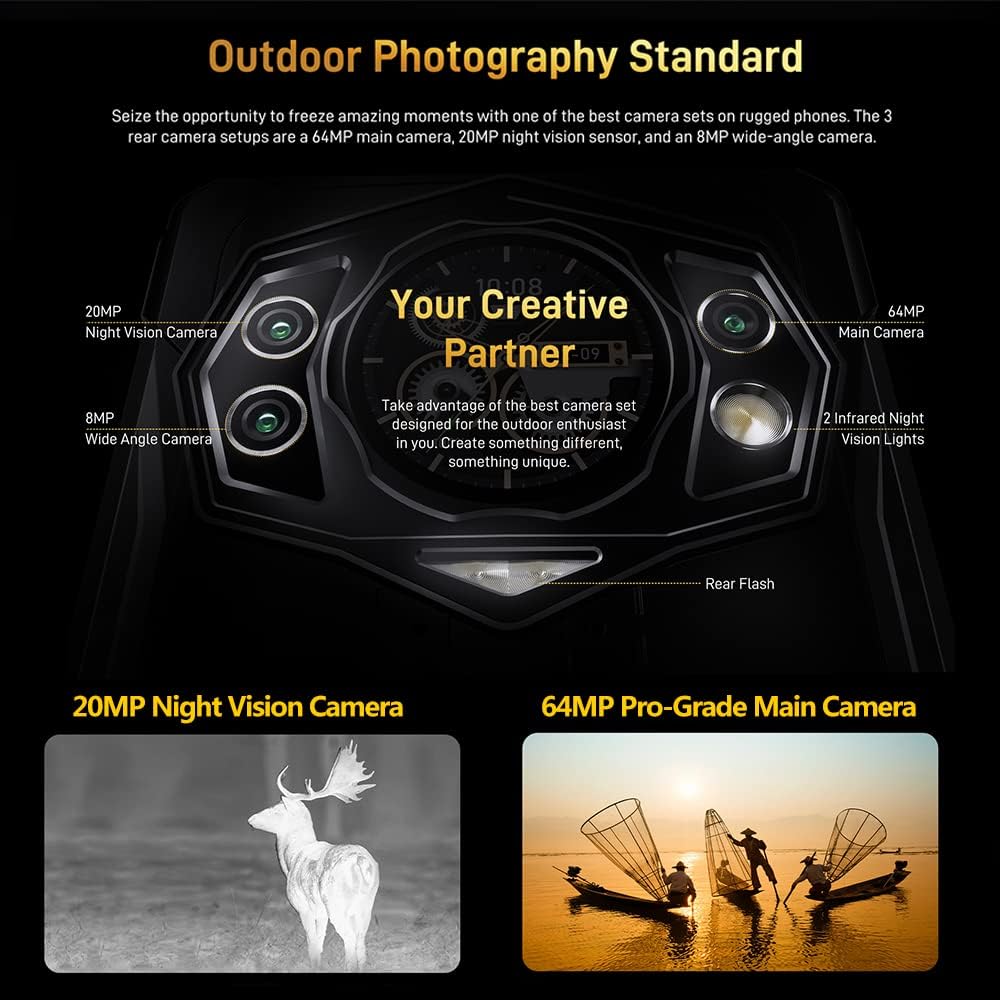
Figur 4.2: Detaljeret view of the DOOGEE S98 camera module, highlighting the 64MP main camera, 20MP night vision camera, 8MP wide-angle camera, and infrared lights.

Figur 4.3: Examples of photos taken with the DOOGEE S98 camera, demonstrating both standard and night vision capabilities.
4.4. Forbindelse
- Dobbelt 4G SIM-kort: Supports two 4G SIM cards simultaneously for flexible network usage.
- NFC: For contactless payments and quick pairing with other NFC-enabled devices.
- OTG: Connect USB peripherals like flash drives or keyboards.
- GPS: Integrated with GPS, Glonass, Beidou, and Galileo for accurate positioning.
5. Batteri og opladning
The DOOGEE S98 is equipped with a 6000mAh battery for extended usage.
- Kablet opladning: Supports 33W fast charging. A 33W charger can replenish 55% of the battery in approximately 1 hour.
- Trådløs opladning: Supports 15W wireless charging. Place the device on a compatible wireless charging pad.

Figur 5.1: Visual representation of the 6000mAh battery capacity and the 33W turbo charging feature of the DOOGEE S98.
6. Holdbarhed og beskyttelse
The DOOGEE S98 is built to withstand harsh environments, certified with IP68, IP69K, and MIL-STD-810G standards.
- Vandtæt: Can withstand immersion in water up to 1.5 meters for 30 minutes. Features an underwater mode for photography.
- Støvtæt: Fuldstændig beskyttet mod indtrængning af støv.
- Stødsikker: Designed to endure drops from a height of 1.5 meters.
- Temperaturmodstand: Operates in extreme temperatures between 70°C (158°F) and -55°C (-67°F).

Figur 6.1: Image demonstrating the DOOGEE S98's waterproof, dustproof, and shockproof capabilities, showing the phone submerged in water and covered in sand.
7. Specifikationer
| Feature | Detalje |
|---|---|
| Modelnavn | DOOGEE S98 |
| Operativsystem | Android 12.0 |
| Processor | MediaTek Helio G96 Octa-core |
| VÆDDER | 8 GB |
| Intern opbevaring | 256 GB |
| Udvidelig opbevaring | Up to 512GB (microSD) |
| Skærmstørrelse | 6.3 tommer |
| Opløsning | 1080 x 2340 (FHD+) |
| Hovedkamera | 64 MP |
| Night Vision Camera | 20 MP (with 4 IR lights) |
| Forreste kamera | 16 MP (Common for this model, inferred) |
| Batterikapacitet | 6000 mAh |
| Kablet opladning | 33W hurtig opladning |
| Trådløs opladning | 15W |
| Holdbarhedsvurderinger | IP68, IP69K, MIL-STD-810G |
| Forbindelse | 4G LTE, Wi-Fi, Bluetooth, NFC, USB, OTG |
| Navigation | GPS, Glonass, Beidou, Galileo |
| Dimensioner | 8.19 x 7.6 x 1.85 tommer (pakke) |
| Vægt | 11.3 ounces (320 gram) |
| Lydstik | 3.5 mm |
8. Vedligeholdelse og pleje
- Rensning: Brug en blød, damp cloth to clean the device. Avoid harsh chemicals.
- Vandeksponering: While waterproof, ensure all ports are securely closed before exposing the device to water. After water exposure, dry the device thoroughly, especially the charging port, before charging.
- Temperatur: Avoid prolonged exposure to extreme heat or cold to prevent battery degradation and component damage.
- Softwareopdateringer: Søg regelmæssigt efter og installer systemopdateringer for at sikre optimal ydeevne og sikkerhed.
9. Fejlfinding
| Problem | Mulig løsning |
|---|---|
| Enheden tænder ikke | Sørg for, at batteriet er opladet. Tilslut det til en oplader i mindst 10 minutter, og prøv derefter at tænde det. |
| Skærmen reagerer ikke | Perform a forced restart by holding the Power button for 10-15 seconds. If the issue persists, contact support. |
| Problemer med netværksforbindelse | Check SIM card insertion. Toggle Airplane Mode on/off. Restart the device. Verify network settings. |
| Batteriet aflades hurtigt | Luk ubrugte apps. Reducer skærmens lysstyrke. Deaktiver unødvendige funktioner som GPS eller Bluetooth, når de ikke er i brug. Tjek for baggrundsaktivitet i apps. |
| Night Vision Camera not working | Ensure you are in a sufficiently dark environment. Check camera app settings for night vision mode activation. |
10. Garanti og support
The DOOGEE S98 comes with a 12-month US warranty. For any questions or issues regarding your device, please contact DOOGEE customer support. Ensure you confirm SIM compatibility with your carrier before purchase, as the device is not compatible with AT&T, Cricket, Verizon, Sprint, Boost Mobile, or other CDMA networks.
For further assistance, please refer to the official DOOGEE webwebstedet eller kontakt deres kundeservicekanaler.


