1. Introduktion
The Ducky One 3 series mechanical keyboard is designed with QUACK Mechanics, focusing on aesthetics, hot-swappable functionality, sound dampening, and high-quality stabilizers. This 60% form factor keyboard offers a compact design without compromising performance, featuring Cherry Speed Silver Switches and durable PBT Doubleshot keycaps.
Nøglefunktioner:
- Ducky's QUACK Mechanics design philosophy for enhanced performance and aesthetics.
- Dual-layer hot-swappable PCB with exclusive Kailh yellow hot-swap sockets.
- Lav-profile One 3 case design.
- Dual-layer high-grade silicone and EVA foam sound dampeners for improved acoustics.
- Thick PBT Double-shot seamless keycaps for durability and clear legends.
- Per-key programmable RGB backlighting.
- 3-level adjustable feet for ergonomic comfort.
- Detachable braided USB-C cable for easy connectivity and portability.
- Improved PCB design, V2 stabilizers, and remapped macro layout.
- N-key rollover for accurate and simultaneous key presses.
2. Hvad er der i æsken
- Ducky One 3 Black 60% Mechanical Keyboard
- Keycap aftrækker
- USB Cable (detachable braided USB-C)
- Ducky Channel Sticker
- Accent Keys (additional keycaps for customization)

3. Opsætning
- Tilslut tastaturet: Plug the detachable USB-C end of the provided cable into the USB-C port on the back of the keyboard. Connect the USB-A end of the cable to an available USB port on your computer.
- Første gang tændt: The keyboard should automatically power on and the RGB backlighting will illuminate.
- Juster tastaturvinkel: Utilize the 3-level adjustable feet located on the underside of the keyboard to set your preferred typing angle.


4. Betjeningsvejledning
4.1 Grundlæggende brug
The Ducky One 3 keyboard functions as a standard 60% mechanical keyboard. All primary keys (letters, numbers, basic punctuation) operate as expected. Due to its compact size, some functions are accessed via combination keys.
4.2 Function Layer (Fn Key)
Many keys have secondary functions printed on their front or side. To access these functions, hold down the Fn key (located on the bottom right) and then press the desired key. Common Fn combinations include:
- Fn + Number Row: Accesses F1-F12 keys.
- Fn + Piletaster: Controls cursor movement (if dedicated arrow keys are not present).
- Fn + Media Keys: Controls volume, playback, etc. (refer to keycap legends).
4.3 RGB Backlighting Customization
The Ducky One 3 features per-key programmable RGB backlighting. Specific key combinations (often involving the Fn key and other designated keys) allow you to change lighting modes, colors, brightness, and speed. Refer to the official Ducky software or the keyboard's quick start guide for detailed instructions on RGB customization patterns and controls.

5. Vedligeholdelse
5.1 Rengøring af tastaturet
- Generel rengøring: Brug en blød, fnugfri klud lidt dampened with water or a mild cleaning solution to wipe down the keycaps and case. Avoid excessive moisture.
- Dyb rengøring (taster): Use the included keycap puller to carefully remove keycaps. Clean the keycaps with warm, soapy water, rinse thoroughly, and ensure they are completely dry before reattaching.
- Rengøring under taster: Use compressed air to blow out dust and debris from between the switches. A small brush can also be used to dislodge stubborn particles.
5.2 Hot-swap-kontakter
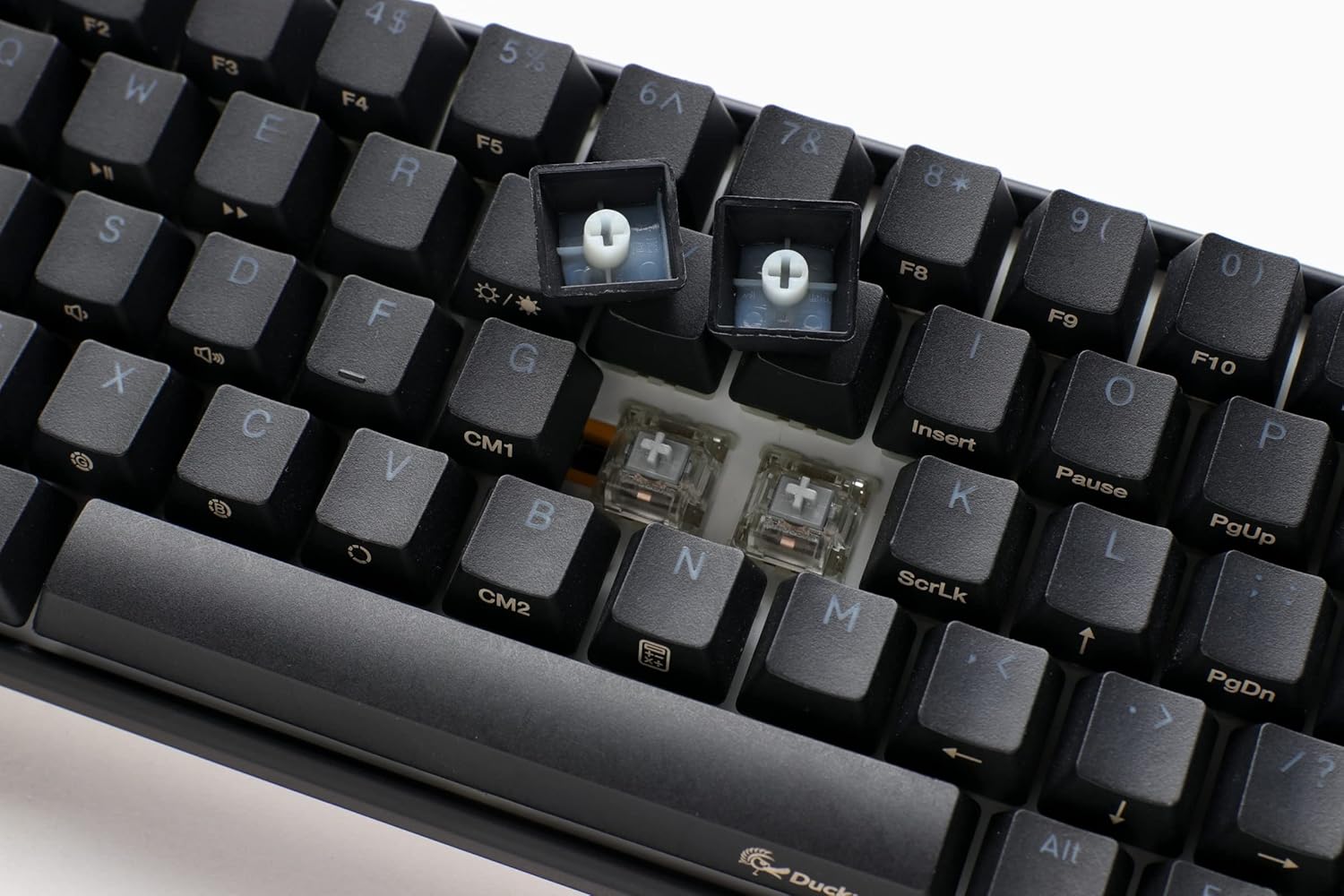
The Ducky One 3 features a hot-swappable PCB, allowing you to change switches without soldering. This model comes with Cherry Speed Silver Switches, but you can replace them with other compatible 3-pin or 5-pin mechanical switches.
- Fjernelse af en kontakt: Use a switch puller (not included, but a keycap puller can sometimes assist) to gently grip the top and bottom clips of the switch and pull it straight up.
- Installing a New Switch: Align the pins of the new switch with the holes on the PCB. Gently push the switch down until it clicks into place. Ensure the switch is seated correctly and the pins are not bent.
6. Fejlfinding
- Tastaturet reagerer ikke:
- Sørg for, at USB-C-kablet er korrekt tilsluttet til både tastaturet og computeren.
- Prøv at tilslutte tastaturet til en anden USB-port på din computer.
- Test tastaturet på en anden computer, hvis det er muligt, for at udelukke et computerspecifikt problem.
- RGB-lys virker ikke/forkert:
- Check the keyboard's manual or Ducky's website for specific key combinations to reset or cycle through RGB modes.
- Ensure Ducky's software (if installed) is up-to-date and correctly configured.
- Keys Not Registering or Double-Typing (Chattering):
- Carefully remove the keycap and switch for the affected key. Inspect the switch for any visible damage or debris.
- If the switch is hot-swappable, try replacing it with a new one or swapping it with a less frequently used key to diagnose if the switch itself is faulty.
- Sørg for, at kontakten er helt indsat i printkortet.
7. Specifikationer
| Feature | Detalje |
|---|---|
| Produktdimensioner | 12.2 x 4.33 x 1.57 tommer |
| Varens vægt | 1.31 pund |
| Fabrikant | Ducky Channel |
| ASIN | B09Y2J5VDB |
| Varemodelnummer | DKON2161ST-PUSPDCLAWSC1 |
| Mærke | Ducky |
| Kompatible enheder | PC |
| Forbindelsesteknologi | USB-C |
| Tastaturbeskrivelse | Mekanisk |
| Anbefalede anvendelser | Hverdagsbrug |
| Særlige funktioner | Backlit, Ducky V2 Stabilizer, Hot-Swappable, Internal Sound Dampening, Quack Mechanics |
| Farve | Cherry MX Silver (Switch Type) / Black (Keyboard Color) |
| Tastatur baggrundsbelysning | RGB |
| Materiale | Plast |
8. Officielle produktvideoer
Ducky One 3 Overview
Video: En officiel overview of the Ducky One 3 keyboard, detailing its features, design, and functionality. This video provides a visual guide to the product's highlights.
Ducky One 3 Black or White
Video: En sammenligningsvideoasing the Ducky One 3 keyboard in both black and white color options, highlighting their aesthetic differences.
9. Garanti og support
For warranty information, technical support, or further assistance, please refer to the official Ducky Channel webwebstedet eller kontakt deres kundeservice direkte. Gem din købskvittering som købsbevis i tilfælde af garantikrav.
Du kan besøge Ducky Store on Amazon for mere produktinformation og ressourcer.


