1. Introduktion
This manual provides detailed instructions for the setup, operation, and maintenance of your Auna AMP-4000 DAB HiFi Stereo Amplifier. Please read this manual thoroughly before using the device to ensure proper functionality and safety. Keep this manual for future reference.

Billede 1.1: Front view af Auna AMP-4000 DAB HiFi Stereo Amplifer. Dette billede viser amplifier's sleek design with its silver and black finish, featuring two large rotary knobs on either side and a central LED display.
2. Sikkerhedsinstruktioner
For at forhindre brand, elektrisk stød og skader på enheden skal du overholde følgende sikkerhedsforanstaltninger:
- Udsæt ikke dette apparat for regn eller fugt.
- Bloker ikke ventilationsåbninger. Installer i overensstemmelse med producentens anvisninger.
- Må ikke installeres i nærheden af varmekilder såsom radiatorer, varmeapparater, komfurer eller andre apparater (inklusive ampløftere), der producerer varme.
- Beskyt netledningen mod at blive gået på eller klemt, især ved stik, stikkontakter og det punkt, hvor de kommer ud af apparatet.
- Brug kun tilbehør/tilbehør specificeret af producenten.
- Træk stikket ud af dette apparat under tordenvejr, eller når det ikke skal bruges i længere perioder.
- Refer all servicing to qualified service personnel. Servicing is required when the appliance has been damaged in any way.
3. Produktet er slutview
3.1 Betjeningselementer på frontpanelet
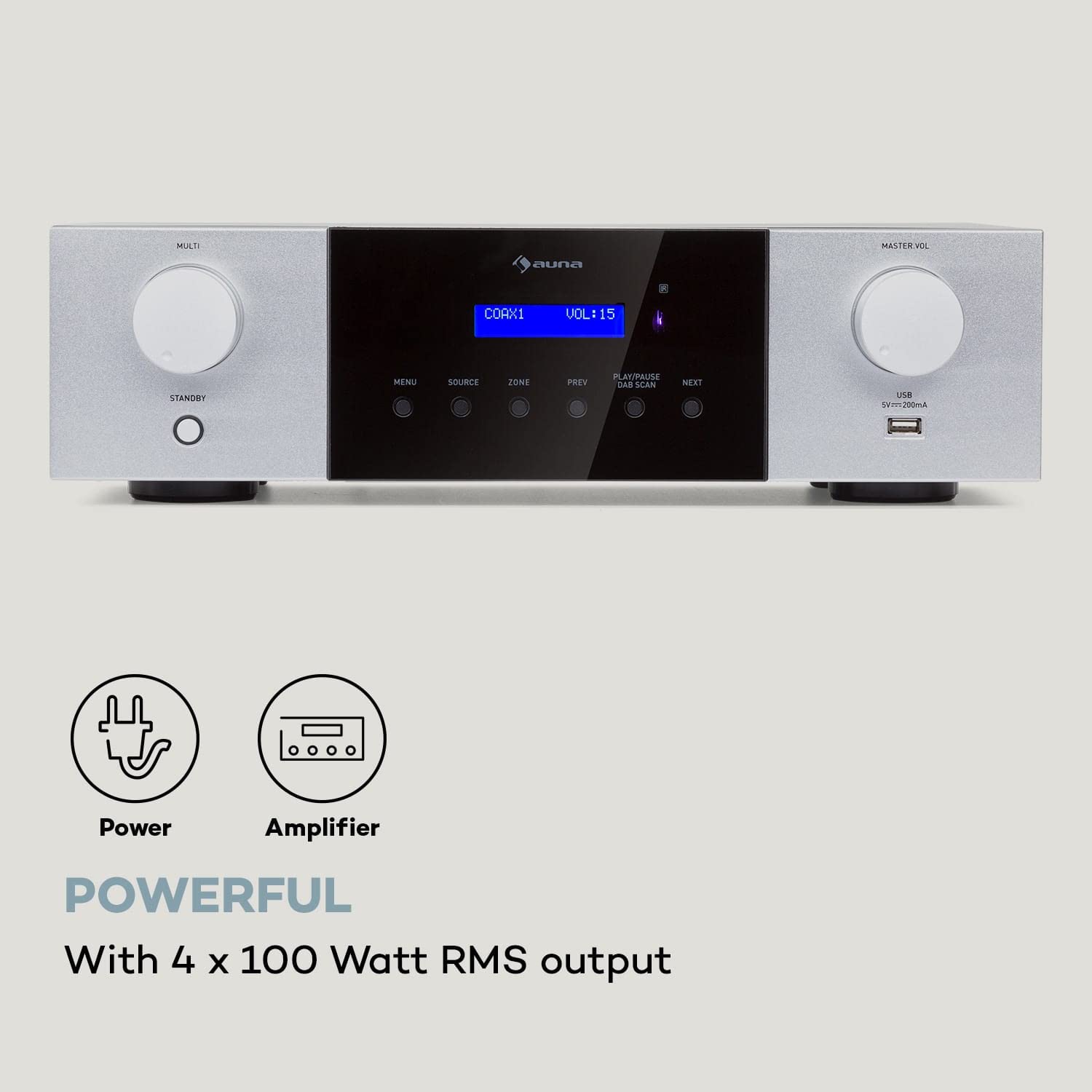
Billede 3.1: Detaljeret view af Auna AMP-4000 front panel. This image highlights the main controls including the Multi-function knob, Standby button, Menu, Source, Zone, Previous, Play/Pause/DAB Scan, Next buttons, Master Volume knob, and USB port.
- MULTI Knob: Adjusts various settings depending on the selected menu option.
- STANDBY-knap: Tænder eller slukker for enheden.
- MENU knap: Giver adgang til systemmenuen for indstillinger og valgmuligheder.
- SOURCE knap: Selects the audio input source (DAB, Bluetooth, USB, AUX, Optical, Coaxial).
- ZONE-knap: (If applicable) Controls multi-zone audio output.
- FORRIGE / NÆSTE knapper: Navigerer mellem spor eller radiostationer.
- PLAY/PAUSE / DAB SCAN Button: Controls playback or initiates a DAB radio scan.
- MASTER VOL-knap: Justerer det overordnede lydstyrkeniveau.
- USB-port: Til tilslutning af USB-lagerenheder til lydafspilning.
- LED display: Shows current status, source, volume, and track information.
3.2 Bagpaneltilslutninger
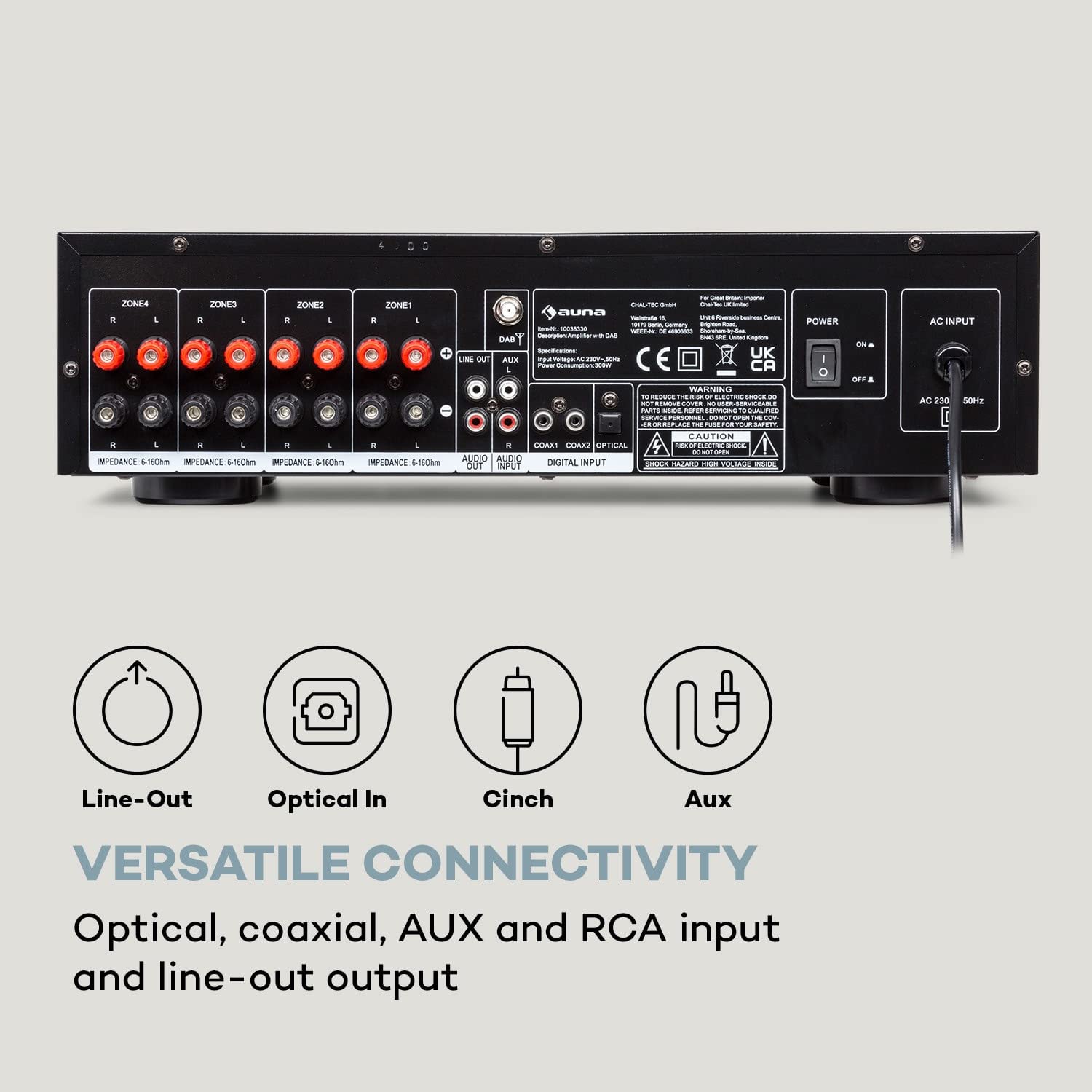
Billede 3.2: Bag view af Auna AMP-4000, showing all available input and output connections. This includes speaker terminals for multiple zones, Line Out, Audio Input (RCA), Digital Input (Coaxial, Optical), and the AC power input.
- Speaker Terminals (ZONE1, ZONE2, ZONE3, ZONE4): Connect your passive speakers. Ensure correct polarity (+ to + and - to -) and impedance matching (5-16 Ohms).
- LINE OUTPUT (RCA): For at forbinde til en anden amplivligere eller optageenhed.
- LYDINDGANG (RCA): Connect external analog audio sources (e.g., CD player, turntable with pre-amp).
- DIGITAL INPUT (COAXIAL, OPTICAL): Connect digital audio sources (e.g., TV, Blu-ray player).
- AC-INDGANG: Connect the power cord to a suitable AC power outlet.
- DAB Antenna Input: Connect the DAB antenna for digital radio reception.
4. Opsætning
4.1 Højttalertilslutning
- Sørg for ampApparatet er slukket og frakoblet strømnettet.
- Connect your passive speakers to the corresponding speaker terminals on the rear panel (ZONE1, ZONE2, etc.).
- Match den positive (+) terminal på amptil den positive (+) terminal på højttaleren og den negative (-) terminal på amptil den negative (-) terminal på højttaleren.
- Ensure the speaker impedance is within the recommended range of 5-16 Ohms.
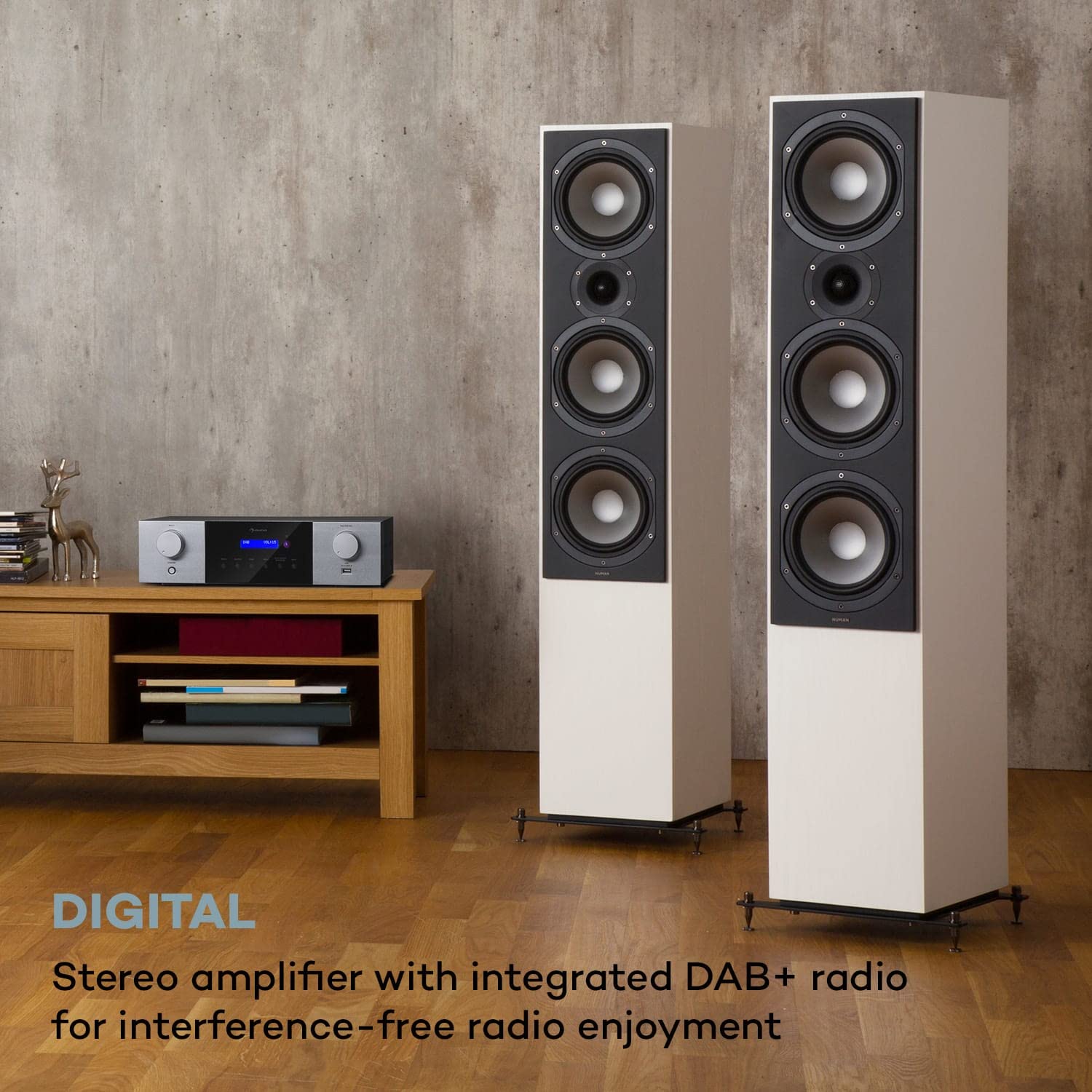
Billede 4.1: The Auna AMP-4000 amplifier positioned with two large floor-standing speakers in a living room setting. This illustrates a typical setup for home audio, emphasizing the connection to external speakers.
4.2 Tilslutning af lydkilde
- Analog Sources (RCA): Connect your CD player, DVD player, or other analog audio devices to the "AUDIO INPUT" RCA jacks using appropriate RCA cables.
- Digital Sources (Optical/Coaxial): Connect your TV, game console, or Blu-ray player to the "DIGITAL INPUT" (Optical or Coaxial) using optical or coaxial cables.
- DAB-antenne: Connect the supplied DAB antenna to the DAB antenna input for optimal digital radio reception.
4.3 Strømtilslutning
After all audio and speaker connections are made, connect the power cord to the "AC INPUT" on the rear panel of the amplifier and then plug it into a wall outlet.
5. Betjeningsvejledning
5.1 Tænd/sluk
Tryk på STÅ VED button on the front panel or the remote control to power the amplivligere til eller fra.
5.2 Kildevalg
Tryk på KILDE button on the front panel or the remote control repeatedly to cycle through available input sources (DAB, Bluetooth, USB, AUX, Optical, Coaxial).
5.3 DAB+ radiobetjening
- Select "DAB" as the source.
- If it's the first time using DAB, or if you want to rescan, press the PLAY/PAUSE / DAB SCAN button to initiate an automatic scan for available DAB+ stations.
- Brug FORR og NÆSTE buttons to navigate through the found stations.
5.4 Bluetooth -parring
- Select "Bluetooth" as the source. The LED display will indicate "Pairing" or similar.
- Aktiver Bluetooth på din smartphone eller tablet, og søg efter tilgængelige enheder.
- Select "Auna AMP-4000" from the list of devices to pair.
- Når den er parret, kan du streame lyd trådløst fra din enhed til amplivligere.

Billede 5.1: The Auna AMP-4000 amplifier shown with a smartphone, illustrating the wireless Bluetooth streaming capability. This image highlights the convenience of playing music from mobile devices.
5.5 USB-afspilning
- Indsæt en USB-lagerenhed (f.eks. et USB-flashdrev) i USB-porten på frontpanelet.
- Select "USB" as the source.
- De amplifier will automatically detect and begin playing compatible audio files. Brug FORR, NÆSTE, og AFSPIL/PAUSE knapper til at styre afspilning.
5.6 Lydstyrkekontrol
Drej på MASTER BIND knob on the front panel or use the volume buttons on the remote control to adjust the audio output level.
5.7 Fjernbetjening
The included remote control provides full functionality for operating the amplifier from a distance. Refer to the remote control diagram (if available) for specific button functions.

Billede 5.2: The Auna AMP-4000 amplifier's front panel displayed alongside its remote control. This image emphasizes the convenient operation provided by the remote, allowing control of various functions including volume, source, and radio stations.
6. Vedligeholdelse
- Rensning: Brug en blød, tør klud til at rengøre ydersiden af ampBrug ikke flydende rengøringsmidler eller slibende materialer.
- Ventilation: Sørg for, at ventilationsåbningerne ikke er blokeret for at forhindre overophedning.
- Opbevaring: Hvis enheden opbevares i længere tid, skal den tages ud af stikkontakten og opbevares et køligt og tørt sted.
7. Fejlfinding
| Problem | Mulig årsag | Løsning |
|---|---|---|
| Ingen strøm | Netledningen er ikke tilsluttet; stikkontakten er defekt. | Kontrollér netledningens tilslutning; prøv en anden stikkontakt. |
| Ingen lydudgang | Incorrect source selected; speaker cables loose; volume too low; mute activated. | Select correct source; check speaker connections; increase volume; deactivate mute. |
| Bluetooth forbinder ikke | Amplifier not in pairing mode; device too far; Bluetooth off on source device. | Sikre amplifier is in Bluetooth source mode; bring device closer; enable Bluetooth on source device. |
| Dårlig DAB+ modtagelse | Antenna not connected or poorly positioned; weak signal in area. | Check antenna connection; reposition antenna; perform a new DAB scan. |
8. Specifikationer

Billede 8.1: Diagram illustrating the physical dimensions of the Auna AMP-4000 amplifier, showing its width (43 cm), depth (24.5 cm), and height (12.5 cm).
- Mærke: AUNA
- Model: AMP-4000
- Udgangseffekt: 4 x 100 Watt RMS
- Tuner teknologi: DAB+
- Forbindelse: Auxiliary, Bluetooth, USB, RCA, Optical, Coaxial
- Kompatible enheder: Smartphone, tablet
- Lydudgangstilstand: Stereoanlæg
- Højttalerimpedans: 5-16 ohm
- Produktmål (LxBxH): 24.5 x 43 x 12.5 cm
- Varens vægt: 4 kg
- Farve: Sort-Hvid
9. Garanti og support
For warranty information and technical support, please refer to the documentation provided with your purchase or contact AUNA customer service. Keep your proof of purchase for warranty claims.


