Indledning
This manual provides detailed instructions for the FACOI Smart Watch, Model 206. It covers setup, operation, maintenance, and troubleshooting to help you maximize your device's potential. This smart watch is designed for both men and women, offering comprehensive features including call management, activity tracking, and health monitoring, compatible with both Android phones and iPhones.
Hvad er der i æsken
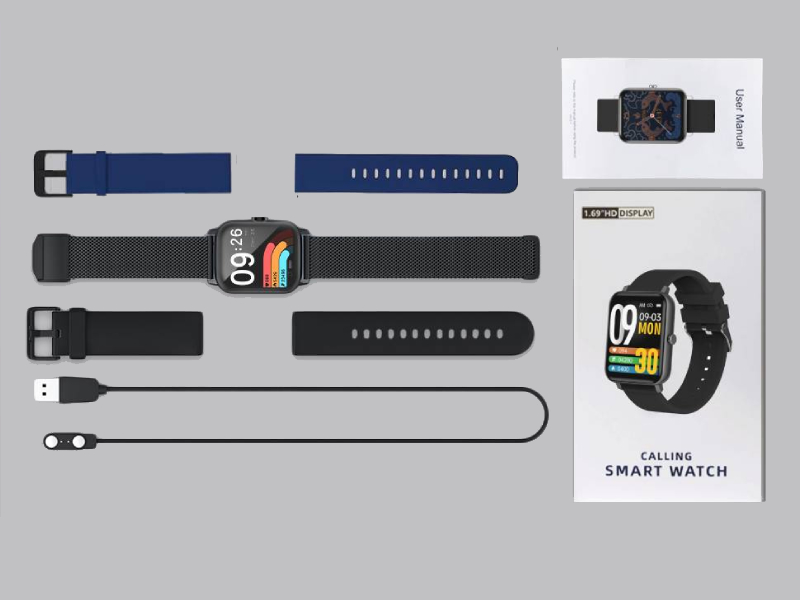
Image: The FACOI Smart Watch package contents, showing the smartwatch unit, a blue silicone strap, a black silicone strap, a black mesh strap, a magnetic charging cable, and the user manual.
- FACOI Smart Watch Unit
- Silicone Watch Straps (typically 2-3, e.g., black, blue)
- Magnetisk opladningskabel
- Brugermanual
Opsætning
1. Opladning af smarturet
Before first use, fully charge your smart watch. Connect the magnetic charging cable to the charging points on the back of the watch. Plug the USB end into a standard USB power adapter (not included) or a computer USB port. The watch display will indicate charging status. A full charge typically takes about 2 hours.
2. Installing Watch Straps
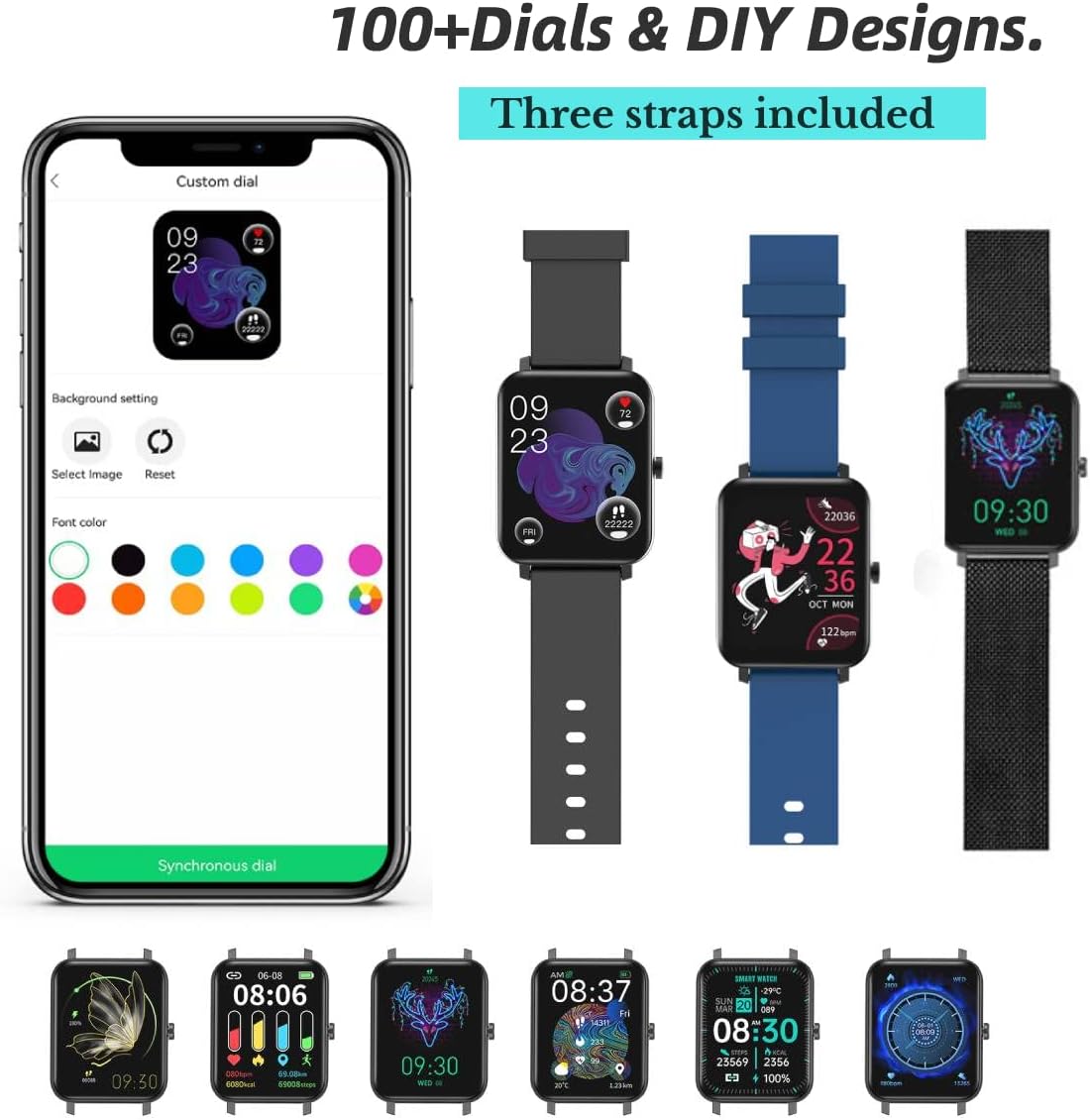
Image: The FACOI Smart Watch with multiple strap options, demonstrating how different straps can be attached to the watch body.
The FACOI Smart Watch comes with interchangeable straps. To attach a strap, align the spring bar with the lug holes on the watch body and push the pin inward to secure it. Release the pin once aligned in the hole. Ensure both ends of the strap are securely fastened before wearing.
3. Parring med din smartphone
- Download appen: Scan the QR code provided in the quick start guide or search for "Glory Fit" in your smartphone's app store (App Store for iOS, Google Play Store for Android). Install the application.
- Aktiver Bluetooth: Sørg for, at Bluetooth er aktiveret på din smartphone.
- Open Glory Fit App: Launch the Glory Fit app and follow the on-screen instructions to create an account or log in.
- Tilføj enhed: In the app, navigate to the "Device" or "My Device" section and select "Add Device." The app will search for nearby smart watches.
- Forbinde: Select "FACOI Smart Watch" or the corresponding device name from the list. Confirm the pairing request on both your phone and the watch if prompted.
- Tilladelser: Grant necessary permissions (e.g., notifications, location, contacts) to the app for full functionality.
Once successfully paired, the watch will synchronize time and data with your smartphone.
Betjeningsvejledning
Grundlæggende navigation

Image: A visual representation of the smart watch's user interface, displaying different screens for various functions.
- Touchskærm: Swipe left/right to navigate between main screens (e.g., activity data, heart rate). Swipe up/down to access quick settings or notifications. Tap to select an icon or option.
- Side knap: Press the side button to wake the screen, return to the main watch face, or access the app menu.
Bluetooth Call and Message Reminders

Image: The smart watch displaying an incoming call, a dialpad for making calls, and notifications from social media applications.
- Foretage opkald: Once paired via Bluetooth, you can dial numbers directly from the watch's dialpad or select contacts synchronized from your phone.
- Modtagelse af opkald: When an incoming call arrives, the watch will display the caller ID. You can answer or reject calls directly from the watch. The watch features a built-in speaker and microphone for hands-free communication.
- Meddelelsesmeddelelser: The watch will display notifications from various apps (e.g., SMS, WhatsApp, Facebook, Twitter) once enabled in the Glory Fit app.
Tilpasning af urskiver
The Glory Fit app offers over 100 watch faces and allows for DIY designs. In the app, navigate to the "Dial Settings" or "Watch Face" section to browse and apply new watch faces. You can also upload your own photos to create custom backgrounds.
Sundhedsovervågning

Image: The smart watch displaying real-time health metrics such as blood pressure, blood oxygen saturation, heart rate, and sleep duration, along with a graph of heart rate recording.
- Heart Rate Monitoring: Uret overvåger løbende din puls. View realtidsdata på uret eller detaljerede historiske data i appen.
- Overvågning af blodilt (SpO2): Measure your blood oxygen levels on demand.
- Blodtryksovervågning: Giver et estimat af dit blodtryk. Note: This device is not a medical device and should not be used for medical diagnosis or treatment.
- Søvnsporing: The watch automatically tracks your sleep patterns, including deep sleep, light sleep, and awake time. Review your sleep quality and duration in the Glory Fit app.
- Stillesiddende påmindelse: The watch can remind you to move if you have been inactive for too long.
Activity Tracking and Sports Modes

Image: The smart watch being used during various activities, highlighting its waterproof capabilities and the extensive list of supported sports modes.
- Skridttæller: Sporer dine daglige skridt, tilbagelagt distance og forbrændte kalorier.
- Sportstilstande: The watch supports 24 different sports modes, including Running, Walking, Cycling, Jump Rope, Badminton, Table Tennis, Tennis, Mountain Climbing, Basketball, Football, Baseball, Volleyball, Cricket, Rugby, Hockey, Dancing, Spinning, Yoga, Sit-ups, Indoor Run, Gymnastics, Rowing, Jumping Jacks, and Free Training. Select the appropriate mode before starting your workout for accurate tracking.
Andre funktioner
- Stopur: Access the stopwatch function from the watch menu for timing activities.
Image: The stopwatch interface on the smart watch.
- Fjernbetjening til kamera: Brug uret som en fjernbetjent lukker til din telefons kamera.

Image: The smart watch displaying the camera shutter icon, used to remotely trigger a phone's camera.
- Vejrudsigt: View current weather conditions and forecasts directly on your watch after synchronization with the app.
Image: The smart watch screen showing the current temperature and weather conditions.
- Musik kontrol: Styr musikafspilning på din smartphone (afspil, pause, spring numre over) direkte fra uret.
Opretholdelse
- Vandtæthed (IP67): The watch is IP67 waterproof, meaning it is resistant to splashes, rain, and brief immersion in water (up to 1 meter for 30 minutes). It is suitable for daily use and activities like washing hands or light rain. It is not recommended for hot showers, saunas, or diving. Avoid prolonged exposure to water.
- Rensning: Regularly clean the watch and straps with a soft, dry cloth. If necessary, use a slightly damp klud og mild sæbe, og tør derefter grundigt. Undgå barske kemikalier eller slibende materialer.
- Batteripleje: For at forlænge batteriets levetid bør du undgå at aflade uret helt ofte. Oplad det, når batteriniveauet er lavt. Opbevar uret et køligt og tørt sted, når det ikke er i brug i længere perioder.
Fejlfinding
| Problem | Mulig løsning |
|---|---|
| Uret tænder ikke eller reagerer ikke. | Ensure the watch is fully charged. Connect it to the charger for at least 30 minutes. If unresponsive, try a soft reset by pressing and holding the side button for 10-15 seconds. |
| Kan ikke parres med smartphone. |
|
| Inaccurate health data (HR, BP, SpO2). | Ensure the watch is worn snugly on your wrist, about one finger's width from the wrist bone. Avoid excessive movement during measurements. Remember, this device is not a medical instrument. |
| Meddelelser modtages ikke. |
|
| Kort batterilevetid. | Frequent use of features like Bluetooth calls, continuous heart rate monitoring, and bright screen settings can drain the battery faster. Reduce screen brightness, disable unnecessary notifications, and turn off continuous monitoring if not needed. |
Specifikationer
| Feature | Detalje |
|---|---|
| Modelnavn | T8pro (Item model number: 206) |
| Mærke | FACOI |
| Skærmstørrelse | 1.69 tommer (Synlig skærmdiagonal: 2" / 5 cm) |
| Operativsystem | Android (Compatible with Android and iOS) |
| Forbindelsesteknologi | Bluetooth |
| Særlige funktioner | Sleep Monitor, 3 Watch Straps, Multisport Tracker, Sedentary Reminder, Phone Call |
| Vandmodstand | IP67 |
| Batteritype | Lithium-ion (1 påkrævet, inkluderet) |
| Produktdimensioner | 9.64 x 1.38 x 0.46 tommer |
| Varens vægt | 5 gram |
Garanti og support
For warranty information and technical support, please refer to the official FACOI website or contact their customer service directly. You may also find additional resources and FAQs on the product's Amazon listing page or within the Glory Fit application.
En digital version af brugermanualen kan downloades: Brugervejledning (PDF)


