1. Introduktion
The HRD-700 Portable Shortwave Radio is a versatile and compact device designed for comprehensive radio reception and music playback. It supports multiple frequency bands including FM, MW, SW, WB (NOAA Weather Band), and features Bluetooth 5.0 connectivity and memory card playback. Its portable design makes it ideal for various indoor and outdoor activities.

Billede 1.1: Forside view of the HRD-700 Portable Shortwave Radio with its telescopic antenna extended.
Nøglefunktioner:
- Modtagelse af hele bandet: Capable of receiving FM, MW, SW, and WB (NOAA Weather Band) frequencies.
- Bluetooth 5.0-forbindelse: Seamlessly connect to Bluetooth-enabled devices for audio streaming.
- Understøttelse af hukommelseskort: Afspil lyd files directly from a memory card (TF card).
- Automatic Search & Store: Features coding pulley switch tuning with automatic station search and storage.
- Langtidsholdbart batteri: Udstyret med et 1000mAh batteri til længere tids brug.
- Sleep timer: Customizable sleep timer function (10-70 minutes).
- Kraftig lyd: Features a 3W diaphragm horn for clear and loud sound output.
- Bærbart design: Compact and lightweight, designed for easy carrying.
2. Produktkomponenter
Before using your HRD-700 radio, please ensure all components are present in the packaging.
Hvad er der i æsken:
- HRD-700 Portable Shortwave Radio Unit
- USB Type-C Charging Cable (Power Cord)
- Bæretaske
- Brugervejledning (dette dokument)
3. Betjeningselementer og funktioner
Familiarize yourself with the various parts and controls of your HRD-700 radio for optimal operation.

Image 3.1: Detailed diagram of the HRD-700 radio highlighting key components and their functions.
| Komponent | Fungere |
|---|---|
| Tie Rod Antenne | Extend for improved FM, SW, and WB reception. |
| Rotating Tuning Button | Used for manual tuning of radio frequencies. |
| Vise | Shows frequency, mode, battery status, and other information. |
| FM Road Pulley | Another control for tuning, possibly for fine-tuning FM. |
| Eksterne højttalere | Audio output for listening to radio or music. |
| Type C ladeport | Connect the USB Type-C cable for charging the internal battery. |
| Snorhul | Attachment point for a lanyard or wrist strap for portability. |
| TF-kortstik | Insert a TF (microSD) card for playing stored audio files. |
| Batteridæksel | Access point for the internal battery. |
| Modusvalgsknap | Switch between Radio (Channel Reception), BT (Bluetooth Reception), and M.Play (TF Card Mode). |
4. Opsætning
4.1 Opladning af batteriet
The HRD-700 radio comes with a built-in 1000mAh rechargeable lithium battery. Before first use, it is recommended to fully charge the battery.
- Locate the Type C Charging Port on the radio.
- Connect one end of the provided USB Type-C charging cable to the radio's charging port.
- Tilslut den anden ende af USB-kablet til en standard USB-strømadapter (medfølger ikke) eller en computers USB-port.
- The display will indicate charging status. Once fully charged, the indicator will change or turn off.

Image 4.1: The HRD-700 radio with an illustration of its high-capacity 1000mAh lithium battery, emphasizing improved battery life.
4.2 Isætning af et hukommelseskort (valgfrit)
If you wish to play audio files from a memory card, follow these steps:
- Locate the TF Card Jack on the side or back of the radio.
- Gently insert a compatible TF (microSD) card into the slot until it clicks into place. Ensure the card is inserted in the correct orientation.
- For at fjerne det skal du forsigtigt skubbe kortet indad, indtil det springer ud.
5. Betjeningsvejledning
5.1 Tænd/sluk og lydstyrkekontrol
- To power on the radio, locate the power button/switch and press/slide it to the ON position.
- To power off, press/slide the power button/switch to the OFF position.
- Adjust the volume using the dedicated volume control knob or buttons. The radio features a 3W speaker capable of over 120 decibels.
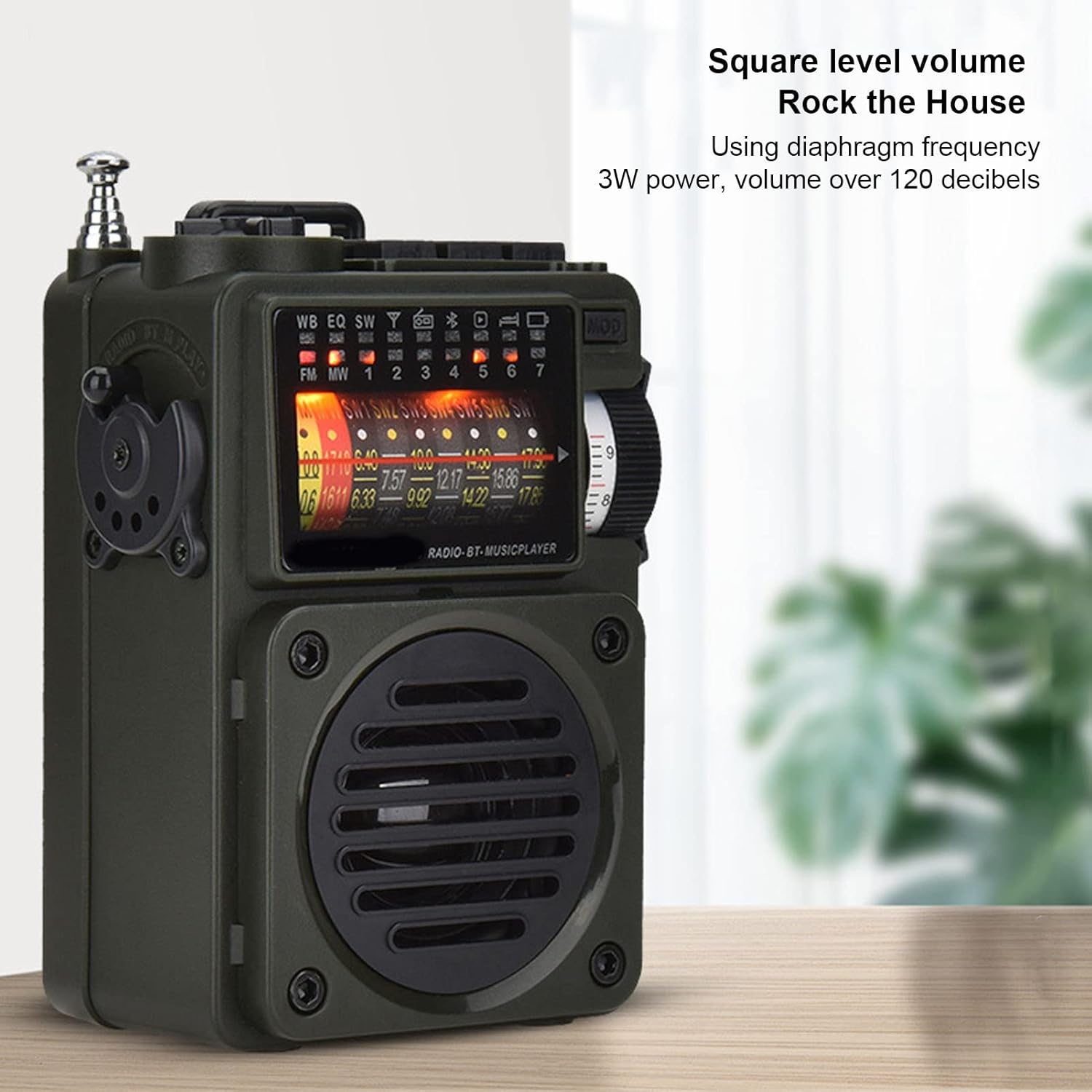
Image 5.1: The HRD-700 radio demonstrating its powerful sound output, suitable for filling a room.
5.2 Radio Reception (FM/MW/SW/WB)
The HRD-700 supports a wide range of radio bands.
- Vælg tilstand: Use the Mode Selection Switch to select "Radio" mode.
- Forlæng antenne: For optimal reception on FM, SW, and WB bands, fully extend the Tie Rod Antenna.
- tuning:
- Manuel indstilling: Use the Rotating Tuning Button or FM Road Pulley to manually scan for stations.
- Automatisk søgning: Press the designated button (refer to display icons for "Auto Search") to automatically scan and store available stations.
- Stationsgenkaldelse: After automatic search, use the tuning controls to cycle through stored stations.

Image 5.2: The HRD-700 radio's display showing various frequency bands (FM, MW, SW, WB) and tuning indicators.
5.3 Bluetooth Music Playback
Connect your smartphone or other Bluetooth devices to the HRD-700 for wireless audio streaming.
- Vælg tilstand: Use the Mode Selection Switch to select "BT" (Bluetooth) mode. The radio will enter pairing mode, indicated by a flashing Bluetooth icon on the display.
- Aktiver Bluetooth: On your device (e.g., smartphone), enable Bluetooth and search for available devices.
- Par: Select "HRD-700" from the list of found devices. Once connected, the Bluetooth icon on the radio's display will become solid.
- Afspil musik: Start playing music on your connected device. Audio will now play through the HRD-700 radio.

Image 5.3: The HRD-700 radio demonstrating its wireless Bluetooth connectivity with a smartphone, offering a stable connection up to 10 meters.
5.4 Memory Card (TF Card) Playback
Play your favorite audio files directly from a TF card.
- Indsæt kort: Ensure a TF card with audio files is properly inserted into the TF Card Jack (refer to Section 4.2).
- Vælg tilstand: Use the Mode Selection Switch to select "M.Play" (Memory Play) mode.
- Afspilning: Radioen vil automatisk begynde at afspille lyd files from the TF card. Use the radio's controls (e.g., next/previous track buttons, if available) to navigate your music.
5.5 Sleep Timer-funktion
The sleep timer allows you to set a duration after which the radio will automatically turn off.
- Access the sleep timer setting through the radio's menu or a dedicated button (refer to display icons or specific buttons).
- Adjust the sleep timer duration between 10 and 70 minutes.
- Confirm your selection. The radio will power off automatically after the set time.
6. Vedligeholdelse
6.1 Rengøring
- Tør radioens yderside af med en blød, tør klud.
- Brug ikke slibende rengøringsmidler, voks eller opløsningsmidler, da de kan beskadige finishen.
- Undgå at fugt kommer ind i åbninger.
6.2 Opbevaring
- Når radioen ikke er i brug i længere perioder, skal den opbevares køligt og tørt, væk fra direkte sollys og ekstreme temperaturer.
- It is advisable to partially charge the battery before long-term storage and recharge it every few months to maintain battery health.
- Use the provided carrying pouch to protect the radio from dust and scratches.
7. Fejlfinding
If you encounter issues with your HRD-700 radio, please refer to the following common problems and solutions.
| Problem | Mulig årsag | Løsning |
|---|---|---|
| Radioen tænder ikke. | Batteriet er afladet. | Charge the radio using the provided USB Type-C cable. |
| Dårlig radiomodtagelse. | Antenne ikke strakt ud; område med svagt signal; interferens. | Fully extend the telescopic antenna. Move to an area with better signal. Avoid sources of electronic interference. |
| Bluetooth opretter ikke forbindelse. | Radio not in BT mode; device Bluetooth off; too far from radio. | Ensure radio is in "BT" mode. Turn on Bluetooth on your device. Keep devices within 10 meters (32.8 feet). Try re-pairing. |
| No sound from memory card. | Card not inserted correctly; radio not in M.Play mode; unsupported file format. | Re-insert the TF card. Switch to "M.Play" mode. Ensure audio files er i et kompatibelt format. |
| Skærmen er tom eller flimrer. | Lavt batteri; internt problem. | Charge the radio. If the problem persists, contact customer support. |
8. Specifikationer
| Feature | Detalje |
|---|---|
| Mærke | Cuifati |
| Modelnummer | CUIFATIywqr0emxu88079 |
| Forbindelsesteknologi | Bluetooth |
| Bluetooth version | 5.0 (up to 10m/32.8ft stable connection range) |
| Tuner-teknologi | FM, AM |
| Radiobånd understøttet | SW, FM, AM, WB (NOAA Weather Band) |
| Strømkilde | Battery Powered (1000mAh internal battery) |
| Højttaler output | 3W (over 120 decibels) |
| Displayteknologi | LCD |
| Speciel funktion | Portable, Memory Card Playback, Sleep Timer |
| Varens vægt | 7.7 ounce |
| Pakkedimensioner | 5.47 x 5 x 2.05 tommer |
| Oprindelsesland | Kina |
9. Garanti og support
Cuifati products are manufactured to high-quality standards. For any questions, technical support, or warranty inquiries, please contact the seller or manufacturer directly through your purchase platform.
Gem venligst din købsbevis i tilfælde af garantikrav.
For mere information kan du besøge Cuifati Store on Amazon.