1. Introduktion
This manual provides comprehensive instructions for the setup, operation, and maintenance of your Cherry MW 9100 Wireless Rechargeable Mouse. The MW 9100 is a compact, versatile mouse offering dual connectivity options (Bluetooth or 2.4 GHz USB receiver) and a convenient rechargeable battery.
Nøglefunktioner omfatter:
- Compact design with charging functionality.
- Flexible operation: use while charging via USB-C cable.
- Dual connectivity: Bluetooth or 2.4 GHz USB receiver.
- Magnetic storage for the USB receiver, ideal for travel.
- Adjustable DPI settings for varied usage.
2. Pakkens indhold
Bekræft at alle varer er til stede i pakken:
- Cherry MW 9100 Wireless Rechargeable Mouse
- USB-C ladekabel
- 2.4 GHz USB-modtager
- Beskyttende pose
- Instruktionsmanual (dette dokument)
3. Opsætning
3.1 Opladning af musen
The Cherry MW 9100 mouse features a built-in rechargeable battery. Before initial use, or when the battery is low, connect the included USB-C cable to the mouse and to a USB power source (e.g., computer USB port, USB wall adapter). The mouse can be used normally while charging.

Billede 3.1: Top view of the Cherry MW 9100 mouse, showing the charging indicator light.
3.2 Tilslutning af musen
The MW 9100 offers two connection methods: 2.4 GHz wireless via USB receiver or Bluetooth.
3.2.1 2.4 GHz trådløs forbindelse
- Locate the USB receiver. It is magnetically stored in a compartment on the underside of the mouse.
- Sæt USB-modtageren i en ledig USB-port på din computer.
- On the underside of the mouse, slide the switch to the "RF" position.
- Musen burde automatisk oprette forbindelse til din computer.
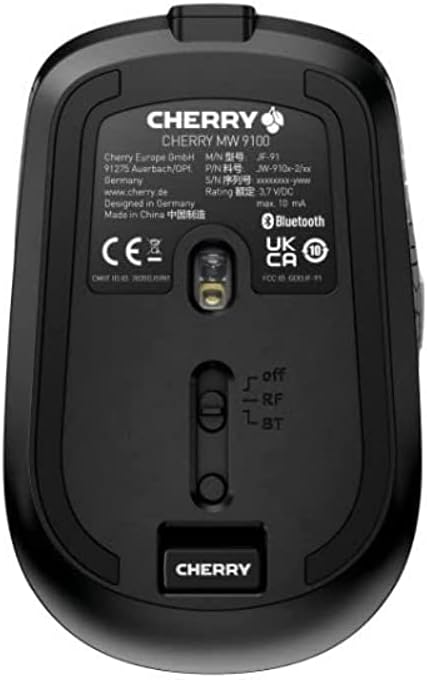
Billede 3.2: Underside of the Cherry MW 9100 mouse, highlighting the USB receiver storage and the connection mode switch.
3.2.2 Bluetooth-forbindelse
- On the underside of the mouse, slide the switch to the "BT" (Bluetooth) position.
- Press and hold the small pairing button located near the connection switch on the underside of the mouse until the LED indicator on the mouse starts blinking, indicating pairing mode.
- Åbn Bluetooth-indstillingerne på din computer eller enhed, og søg efter nye enheder.
- Select "Cherry MW 9100" from the list of available devices to complete the pairing process.
4. Betjeningsvejledning
4.1 Grundlæggende funktioner
The Cherry MW 9100 mouse features standard left and right click buttons, a scroll wheel (which also functions as a middle click button), and two side buttons for navigation (typically forward/back).
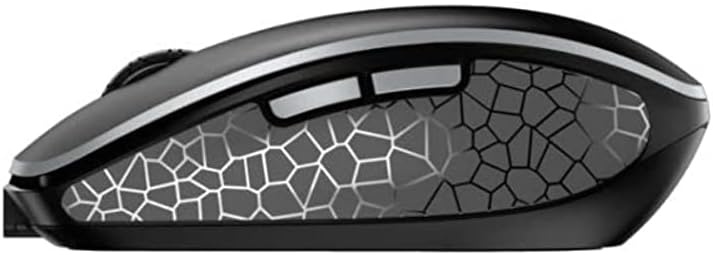
Billede 4.1: Side view of the Cherry MW 9100 mouse, illustrating the ergonomic design and side buttons.
4.2 DPI-justering
The mouse includes a DPI (Dots Per Inch) button, usually located near the scroll wheel, allowing you to adjust the cursor sensitivity. Press this button to cycle through different DPI settings to match your preference or task requirements.

Billede 4.2: A hand demonstrating the comfortable grip on the Cherry MW 9100 mouse during use.
5. Vedligeholdelse
To ensure optimal performance and longevity of your Cherry MW 9100 mouse:
- Rensning: Brug en blød, tør klud til at rengøre musens overflade. Ved genstridigt snavs, brug en let tør klud.amp En klud kan bruges, men sørg for, at der ikke kommer fugt ind i enheden. Undgå skrappe kemikalier eller slibende materialer.
- Opbevaring: When not in use, especially during travel, store the mouse in the provided protective pouch to prevent scratches and damage.
- Batteripleje: Avoid fully discharging the battery frequently. Recharge the mouse when the low battery indicator appears.
6. Fejlfinding
| Problem | Mulig årsag | Løsning |
|---|---|---|
| Musen reagerer ikke | Low battery, incorrect connection mode, USB receiver not connected, Bluetooth not paired. |
|
| Intermittent connection (Bluetooth) | Interference, device driver issues, distance from device. |
|
| Markørbevægelsen er uregelmæssig eller langsom | Dirty optical sensor, low battery, incorrect DPI setting. |
|
7. Specifikationer
| Feature | Detalje |
|---|---|
| Mærke | Kirsebær |
| Modelnummer | JW-9100US-2 |
| Forbindelsesteknologi | Bluetooth, 2.4 GHz USB trådløs |
| Bevægelsesdetektion | Optisk |
| Særlige funktioner | Lightweight, Portable, Rechargeable |
| Produktdimensioner | 4 x 3 x 2 tommer |
| Varens vægt | 6.4 ounce |
| Farve | Sort |
8. Garanti og support
For garantioplysninger og teknisk support henvises til den officielle Cherry-butik. webwebstedet eller kontakt Cherrys kundeservice direkte. Gem din købsbevis til garantikrav.
Fabrikant: KIRSEBÆR
Webwebsted: www.cherry.de


