1. Sikkerhedsoplysninger
Please read these instructions carefully before installation. If you have any doubts about the installation process, consult a qualified professional. Improper installation may result in property damage or personal injury.
- Sørg for, at monteringsfladen sikkert kan bære den samlede vægt af beslaget og fjernsynet.
- Always attach the wall mount to a solid wood stud, concrete, or brick wall. Do not install on drywall alone.
- Use a stud finder to locate wood studs accurately.
- Do not exceed the maximum weight capacity specified for your model.
- Use the provided mounting hardware. If your TV requires different screws, consult your TV's manual.
- Hold børn og kæledyr væk under installationen.
2. Pakkens indhold
Verify all components are present and undamaged before proceeding with installation. Refer to the detailed parts list in your physical manual for specific quantities.

Billede: Overview of included mounting hardware and main mount components.
3. Kompatibilitetskontrol
Before installation, confirm your TV and wall type are compatible with the mount.

Image: Visual guide for checking TV size, VESA pattern, and compatible wall types.
Model PSMFK7:
- TV størrelse: 26-55 tommer
- Vægt kapacitet: Op til 70 lbs (31.8 kg)
- VESA-mønstre: 100x100mm til 400x400mm
Model PSMFK9:
- TV størrelse: 32-65 tommer
- Vægt kapacitet: Op til 99 lbs (45 kg)
- VESA-mønstre: 75x75mm til 400x400mm
Compatible Wall Types (Both Models):
- Wood Studs (12" or 16" spacing)
- Solid Beton
- Mursten
4. Nødvendigt værktøj
Følgende værktøjer er generelt nødvendige til installation:
- Blyant
- Bore
- Stolpefinder (til montering af træstolper)
- Level (a small one is often included)
- Topnøgle eller justerbar nøgle
- Phillips hovedskruetrækker
- Hammer (til betonankre)
5. Installationsvejledning
Dette afsnit giver en generel overview. Always refer to the detailed step-by-step instructions and diagrams in your product's printed manual for precise guidance.
Trin 1: Fastgør tv-beslag til fjernsynet
- Placer forsigtigt dit tv med forsiden nedad på en blød, ren overflade.
- Identificer VESA-monteringshullerne på bagsiden af dit tv.
- Select the appropriate screws, washers, and spacers from the provided hardware that fit your TV's VESA pattern.
- Attach the two vertical TV brackets to the back of your television, ensuring they are centered and securely fastened. Do not overtighten.
Step 2: Install Wall Plate to Wall
- Bestem den ønskede højde og placering til dit tv.
- Til træstolper: Use a stud finder to locate the center of one or two adjacent wood studs. Mark the drill holes for the wall plate. Drill pilot holes and securely fasten the wall plate using lag bolts.
- For Solid Concrete/Brick: Mark the drill holes. Drill pilot holes using a masonry drill bit. Insert concrete anchors into the holes, then securely fasten the wall plate using lag bolts.
- Use a level to ensure the wall plate is perfectly horizontal before tightening all fasteners.

Image: The PSMFK9 mount features pre-assembled arms for simplified installation.
Trin 3: Monter fjernsynet på vægpladen
- With assistance, carefully lift the television with the attached brackets.
- Hook the TV brackets onto the wall plate. Ensure the brackets are properly seated and engaged with the wall plate's hooks.
- Fastgør tv'et til vægpladen med de medfølgende sikkerhedsskruer eller låsemekanismer. Dette forhindrer utilsigtet forskydning.
Video: Official PERLESMITH PSMFK7 Full Motion TV Mount Installation Guide. This video demonstrates the installation process for the PSMFK7 model, including attaching the TV brackets, mounting the wall plate, and securing the TV.
6. Betjeningsvejledning
Your PERLESMITH full motion TV wall mount offers various adjustments for optimal viewing.
Adjusting Tilt, Swivel, and Extension (Model PSMFK7):
- Vip: The mount allows for a +5°/-15° tilt to reduce glare and achieve the best viewing angle. Loosen the tilt knobs on the TV brackets, adjust the TV to the desired angle, and then tighten the knobs securely.
- Drejelig: The articulating arm allows for a +/-90° swivel, enabling you to redirect the screen angle to different parts of the room. Gently push or pull the TV to the desired swivel position.
- Udvidelse/tilbagetrækning: Extend the TV up to 19.17 inches (48.7 cm) from the wall for viewing or retract it back to 3.2 inches (8.1 cm) for a clean, streamlined look.
- Post-Installation Leveling: A +/-3° leveling adjustment is available after installation to ensure your TV is perfectly horizontal. Refer to your manual for specific instructions on how to use the leveling bolts.

Image: Demonstrates the full motion capabilities of the PSMFK7 mount, including tilt, swivel, extension, and post-installation leveling.

Billede: Eksample of a TV mounted with the PSMFK7, demonstrating the ability to perfectly center the display.

Image: The articulating design of the PSMFK7 mount allows for flexible corner mounting.
7. Vedligeholdelse
Regelmæssig vedligeholdelse sikrer levetiden og sikker drift af dit TV-vægbeslag.
- Periodiske kontroller: Every few months, check all screws and connections to ensure they remain tight. Retighten if necessary.
- Rensning: Tør holderen af med en blød, tør klud for at fjerne støv. Undgå slibende rengøringsmidler eller opløsningsmidler.
- Smøring: The articulating joints are designed for smooth movement. If movement becomes stiff, a small amount of silicone-based lubricant can be applied to the pivot points.
8. Fejlfinding
If you encounter issues, refer to these common solutions:
- TV'et er ikke i vater: Use the post-installation leveling feature (refer to your manual for specific adjustment points) or re-check the wall plate's level during installation.
- Beslaget føles løst: Immediately remove the TV and re-check all wall plate and TV bracket fasteners. Ensure the mount is secured to a solid stud or appropriate concrete/brick anchors.
- Vanskeligheder med at justere TV'et: Check if any adjustment knobs or bolts are overtightened. Loosen slightly to allow movement, then retighten to hold the position.
- Manglende dele: Contact PERLESMITH customer support for assistance.
9. Specifikationer
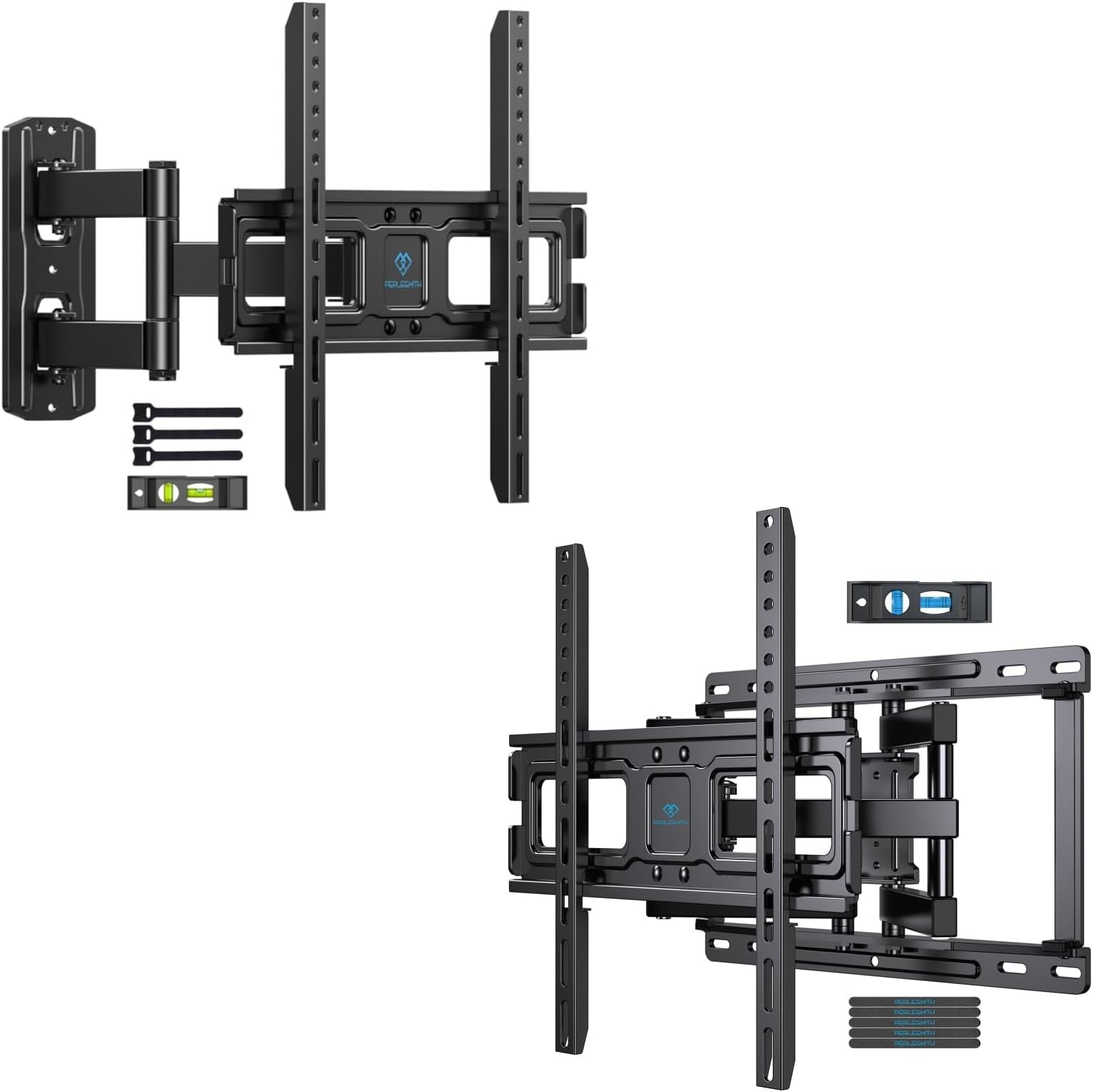
Image: The PERLESMITH Full Motion TV Wall Mounts, models PSMFK7 and PSMFK9.
Model PSMFK7:
| Specifikation | Detalje |
|---|---|
| Kompatibel tv-størrelse | 26" - 55" |
| Vægt kapacitet | Op til 70 lbs (31.8 kg) |
| VESA-kompatibilitet | 100x100mm til 400x400mm |
| Tilt vinkel | +5° / -15° |
| Drejevinkel | +/-90° |
| Justering af nivellering | +/-3° |
| Forlængelse fra væg | 8.1 cm - 48.7 cm (3.2" - 19.17") |
| Materiale | Legeret stål |
Model PSMFK9:
| Specifikation | Detalje |
|---|---|
| Kompatibel tv-størrelse | 32" - 65" |
| Vægt kapacitet | Op til 99 lbs (45 kg) |
| VESA-kompatibilitet | 75x75mm til 400x400mm |
| Afstand mellem vægstolper | 12" or 16" |
| Materiale | Legeret stål |
| Formonteret | Yes (wall plate and articulating arms) |
10. Garanti og support
For warranty information, product registration, or technical support, please refer to the contact details provided in your product packaging or visit the official PERLESMITH webwebsted. Gem din købskvittering for garantikrav.


