1. Introduktion
Thank you for choosing the Sygonix SY-4782322 LED Outdoor Spotlight. This manual provides essential information for the safe and efficient operation of your device. Please read these instructions thoroughly before installation and use, and retain them for future reference.
This 45W LED floodlight offers versatile lighting options, including neutral white, warm white, and RGB colors, controllable via the Tuya Wi-Fi app. It is designed for outdoor use in gardens, on terraces, or other outdoor areas.
2. Sikkerhedsinstruktioner
- Sørg for, at strømforsyningen er afbrudt før installation eller vedligeholdelse.
- Installationen skal udføres af en kvalificeret elektriker i overensstemmelse med lokale el-forskrifter.
- Do not look directly into the LED light source when it is illuminated, as this may cause eye damage.
- Dette produkt er designet til udendørs brug. Sørg for, at alle forbindelser er vandtætte.
- Do not modify or disassemble the product. Unauthorized modifications may void the warranty and pose safety risks.
- Hold produktet væk fra brændbare materialer.
- Driftstemperaturområde: Se produktspecifikationerne for yderligere oplysninger.
3. Pakkens indhold
Kontroller, at alle varer er til stede og i god stand ved udpakning:
- Sygonix SY-4782322 LED Outdoor Spotlight (1 unit)
- Mounting bracket (pre-attached)
- Brugervejledning (dette dokument)
4. Produktet er slutview
The Sygonix SY-4782322 is a robust LED floodlight designed for outdoor environments, featuring smart control capabilities.
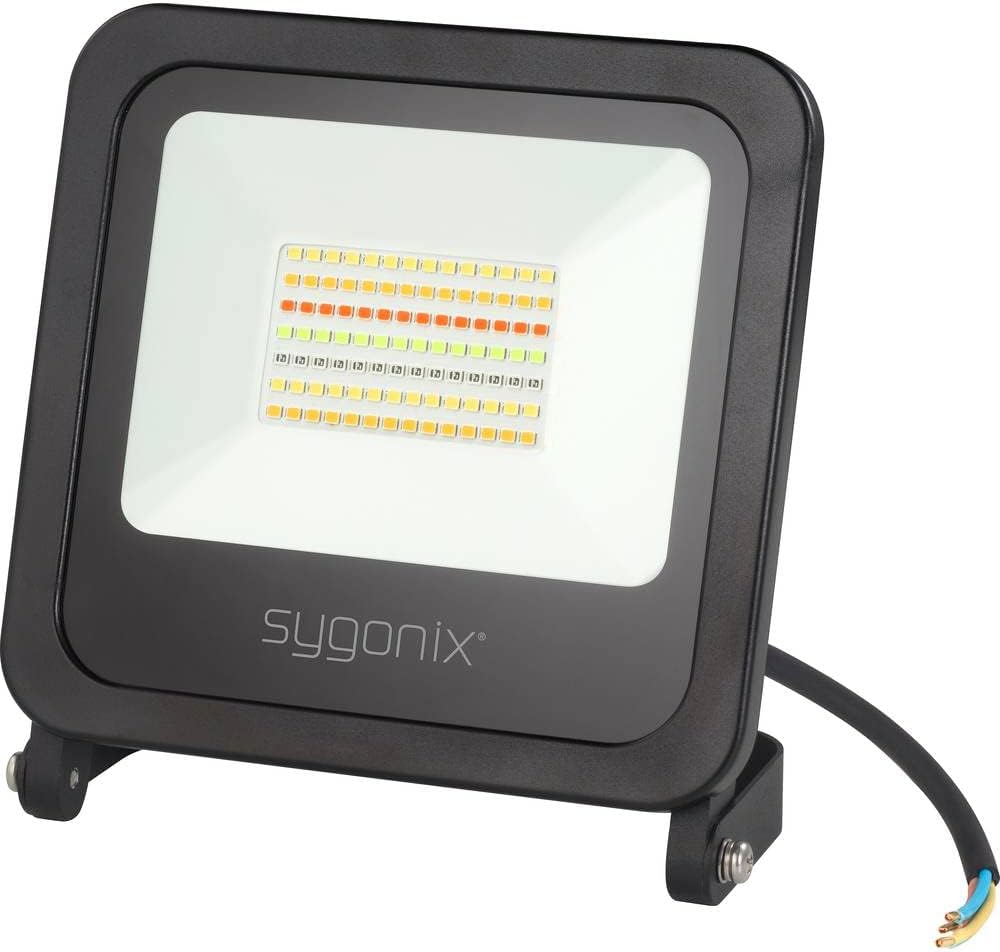
Figur 1: Front view of the Sygonix SY-4782322 LED Outdoor Spotlight, showing the LED array and the Sygonix logo on the black casing.

Figur 2: Bag view of the Sygonix SY-4782322 LED Outdoor Spotlight, highlighting the heat sink fins and the adjustable mounting bracket.
5. Opsætning og installation
The spotlight is designed for wall mounting. Ensure the mounting surface is stable and can support the weight of the fixture.
- Vælg en placering: Select a suitable outdoor location for optimal lighting coverage and secure mounting.
- Markér borepunkter: Use the pre-attached mounting bracket as a template to mark the drilling points on the wall.
- Bore huller: Bor huller på de markerede steder. Isæt passende vægdyvler om nødvendigt.
- Monter beslaget: Secure the mounting bracket to the wall using screws (not included).
- Juster vinkel: Adjust the spotlight to the desired angle and tighten the screws on the bracket to fix its position.
- Elektrisk tilslutning:
- Sørg for, at hovedstrømforsyningen er SLUKKET, før du foretager nogen elektriske tilslutninger.
- Connect the spotlight's power cable to your outdoor electrical wiring. The cable typically includes Live (brown), Neutral (blue), and Earth (green/yellow) wires.
- Ensure all connections are secure and properly insulated to prevent water ingress.
- Tænd: Når installationen er færdig, og alle forbindelser er sikre, skal strømmen til kredsløbet genoprettes.
6. Betjeningsvejledning
6.1. Tuya Wi-Fi App Connection
The Sygonix SY-4782322 LED Outdoor Spotlight is controlled via the Tuya Wi-Fi app. Follow these steps to connect your device:
- Download appen: Download appen "Tuya Smart" eller "Smart Life" fra din smartphones appbutik (iOS eller Android).
- Registrer/Log ind: Åbn appen, og opret en ny konto, eller log ind med en eksisterende.
- Tilføj enhed:
- Sørg for, at din smartphone er forbundet til et 2.4 GHz Wi-Fi-netværk.
- Power on the spotlight. It should enter pairing mode (often indicated by flashing light). If not, power cycle it three times (on-off-on-off-on) to force pairing mode.
- In the app, tap "+" or "Add Device".
- Vælg "Belysning" eller "Lyskilde (Wi-Fi)" fra enhedslisten.
- Follow the on-screen instructions to connect the spotlight to your Wi-Fi network. This usually involves confirming the Wi-Fi network and entering the password.
- Enhed tilsluttet: Once successfully connected, the spotlight will stop flashing and appear in your app's device list.

Figur 3: The Sygonix LED Outdoor Spotlight shown alongside a smartphone displaying the Tuya app interface, illustrating color selection and control options.
6.2. Grundlæggende lysstyring
- Til/fra: Tap the power icon in the app to turn the spotlight on or off.
- Justering af lysstyrke: Use the dimmer slider in the app to adjust the light intensity.
- Farvevalg: Choose from a wide range of RGB colors, neutral white, or warm white directly from the app's color palette.
6.3. Avancerede funktioner
- Timer funktion: Set schedules for the spotlight to turn on or off at specific times.
- Gruppekontrol: If you have multiple Sygonix smart spotlights, you can group them in the app to control them simultaneously.
- Music Sync Function: The app allows the spotlight to synchronize its lighting effects with music, creating dynamic light shows.
- Scenetilstande: Explore pre-set scene modes or create custom scenes for different moods and occasions.
7. Vedligeholdelse
- Rensning: Disconnect power before cleaning. Wipe the spotlight with a soft, damp klæde. Brug ikke slibende rengøringsmidler eller opløsningsmidler.
- Inspektion: Periodically check the power cable and housing for any signs of damage. If damage is found, discontinue use and consult a qualified technician.
- LED-levetid: The LEDs are designed for long-term use and are not user-replaceable.
8. Fejlfinding
| Problem | Mulig årsag | Løsning |
|---|---|---|
| Spotlight tænder ikke. | No power supply; loose connection; faulty unit. | Check power connection and circuit breaker. Ensure all wires are securely connected. If problem persists, contact support. |
| Cannot connect to Wi-Fi app. | Incorrect Wi-Fi password; 5 GHz Wi-Fi network; spotlight not in pairing mode; poor signal. | Ensure correct 2.4 GHz Wi-Fi network and password. Power cycle the spotlight three times to enter pairing mode. Move closer to the Wi-Fi router. |
| Lyset flimrer eller skifter farve uventet. | Unstable power supply; app malfunction; interference. | Check power supply stability. Restart the app and the spotlight. Ensure no strong electromagnetic interference nearby. |
9. Specifikationer
| Model | SY-4782322 |
| Mærke | Sygonix |
| Strømforbrug | 45 W |
| Lys farve | Neutral White, Warm White, RGB |
| Kontrolmetode | Tuya Wi-Fi App |
| Dimensioner (L x B x H) | 38 x 16 x 25 cm |
| Vægt | 713 g |
| Særlige funktioner | Outdoor use, Dimmer function, Group control, Timer setting, Music sync function, Adjustable color profiles, Wall mountable. |
| Energieffektivitetsklasse | F |

Figur 4: EU Energy Label for the Sygonix SY-4782322 LED Outdoor Spotlight, indicating an Energy Efficiency Class F and energy consumption of 45 kWh per 1000 hours. More details can be found at eprel.ec.europa.eu/qr/977369.
10. Oplysninger om bortskaffelse
Bortskaf ikke elektriske apparater som usorteret husholdningsaffald. Brug separate indsamlingsfaciliteter. Kontakt din kommune for information om tilgængelige indsamlingssystemer. Hvis elektriske apparater bortskaffes på lossepladser eller lossepladser, kan farlige stoffer sive ud i grundvandet og komme ind i fødekæden, hvilket skader dit helbred og velbefindende.
11. Garanti og support
Sygonix products are manufactured to high-quality standards. In the unlikely event of a defect, please refer to your purchase documentation for warranty terms and conditions. For technical support or service inquiries, please contact your retailer or the official Sygonix support channels.


