1. Introduktion
The Alpina Smart Home Smart Switch allows you to control your wired electrical devices remotely. This device integrates into your existing wiring to provide smart control over appliances such as lamps or security cameras. All functions of the smart switch are configurable via the Alpina Smart Home app, and it supports voice control through Amazon Alexa or Google Home.
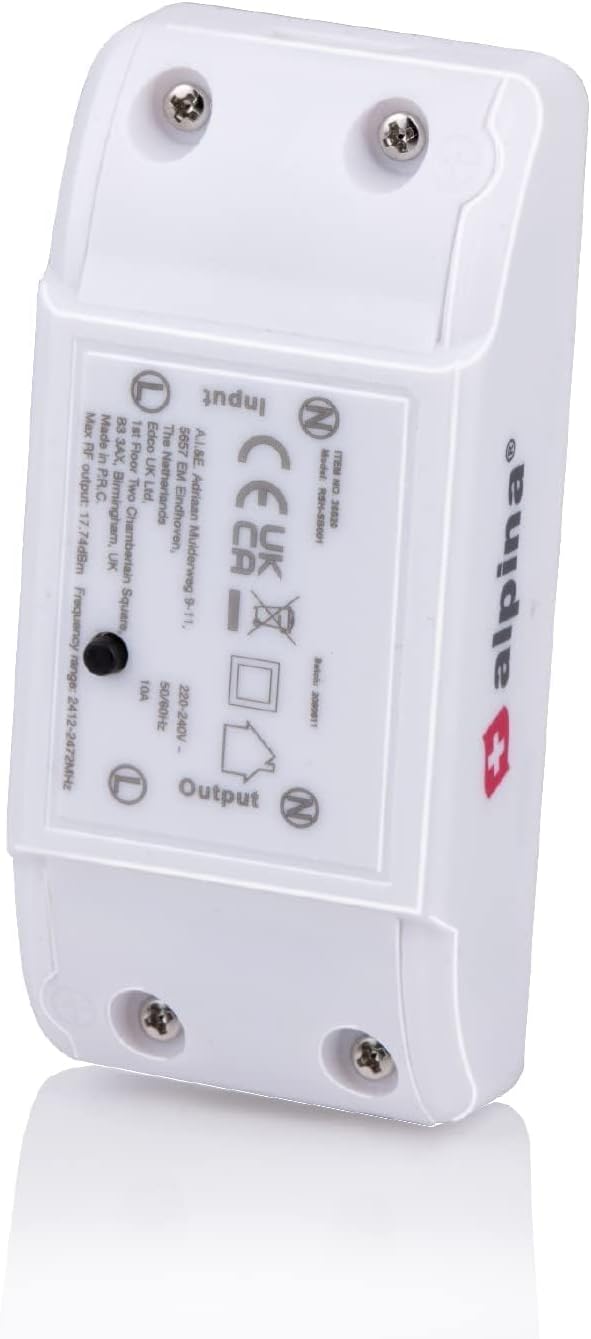
Image 1: Alpina Smart Home Smart Switch, a compact white device designed for inline wiring.
2. Sikkerhedsoplysninger
Please read this manual carefully before installation and use. Improper installation or use can lead to electrical shock, fire, or other hazards. Always ensure the power supply is disconnected before performing any wiring. Installation should be performed by a qualified electrician if you are unsure about electrical wiring procedures. This device is designed for indoor use only.
- Sørg for, at input voltage is 100-240V~ 50/60 Hz.
- Do not exceed the maximum output power of 2500W or input current of 10A.
- Hold enheden væk fra vand og høj luftfugtighed.
- Forsøg ikke selv at adskille eller reparere enheden.
3. Pakkens indhold
- 1 x Alpina Smart Home Smart Switch
- 1 x brugsanvisning
4. Produktet er slutview
The Alpina Smart Home Smart Switch is a compact module designed to be wired inline with your electrical appliances. It features clearly marked input and output terminals for secure electrical connections. A reset button is also present for pairing and troubleshooting.

Billede 2: Underside view of the Alpina Smart Home Smart Switch, showing the 'Input' and 'Output' terminal block connections and regulatory markings.
5. Installation
Follow these steps to install and set up your Alpina Smart Home Smart Switch:
- Strømafbrydelse: Before starting any wiring, ensure the main power supply to the circuit you are working on is completely disconnected at the breaker.
- Download app: Download the Alpina Smart Home app from the App Store (for iOS) or Google Play Store (for Android).
- Kontoopsætning: Åbn appen, og opret en ny konto, eller log ind på en eksisterende.
- Wire the Switch: Connect the smart switch to the electrical wiring of the device you wish to control. Ensure that the input and output connections are correctly wired according to the labels on the switch. Maintain a 100-240V input voltage.
- Genopkobling af strøm: Når ledningsføringen er færdig og sikker, skal strømmen til kredsløbet genoprettes.
- Tilføj enhed i appen: In the Alpina Smart Home app, press the plus sign (+) to add a new device.
- Parring: The reset button on the smart switch should be flashing. Confirm this status in the app. If it's not flashing, you may need to press and hold the reset button for a few seconds until it starts flashing.
- Wi-Fi-forbindelse: Confirm your Wi-Fi network and enter the password within the application. The switch supports 2.4 GHz Wi-Fi networks.
- Name the Switch: The final step is to assign a descriptive name to the switch within the app (e.g., "Living Room Lamp," "Bedroom Fan").

Image 3: A smartphone displaying the Alpina Smart Home app interface, positioned next to the smart switch, illustrating app control.
6. Betjening
After successful installation, you can control your smart switch using the Alpina Smart Home app or voice commands.
6.1. Appkontrol
- On/Off kontrol: Open the Alpina Smart Home app, select your switch, and tap the power icon to turn the connected device on or off.
- Time Schedules: Navigate to the scheduling section within the app. You can set up custom schedules to automatically turn devices on or off at specific times or days. For example, planlæg alamp to turn on before you arrive home and turn off after you leave.
- Automatisering: Explore other automation features within the app, such as creating scenes or linking with other Alpina Smart Home devices.
6.2. Stemmekontrol
The Alpina Smart Home Smart Switch is compatible with Google Home and Amazon Alexa. To enable voice control:
- Tilknyt konto: In your Google Home or Amazon Alexa app, search for the 'Alpina Smart Home' skill/service and link your Alpina Smart Home account.
- Opdag enheder: Once linked, ask your voice assistant to discover new devices (e.g., "Alexa, discover my devices" or "Hey Google, sync my devices").
- Stemmekommandoer: You can now control your switch using voice commands. Examples inkluderer:
- "Alexa, turn on [Switch Name]"
- "Hey Google, turn off [Switch Name]"
7. Vedligeholdelse
The Alpina Smart Home Smart Switch requires minimal maintenance. To ensure optimal performance and longevity:
- Rensning: Gently wipe the exterior of the device with a soft, dry cloth. Do not use liquid cleaners or abrasive materials.
- Firmwareopdateringer: Periodically check the Alpina Smart Home app for any available firmware updates for your device. Updates can improve performance and add new features.
- Miljøforhold: Ensure the device is operated within its specified temperature and humidity ranges.
8. Fejlfinding
If you encounter issues with your Alpina Smart Home Smart Switch, refer to the following common solutions:
- Enheden reagerer ikke:
- Check if the device is properly wired and receiving power.
- Ensure your Wi-Fi network is active and the switch is within range.
- Restart the switch by temporarily cutting power to it.
- Kan ikke oprette forbindelse til appen:
- Verify your Wi-Fi network is 2.4 GHz. The switch does not support 5 GHz networks.
- Ensure your phone is connected to the same 2.4 GHz Wi-Fi network during the pairing process.
- Try resetting the switch by pressing and holding the reset button until the indicator light flashes rapidly, then attempt pairing again.
- Stemmestyring virker ikke:
- Confirm that your Alpina Smart Home account is correctly linked in the Google Home or Amazon Alexa app.
- Ensure the switch name used in voice commands matches the name set in the Alpina Smart Home app.
- Ask your voice assistant to discover devices again.
9. Specifikationer
| Feature | Specifikation |
|---|---|
| Enhedstype | Smart Switch |
| Modelnummer | 8711252265292 |
| Mærke | alpina |
| Input bindtage | 100-240V ~ 50/60 Hz |
| Indgangsstrøm | 10 A |
| Udgangseffekt | 2500 W (maks.) |
| Montering | Kablet tilslutning |
| Strømtilslutning | Terminalblok |
| Dimensioner (L x B x H) | 90 x 40 x 25 mm |
| Trådløs teknologi | Wi-Fi (2.4 GHz) |
| Frekvensområde | 2412 - 2472 MHz |
| Max RF-udgangseffekt | 17.74 dBm |
| Antenne Gain | 1 dBi |
| Disconnection Circuit | Micro-disconnection (C.T.) |
| Forureningsgrad | 2 |
| Materiale til hus | Plast |
| Farve | Hvid |
10. Garanti og support
For warranty information and technical support, please refer to the documentation provided with your purchase or visit the official Alpina Smart Home webwebsted. Gem din købsbevis til garantikrav.
- Online support: Visit the Alpina Smart Home support page for FAQs and troubleshooting guides.
- Kontakte: If you require further assistance, please contact Alpina customer service through the contact details provided on their official webwebsted.


