1. Introduktion
Thank you for choosing the Ctronics 4K 8MP Security Camera. This manual provides detailed instructions for the installation, operation, and maintenance of your new surveillance camera. Designed for outdoor use, this camera offers advanced features to enhance your property's security.

Image: Ctronics 4K 8MP Security Camera Outdoor, showcasing dens design og dobbelte antenner.
2. Produktfunktioner
- 4K 8MP Ultra HD & 355° Pan and 90° Tilt: Experience crystal-clear 3840x2160P resolution, 1.6 times clearer than 5MP. Control the camera's pan (355°) and tilt (90°) remotely via the Ctronics Pro APP to cover wide areas.
- Intelligent Human/Vehicle Detection & Auto-Tracking: The camera can specifically identify people and vehicles, reducing false alarms from animals or shadows. Upon detection, it automatically tracks the target and sends real-time alerts to your phone.
- 65ft Color Night Vision & Two-Way Audio: Equipped with 12 spotlights and 12 infrared lights, providing 65ft color night vision or 82ft infrared night vision. The built-in microphone and speaker enable real-time two-way communication.
- Multi-User Sharing & Remote Access: Share surveillance footage with up to 4 users simultaneously. Compatible with iOS, Android, Mac, and Windows systems via "HIP2P" or "Ctronics" apps.
- Multiple Recording Options & IP66 Waterproofing: Supports 24/7 continuous recording or scheduled recording. Videos are stored on an SD card (up to 256GB, not included). IP66 rating ensures perfect operation in extreme weather (-10℃ to 55℃).
- 2.4/5Ghz Dual-Band WiFi: Provides excellent WiFi performance and a stronger network connection, adapting to different distances and transmission speeds.

Image: A young child in a field, demonstrating the camera's 4K 8MP Ultra HD image clarity.

Image: An outdoor patio scene with the camera mounted, illustrating its 355° pan and 90° tilt capabilities.

Image: A car and a person in a driveway, highlighting the camera's human and vehicle detection with auto-tracking features.
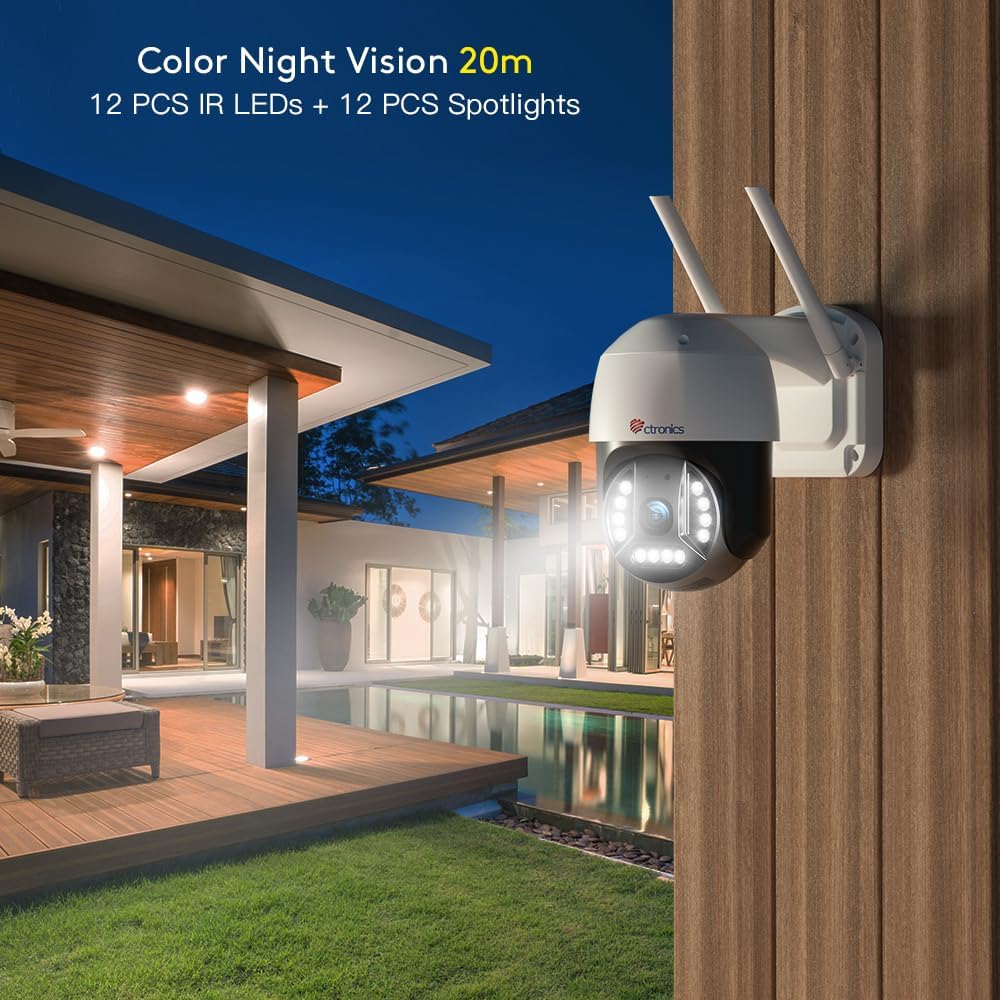
Image: An outdoor night scene with the camera's spotlights illuminating the area, demonstrating 20m color night vision.

Image: A split image showing a child speaking into a camera and a person on a laptop, illustrating two-way audio and multi-user sharing.

Image: Various devices (smartphone, tablet, laptop, desktop) displaying the camera's interface, highlighting broad compatibility.

Image: The camera mounted outdoors in the rain, with a temperature scale indicating its operating range from -10°C to 55°C, demonstrating IP66 waterproofing.

Image: A house with WiFi signals indicating 2.4Ghz and 5Ghz bands, showing the camera's dual-band WiFi capability.
3. Pakkens indhold
- Ctronics 4K 8MP Security Camera
- Strømadapter
- Monteringsskruer og ankre
- Waterproof Kit for Network Cable
- Hurtig startvejledning
4. Opsætning
4.1 Fysisk installation
- Choose a suitable outdoor location for mounting, ensuring a clear view og adgang til en stikkontakt.
- Brug den medfølgende monteringsskabelon (hvis medfølger) til at markere borehuller.
- Drill holes and insert wall anchors. Secure the camera's mounting bracket with screws.
- Tilslut strømadapteren til kameraet, og sæt den i en strømkilde.
- For wired connection, connect an Ethernet cable to the LAN port and use the waterproof kit to protect the connection.
4.2 Netværksforbindelse og app-opsætning
- Download Ctronics Pro APP (anbefales) eller HIP2P from your device's app store (iOS, Android) or the Ctronics website (Mac, Windows).
- Registrer en konto og log ind.
- Tap 'Add Camera' and follow the on-screen instructions to add your device. You may need to scan a QR code on the camera or manually enter its UID.
- For WiFi connection, select your 2.4Ghz or 5Ghz network and enter the password. Ensure your router is within range.
5. Betjening
5.1 Live View & Afspilning
- Open the Ctronics Pro APP and select your camera to view livestreamen.
- To adjust video resolution to 4K, tap the HD/SD icon in the lower right corner of the monitoring page and select 'HD'.
- Access recorded videos via the playback function in the app.

Image: Screenshots of the Ctronics app interface, showing how to select the camera and adjust video resolution to HD (4K).
5.2 Panorerings- og vippekontrol
På live view screen, use the directional controls to remotely pan the camera 355° horizontally and tilt it 90° vertically to cover desired areas.
5.3 Tovejslyd
Tap the microphone icon in the app to speak through the camera's speaker. Tap the speaker icon to hear audio from the camera's microphone.
5.4 Nattesynstilstande
The camera supports both color night vision (with spotlights) and infrared night vision. You can switch between these modes in the app settings based on your preference.
5.5 Smart Detection & Auto-Tracking
Enable human/vehicle detection in the app settings to receive specific alerts. Activate auto-tracking to have the camera follow detected subjects.
5.6 Optagelsesmuligheder
Configure continuous recording or set specific schedules for recording in the app. Ensure an SD card (not included) is inserted for local storage.

Image: Close-up of the camera's base showing the SD card slot for local video storage.
5.7 Flerbrugerdeling
In the app, navigate to the sharing settings to invite other users to view your camera's feed. Up to 4 users can view samtidigt.

Image: A world map with connected user icons, illustrating the multi-user sharing capability of the camera.
6. Vedligeholdelse
- Rensning: Tør forsigtigt kameralinsen og huset af med en blød kludamp klæde. Undgå slibende rengøringsmidler.
- IP66 Vandtætning: The camera is designed to withstand harsh weather conditions. Ensure all cable connections are properly sealed using the provided waterproof kit during installation.
- Driftsbetingelser: The camera operates effectively in temperatures ranging from -10℃ to 55℃ (14℉ to 131℉).
- SD-kortadministration: Regularly check the SD card status in the app. Format the SD card periodically to maintain optimal recording performance.
7. Fejlfinding
- Cannot see 4K resolution on Ctronics app: You can change your video resolution preference to HD in the lower right corner of the monitoring page. Resolution may be affected by network conditions.
- Connectivity Issues (2.4Ghz vs. 5Ghz WiFi): This camera supports both 2.4Ghz and 5Ghz WiFi networks. If the router and camera distance is far, 2.4Ghz WiFi is recommended for its longer connection distance. If they are closer, 5Ghz WiFi offers faster transmission speed.
- Ingen strøm: Sørg for, at strømadapteren er korrekt tilsluttet både kameraet og en fungerende stikkontakt.
- Ingen optagelse: Check if an SD card is inserted and properly formatted. Verify recording settings in the app (24/7 or scheduled).
- Falske alarmer: Adjust detection sensitivity and set specific detection zones in the app to minimize false alarms caused by environmental factors.
8. Specifikationer
| Feature | Detalje |
|---|---|
| Mærke | Ctronics |
| Modelnummer | CTIPC-590C-EU |
| Videooptagelsesopløsning | 4K (3840x2160P) |
| Effektiv stillopløsning | 8 MP |
| Pan/tilt rækkevidde | 355° Pan, 90° Tilt |
| Night Vision Range | 65ft (Color), 82ft (Infrared) |
| Forbindelsesteknologi | Wireless (2.4/5Ghz Wi-Fi), Wired (Ethernet) |
| Særlige funktioner | Night Vision, Motion Sensor, Human/Vehicle Detection, Auto-Tracking, Two-Way Audio |
| Indendørs/Udendørs brug | Udendørs |
| Vandmodstandsniveau | IP66 vandtæt |
| Driftstemperatur | -10℃ til 55℃ (14℉ til 131℉) |
| Opbevaring | SD Card (up to 256GB, not included) |
| Strømkilde | Plug-in (12 Volts, 10 watts) |
| Emnemål L x B x H | 4.72 x 6.69 x 6.69 tommer |
| Varens vægt | 2.11 pund |
9. Officielle produktvideoer
9.1 Ctronics 4K 8MP Security Camera Outdoor Overview
Video: En officiel overview of the Ctronics 4K 8MP Security Camera, highlighting its key features and capabilities.
9.2 Convert High-definition video
Video: En kort optaktview demonstrating the camera's ability to convert to high-definition video, showcasing clarity.
10. Garanti og support
Ctronics products come with a standard manufacturer's warranty. For detailed warranty information, technical support, or any inquiries, please visit the official Ctronics store or contact their customer service directly.


