1. Introduktion
Tak for købetasing the Muse MT-106 BT Stereo Turntable. This manual provides essential information for the safe and efficient operation of your new device. Please read it thoroughly before use and retain it for future reference.
The Muse MT-106 BT is a versatile 3-speed (33/45/78 RPM) stereo turntable featuring a Bluetooth receiver, a USB port for playback and encoding, and two integrated speakers. It is designed to play vinyl records and can also stream music from any Bluetooth-compatible device such as a tablet, smartphone, or laptop.
2. Sikkerhedsinstruktioner
- Strømkilde: Sørg for, at strømforsyningen voltage matches the rating indicated on the unit.
- Vand og fugt: Do not expose the unit to rain, moisture, or dripping water. Do not place objects filled with liquids, such as vases, on the unit.
- Ventilation: Sørg for tilstrækkelig ventilation. Bloker ikke ventilationsåbningerne.
- Varme: Hold enheden væk fra varmekilder såsom radiatorer, varmeregistreringsapparater, komfurer eller andre varmeproducerende apparater.
- Rensning: Tag stikket ud af stikkontakten før rengøring. Brug en blød, tør klud. Brug ikke flydende rengøringsmidler eller sprayrengøringsmidler.
- Service: Forsøg ikke selv at servicere dette produkt. Overlad al service til kvalificeret servicepersonale.
- Placering: Placer enheden på en stabil, plan overflade for at forhindre skader som følge af fald.
3. Pakkens indhold
Kontroller venligst, at følgende varer er inkluderet i din pakke:
- Muse MT-106 BT Stereo Turntable
- Brugermanual
- Strømadapter
- 45 omdr./min. Adapter
4. Produktet er slutview
Familiarize yourself with the components and controls of your Muse MT-106 BT Turntable.

Figur 4.1: Samlet set view of the Muse MT-106 BT Stereo Turntable. This image displays the turntable from an angled perspective, with its transparent dust cover lifted. The wooden base and integrated speakers are visible, along with the black platter, tonearm, and control knobs on the right side.
4.1 Forreste og øverste komponenter
- Støvdæksel: Beskytter plade og tonearm mod støv.
- Fad: Den roterende platform, hvor plader placeres.
- Spindel: Holds the record in place on the platter.
- 45 RPM Adapter: Bruges til at afspille 7-tommer plader med store huller i midten.
- Tonearm: Holder pennen og sporer pladens riller.
- Stylus (nål): The part that reads the record grooves.
- Stødhåndtag: Lifts and lowers the tonearm.
- Hastighedsvælger: Switch to select 33, 45, or 78 RPM.
- Integrerede højttalere: Indbyggede højttalere til lydoutput.

Figure 4.2: Control Panel. This image provides a detailed view of the control panel located on the right side of the turntable. It shows three rotary knobs for volume and function selection, along with several buttons for playback control and mode switching.
4.2 Kontrolpanel
- Strøm-/lydstyrkeknap: Turns the unit on/off and adjusts the volume.
- Funktionsvælgerknap: Switches between Phono, Bluetooth, USB, and Aux-in modes.
- Afspilningskontrolknapper: Play/Pause, Skip Forward, Skip Backward (for USB mode).
- Automatisk stopknap: Enables or disables the automatic stop function for vinyl playback.
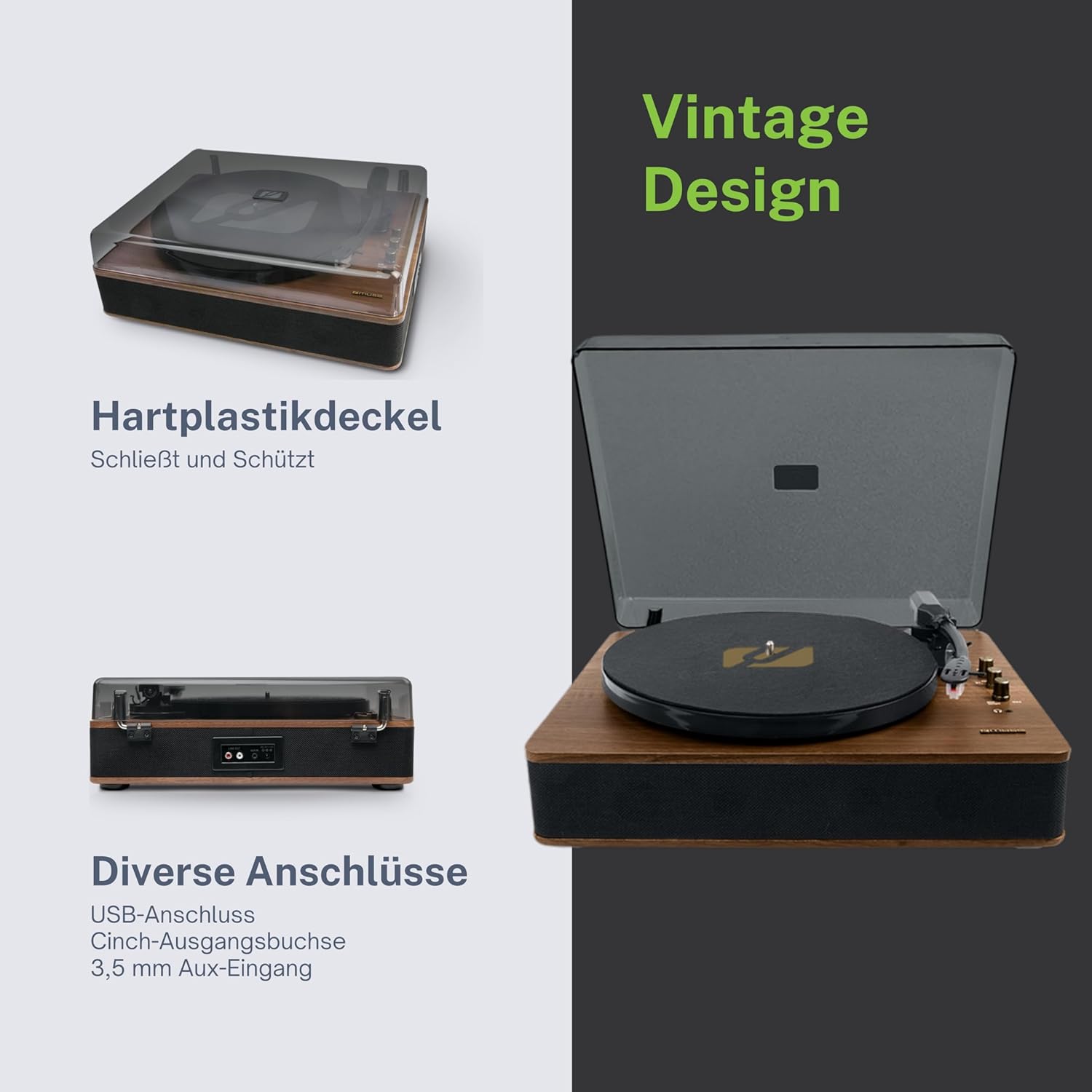
Figure 4.3: Rear Connections. The rear panel of the turntable is shown, featuring various connection ports including RCA audio outputs, a USB port, and an auxiliary input jack, allowing connection to external audio systems or devices.
4.3 Rear and Side Connections
- RCA Output Jacks (L/R): Tilslut til en ekstern amplifier eller drevne højttalere.
- USB-port: Til afspilning af MP3 files from a USB drive or encoding vinyl to USB.
- AUX IN Jack (3.5mm): Tilslut eksterne lydenheder.
- DC IN-stik: Tilslut strømadapteren.
- Hovedtelefonstik (3.5 mm): Til privat lytning.

Figure 4.4: Key Functions Overview. An illustrative graphic highlighting the key functions and connectivity options of the turntable. Icons represent features such as USB encoding, MP3 playback via USB, RCA output, auto-stop, integrated speakers, headphone jack, auxiliary input, and AC power input.
5. Opsætning
5.1 Udpakning
- Tag forsigtigt enheden ud af emballagen.
- Fjern alle emballagematerialer og beskyttelsesfilm.
- Keep the packaging for future transport or storage.
5.2 Placering
- Place the turntable on a flat, stable, and level surface.
- Avoid placing it near strong magnetic fields, direct sunlight, or heat sources.
- Sørg for, at der er nok plads omkring enheden til korrekt ventilation.
5.3 Strømtilslutning
- Connect the supplied power adapter to the DC IN jack on the rear of the turntable.
- Sæt strømadapteren i en passende stikkontakt.
5.4 Montering af støvdæksel
- Carefully attach the dust cover to the hinges on the back of the turntable.
- The dust cover protects the unit when not in use. Remove it or lift it fully when playing records.
6. Betjeningsvejledning
6.1 Afspilning af vinylplader
- Løft støvdækslet.
- Rotate the Power/Volume knob clockwise to turn on the unit.
- Set the Function Selector knob to 'Phono'.
- Place a record on the platter. If playing a 45 RPM single, place the 45 RPM adapter on the spindle first.
- Select the correct speed (33, 45, or 78 RPM) using the Speed Selector switch.
- Fjern stylus-beskytteren fra pennen.
- Lift the tonearm using the cue lever.
- Flyt tonearmen hen over det ønskede startpunkt på pladen.
- Gently lower the tonearm onto the record using the cue lever. The music will begin to play.
- Juster lydstyrken ved hjælp af tænd/sluk-/lydstyrkeknappen.
- At the end of the record, if the Auto Stop switch is ON, the platter will stop rotating. If OFF, the platter will continue to rotate. Manually lift the tonearm and return it to its rest.
6.2 Bluetooth-tilstand
- Rotate the Power/Volume knob clockwise to turn on the unit.
- Set the Function Selector knob to 'BT' (Bluetooth). The Bluetooth indicator will flash, indicating pairing mode.
- Enable Bluetooth on your external device (smartphone, tablet, etc.) and search for available devices.
- Select 'MUSE MT-106 BT' from the list of devices. Once connected, the Bluetooth indicator will stop flashing and remain solid.
- You can now play music from your external device through the turntable's speakers. Adjust volume using both the turntable's knob and your external device.
6.3 USB-afspilning og -kodning
6.3.1 USB-afspilning
- Rotate the Power/Volume knob clockwise to turn on the unit.
- Set the Function Selector knob to 'USB'.
- Insert a USB flash drive into the USB port. The unit will automatically detect and begin playing MP3 files.
- Use the Playback Control Buttons (Play/Pause, Skip Forward, Skip Backward) to navigate tracks.
6.3.2 USB Encoding (Recording Vinyl to USB)
The MT-106 BT allows you to convert your vinyl records into digital MP3 files on a USB drive.
- Sørg for, at der er sat et USB-flashdrev i USB-porten.
- Set the Function Selector knob to 'Phono'.
- Start playing your vinyl record as described in section 6.1.
- Press the 'Record' button (refer to Figure 4.2 for button location, typically indicated by a circle or 'REC' label). The recording indicator will illuminate.
- To stop recording, press the 'Record' button again. The recording indicator will turn off.
- The recorded audio will be saved as an MP3 file on your USB drive.
6.4 Ekstraindgang (AUX IN)
- Rotate the Power/Volume knob clockwise to turn on the unit.
- Set the Function Selector knob to 'AUX'.
- Connect an external audio device (e.g., MP3 player, CD player) to the AUX IN jack (3.5mm) on the rear of the turntable using an audio cable (not supplied).
- Play audio from your external device. The sound will be output through the turntable's speakers.
6.5 RCA-udgang
To connect your turntable to an external amplifier or powered speakers:
- Ensure the turntable and the external audio system are turned off.
- Connect an RCA audio cable (not supplied) from the RCA Output Jacks (L/R) on the rear of the turntable to the corresponding audio input jacks on your amplifier eller drevne højttalere.
- Turn on both the turntable and your external audio system.
- Select the appropriate input on your external audio system.
7. Vedligeholdelse
7.1 Rengøring af pennen
- Brug en blød børste, der er specielt designet til rengøring af pennen, til forsigtigt at børste pennen bagfra og forfra.
- Do not use excessive force or brush from side to side, as this can damage the stylus.
- Replace the stylus approximately every 300-500 hours of playback, or if you notice a degradation in sound quality.
7.2 Rengøring af enheden
- Wipe the exterior of the turntable with a soft, dry, lint-free cloth.
- Brug ikke slibende rengøringsmidler, voks eller opløsningsmidler, da de kan beskadige overfladen.
- For the dust cover, use a soft cloth and a mild, non-abrasive cleaner if necessary.
8. Fejlfinding
If you experience issues with your turntable, please consult the following table before contacting support.
| Problem | Mulig årsag | Løsning |
|---|---|---|
| Ingen strøm | Strømadapteren er ikke tilsluttet, eller der er en defekt stikkontakt. | Sørg for, at strømadapteren er korrekt tilsluttet, og at stikkontakten fungerer. |
| Ingen lyd | Volume too low; incorrect function mode; external speakers not connected/powered. | Increase volume; select correct function (Phono, BT, USB, AUX); check external speaker connections and power. |
| Poor sound quality (vinyl) | Dirty or worn stylus; dirty record; incorrect speed selected. | Clean or replace stylus; clean record; select correct RPM. |
| Bluetooth forbinder ikke | Turntable not in pairing mode; device too far; already connected to another device. | Ensure turntable is in BT mode and flashing; move device closer; disconnect from other devices. |
| USB-afspilning virker ikke | USB-drev er ikke isat korrekt; understøttes ikke file format; USB drive faulty. | Sæt USB-drevet i igen; sørg for files are MP3 format; try a different USB drive. |
9. Specifikationer
| Mærke | MUSE |
| Modelnavn | MT-106 BT |
| Farve | Træ |
| Materiale | Træ |
| Varens vægt | 4.3 kilo |
| Rotationshastigheder | 33, 45, 78 RPM |
| Forbindelse | Bluetooth, USB, RCA Output, 3.5mm AUX Input, 3.5mm Headphone Jack |
| Særlige funktioner | Integrated Speaker, Dust Protection, Adjustable Speed, USB Encoding |
| Kompatible enheder | Smartphone, tablet |
| Strømkilde | AC Adapter (1 AAAA battery required for unspecified function, likely remote or internal clock) |
| Oprindelsesland | Kina |
10. Garanti og support
This product is covered by a manufacturer's warranty. Please refer to the warranty card included with your purchase or visit the official MUSE webhjemmeside for detaljerede garantivilkår.
For technical support, troubleshooting assistance, or inquiries regarding spare parts, please contact MUSE customer service through their official channels. Information regarding spare parts availability is currently not available.


