1. Introduktion
Thank you for choosing the Dripex Electric Height Adjustable Standing Desk. This manual provides essential information for the safe assembly, operation, and maintenance of your new desk. Please read it thoroughly before use and keep it for future reference.

Figure 1.1: Dripex Electric Standing Desk (Walnut, 160x75 cm)
This image shows the complete Dripex Electric Standing Desk setup, featuring a spacious walnut-colored tabletop, sturdy black legs, and an integrated control panel. It is equipped to hold multiple monitors, a laptop, and various office accessories, demonstrating its amparbejdsområdet.
2. Sikkerhedsoplysninger
For at sikre sikker drift og forhindre skader, bedes du følge følgende sikkerhedsretningslinjer:
- Do not exceed the recommended weight limit of 80 kg (176 lbs) on the desktop. Overloading can cause damage or instability.
- Avoid touching moving parts (e.g., lifting columns) during operation. Keep hands, hair, and clothing clear of all moving mechanisms.
- Ensure the desk is stable and level before placing heavy items on it or adjusting its height.
- Keep children and pets away from the desk during height adjustments to prevent accidents.
- Du må ikke sidde eller stå på skrivebordet.
- Brug kun den medfølgende strømadapter og komponenter.
- If the desk makes unusual noises, stops moving, or shows signs of damage, disconnect it from the power supply immediately and contact customer support.
- The desk features an anti-collision system to prevent damage if it encounters an obstacle during movement. However, always be aware of your surroundings.
- The motor includes overbelastningsbeskyttelse to prevent damage from excessive weight or prolonged use.

Figure 2.1: Safety Features Overview
This diagram highlights key safety features: anti-collision technology that stops movement upon encountering an obstacle, overload protection for the motor, and a low noise operation (under 45dB) ensuring a quiet working environment.
3. Produktkomponenter
Before assembly, ensure all components are present and undamaged. Refer to the packing list for a complete inventory.
- Desktop (Walnut, 160 x 75 cm)
- Løftesøjler (ben)
- Fodstøtter
- Kontrolpanel
- Motor
- Strømadapter og kabel
- Assembly Hardware (Screws, Allen wrenches)
- Optional Accessories: Cup Holder, Headphone Hook, Cable Management Clips, Adjustable Feet

Figur 3.1: Medfølgende tilbehør
This image displays additional accessories that may be included with your desk, such as a desk mat, a convenient cup holder, a headphone hook for organization, and adjustable feet for leveling the desk on uneven surfaces.
4. Monteringsvejledning
Follow these steps carefully for proper assembly. All necessary tools are typically included.
- Step 1: Install the Motor
Attach the motor to the crossbar frame according to the diagrams. Ensure all connections are secure. - Step 2: Install the Frame
Assemble the main frame structure, connecting the crossbar with the motor to the leg columns. - Step 3: Install the Table Legs
Securely attach the foot supports to the bottom of the lifting columns. - Trin 4: Installer bordpladen
Carefully place the desktop onto the assembled frame and secure it using the provided screws. Attach the control panel to the underside of the desktop in your preferred location.

Figure 4.1: Simple 4-Step Assembly
This visual guide illustrates the straightforward four-step assembly process: first, install the motor; second, assemble the main frame; third, attach the table legs; and finally, secure the tabletop to the frame.
5. Betjeningsvejledning
Your Dripex Electric Standing Desk features an intuitive control panel for easy height adjustment and memory functions.
Kontrolpanelets funktioner:

Figure 5.1: Intelligent Control Panel
Dette billede giver en detaljeret view of the desk's intelligent control panel, highlighting its various buttons: Up/Down for height adjustment, Sedentary reminder, Reset, and Siting/Standing preset buttons.
- Op/ned-pile (▲ / ▼): Press and hold to raise or lower the desk to your desired height.
- Hukommelsesforudindstillinger (1, 2, 3, 4): To save a height, adjust the desk to the desired position, then press the 'M' button followed by the desired number (e.g., M + 1). To recall a saved height, simply press the corresponding number button.
- Sedentary Reminder (T): Activates a timer to remind you to change positions (e.g., from sitting to standing). Refer to the full manual for setting specific intervals.
- Reset (RESET): If the desk encounters an error or does not move smoothly, press and hold the RESET button until the desk moves to its lowest position and then slightly up, indicating a successful reset.
- Siting/Standing Presets (Person Sitting/Person Standing icons): Quickly switch between pre-programmed sitting and standing heights.
Ergonomiske fordele:
Utilizing the height adjustment feature allows you to alternate between sitting and standing throughout your workday, promoting better posture and reducing discomfort associated with prolonged sitting.

Figure 5.2: Ergonomic Posture Comparison
This illustration compares the ergonomic advantages of a height-adjustable electric desk to a traditional fixed-height desk. It demonstrates how an adjustable desk helps maintain a straight spine and neck, alleviating common issues like neck pain, back pain, and leg numbness often experienced with static sitting postures.
6. Vedligeholdelse og pleje
Regular maintenance will ensure the longevity and optimal performance of your desk.
- Rensning: Wipe the desktop and legs with a soft, damp klæde. Undgå slibende rengøringsmidler eller skrappe kemikalier, der kan beskadige finishen.
- Inspektioner: Kontrollér regelmæssigt alle skruer og forbindelser for at sikre, at de er fastspændte. Efterspænd om nødvendigt.
- Kabelstyring: Keep cables organized and clear of moving parts to prevent entanglement or damage.
- Motorpleje: The motor is designed for durability. Avoid continuous operation for extended periods without rest to prevent overheating.
7. Fejlfinding
Hvis du støder på problemer med dit skrivebord, kan du se følgende almindelige problemer og løsninger:
| Problem | Mulig årsag | Løsning |
|---|---|---|
| Skrivebordet bevæger sig ikke eller reagerer ikke på betjeningselementer. | Power cable disconnected, motor error, overload. | Check power connections. Perform a NULSTIL (see Operation Guide). Reduce weight on desk. |
| Skrivebordet bevæger sig ujævnt eller laver usædvanlige lyde. | Løse forbindelser, blokering, ujævn vægtfordeling. | Check all assembly screws. Ensure no obstructions. Redistribute weight evenly. Perform a NULSTIL. |
| Antikollisionssystemet aktiveres ofte. | Hindring i stien, følsomme omgivelser. | Clear any obstacles. If issues persist, consult the full manual for sensitivity adjustment (if available). |
| Hukommelsesfunktionen virker ikke. | Forkert lagringsprocedure. | Ensure you press 'M' then the number button to save. Perform a NULSTIL hvis det er nødvendigt. |
If the problem persists after attempting these solutions, please contact Dripex customer support.
8. Specifikationer
| Feature | Detalje |
|---|---|
| Mærke | Dripex |
| Modelnummer | NEL-02 |
| Desktop dimensioner | 160 cm (bredde) x 75 cm (dybde) |
| Højdejusteringsområde | 71 cm - 117 cm (28 tommer - 46 tommer) |
| Farve | Valnød |
| Materiale | Wood (Desktop), Steel (Frame) |
| Vægt kapacitet | 80 kg (176 lbs) |
| Støjniveau | <45 dB |
| Særlige funktioner | Electric Height Adjustment, Memory Function, Anti-Collision, Overload Protection, Ergonomic Design |
| Produktets vægt | Ca. 23 kg (50.7 lbs) |

Figure 8.1: Desk Dimensions (Centimeters)
This diagram provides the key dimensions of the desk in centimeters, including the tabletop width (160cm), depth (75cm), and the adjustable height range from 71cm to 116cm.
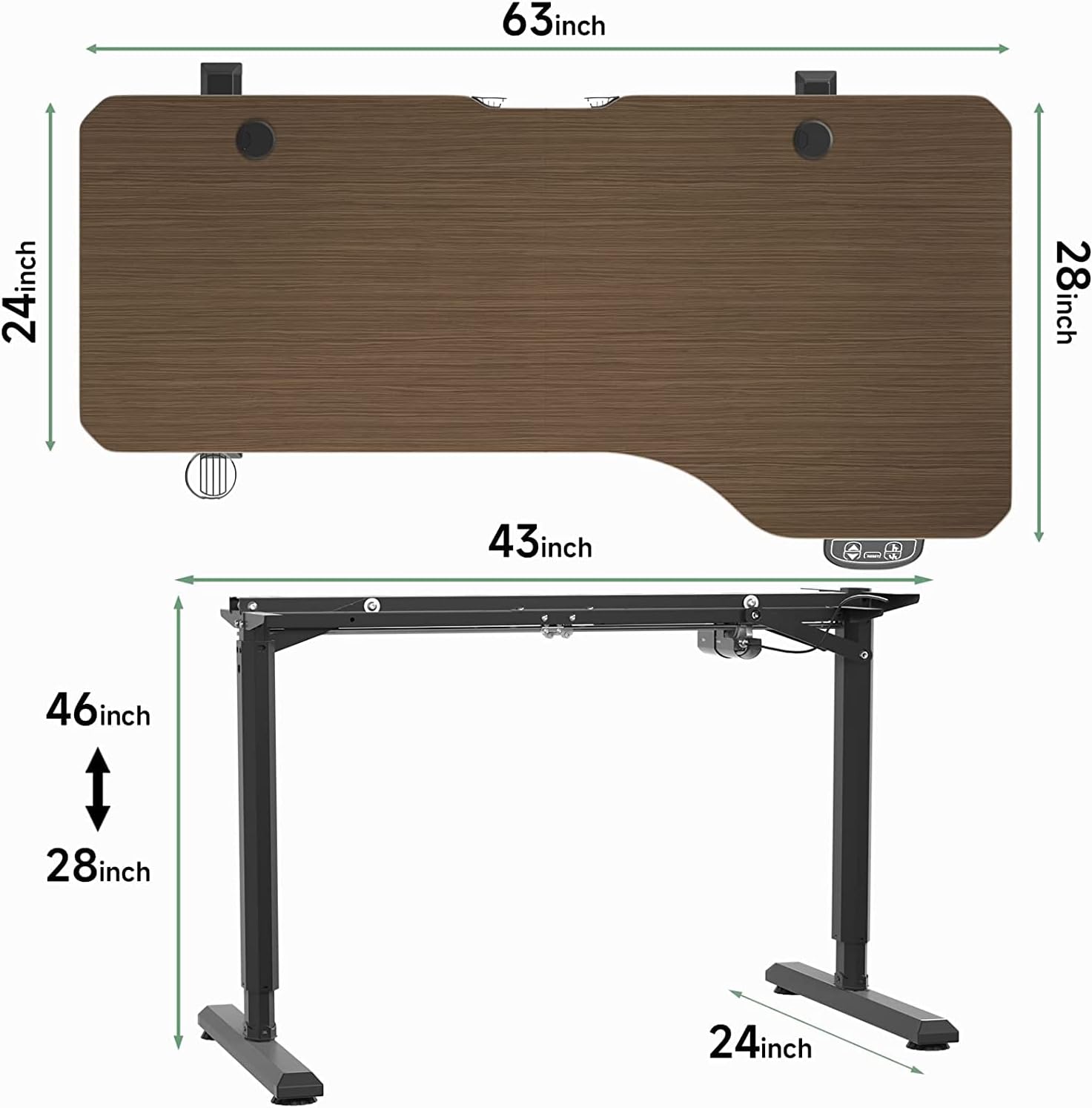
Figure 8.2: Desk Dimensions (Inches)
This diagram provides the key dimensions of the desk in inches, including the tabletop width (63 inches), depth (28 inches), and the adjustable height range from 28 inches to 46 inches.

Figur 8.3: Maksimal lasteevne
This image visually represents the desk's robust 80kg (176 lbs) load capacity, demonstrating its ability to support a significant amount of equipment and materials.
9. Garanti og support
For warranty information, please refer to the documentation included with your purchase or visit the official Dripex webGarantibetingelserne kan variere afhængigt af region og forhandler.
If you require technical assistance, have questions about assembly, or need to report a defect, please contact Dripex customer support through the retailer where you purchased the product or via the contact information provided on the official Dripex webwebsted.
Online ressourcer:
- Dripex Official Webwebsted: Besøg Dripex-butikken på Amazon


