1. Introduktion
This manual provides detailed instructions for the installation, configuration, and operation of your MokerLink 24G + 4x10G SFP Managed Gigabit Switch. This device is designed to offer high-performance networking solutions with advanced Layer 2 and Layer 3 management capabilities, suitable for various network environments including enterprise, data centers, and broadband access.
2. Pakkens indhold
- MokerLink 24G + 4x10G SFP Managed Gigabit Switch
- Strømledning
- Rackmonteringssæt
- Brugervejledning (dette dokument)
3. Opsætning
3.1 Fysisk installation
The MokerLink switch is designed for 1U rackmount installation. Ensure adequate ventilation around the device. Connect the power cord to the switch and a suitable power outlet. Connect your network devices (servers, workstations, other switches) to the Gigabit Ethernet ports (1-24) and 10G SFP+ uplink ports (25-28) using appropriate Ethernet cables or SFP+ transceivers and fiber optic cables.
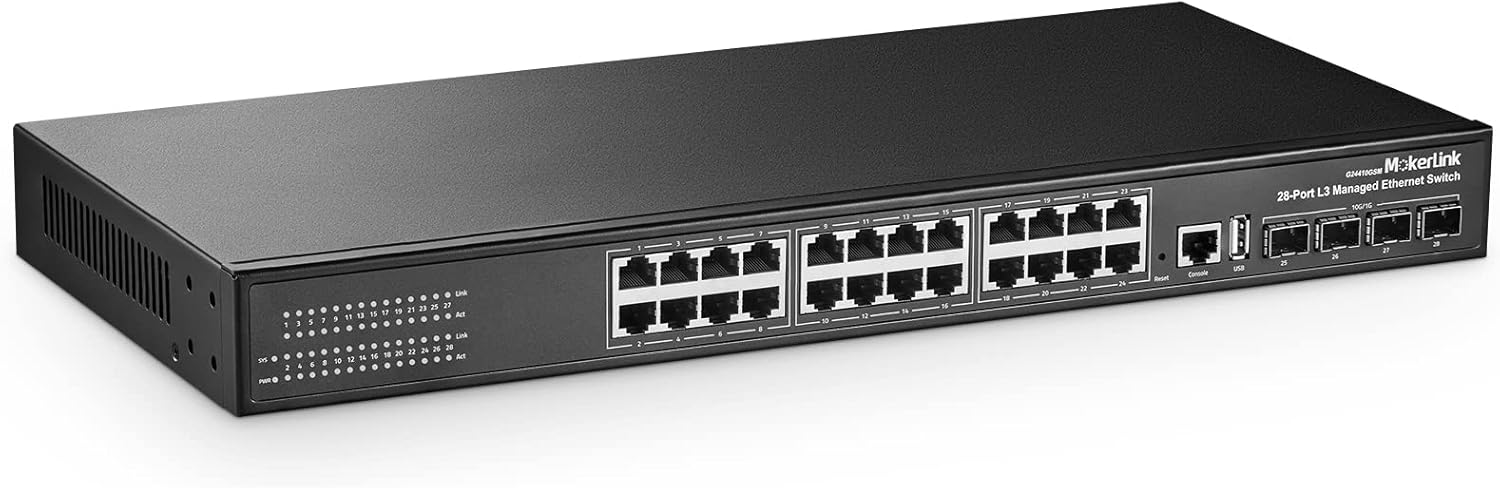
Figur 3.1: Forside view of the MokerLink 28-Port L3 Managed Ethernet Switch, showing 24 Gigabit Ethernet ports and 4 SFP+ uplink ports.

Figure 3.2: Detailed diagram illustrating the 24 Gigabit Ethernet ports, 4 SFP+ uplink ports, Console port, USB port, system indicators (SYS, PWR), and Link/Act LEDs for each port.

Figure 3.3: The MokerLink switch mounted in a standard 19-inch server rack, demonstrating its compact 1U form factor.
3.2 Indledende konfiguration
The switch typically has a default IP address (e.g., 192.168.2.1). To access the management interface, connect a computer directly to one of the switch's Ethernet ports and configure your computer's IP address to be in the same subnet. Open a web browser and navigate to the switch's default IP address. Alternatively, use the console port for Command Line Interface (CLI) access.
Video 3.1: En overview of a MokerLink 26-port Gigabit PoE switch, demonstrating its physical appearance and port layout. While this video features a PoE model, the general setup and port types are similar to the managed switch.
4. Betjening af kontakten
4.1 Layer 2 Features
- VLAN (virtuelt lokalnetværk): Supports 4K 802.1Q VLANs for network segmentation and traffic isolation.
- MAC tabel: Features a 16K MAC address table for efficient forwarding.
- Packet Filtering: L2-L4 packet filtering for enhanced security.
- Havnesikkerhed: Restrict access to specific ports based on MAC addresses.
- Portspejling: Monitor network traffic by mirroring it to a designated port.
- Flow Rate Limiting: Control bandwidth usage on individual ports.
- QoS (Quality of Service): Prioritize critical network traffic.
- STP/RSTP/MSTP: Spanning Tree Protocols to prevent network loops.
- IGMP (Internet Group Management Protocol): Support for V1/V2/V3 multicast.
- Storm -undertrykkelse: Prevent network performance degradation from broadcast, multicast, or unknown unicast storms.
- Ring Network Protection: Implement resilient network topologies.
- Link sammenlægning: Kombinér flere fysiske links til et enkelt logisk link for øget båndbredde og redundans.

Figure 4.1: A visual representation of the various Layer 3 software functions supported by the switch, including SNMP, Port Mirroring, Port Isolation, Storm Suppression, Link Aggregation, VLAN, Spanning Tree, Multicast, Anti-attack, IP Route, and Network Diagnosis.
4.2 Layer 3 Features
- Statisk routing: Configure static routes for inter-VLAN routing and network segmentation.
- DHCP Server/Relay/Snooping: Manage IP address assignment and security.
- IPv4/IPv6 Support: Compatibility with both current and next-generation IP protocols.
- ARP Configuration: Address Resolution Protocol management.
4.3 Administrationsgrænseflader
The switch offers multiple management options:
- Web-baseret GUI: A user-friendly graphical interface accessible via a web browser for nem konfiguration og overvågning.
- CLI (kommandolinjegrænseflade): Accessible via console port, Telnet, or SSH for advanced configuration and scripting.
- SNMP (Simple Network Management Protocol): For centralized network management and monitoring.
- RMON (Remote Monitoring): For network traffic analysis and performance monitoring.

Figure 4.2: Illustration of the switch's management utilities, showing both the intuitive web interface and the powerful command-line interface (CLI) for comprehensive network control.
5. Vedligeholdelse
The MokerLink switch features a fanless design, contributing to silent operation and reduced maintenance requirements. Regular firmware updates are recommended to ensure optimal performance and security. Keep the device in a clean, dry environment with proper airflow to prevent overheating.

Figure 5.1: Depiction of the switch's fanless and noiseless design, highlighting its quiet operation and efficient heat dissipation through its metal casing.
6. Fejlfinding
6.1 Almindelige problemer og løsninger
- Ingen strøm: Ensure the power cord is securely connected and the power outlet is functional. Check the PWR LED on the front panel.
- Intet link/aktivitet: Verify that Ethernet cables are properly connected to both the switch and the connected device. Check the Link/Act LED for the corresponding port. Ensure the connected device is powered on and functioning correctly.
- Kan ikke få adgang Web Interface: Confirm your computer's IP address is in the same subnet as the switch's management IP. Try pinging the switch's IP address. Clear your browser's cache or try a different browser.
- Langsom netværksydelse: Check for network loops (ensure STP is enabled). Verify cable quality and length. Monitor port utilization for bottlenecks.
6.2 LED-indikatorer
LED'erne på frontpanelet giver statusoplysninger:
- SYS (Systemindikator):
- Lighting: System Normal
- Flashing: System Starting
- PWR (strømindikator):
- Belysning: Strømforsynet
- Un-Light: Ingen strøm
- Link (Street Lamp):
- Lighting: Gigabit
- Un-Light: Not Gigabit
- Act (Data Lamp):
- Lighting: Connecting
- Flashing: Data Transmit
- Un-Light: Disconnect
7. Specifikationer
| Feature | Beskrivelse |
|---|---|
| Mærke | MokerLink |
| Modelnummer | 24G + 4x10G SFP(Managed) |
| Antal havne | 28 (24 x 1 Gigabit Ethernet, 4 x 10 Gigabit SFP+ Uplink) |
| Skiftekapacitet | 336 Gbps |
| Pakkevideresendelseshastighed | 95.23 Mpps |
| Hukommelse | 512MB DDR |
| Blitz | 32 MB |
| MAC-tabelstørrelse | 16K |
| Jumbo rammer | 9600 bytes |
| VLAN support | 4K 802.1Q VLAN |
| Ledelse | Web, CLI (Console, Telnet, SSH), SNMP, RMON |
| Lagfunktioner | L2 (QoS, STP/RSTP/MSTP, IGMP, Link Aggregation, Port Security, Port Mirroring, Flow Rate Limiting), L3 (Static Routing, DHCP Server/Relay/Snooping, IPv4/IPv6, ARP) |
| Design | Rackmount, Fanless, Metal Housing |
| Dimensioner | 19.76 x 11.81 x 3.7 tommer |
| Varens vægt | 7.04 pund |
8. Garanti og support
For technical support, troubleshooting assistance, or warranty inquiries, please refer to the contact information provided with your product packaging or visit the official MokerLink webwebsted. Gem din købskvittering for at bekræfte garantien.


