1. Introduktion
The XTOOL D9S Pro V2.0 is an advanced professional automotive diagnostic tool designed for mechanics and workshops. This device offers comprehensive OE-level diagnostics, including topological mapping, ECU programming and coding, over 45 special functions, and bi-directional control. It supports modern vehicle protocols such as FCA, DoIP, and CAN FD, ensuring broad compatibility and efficient vehicle maintenance.
2. Sikkerhedsoplysninger
Always observe the following safety precautions when operating the XTOOL D9S Pro V2.0 to prevent personal injury or damage to the vehicle or device:
- Sørg for, at køretøjet er i et godt ventileret område.
- Brug passende personlige værnemidler, herunder øjenbeskyttelse.
- Betjen ikke enheden under kørsel.
- Hold enheden tør og væk fra ekstreme temperaturer.
- Refer to the vehicle's service manual for specific procedures and precautions.
- Avoid touching hot engine components or moving parts.
3. Pakkens indhold
The XTOOL D9S Pro V2.0 package typically includes the following items:
- XTOOL D9S Pro V2.0 Tablet
- WIFI VCI (Vehicle Communication Interface)
- Hovedkabel
- Power Adapter (US, EU, UK plugs)
- Type-C to B Cable
- Type-C til C-kabel
- Type-C to A Cable
- Cigartænderkabel
- OBDII Non-Standard Adapters (16 types, e.g., for HONDA-3, TOYOTA-17, BMW-20, KIA-20, MAZDA-17R, NISSAN-14, GM/DAEWOO-12, SUZUKI-3, FIAT-3, HYUNDAI/KIA-10, AUDI-4, MITSUBISHI-12+16, UNIVERSAL-3, CITROEN-2, BENZ-38, BENZ-14)
- Brugermanual
- KIT KOOL (if applicable)

Figure 3.1: XTOOL D9S Pro V2.0 main unit and VCI module.

Figur 3.2: Overview of the XTOOL D9S Pro V2.0 package contents, including the tablet, VCI, cables, and adapters.
Video 3.1: An unboxing video demonstrating the contents of a similar XTOOL diagnostic system, showing the tablet, VCI, and various accessories.
4. Opsætning
4.1 Initial Device Preparation
- Oplad enheden: Connect the power adapter to the XTOOL D9S Pro V2.0 tablet and a power outlet. Ensure the device is fully charged before first use.
- Tænd: Tryk og hold tænd/sluk-knappen på enheden nede, indtil skærmen lyser.
- Sprogvalg: Upon first startup, you may be prompted to select your preferred language. Navigate to Indstillinger > Sprog to change if needed.
- Wi-Fi-forbindelse: Connect the device to a stable Wi-Fi network via Indstillinger > Wi-Fi. A stable internet connection is crucial for software updates and online functions.
4.2 VCI-forbindelse
The VCI (Vehicle Communication Interface) connects the diagnostic tablet to the vehicle's OBD-II port.
- Locate the vehicle's OBD-II port, usually under the dashboard on the driver's side.
- Plug the VCI module into the OBD-II port. Ensure a secure connection.
- The VCI will automatically establish a wireless connection with the D9S Pro V2.0 tablet. Verify the connection status indicator on the tablet.

Figur 4.1: Detaljeret view of the XTOOL D9S Pro V2.0 tablet and VCI, highlighting ports and buttons for setup.
5. Betjeningsvejledning
5.1 Navigation i hovedgrænsefladen
The main interface provides access to key functions:
- Diagnose: For vehicle system scanning and fault code retrieval.
- Rapport: Til view, save, and print diagnostic reports.
- Specialfunktion: Access to various maintenance and service functions.
- Opdateringer: Til software- og firmwareopdateringer.
- Indstillinger: Device configuration, language, units, etc.
- Fjernbetjening: For remote technical assistance.
Video 5.1: A demonstration of the XTOOL D8S interface, which is similar to the D9S Pro, showing navigation through diagnosis, reports, special functions, and updates.
5.2 Køretøjsdiagnose
To begin a diagnosis, select Diagnose fra hovedmenuen.
- Automatic Scan / VIN Scan: The device can automatically detect the vehicle's VIN for quick identification and system scanning.
- OE-Level All Systems Diagnosis: Perform a comprehensive scan of all available electronic control units (ECUs) to read and clear diagnostic trouble codes (DTCs), view livedata og hent ECU-oplysninger.
- Topology Mapping: This feature provides an intuitive visual representation of the vehicle's communication network, allowing for quick identification of faulty modules and their relationships.
- Tovejskontrol / Aktive tests: Send commands to vehicle systems and components to perform active tests, such as turning on/off lights, operating windows, or testing fuel pumps, to verify functionality and pinpoint issues.
- Live datastrøm: View real-time data parameters from various sensors and modules. Data can be displayed in text, graph, or combined formats for detailed analysis.
- Diagnostiske rapporter: Generate professional PDF reports of diagnostic results, which can be saved, printed, or shared via email or Bluetooth.

Figure 5.1: The OE-Level All Systems Diagnosis screen, showing a comprehensive scan of vehicle modules.

Figur 5.2: Et example of the OEM Topology Mapping feature, illustrating the communication network between vehicle modules.

Figure 5.3: The bi-directional control interface, demonstrating active tests on various vehicle components.

Figure 5.4: Live data stream displayed in a combined graphing format for detailed parameter analysis.
5.3 Special Functions (45+ Services)
The D9S Pro V2.0 offers a wide range of special functions for various vehicle maintenance and service tasks. Access these via Special funktion på hovedmenuen.
- ECU-programmering og -kodning: Perform online/offline ECU programming for specific brands (e.g., Audi, Skoda, Benz, BMW F/G Chassis) and offline ECU programming for Ford/Mazda/Lincoln. This includes reflashing/reprogramming used or blank ECUs and flashing hidden features to enhance vehicle performance.
- FCA AutoAuth V2.0: Supports Chrysler 2018+ vehicles (Chrysler, Dodge, Jeep, Fiat) to access FCA SGW for diagnostics and bi-directional control. An FCA account is required.
- Guided Functions for V.A.G: Provides step-by-step guided procedures for Volkswagen, Audi, and Skoda vehicles.
- Common Resets & Calibrations: Includes Oil Reset, EPB (Electronic Parking Brake), SAS (Steering Angle Sensor), BMS (Battery Management System), ABS Bleeding, Injector Coding, Throttle Relearn, TPMS Reset, Gearbox Match, DPF Reset, Headlight, Airbag Repair, Suspension, Seat Match, Transport Mode, A/C Relearn, Stop/Start Reset, A/F Reset, ADAS Calibration, and many more.
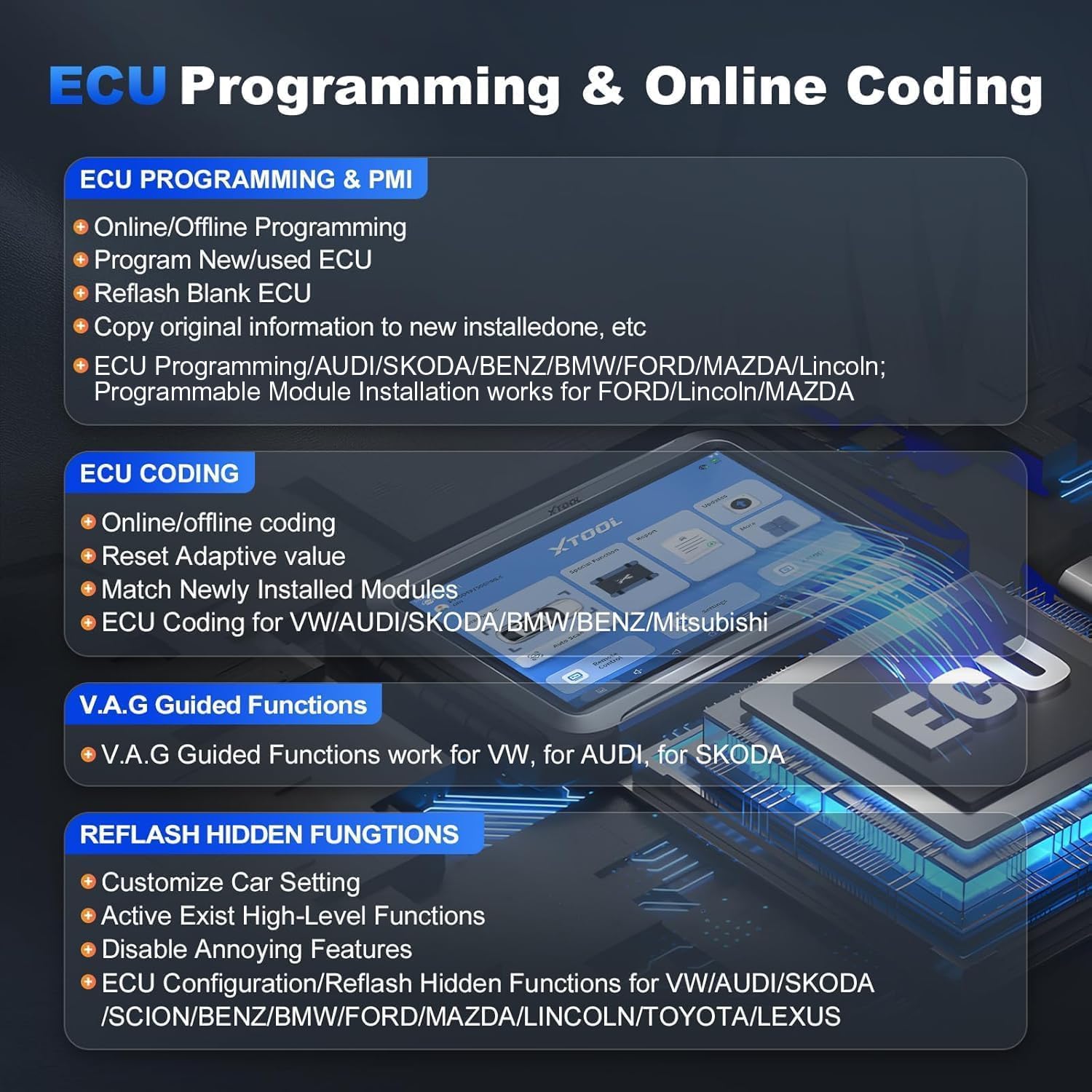
Figure 5.5: Details on ECU Programming and Online Coding capabilities of the device.

Figure 5.6: A visual representation of some of the 45+ special functions available on the XTOOL D9S Pro V2.0.
Video 5.2: En videovisningasing special functions and maintenance procedures on a similar XTOOL D7 device, illustrating the range of capabilities.
6. Vedligeholdelse
6.1 Softwareopdateringer
Regular software updates ensure your D9S Pro V2.0 has the latest vehicle coverage, bug fixes, and new features.
- Sørg for, at enheden er forbundet til et stabilt Wi-Fi-netværk.
- Fra hovedmenuen skal du vælge Opdateringer.
- The device will check for available updates. Select Opdater alle or choose specific updates to download and install.
- Follow the on-screen prompts to complete the update process. Do not power off the device during updates.
6.2 Vedligeholdelse af enheden
- Rengør skærmen med en blød, fnugfri klud.
- Opbevar enheden i dens beskyttende etui, når den ikke er i brug.
- Avoid exposing the device to direct sunlight, moisture, or corrosive substances.
7. Fejlfinding
If you encounter issues with your XTOOL D9S Pro V2.0, refer to the following common solutions:
| Problem | Mulig årsag | Løsning |
|---|---|---|
| Enheden tænder ikke | Low battery; faulty power adapter | Charge the device for at least 30 minutes; check power adapter connection. |
| VCI not connecting | Loose connection; VCI not powered; software issue | Ensure VCI is securely plugged into OBD-II port; check vehicle ignition; restart device and VCI; update software. |
| Unable to perform special functions | Vehicle incompatibility; outdated software; incorrect procedure | Verify vehicle compatibility; update software; follow specific function instructions carefully. |
| Langsom drift | Too many applications running; low storage | Close unnecessary applications; clear cache; ensure sufficient storage space. |
If the problem persists, contact XTOOL customer support for further assistance.
8. Specifikationer
Key technical specifications of the XTOOL D9S Pro V2.0:
- Operativsystem: Android 10.0
- Processor: Quad-core 1.8 GHz
- Hukommelse: 4GB RAM, 128GB ROM
- Vise: 9.7 tommer, 1024x768 opløsning
- Batteri: 6400 mAh (7.4V) / 12800 mAh (3.7V)
- Kamera: 8MP med blitz
- Forbindelse: Enhanced Wireless Wi-Fi (2.4GHz & 5GHz), USB
- Understøttede protokoller: DoIP, CAN FD, FCA AutoAuth V2.0, and standard OBD-II protocols.
- Køretøjets dækning: Over 10,000+ car models, 150+ brands (European, Asian, American).
- Sprog: Supports 23+ languages including English, French, German, Spanish, Italian, etc.
- Dimensioner: Cirka 11 x 28 x 32 cm
- Vægt: Cirka 2.17 kg
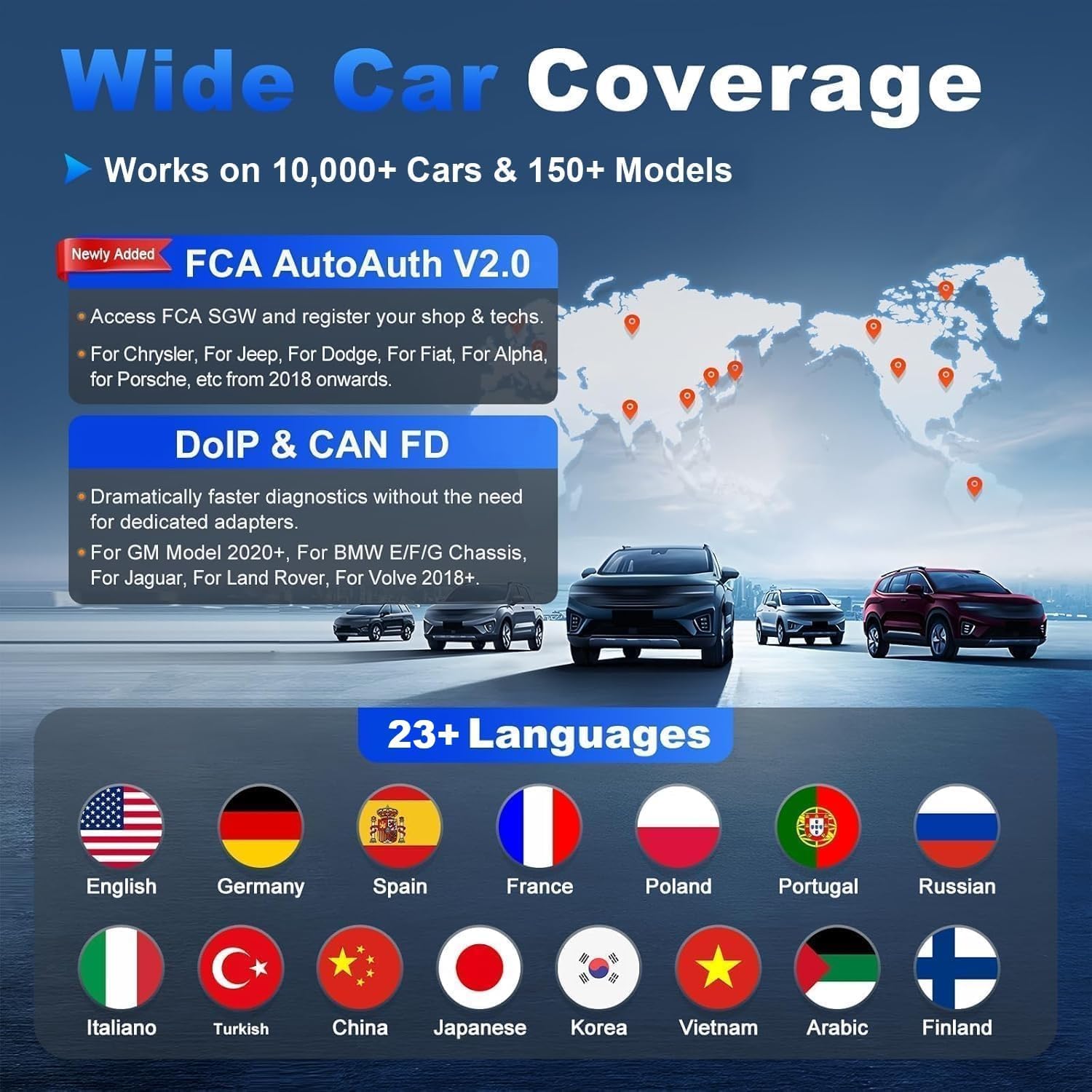
Figure 8.1: Illustration of the wide vehicle coverage and multi-language support of the XTOOL D9S Pro V2.0.

Figure 8.2: The multilingual settings screen, showing the extensive language options available on the device.
9. Garanti og support
XTOOL provides comprehensive support for the D9S Pro V2.0:
- Gratis opdateringer: Enjoy 3 years of free software updates from the date of purchase. After 3 years, you can retain the functions of the last updated version without renewal.
- Garanti: Enheden leveres med 2 års garanti.
- Teknisk support: Lifetime technical support is available to assist with any operational or technical queries.
For technical assistance or warranty claims, please refer to the contact information provided in your product packaging or visit the official XTOOL webwebsted.

Figure 9.1: Information regarding the 3 years of free updates and support services.


