1. Introduktion og overview
The ATOMSTACK A10 Pro is a powerful and versatile laser engraving and cutting machine designed for DIY enthusiasts. Featuring a 10000mW optical power compressed spot laser, it offers high energy for cutting and precision for engraving across various materials. Its robust all-metal structure ensures stability and durability, while the integrated terminal panel allows for convenient offline operation.

Figure 1: ATOMSTACK A10 Pro Laser Engraver overview.
2. Produktfunktioner
- Ultimate Laser Engraving and Cutting Capability: Equipped with a 0.06mm laser spot and 10W optical power, utilizing double compression spot coupling technology. Capable of cutting 4mm plywood and 8mm black acrylic, and engraving mirror stainless steel, ceramic, and glass.
- Offline Engraving Support: Features a terminal control panel with an ergonomic design and magnet adsorption for easy attachment. The 32-bit motherboard allows for engraving operations without a computer connection.
- Precise, Solid, and Easy Assembly: Constructed with an all-aluminum alloy anodized structure for durability and accuracy. The integrated screw rod ensures precise laser movement. Assembly typically takes 10-20 minutes.
- Enhanced Eye Protection and Safety: Includes a panoramic filter glass protective cover that filters 97% of ultraviolet light, safeguarding eyes and preventing accidental laser exposure. An emergency stop button and stopper are integrated for user safety.
- Wide Software and Material Compatibility: Supports popular engraving software such as LaserGRBL and LightBurn. Compatible with Windows XP/7/8/10 and Mac systems (LightBurn). Supports various file formats including NC, BMP, JPG, PNG, DXF. Engraving area is 410x400mm.
- Lasereffekt: 10000mW. Laser Class: CLASS 4.
3. Pakkens indhold
Bekræft, at alle nedenstående komponenter er til stede i din pakke:
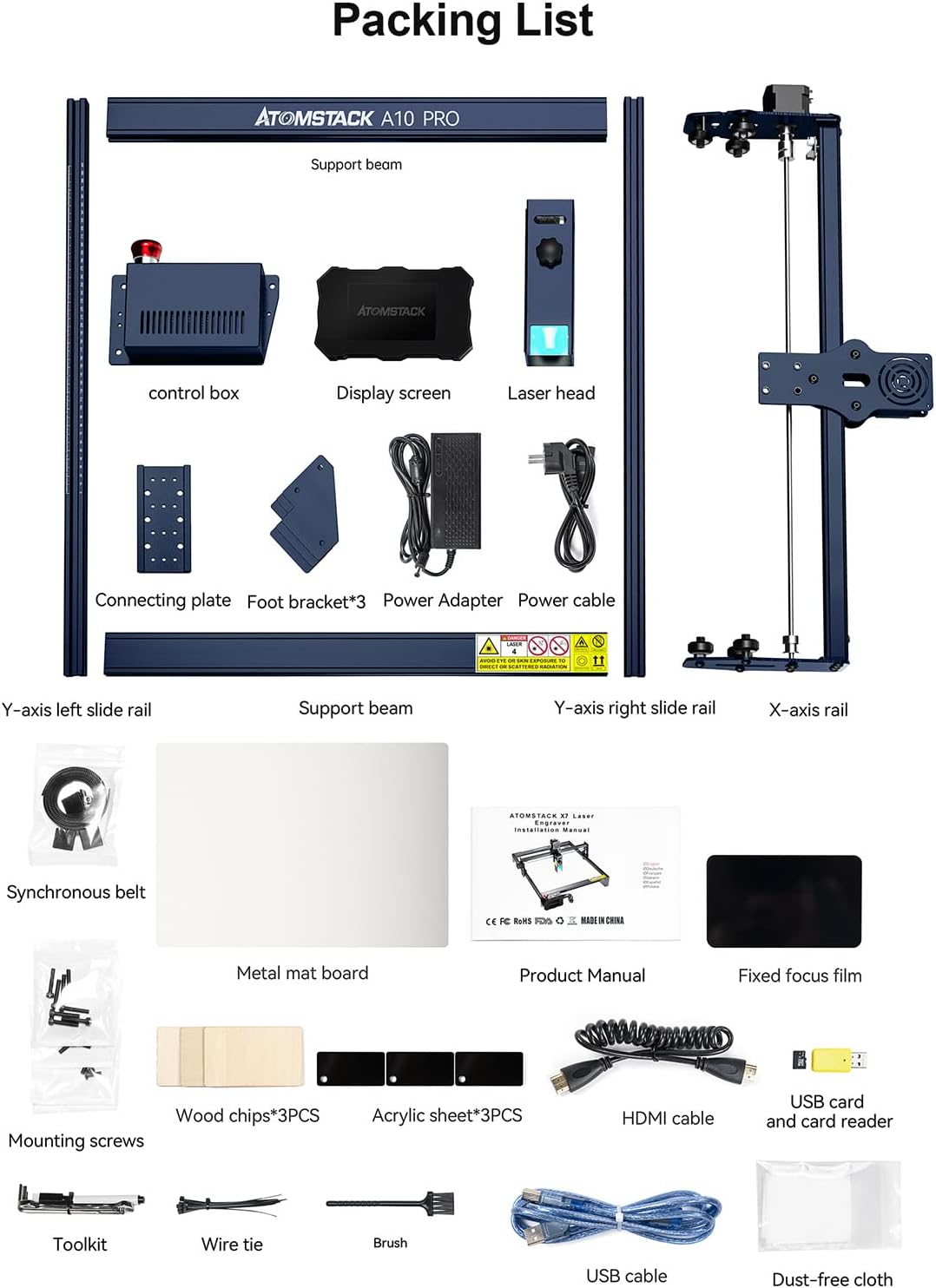
Figur 2: Detaljeret view of the ATOMSTACK A10 Pro Laser Engraver package contents.
- Y-axis left slide rail
- Støttebjælke
- Y-axis right slide rail
- X-akse skinne
- Kontrolboks
- Skærm
- Laser hoved
- Forbindelsesplade
- Foot bracket (x3)
- Strømadapter
- Strømkabel
- Synkront bælte
- Metal mat board
- Produktmanual
- Film med fast fokus
- Monteringsskruer
- Wood chips (x3)
- Acrylic sheet (x3)
- HDMI kabel
- USB-kort og kortlæser
- Værktøjskasse
- Wire slips
- Børste
- USB-kabel
- Støvfri klud
4. Opsætning og montering
The ATOMSTACK A10 Pro is designed for quick and easy assembly, typically completed within 10-20 minutes. Follow the detailed instructions in the included Product Manual for step-by-step guidance.
4.1 Key Structural Components
The machine features an all-metal structure with an integral screw for precise movement and durability.

Figure 3: All-metal structure and integral screw for enhanced precision.
4.2 Laser Head and Focus Adjustment
The A10 Pro features a fixed-focus laser, eliminating the need for manual focus adjustment. This design ensures accurate and precise carving. The laser head includes a knob for easy height adjustment to accommodate different material thicknesses.

Figure 4: Fixed focus laser for convenient and precise operation.
4.3 Kontrolpanel overview
The independent control terminal allows for offline engraving and features a high-definition touch screen for intuitive operation. Key controls include an emergency stop button, power switch, and reset switch.

Figure 5: Control panel with emergency stop, power, and reset functions.
5. Betjeningsvejledning
5.1 Softwarekompatibilitet
The ATOMSTACK A10 Pro is compatible with widely used engraving software such as LaserGRBL and LightBurn. Ensure you have the latest version of your preferred software installed on your computer. The machine supports Windows XP, 7, 8, 10, and Mac systems (LightBurn).
5.2 Offline gravering
Utilize the integrated terminal control panel for offline engraving. This feature allows you to perform engraving tasks without a continuous connection to a computer, providing greater flexibility.
5.3 Material Compatibility and Engraving Examples
The A10 Pro can engrave and cut a wide range of materials. Examples include wood, metal, acrylic, leather, paper, ceramic, and glass. Experiment with different materials and settings to achieve desired results.

Figur 6: Eksamples of materials that can be engraved and cut by the A10 Pro.
5.4 Official Product Video Guide
For a visual guide on setup and operation, please refer to the official product video below. This video demonstrates key features and operational procedures.
Video 1: Official ATOMSTACK A10 Pro Laser Engraver demonstration, covering assembly, features, and various engraving/cutting applications.
6. Sikkerhedsretningslinjer
Your safety is paramount when operating the laser engraver. Adhere to the following guidelines:
- Øjenbeskyttelse: Always wear the provided panoramic filter glasses during operation. The panoramic filter glass protective cover effectively filters 97% of ultraviolet light, but direct exposure to the laser beam should always be avoided.
- Nødstop: Familiarize yourself with the location and function of the emergency stop button. In case of any malfunction or emergency, press this button immediately to halt all operations.
- Ventilation: Brug maskinen i et godt ventileret område for at fjerne dampe og røg, der produceres under gravering og skæring.
- Materialesikkerhed: Ensure the materials you are working with are safe for laser processing. Some materials can produce toxic fumes or catch fire.
- Overvågning: Efterlad aldrig maskinen uden opsyn under drift.
- Børn og kæledyr: Keep children and pets away from the operating area to prevent accidental exposure to the laser.
7. Vedligeholdelse
Regular maintenance ensures the longevity and optimal performance of your ATOMSTACK A10 Pro. Refer to the detailed maintenance schedule in the full product manual for comprehensive instructions.
- Rengøring af linser: Periodically clean the laser lens with a soft, lint-free cloth and appropriate lens cleaning solution to maintain engraving precision.
- Smøring af skinner: Apply a small amount of lubricant to the guide rails as recommended in the full manual to ensure smooth movement of the laser head.
- Fjernelse af affald: Regularly remove any dust, debris, or material residue from the machine's working area and components to prevent interference with operation.
8. Fejlfinding
This section provides solutions to common issues. For more complex problems, consult the full product manual or contact customer support.
| Problem | Mulig årsag | Løsning |
|---|---|---|
| Laseren affyrer ikke | Incorrect software settings, loose cable connection, laser module issue. | Check software settings (power, speed), ensure all cables are securely connected, verify laser module is properly installed. |
| Engraving is blurry or inconsistent | Incorrect focus, loose belts, dirty lens. | Adjust laser height using the knob for proper focus, check and tighten synchronous belts, clean the laser lens. |
| Maskinen svarer ikke | Power issue, emergency stop engaged, software communication error. | Ensure power cable is connected and power switch is ON, check if emergency stop button is disengaged, restart software and machine. |
9. Specifikationer
- Model: A10 Pro
- Lasereffekt: 10000 mW (10 W)
- Laser Spot Area: 0.06mm (Compressed Spot)
- Graveringsområde: 410 mm x 400 mm
- Struktur: All-aluminum alloy anodized structure
- Kontrolsystem: Integrated terminal control panel with 32-bit motherboard
- Kompatibilitet: LaserGRBL, LightBurn (Win XP/7/8/10, Mac)
- Understøttet File Formater: NC, BMP, JPG, PNG, DXF osv.
- Varens vægt: 13.32 pund
- Fabrikant: ATOMSTAK
- ASIN: B09TT4VNY5
10. Garanti og support
For warranty information, technical support, or service inquiries, please refer to the warranty card included with your product or visit the official ATOMSTACK webwebsted. Gem din købskvittering for garantikrav.
Official ATOMSTACK Store: Besøg butik


