1. Introduktion
This manual provides detailed instructions for the LFF DAB Plus Digital FM Radio. It covers setup, operation, maintenance, and troubleshooting to ensure optimal performance and user experience. Please read this manual thoroughly before using the device.

Front view of the LFF DAB Plus Digital FM Radio, showing the speaker grille, color display, and extended antenna.
2. Pakkens indhold
Tjek venligst pakken for følgende varer:
- 1 x LFF DAB Plus Digital FM Radio
- 1 x vekselstrømsadapter
- 1 x Quick Start Guide
3. Produktet er slutview
Gør dig bekendt med radioens komponenter og betjeningselementer.
3.1 Nøglefunktioner

This diagram illustrates the radio's key functions: DAB+ radio, 60 station presets, FM radio, sleep timer, headphone jack, Bluetooth connectivity, full-color screen, and dual alarm capability.
3.2 Betjeningselementer og porte

Top og side view of the radio, showing control buttons and knobs on the top panel, and the 3.5mm headphone jack located on the side.
Refer to the diagram above for the location of the following:
- Power knap: Tænder/slukker radioen.
- Mode knap: Switches between DAB+, FM, and Bluetooth modes.
- Tune/Select-knap: Rotates to tune stations or navigate menus, press to select.
- Lydstyrkeknap: Justerer lydstyrken.
- Forudindstillede knapper: For saving and recalling favorite stations.
- Alarm/Sleep Timer Button: Giver adgang til indstillinger for alarm og sleeptimer.
- Farveskærm: Viser stationsoplysninger, tid og menupunkter.
- Hovedtelefonstik (3.5 mm): Til privat lytning.
- DC IN-port: Til tilslutning af AC-strømadapteren.
- Teleskopantenne: For forbedret radiomodtagelse.
4. Opsætning
4.1 Tænd
The radio can be powered by the included AC adapter or by batteries.
- AC strøm: Connect the AC power adapter to the DC IN port on the back of the radio and plug it into a wall outlet.
- Batteristrøm: Open the battery compartment on the back of the radio and insert 4 x 1.5V AA (LR6) batteries, ensuring correct polarity.
Tilbage view of the radio, detailing the battery compartment for 4x AA batteries, the AC adapter input (5V/1000mA), and the 360° rotatable antenna. Product dimensions are also indicated.
4.2 Justering af antenne
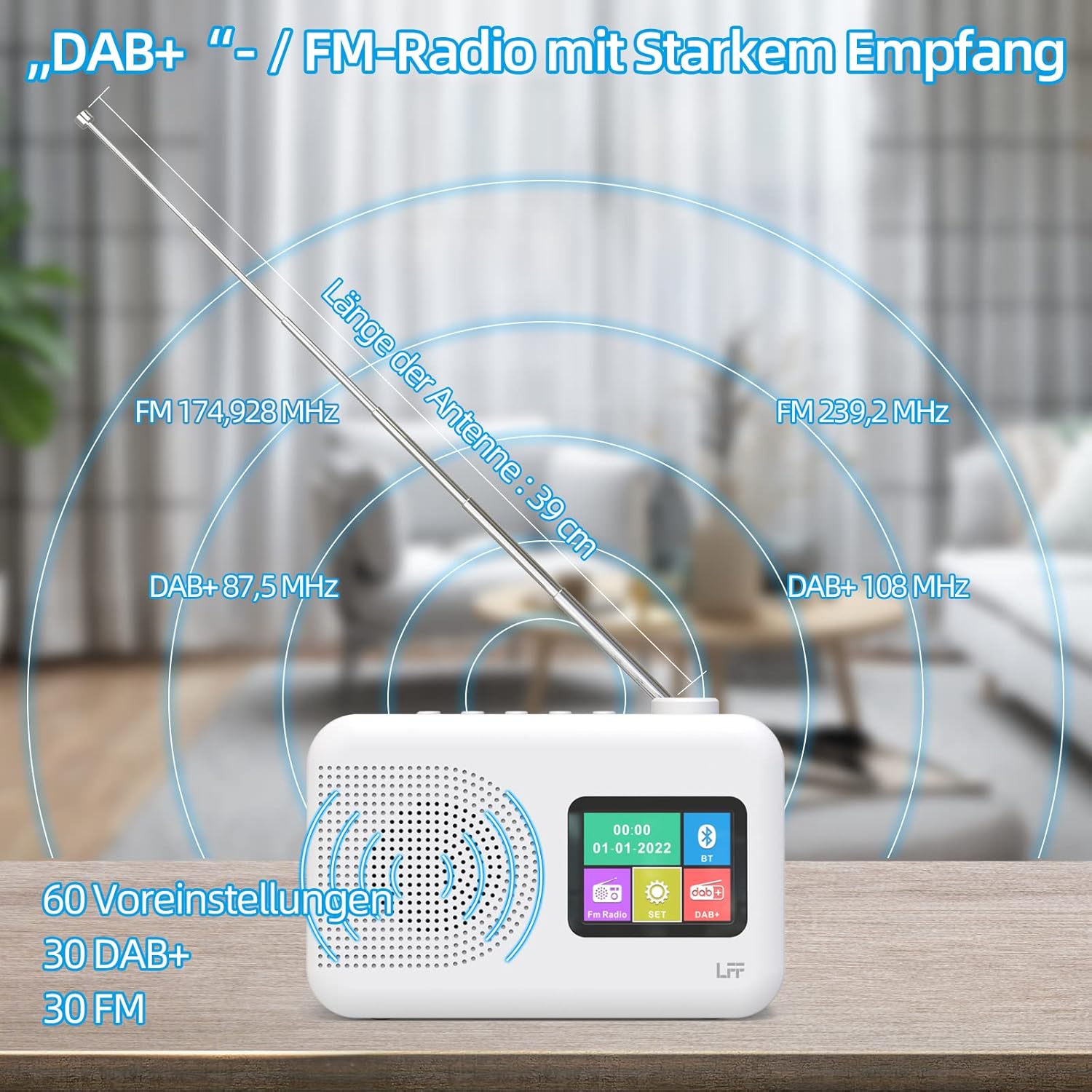
Extend the telescopic antenna fully (approximately 39 cm) and adjust its angle for optimal reception, especially for DAB+ and FM stations.

This diagram illustrates the radio's strong DAB+ and FM reception capabilities with the fully extended 39cm antenna, showing frequency ranges and the capacity for 60 total presets (30 DAB+, 30 FM).
4.3 Initial Scan (DAB+)
- Tænd for radioen.
- Ensure the mode is set to DAB+. If not, press the Mode knappen for at skifte.
- Radioen vil automatisk udføre en fuld scanning efter tilgængelige DAB+ stationer. Dette kan tage et par minutter.
- Once the scan is complete, the radio will display a list of found stations.
5. Betjeningsvejledning
5.1 DAB+ radiotilstand
- Tryk på Mode -knappen for at vælge DAB+-tilstand.
- Drej på Indstil/Vælg knappen for at gennemse de tilgængelige stationer.
- Tryk på Indstil/Vælg knappen for at vælge en station.
- Gem forudindstillinger: For at gemme en station skal du trykke på og holde en Forudindstillet button until the display confirms. To recall, briefly press the corresponding Forudindstillet button. Up to 30 DAB+ stations can be saved.
5.2 FM-radiotilstand
- Tryk på Mode knappen for at vælge FM-tilstand.
- Drej på Indstil/Vælg knappen til manuelt at indstille til en frekvens.
- Tryk og hold på Indstil/Vælg knob for a few seconds to auto-scan for the next available station.
- Gem forudindstillinger: Similar to DAB+ mode, press and hold a Forudindstillet button to save, and briefly press to recall. Up to 30 FM stations can be saved.
5.3 Bluetooth-tilstand

This diagram illustrates the three primary playback options for the radio: through its internal speaker, via Bluetooth connection to an external device, or using headphones connected to the headphone jack.
- Tryk på Mode button to select Bluetooth mode. The display will show "Bluetooth Pairing" or similar.
- On your external device (e.g., smartphone), enable Bluetooth and search for available devices.
- Select "LFF Radio" (or similar name) from the list to pair.
- Når den er parret, kan du afspille lyd fra din enhed via radioens højttaler.
- Note: This radio acts as a Bluetooth receiver. It does not support connecting to Bluetooth headphones or other Bluetooth speakers.
5.4 Sleep Timer
Sleep-timeren gør det muligt for radioen at slukke automatisk efter en indstillet periode.

This image depicts the sleep timer function, offering selectable durations of 15, 30, 45, 60, 90, and 120 minutes before the radio automatically powers off.
- Tryk på Alarm/Sleep Timer button repeatedly to cycle through sleep timer options (15 min, 30 min, 45 min, 60 min, 90 min, 120 min, OFF).
- Select your desired duration. The radio will turn off automatically after this time.
5.5 Vækkeur
The radio features a dual alarm function.
- Tryk og hold på Alarm/Sleep Timer knappen for at indtaste alarmindstillinger.
- Brug Indstil/Vælg knob to set the alarm time, alarm source (DAB+, FM, or buzzer), and volume.
- Tryk på Indstil/Vælg knappen for at bekræfte hver indstilling.
- Repeat the process for the second alarm if needed.
5.6 Brug af hovedtelefoner
Plug 3.5mm headphones into the headphone jack on the side of the radio for private listening. The internal speaker will automatically mute.
6. Vedligeholdelse
6.1 Rengøring
- Wipe the radio's surface with a soft, dry cloth.
- Brug ikke slibende rengøringsmidler, voks eller opløsningsmidler, da de kan beskadige finishen.
6.2 Udskiftning af batteri
When using battery power, replace all four AA batteries when the low battery indicator appears on the display or when performance degrades.
- Ensure the radio is turned off and disconnected from AC power.
- Åbn batterirummets dæksel på bagsiden.
- Fjern gamle batterier og bortskaf dem korrekt.
- Insert new 4 x 1.5V AA (LR6) batteries, observing correct polarity (+/-).
- Luk batterirummets dæksel forsvarligt.
6.3 Screen Protection Film
The radio's display comes with a transparent protective film. For optimal clarity, gently peel off this film before first use.
7. Fejlfinding
Hvis du støder på problemer, kan du se følgende almindelige problemer og løsninger:
| Problem | Mulig årsag | Løsning |
|---|---|---|
| Ingen strøm | AC adapter not connected, batteries depleted or incorrectly inserted. | Check AC adapter connection. Replace batteries or ensure correct polarity. |
| Dårlig radiomodtagelse | Antennen er ikke strakt ud, område med svagt signal, interferens. | Fully extend and adjust the telescopic antenna. Move the radio to a different location. Avoid sources of interference. |
| Bluetooth forbinder ikke | Radio not in Bluetooth mode, device too far, already paired with another device. | Ensure radio is in Bluetooth mode. Keep devices within range. Disconnect from other devices. |
| Ingen lyd | Volume too low, headphones connected, mute activated. | Increase volume. Disconnect headphones. Check if mute is active. |
8. Specifikationer
- Mærke: LFF forlængelse
- Model: DAB Plus Digital FM Radio
- Farve: Hvid
- Forbindelse teknologi: Bluetooth
- Dimensioner (L x B x H): 16.1 cm x 5.9 cm x 10.9 cm
- Tuningteknologi: DAB
- Strømkilde: AC Adapter (5V/1000mA) or 4 x 1.5V AA (LR6) Batteries
- Understøttede radiobånd: DAB+, FM
- DAB+ frekvensområde: 174.928 - 239.2 MHz
- FM-frekvensområde: 87.5 - 108 MHz
- Presets: 30 DAB+, 30 FM
- Antennelængde: 39 cm (extendable)
- Særlige funktioner: DAB Plus Radio, Sleep Timer, Dual Alarm, Headphone Jack, Color Display
- Inkluderede komponenter: DAB Digital Radio, AC Power Adapter, Quick Start Guide
9. Garanti og support
For any quality-related issues or technical support, please contact the seller directly. We are committed to resolving any problems you may encounter with your LFF DAB Plus Digital FM Radio.


