1. Introduktion
Tak for købetasing the ENUOSUMA Bluetooth Desktop Soundbar. This manual provides essential information for setting up, operating, and maintaining your new speaker. Please read it thoroughly before use to ensure optimal performance and longevity of the product.
2. Sikkerhedsoplysninger
- Udsæt ikke enheden for vand eller overdreven fugt.
- Undgå at placere højttaleren i nærheden af varmekilder eller i direkte sollys.
- Forsøg ikke selv at skille højttaleren ad eller reparere den. Overlad al service til kvalificeret personale.
- Brug kun det medfølgende USB-kabel til strøm.
- Opbevares utilgængeligt for børn.
3. Pakkens indhold
Tjek venligst pakken for følgende varer:
- ENUOSUMA Bluetooth Desktop Soundbar
- USB strømkabel
- 3.5 mm AUX lydkabel

4. Produktet er slutview
4.1 Styringer

- Large Central Knob: Turn on/off, adjust volume.
- Afspil/pause knap: Play/pause audio, answer/reject calls.
- Knap til forrige sang: Spring til forrige spor.
- Næste sang-knap: Spring til næste nummer.
- Mode knap: Switch between input modes (Bluetooth, AUX, FM Radio, USB Disk/TF Card). Double-press to turn RGB lights on/off.
4.2 havne

- USB-strømindgang: For connecting the USB power cable.
- AUX-indgang: 3.5 mm jackstik til kablet lydforbindelse.
- USB Disk Slot: Til afspilning af lyd fra et USB-flashdrev.
- TF-kortslot: For playing audio from a TF (Micro SD) card.
5. Opsætning
- Strømtilslutning: Connect the USB power cable to the speaker's USB power input and then to a USB power source (e.g., computer USB port, USB wall adapter).
- Tænd: Rotate the large central knob clockwise to turn on the speaker. The RGB lights will illuminate.
6. Betjeningsvejledning
6.1 Tænd/sluk og lydstyrkejustering
- To turn on, rotate the large central knob clockwise.
- To turn off, rotate the large central knob counter-clockwise until it clicks.
- To adjust volume, rotate the large central knob clockwise to increase and counter-clockwise to decrease.
6.2 Bluetooth-tilstand
- Tænd højttaleren. Den vil automatisk gå i Bluetooth-parringstilstand.
- On your device (phone, tablet, computer), enable Bluetooth and search for available devices.
- Select "ENUOSUMA Speaker" (or similar) from the list to pair.
- Once paired, you will hear a confirmation sound, and you can play audio wirelessly.
6.3 AUX Wired Mode
- Connect one end of the 3.5mm AUX audio cable to the speaker's AUX input.
- Connect the other end of the 3.5mm AUX audio cable to your audio source's headphone jack (e.g., computer, laptop, MP3 player).
- Press the "Mode" button on the speaker until it switches to AUX mode.
6.4 FM-radiotilstand
- Ensure the USB power cable is connected, as it acts as the FM antenna.
- Press the "Mode" button repeatedly until the speaker enters FM Radio mode.
- Press and hold the "Play/Pause" button to automatically search for and save available FM stations.
- Use the "Previous Song" and "Next Song" buttons to navigate between saved stations.
6.5 USB Disk / TF Card Playback
- Insert a USB flash drive or TF (Micro SD) card containing audio files ind i den tilsvarende åbning.
- Press the "Mode" button until the speaker switches to USB Disk or TF Card mode.
- Højttaleren vil automatisk begynde at afspille lyd files. Use the "Play/Pause", "Previous Song", and "Next Song" buttons for control.
6.6 RGB-lysstyring

- Højttaleren har dynamisk RGB-belysning.
- To turn the RGB lights on or off, quickly double-press the "Mode" button.
7. Vedligeholdelse
- Rensning: Use a soft, dry cloth to clean the speaker's surface. Do not use liquid cleaners or abrasive materials.
- Opbevaring: When not in use for extended periods, store the speaker in a cool, dry place away from direct sunlight.
8. Fejlfinding
| Problem | Mulig årsag | Løsning |
|---|---|---|
| Ingen strøm | USB cable not connected or power source faulty. | Sørg for, at USB-kablet er korrekt tilsluttet en fungerende USB-port. |
| Ingen lyd | Volume too low; incorrect mode selected; device not connected. | Increase volume; press 'Mode' button to select correct input; ensure Bluetooth is paired or AUX cable is connected. |
| Bluetooth-parring mislykkes | Højttaleren er ikke i parringstilstand; enhedens Bluetooth er slået fra; for langt fra højttaleren. | Ensure speaker is in Bluetooth mode; enable Bluetooth on your device; move device closer to speaker. |
| Dårlig FM -modtagelse | USB cable not connected (acting as antenna); weak signal. | Ensure USB cable is connected; try repositioning the speaker or the USB cable for better reception. |
9. Specifikationer

| Feature | Detalje |
|---|---|
| Mærke | ENUOSUMA |
| Model | Bluetooth Desktop Soundbar |
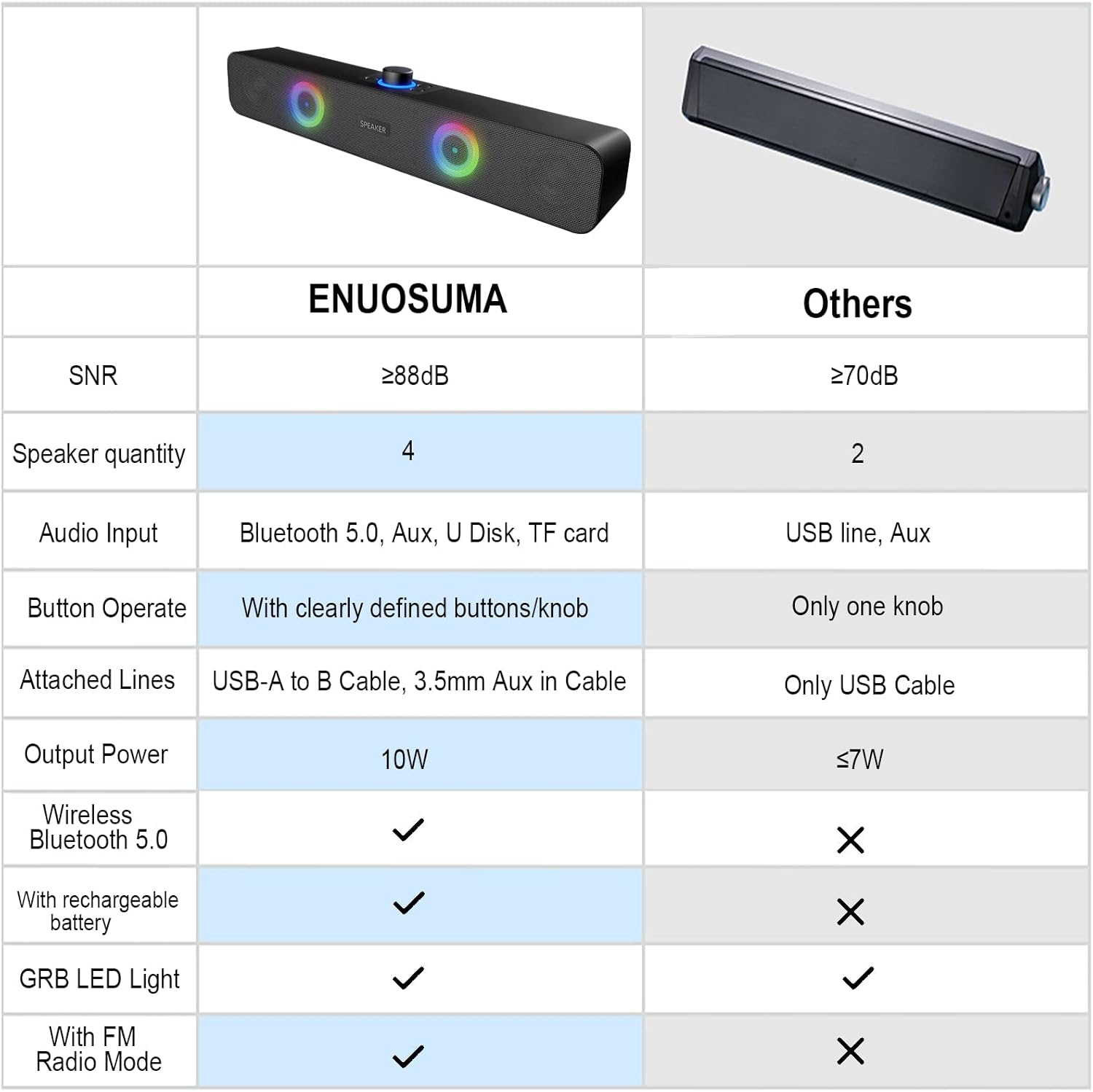
| Forbindelsesteknologi | Bluetooth, Auxiliary (3.5mm), USB Disk, TF Card |
| Lydudgangstilstand | Stereo (2.0 kanal) |
| Højttaler Maksimal udgangseffekt | 10 watt (2 x 5W) |
| Særlige funktioner | RGB Lights, FM Radio |
| Strømkilde | Elektrisk ledning (USB-drevet) |
| Produktdimensioner | 38 cm (B) x 8 cm (D) x 5 cm (H) |
| Varens vægt | 598.74 gram |
| Materiale | Metal |
| Farve | Sort |
| Anbefalede anvendelser | Gaming, Movies, Music |
| Kompatible enheder | Laptop, Personal Computer, Projector, Tablet, Phone |
10. Garanti og support
This product comes with a standard manufacturer's warranty. For specific warranty details, technical support, or service inquiries, please refer to the documentation provided with your purchase or contact the retailer/manufacturer directly.


