1. Introduktion
This manual provides detailed instructions for the setup, operation, and maintenance of your TEAC TN-180-BT-A3 Bluetooth Wireless Turntable. Please read this manual thoroughly before using the product to ensure proper and safe operation.
The TEAC TN-180-BT-A3 is designed to deliver high-quality vinyl playback with the added convenience of Bluetooth connectivity, allowing wireless audio streaming to compatible devices.
2. Vigtige sikkerhedsinstruktioner
Følg altid grundlæggende sikkerhedsforanstaltninger, når du bruger dette produkt, for at reducere risikoen for brand, elektrisk stød og personskade.
- Udsæt ikke dette apparat for regn eller fugt.
- Bloker ikke nogen ventilationsåbninger.
- Brug kun tilbehør/tilbehør specificeret af producenten.
- Overlad al service til kvalificeret servicepersonale.
3. Hvad er der i æsken
Bekræft at alle komponenter er til stede, før du fortsætter med opsætningen:
- TEAC TN-180-BT-A3 Turntable Unit
- Støvdæksel
- Platter
- Kør bælte
- Slipmåtte
- AC Adapter
- RCA lydkabel
- 45 omdr./min. Adapter
- Brugervejledning (dette dokument)

Image: The TEAC TN-180-BT-A3 turntable unit, showing the platter, tonearm, and controls. This is the main unit you will find in the box.
4. Opsætningsvejledning
4.1 Udpakning og placering
- Fjern forsigtigt alle komponenter fra emballagen.
- Placer pladespilleren på en stabil, plan overflade væk fra direkte sollys, varmekilder og kraftige vibrationer.
- Sørg for tilstrækkelig ventilation omkring enheden.
4.2 Assembling the Turntable
- Install the Platter: Placer forsigtigt tallerkenen på den midterste spindel.
- Install the Drive Belt: Carefully loop the drive belt around the motor pulley and the inner rim of the platter. Use the included ribbon or your fingers to guide the belt.
- Place the Slip Mat: Lay the felt slip mat on top of the platter.
- Attach the Dust Cover: Insert the hinges of the dust cover into the receptacles at the rear of the turntable.
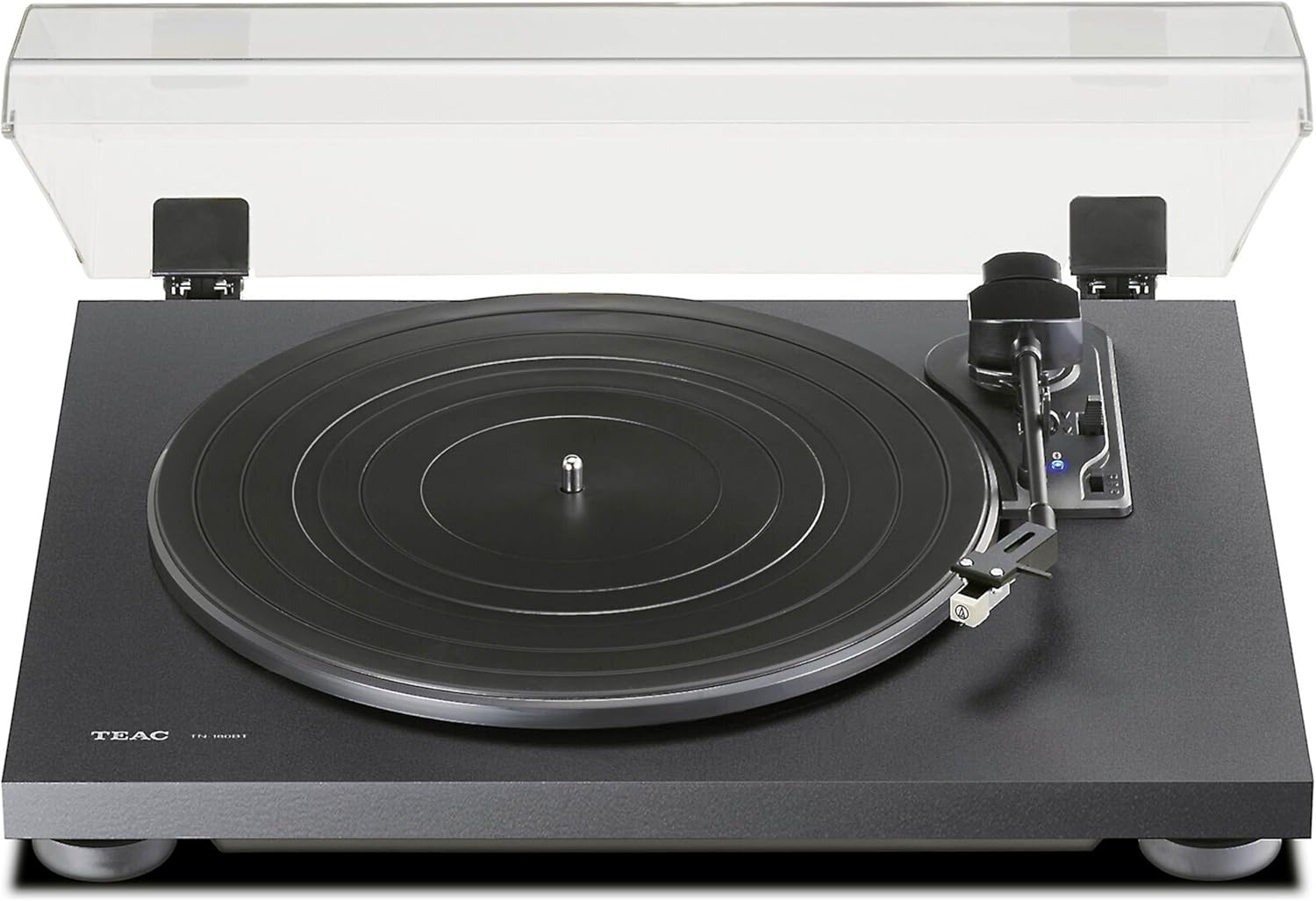
Image: The TEAC TN-180-BT-A3 turntable with its clear dust cover in the open position, showing the platter and tonearm ready for use.
4.3 Connecting to Power and Audio System
- Strømtilslutning: Connect the supplied AC adapter to the DC IN 12V port on the rear of the turntable, then plug it into a wall outlet.
- Lydudgang (RCA):
- Connect the RCA audio cables (red for right, white for left) from the turntable's RCA output jacks to your amplifier eller modtager.
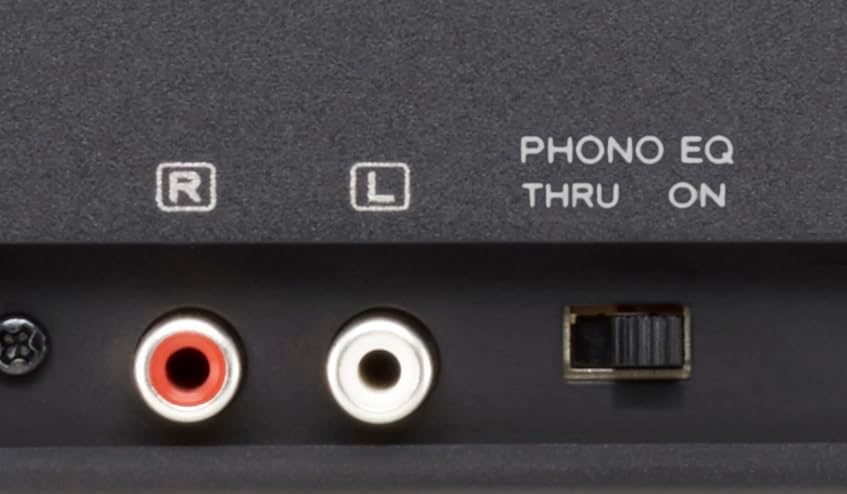
- PHONO EQ Switch: Locate the "PHONO EQ THRU ON" switch on the rear panel.
- Indstil til ON hvis der oprettes forbindelse til en amplifier without a built-in phono equalizer (LINE input).
- Indstil til GENNEM hvis der oprettes forbindelse til en amplifier with a built-in phono equalizer (PHONO input).

Image: The rear panel of the TEAC TN-180-BT-A3, highlighting the RCA output jacks, the DC IN 12V power input, and the PHONO EQ THRU/ON switch.

Billede: En detaljeret view of the PHONO EQ THRU/ON switch and the RCA audio output ports (red for right, white for left) on the back of the turntable.
5. Betjeningsvejledning
5.1 Grundlæggende afspilning
- Tænd: Turn the power switch on the rear panel to the "ON" position.
- Vælg hastighed: Set the speed selector switch (33/45/78 RPM) on the turntable to match the record you are playing.
- Stedrekord: Place your vinyl record on the slip mat. For 45 RPM singles, use the included adapter.
- Løft tonearm: Brug tonearmsløftearmen til at hæve tonearmen.
- Position pennen: Gently move the tonearm over the desired starting groove of the record.
- Nederste tonearm: Slowly lower the tonearm using the lift lever. The stylus will make contact with the record and playback will begin.
- Auto-Return: When the record finishes playing, the tonearm will automatically return to its rest position.
Billede: Et nærbillede view of the turntable's control area, showing the tonearm, the Bluetooth pairing button with its blue indicator light, and the 33/45/78 RPM speed selector switch.
5.2 Bluetooth -parring
The TN-180-BT-A3 can transmit audio wirelessly to Bluetooth-enabled speakers or headphones.
- Ensure your Bluetooth receiving device (speaker, headphones) is in pairing mode. Refer to your device's manual for instructions.
- On the turntable, press and hold the Bluetooth-parringsknap located near the tonearm base. The blue indicator light will flash rapidly, indicating pairing mode.
- Once connected, the blue indicator light will remain steadily lit.
- If pairing fails, turn off both devices and try again.

Image: A close-up of the Bluetooth pairing button on the turntable, showing the blue LED indicator light which signifies pairing status.
6. Vedligeholdelse
6.1 Rengøring af drejeskiven
- Always unplug the turntable from the power outlet before cleaning.
- Use a soft, dry cloth to wipe the surface of the turntable. Do not use abrasive cleaners, waxes, or solvents.
- The dust cover can be cleaned with a soft cloth and mild, non-abrasive cleaner.
6.2 Pleje af pennen
- Regularly clean the stylus using a soft brush designed for stylus cleaning, brushing gently from back to front.
- A dirty or worn stylus can damage your records and degrade sound quality. Replace the stylus when necessary (typically after 300-500 hours of playback). The pre-installed cartridge is an Audio-Technica AT3600L.
Image: The TEAC TN-180-BT-A3 turntable, showing the tonearm and the stylus cartridge at its end, which requires regular cleaning and eventual replacement.
7. Fejlfinding
| Problem | Mulig årsag | Løsning |
|---|---|---|
| Ingen strøm | AC adapter not connected; Power switch off | Ensure AC adapter is securely connected and power switch is ON. |
| Ingen lyd eller lav lyd | Incorrect PHONO EQ switch setting; RCA cables loose; Amplifier input incorrect | Check PHONO EQ switch (ON for LINE, THRU for PHONO); Secure RCA connections; Select correct input on amplivligere. |
| Lyd forvrænget eller springende | Dirty stylus; Worn stylus; Record dirty or damaged; Turntable not level | Clean stylus; Replace stylus; Clean record; Ensure turntable is on a level surface. |
| Bluetooth-parring mislykkes | Receiving device not in pairing mode; Too far from device | Ensure receiving device is in pairing mode; Move devices closer; Try re-pairing. |
| Tallerkenen drejer ikke | Drive belt dislodged or broken | Check and re-seat the drive belt; Replace if broken. |
8. Specifikationer
| Feature | Detalje |
|---|---|
| Modelnavn | TN-180-BT-A3 (TN180BTA3B) |
| Mærke | TEAC |
| Forbindelsesteknologi | Bluetooth, RCA |
| Rotational Speeds | 33.3 RPM, 45 RPM, 78 RPM |
| Motortype | AC motor |
| Inkluderede komponenter | Turntable unit, Dust Cover, AC Adapter, RCA Cable, 45 RPM Adapter |
| Materiale | Konstrueret træ, plastik |
| Farve | Mat sort |
| Varens vægt | 10.64 pund (ca. 4.83 kg) |
| Pakkedimensioner | 20 x 16 x 6 tommer (ca. 50.8 x 40.6 x 15.2 cm) |
9. Garanti og support
For warranty information and technical support, please refer to the official TEAC webwebstedet eller kontakt deres kundeservice direkte. Gem din købskvittering som købsbevis i tilfælde af garantikrav.
TEAC Official Webwebsted: https://teac.jp/int/product/tn-180bt-a3/top (Eksamplinket, det faktiske link kan variere)
For further assistance, you may also contact the retailer where you purchased the product.


