Indledning
This manual provides comprehensive instructions for the Angrox XRT140 Universal Remote Control, designed as a replacement for various VIZIO Smart TV models. It covers setup, operation, and troubleshooting to ensure optimal performance and ease of use.
Produkt overview

Billede: Forside og bagside view of the Angrox XRT140 Universal Remote Control.
Nøglefunktioner
- Adgang med et enkelt tryk: Dedicated buttons for popular streaming services including Vudu, Netflix, Prime Video, Xumo, Hulu, and Redbox, plus a WatchFree button.
- Responsive knapper: Engineered for quick response times (less than 0.5 seconds) and durability (over 11,000 clicks).
- Udvidet rækkevidde: Offers a transmitting distance of over 42 feet for flexible use.
- Holdbar konstruktion: Made from high-quality ABS material with a glossy finish for enhanced durability and soft, tactile buttons.
- Ingen programmering påkrævet: Ready to use immediately after battery installation.
Kompatibilitet
The Angrox XRT140 remote control is designed for broad compatibility with VIZIO Smart TV models and can replace several VIZIO remote models.
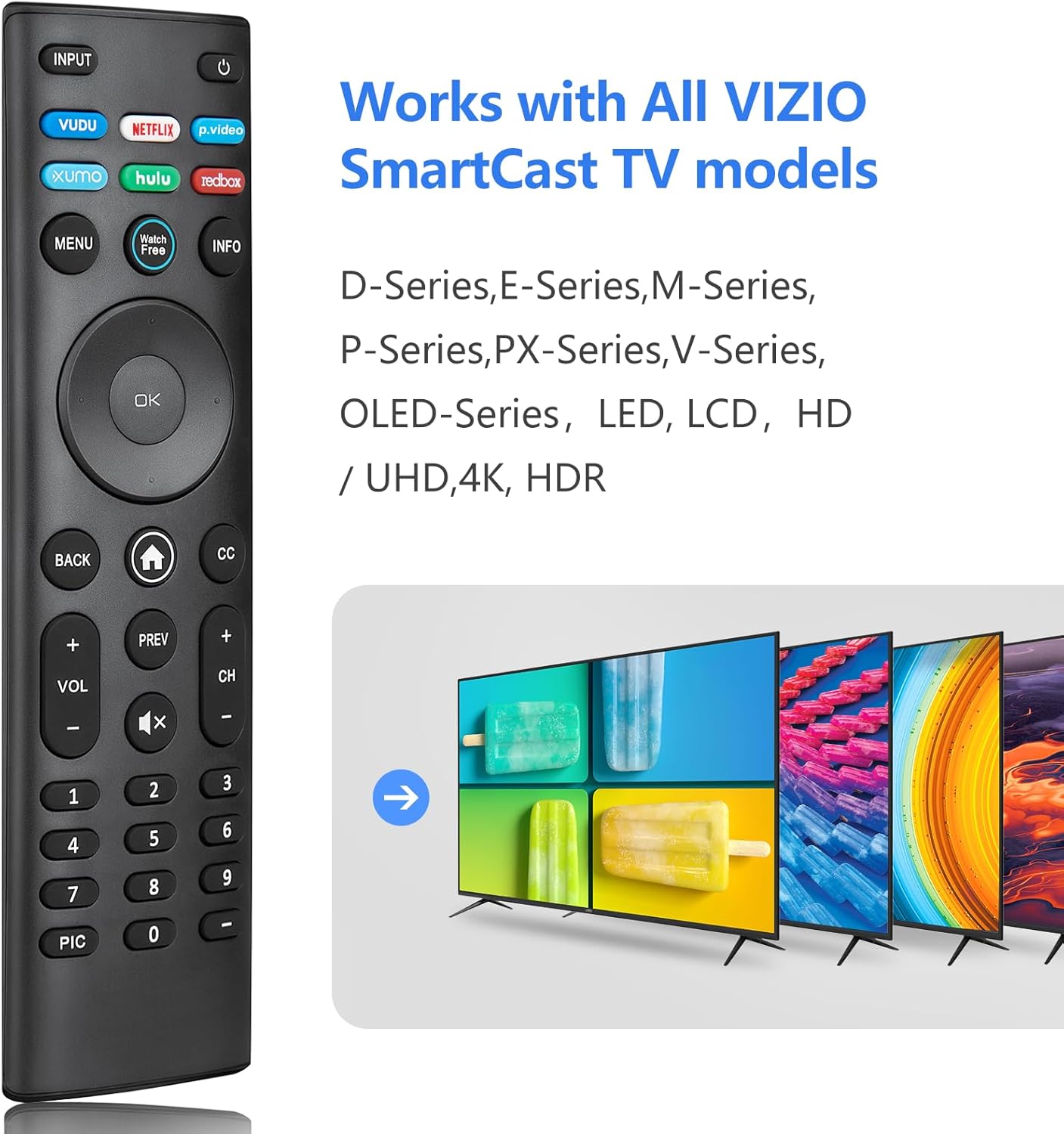
Image: The Angrox XRT140 remote control is compatible with various VIZIO SmartCast TV models, including D-Series, E-Series, M-Series, P-Series, PX-Series, V-Series, and OLED-Series.
- Compatible VIZIO TV Models: D-Series, E-Series, M-Series, P-Series, PX-Series, V-Series, OLED-Series, and other LED, LCD, HD, 4K UHD, HDR Smart TVs.
- Erstatter VIZIO fjernbetjeningsmodeller: XRT136, XRT135, XRT510, XRT500, XRT100, XRT112, XRT122, XRT302, VR1, VR2, VR10, VR15.
Opsætningsinstruktioner
Installation af batteri
- Find batterirummet på bagsiden af fjernbetjeningen.
- Skub batteridækslet nedad for at åbne det.
- Insert two (2) 1.5V AAA batteries, ensuring the positive (+) and negative (-) terminals align correctly with the markings inside the compartment.
- Skub batteridækslet tilbage på plads, indtil det klikker sikkert.
Note: Brug altid nye batterier, og udskift begge batterier samtidig. Bland ikke gamle og nye batterier eller forskellige typer batterier.
Indledende brug
The Angrox XRT140 remote control requires no programming. Once batteries are installed, it is ready for immediate use with compatible VIZIO Smart TVs.
- Ensure your VIZIO Smart TV is powered on.
- Point the remote control directly towards the TV's infrared (IR) sensor.
- Press any button (e.g., Power, Volume Up) to test functionality.
If the remote does not respond, verify battery installation and ensure there are no obstructions between the remote and the TV sensor.
Betjeningsvejledning
Knap funktioner
The following diagram and descriptions detail the functions of each button on the Angrox XRT140 remote control.

Image: Detailed diagram illustrating the function of each button on the Angrox XRT140 remote control.
| Knap | Fungere |
|---|---|
| INPUT | Ændrer den aktuelt viste inputkilde. |
| Effekt (⏻) | Tænder eller slukker fjernsynet. |
| VUDU | Accesses VUDU channels/application. |
| NETFLIX | Accesses NETFLIX channels/application. |
| p.video (Prime Video) | Accesses Prime Video channels/application. |
| XUMO | Accesses XUMO channels/application. |
| HULU | Accesses HULU channels/application. |
| REDBOX | Accesses REDBOX channels/application. |
| MENU | Viser indstillingsmenuen. |
| Se gratis | Accesses WatchFree channels (availability may vary by region). |
| INFO | Displays the information window. |
| Navigationsknapper (op/ned/venstre/højre) | Navigates on-screen menus. |
| OK / Afspil / Pause | Selects the highlighted menu option and plays or pauses content. |
| TILBAGE | Går til den forrige skærmmenu. |
| Home Button (⌂) | Launches SmartCast Home or returns to the SmartCast Home Screen. |
| CC (undertekster) | Enables or disables closed captions. Long press to open the Accessibility menu. |
| VOL +/- (Volume Up/Down) | Øger eller mindsker lydstyrken. |
| FORR | Vender tilbage til den sidste kanal viewudg. |
| CH +/- (Channel Up/Down) | Skifter kanal. |
| Lydløs (🔇) | Tænder eller slukker for lyden. |
| Tastatur (0-9) | Indtaster manuelt et kanalnummer. |
| PIC | Skifter gennem forskellige billedindstillingstilstande. Tryk længe for at aktivere/deaktivere talkback-funktionen. |
| Bindestreg (-) | Bruges sammen med nummertastaturet til manuelt at indtaste en digital underkanal (f.eks. 18-4 eller 18-5). |
Fejlfinding
If you encounter issues with your Angrox XRT140 remote control, please refer to the following common troubleshooting steps:
- Fjernbetjeningen reagerer ikke:
- Ensure batteries are correctly installed with proper polarity (+/-).
- Replace old batteries with two new 1.5V AAA batteries.
- Confirm there are no obstructions between the remote's IR emitter and the TV's IR receiver.
- Ret fjernbetjeningen direkte mod tv'ets IR-sensor.
- Begrænset rækkevidde:
- Ensure batteries are fresh. Low battery power can reduce signal strength.
- Fjern eventuelle genstande, der måtte blokere signalvejen mellem fjernbetjeningen og tv'et.
- The remote operates via infrared (IR) and requires a direct line of sight to the TV.

Image: The remote control offers an extended transmitting distance of over 42 feet, but requires a clear line of sight.
- Specifikke knapper virker ikke:
- Clean the remote control buttons and surface with a soft, dry cloth to remove any dirt or residue that might be interfering with button presses.
- Hvis kun visse knapper ikke reagerer, kan fjernbetjeningen være beskadiget. Overvej at udskifte fjernbetjeningen.
Specifikationer
| Feature | Detalje |
|---|---|
| Modelnummer | XRT140 |
| Mærke | Angrox |
| Produktdimensioner | 6.3 x 1.57 x 0.39 tommer (16.0 x 4.0 x 1.0 cm) |
| Varens vægt | 1.76 ounce (50 gram) |
| Batterier påkrævet | 2 x AAA-batterier (1.5V) |
| Særlige funktioner | Ergonomic design, No Programming Required, Universal compatibility with specified VIZIO TVs |
| Fabrikant | ENJOYLink Direct |

Image: Physical dimensions of the Angrox XRT140 remote control.
Opretholdelse
- Rensning: Brug en blød, tør klud til at rengøre fjernbetjeningen. Brug ikke flydende rengøringsmidler eller slibende materialer.
- Batteripleje: Remove batteries if the remote will not be used for an extended period to prevent leakage. Dispose of used batteries responsibly according to local regulations.
- Opbevaring: Opbevar fjernbetjeningen et køligt, tørt sted væk fra direkte sollys og ekstreme temperaturer.
Garanti og support
Specific warranty details for the Angrox XRT140 remote control may vary. Please refer to the product packaging or contact the retailer where the product was purchased for detailed warranty information.
For technical support or further assistance, please contact Angrox customer service through their official channels or the retailer's support services.
