1. Introduktion
The VOLTCRAFT DSO-2072H is a versatile 3-in-1 digital instrument, combining the functionalities of a digital oscilloscope, a multimeter, and a waveform generator. Designed for precision and ease of use, this device is ideal for various electrical measurement and testing applications.

Figure 1.1: VOLTCRAFT DSO-2072H Handheld Oscilloscope
2. Sikkerhedsoplysninger
Please read and understand all safety warnings and operating instructions before using this device. Failure to do so may result in injury or damage to the device.
- This device is rated for CATII 1000 V measurements. Always adhere to safety standards for the measurement category.
- ADVARSEL: To avoid electrical shock, do not open the case. There are no user-serviceable parts inside.
- To avoid personal injury or damage to the instrument, install quick-acting fuses with amp/voltage ratings shown on the device.
- Brug ikke enheden, hvis den ser beskadiget ud eller fungerer unormalt.
- Sørg for ordentlig ventilation under drift.
3. Pakkens indhold
Bekræft, at alle nedenstående varer er inkluderet i din pakke:
- VOLTCRAFT DSO-2072H håndholdt oscilloskop
- Oscilloscope Probe and Adjustment Tool
- BNC to Alligator Clip Cable
- Multimeter Test Leads (one black, one red)
- USB kabel
- Hurtig startvejledning
- Soft Protective Case
- CD with Software and English User Manual
4. Produktet er slutview
4.1 Frontpanel og display
The device features a 3.5-inch (8.89 cm) LCD color display with a resolution of 320 x 240 pixels. The front panel includes various function buttons and input terminals for operation.
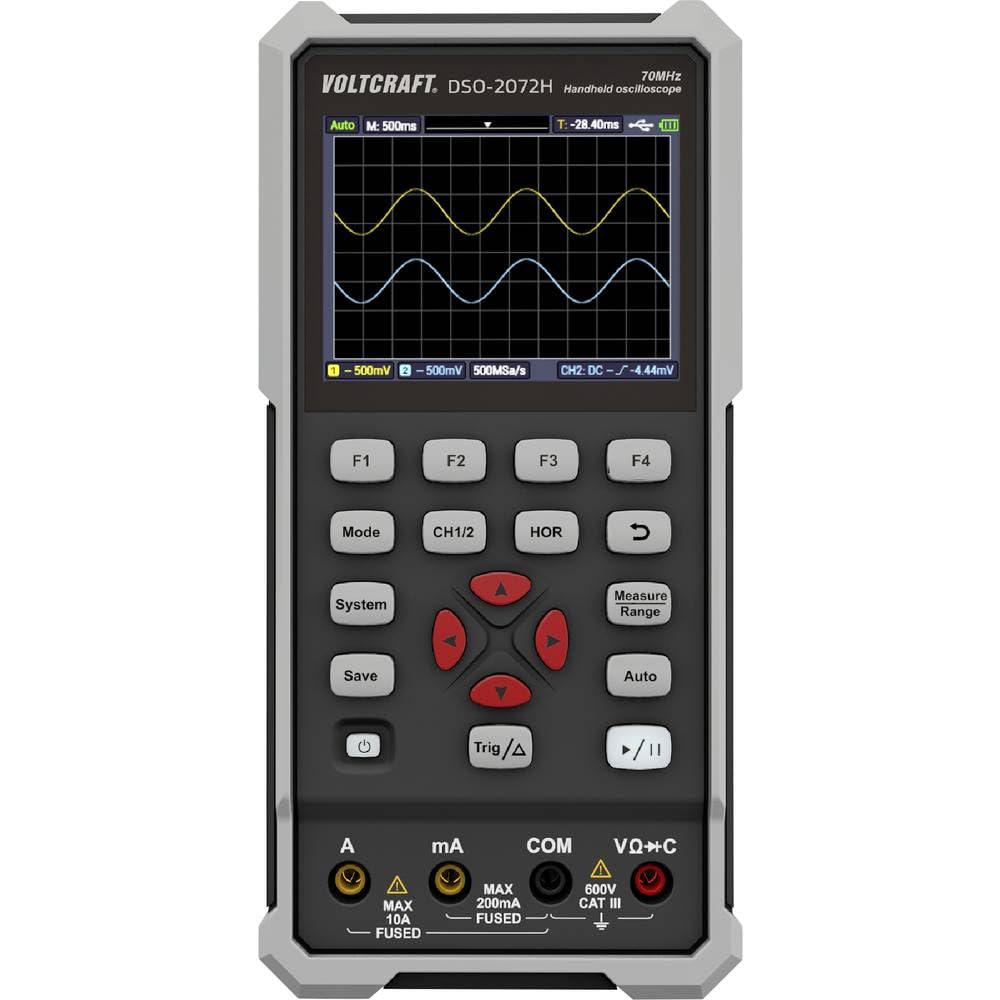
Figur 4.1: Frontpanellayout
- Vise: Shows waveform, measurement readings, and menu options.
- Funktionsknapper (F1-F4): Kontekstafhængige knapper til menunavigation.
- Mode: Skifter mellem oscilloskop-, multimeter- og bølgeformgeneratortilstande.
- CH1/2: Selects or controls oscilloscope channels.
- HOR: Adjusts horizontal scale/time base.
- Spare: Saves waveform data or settings.
- System: Giver adgang til systemindstillinger og konfigurationer.
- Trig/Δ: Controls trigger settings or delta measurements.
- Auto: Auto-sets oscilloscope or multimeter parameters for quick measurements.
- Målområde: Adjusts measurement range in multimeter mode.
- Navigation Keys (Up/Down/Left/Right/Enter): Til menunavigation og parameterjustering.
- Power knap: Tænder eller slukker for enheden.
- Afspil/pause: Starts or stops waveform acquisition.
4.2 indgangsterminaler
- A (Amperes): Input for high current measurements (Max 10A, Fused).
- mA (Milliamperes): Input for low current measurements (Max 200mA, Fused).
- COM (Fælles): Common return terminal for all measurements.
- VΩ+C (Volts, Ohms, Capacitance): Input til bdtage, resistance, capacitance, continuity, and diode measurements (600V CAT III).
4.3 Bagpanel
The rear panel provides information about the device model, battery specifications, and important warnings.

Figur 4.2: Bagpanel
- Model nr.: DSO-2072H
- Li-ion cell: 3.7V, 2200 mAh, 8.14 Wh
- USB Type-C-port: Til opladning og dataoverførsel.
5. Opsætning
5.1 Tænd/sluk
For at tænde enheden skal du trykke på og holde Magt knappen, indtil displayet lyser. For at slukke skal du trykke på og holde Magt knappen igen, indtil displayet slukker.
5.2 Batteriopladning
Connect the device to a USB power source using the provided USB Type-C cable. The battery indicator on the display will show charging status. Ensure the device is fully charged before initial use for optimal battery life.
5.3 Connecting Probes/Leads
For oscilloscope measurements, connect the oscilloscope probe to the BNC input. For multimeter measurements, insert the red test lead into the VΩ+C terminal and the black test lead into the COM terminal. For current measurements, use the A or mA terminals as appropriate.
6. Betjeningsvejledning
6.1 Digital Oscilloscope Function
The DSO-2072H operates as a 2-channel digital oscilloscope with a maximum bandwidth of 70 MHz and a sampling rate of 250 MS/s. It features an 8K record length and 8-bit vertical resolution.
- Trykke Mode to select Oscilloscope mode.
- Bruge CH1/2 to select the active channel or adjust channel settings.
- Adjust the horizontal time base using the HOR button and navigation keys.
- Configure trigger settings with the Trig/Δ knap.
- Trykke Auto for automatic waveform scaling and triggering.
6.2 Multimeter Function
The integrated multimeter supports measurements for voltage, current, resistance, capacitance, continuity, and diode testing, with a 20,000-count display and TRMS capability.
- Trykke Mode to select Multimeter mode.
- Brug Mål rækkevidde button or navigation keys to select the desired measurement type (V, A, Ω, F, continuity, diode).
- De Auto function can simplify the measurement process by automatically selecting the appropriate range.
6.3 Waveform Generator Function
The device includes a single-channel waveform generator with a maximum frequency output of 25 MHz, a sampling rate of 125 MS/s, 0.1 Hz frequency resolution, 14-bit vertical resolution, and 8K waveform length.
- Trykke Mode to select Waveform Generator mode.
- Use the function buttons and navigation keys to configure waveform type, frequency, amplitude og forskydning.
6.4 Saving Data and System Settings
- Trykke Spare to store current waveform data or measurement results.
- Trykke System to access and adjust general device settings, display options, and calibration.
7. Vedligeholdelse
Proper maintenance ensures the longevity and accuracy of your VOLTCRAFT DSO-2072H.
- Rensning: Brug en blød, tør klud til at rengøre enheden. Brug ikke slibende rengøringsmidler eller opløsningsmidler.
- Opbevaring: Opbevar enheden et køligt, tørt sted væk fra direkte sollys og ekstreme temperaturer.
- Udskiftning af sikring: If a fuse blows, replace it only with a quick-acting fuse of the specified amp/voltage rating as indicated on the device's rear panel or in the full manual.
8. Fejlfinding
Hvis du støder på problemer med din enhed, kan du bruge følgende almindelige løsninger:
- Enheden tændes ikke: Ensure the battery is charged. Connect the USB cable to a power source and allow it to charge for some time.
- Ingen bølgeform vist: Check probe connections. Ensure the input signal is within the device's measurement range. Try using the Auto fungere.
- Incorrect multimeter readings: Verify that the test leads are correctly inserted into the appropriate terminals (VΩ+C, A, mA, COM) for the measurement type. Ensure the correct measurement range is selected.
- Enheden fryser eller reagerer ikke: Try restarting the device by holding the Magt button. If the issue persists, refer to the full user manual on the provided CD for advanced troubleshooting.
9. Specifikationer
| Feature | Specifikation |
|---|---|
| Modelnummer | VC-11901280 |
| Dimensioner (L x B x H) | 19.8 x 3.8 x 9.6 cm (7.8 x 1.5 x 3.8 tommer) |
| Vægt | 600 gram (1.32 pund) |
| Vise | 3.5-inch (8.89 cm) LCD Color Display (320 x 240 pixels) |
| Strømkilde | Electric Cable (USB Type-C), Li-ion Battery (3.7V, 2200 mAh) |
| Oscilloskop båndbredde | 70 MHz |
| Oscilloskopkanaler | 2 |
| Oscilloscope Sampling Rate | 250 MS/s |
| Oscilloscope Record Length | 8K |
| Oscilloscope Vertical Resolution | 8 bits |
| Multimeter Display Counts | 20,000 |
| Multimeter Measurement Category | CATII 1000 V |
| Waveform Generator Channels | 1 |
| Waveform Generator Max Frequency | 25 MHz |
| Waveform Generator Sampling Rate | 125 MS/s |
| Waveform Generator Vertical Resolution | 14 bits |
| Overholdelse | EN 61010-1 |
10. Garanti og support
For detailed warranty information and technical support, please refer to the full user manual and software provided on the included CD. You can also visit the official VOLTCRAFT webwebsted for yderligere hjælp.
Fabrikant: VOLTCRAFT


