1. Introduktion og sikkerhedsoplysninger
Tak for købetasing the SMART TECH 32HN10T2 32" HD LED Television. This manual provides important instructions for the safe and efficient operation of your new television. Please read it thoroughly before use and retain it for future reference.
Vigtige sikkerhedsinstruktioner:
- Læs disse instruktioner.
- Gem disse instruktioner.
- Overhold alle advarsler.
- Følg alle instruktioner.
- Brug ikke dette apparat i nærheden af vand.
- Rengør kun med en tør klud.
- Bloker ikke ventilationsåbninger. Installer i overensstemmelse med producentens anvisninger.
- Må ikke installeres i nærheden af varmekilder såsom radiatorer, varmeapparater, komfurer eller andre apparater (inklusive ampløftere), der producerer varme.
- Beskyt netledningen mod at blive trådt på eller klemt, især ved stik, stikkontakter og det sted, hvor de kommer ud af apparatet.
- Brug kun tilbehør/tilbehør specificeret af producenten.
- Træk stikket ud af dette apparat under tordenvejr, eller når det ikke skal bruges i længere perioder.
- Overlad al service til kvalificeret servicepersonale. Service er påkrævet, når apparatet er blevet beskadiget på nogen måde, såsom strømforsyningsledning eller stik er beskadiget, væske er blevet spildt, eller genstande er faldet ind i apparatet, apparatet har været udsat for regn eller fugt, ikke fungerer normalt , eller er blevet droppet.

Figur 1.1: Front view of the SMART TECH 32HN10T2 32-inch HD LED Television. This image displays the television's screen, the "SMART TECH" logo at the bottom center, and various feature icons on the top left, including "32"", "HD ready", "DVB T2/S2/C", "CI+", "Dolby Audio", and "HDMI".
2. Pakkens indhold
Please check that all items are present and in good condition upon unpacking your television.
- SMART TECH 32HN10T2 32" HD LED Television
- Fjernbetjening (RC)
- TV Stand (Feet)
- AAA-batterier (2x) til fjernbetjening
3. Opsætning
3.1 Montering af tv-bordet
To install the TV stand, carefully place the television face down on a soft, flat surface to prevent screen damage. Align the stand feet with the corresponding slots on the bottom of the TV and secure them with the provided screws.

Figur 3.1: The SMART TECH 32HN10T2 television positioned on its stand on a media console, demonstrating a typical setup.
3.2 Vægmontering (valgfrit)
The television supports VESA wall mounts. The VESA mounting pattern for this model is 100mm x 100mm. Ensure you use a compatible wall mount bracket and follow the instructions provided with the wall mount. Professional installation is recommended for wall mounting.

Figur 3.2: Bag view of the television, highlighting the VESA mounting points (100mm x 100mm) and various input/output ports. These ports include USB 2, USB 1, DVB-T/T2, DVB-S/S2, HDMI 1, HDMI 2, HDMI 3, AV IN, and COAXIAL.

Figur 3.3: The television wall-mounted above a media console, illustrating an alternative installation method.
3.3 Tilslutning af eksterne enheder
The SMART TECH 32HN10T2 TV offers multiple connectivity options:
- HDMI: Connect Blu-ray players, game consoles, or other HDMI-enabled devices to HDMI 1, HDMI 2, or HDMI 3 ports.
- USB: Indsæt USB-drev i USB 1- eller USB 2-porte for at afspille mediefiler.
- DVB-T/T2 (Antenna): Connect a terrestrial antenna for digital broadcast reception.
- DVB-S/S2 (Satellite): Connect a satellite dish for satellite broadcast reception.
- AV IN: Bruges til ældre enheder med kompositvideo- og stereolydudgange.
- COAXIAL: For digital audio output to a sound system.
3.4 Strømtilslutning
After connecting all necessary cables, plug the power cord into the TV's power input and then into a suitable wall outlet.
4. Betjeningsvejledning
4.1 Fjernbetjening overview
The remote control allows you to access all functions of your television. Insert the two AAA batteries into the remote control, ensuring correct polarity.

Figur 4.1: This image displays the overall dimensions of the television (732mm width, 483mm height, 180mm depth) and an illustration of the remote control with its various buttons.
4.2 Indledende opsætning og kanalscanning
Upon first power-on, the TV will guide you through the initial setup process, including language selection, country, and channel scanning for DVB-T2/S2 signals. Follow the on-screen prompts.
4.3 Grundlæggende funktioner
- Tænd/sluk: Tryk på MAGT knappen på fjernbetjeningen.
- Kanalvalg: Brug CH +/- buttons or numeric buttons to change channels.
- Lydstyrkekontrol: Brug VOL +/- knapper for at justere lydstyrken.
- Inputkilde: Tryk på KILDE button to select between HDMI, USB, DVB-T/T2, DVB-S/S2, or AV inputs.
- Menu navigation: Brug MENU button to access settings, and the arrow keys (OP/NED/VENSTRE/HØJRE) og OK for at navigere.
5. Vedligeholdelse
5.1 Rengøring af tv'et
- Tag altid stikket ud af stikkontakten før rengøring.
- Brug en blød, tør klud til at tørre skærmen og kabinettet af.
- For genstridige mærker, gnid letampRengør kluden med vand eller et mildt, ikke-slibende skærmrensemiddel. Spray aldrig rengøringsmiddel direkte på skærmen.
- Undgå at bruge slibende rengøringsmidler, voks eller opløsningsmidler, da de kan beskadige tv'ets overflade.
5.2 Udskiftning af batteri i fjernbetjening
If the remote control's response becomes sluggish, replace the two AAA batteries with new ones. Ensure correct polarity when inserting the new batteries.
6. Fejlfinding
Før du kontakter kundesupport, bedes du læse følgende almindelige problemer og løsninger:
| Problem | Mulig årsag/løsning |
|---|---|
| Ingen strøm |
|
| Intet billede, men der er lyd |
|
| Ingen lyd, men der er billede |
|
| Fjernbetjening virker ikke |
|
| "Intet signal"-meddelelse |
|
7. Specifikationer
| Feature | Detalje |
|---|---|
| Mærke | Smart Tech |
| Modelnummer | 32HN10T2 |
| Skærmstørrelse | 32 tommer (80 cm diagonalt) |
| Displayteknologi | LED |
| Opløsning | 720p (1366 x 768 pixels) |
| Opdateringshastighed | 60 Hz |
| Forbindelsesteknologi | HDMI, USB |
| Antal USB-porte | 2 |
| HDMI porte | 3 |
| Tuner type | DVB-T2/S2 (Triple Tuner) |
| Lydfunktioner | Dolby Audio |
| Særlige funktioner | Fladskærm |
| Farve | Sort |
| Strømforbrug (SDR) | 26.0 W |
| Energieffektivitetsklasse (SDR) | E |
| Standby strømforbrug | 0.5 W |
| Netværket standby strømforbrug | 2.0 W |
| VESA monteringsmønster | 100 mm x 100 mm |
| Inkluderede komponenter | TV, Remote Control, Stand Feet |
| Batteritype (fjernbetjening) | 2 AAA (inkluderet) |
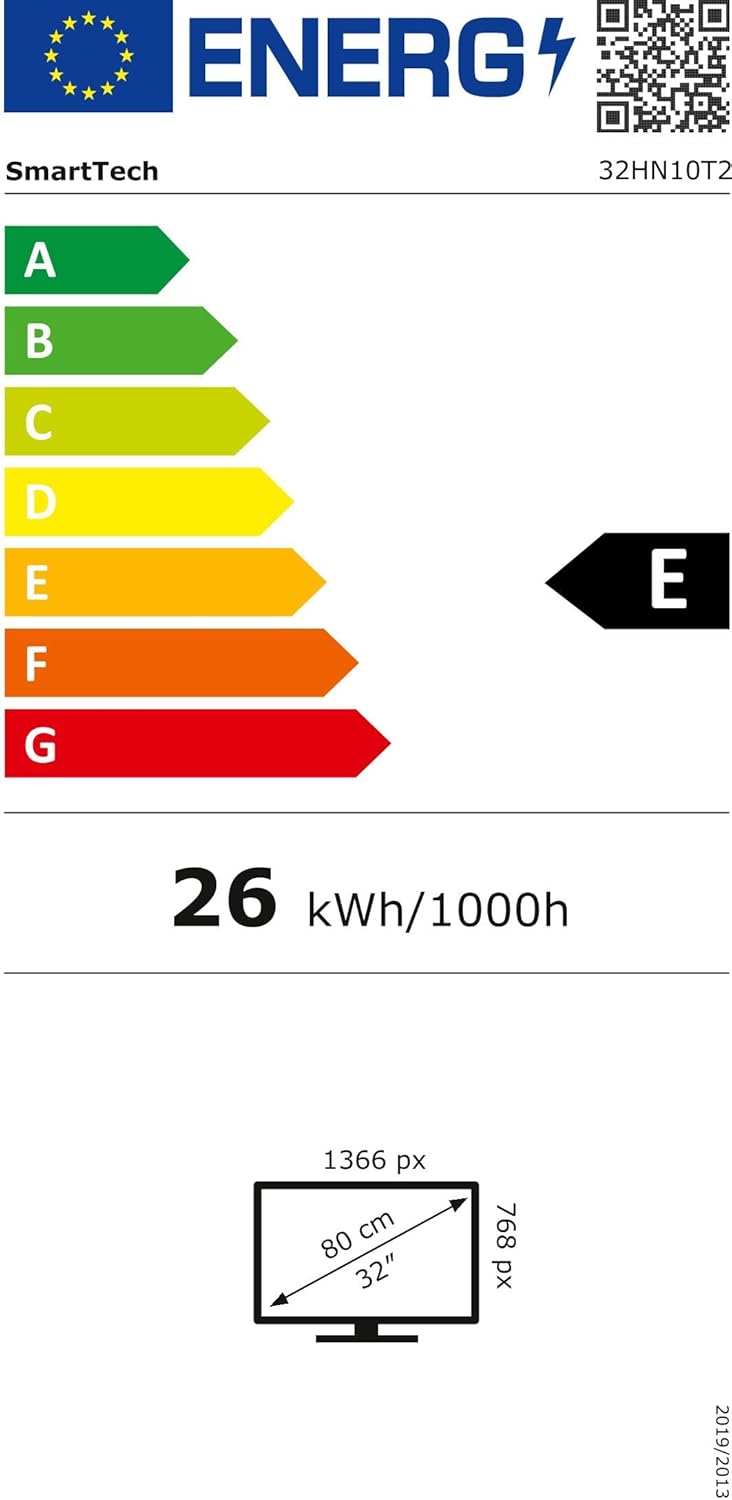
Figur 7.1: Energy efficiency label for the SMART TECH 32HN10T2, indicating an 'E' class rating and 26 kWh per 1000 hours of operation.
For detailed product information and energy efficiency data, please refer to the EPREL database: https://eprel.ec.europa.eu/qr/964700
8. Garanti og support
SMART TECH products are designed and manufactured to the highest quality standards. For warranty information, please refer to the warranty card included with your product or contact your retailer.
Kundesupport:
- Fabrikant: Express LUCK Europe Electric Kft.
- Webwebsted: www.smarttech-tv.com
- E-mail: csilla.simita-tompa@expressluck.hu
- Telefon: +3624889353
- Adresse: Sales, Leshegy út 2., 2310 Szigetszentmiklós, Pest, HU
Please note that spare parts availability and software updates are not explicitly guaranteed beyond initial purchase, as per available product information.


