Digital Water Timer User Manual
Model: johgee 2 Outlet Black
For Garden, Lawn, Patio, Farm
Indledning
This manual provides comprehensive instructions for the setup, operation, and maintenance of your johgee Digital Water Timer. Please read this manual carefully before use to ensure proper function and longevity of the device.
The johgee Digital Water Timer is designed to automate your watering needs with its dual independent outlets, programmable schedules, rain delay function, and manual watering mode. Its IP54 waterproof rating ensures durability for outdoor use.
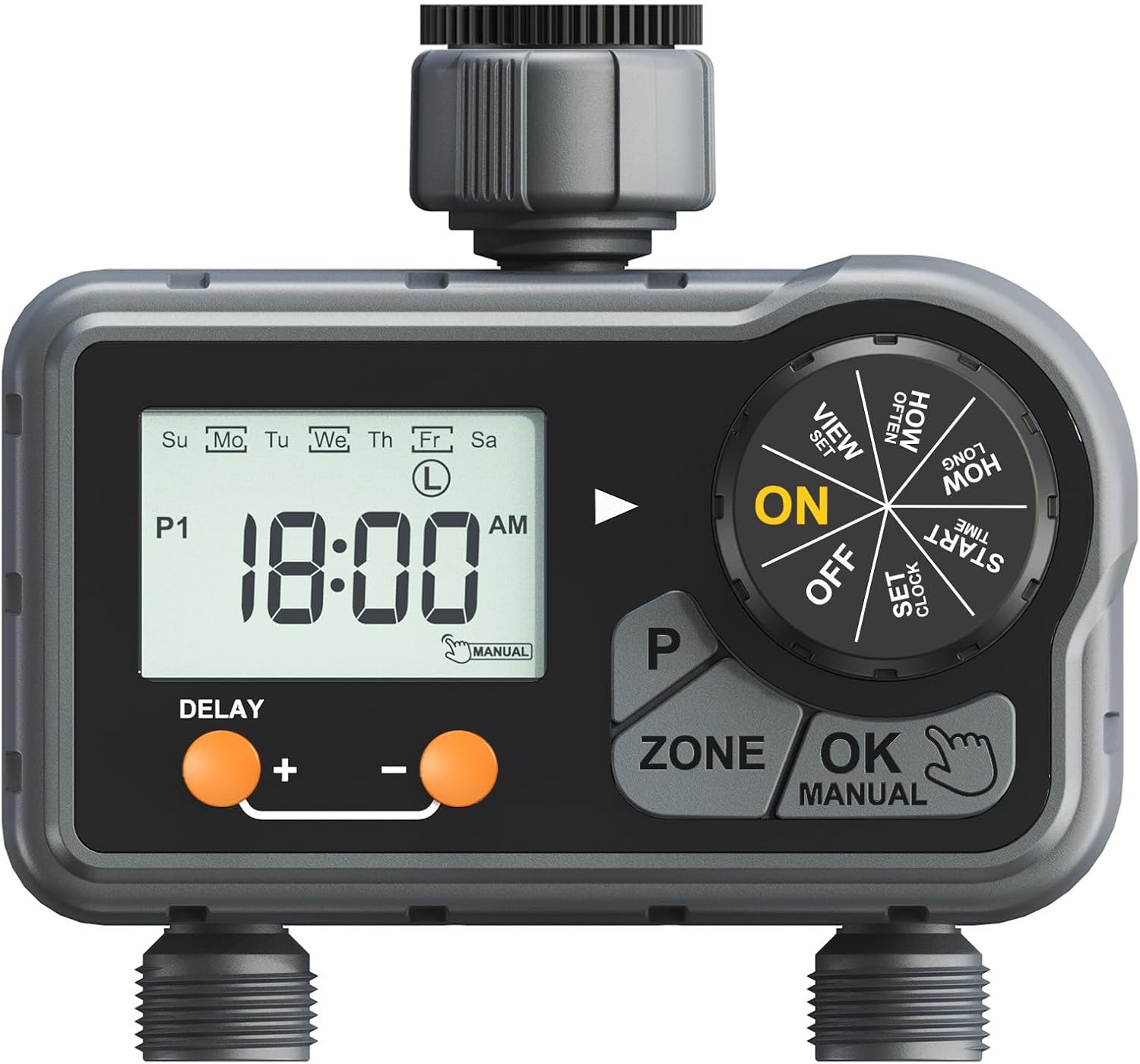
Billede: Forside view of the johgee Digital Water Timer, showcasing its large LCD display, control dial, and two independent outlets. The device is grey and black with orange buttons.
Produktkomponenter

Image: Labeled diagram of the water timer, indicating the filter, hose tap connection, P button, dial, OK/Manual button, Zone button, Delay buttons, and the two Zone outlets.
Familiarize yourself with the main components of your water timer:
- Tilslutning af slangehane: Connects the timer to your outdoor faucet.
- Filter: Forhindrer snavs i at trænge ind i timeren.
- Stor LCD-skærm: Displays time, program settings, and status.
- Urskive: Used to navigate through settings (VIEW, HOW OFTEN, HOW LONG, START TIME, SET CLOCK, ON, OFF).
- P knap: Program button, likely for cycling through programs.
- ZONE-knap: Selects between Zone 1 and Zone 2.
- OK/MANUAL knap: Confirms selections and activates manual watering.
- DELAY / + knap: Adjusts delay time or increases values.
- - Knap: Reducerer værdier.
- Zone 1 & Zone 2 Outlets: Independent outlets for connecting hoses.
Opsætningsinstruktioner
- Batteri installation:
The timer requires 2 AAA alkaline batteries (not included). Locate the battery compartment on the back of the device. Open the compartment, insert the batteries, ensuring correct polarity (+/-), and close the compartment securely. The battery life is approximately half a year.
- Tilslutning til vandhane:
Screw the hose tap connection of the timer onto your outdoor faucet. Ensure the connection is tight to prevent leaks. The timer is designed for 3/4" or 1" BSP or NH thread taps.

Image: The water timer attached to an outdoor faucet, highlighting its IP54 waterproof design and the ability for 360-degree rotation adjustment for optimal positioning.
- Tilslutningsslanger:
Attach your garden hoses to the Zone 1 and Zone 2 outlets at the bottom of the timer. Ensure these connections are also secure.
Betjeningsvejledning
Indstilling af uret
- Drej drejeknappen til SÆT UR.
- Brug + og - knapper for at indstille det aktuelle klokkeslæt.
- Trykke OK/MANUEL for at bekræfte.
Programming Watering Schedules (3 Programs per Outlet)
Each of the two independent outlets (Zone 1 and Zone 2) can be programmed with up to three distinct watering schedules.
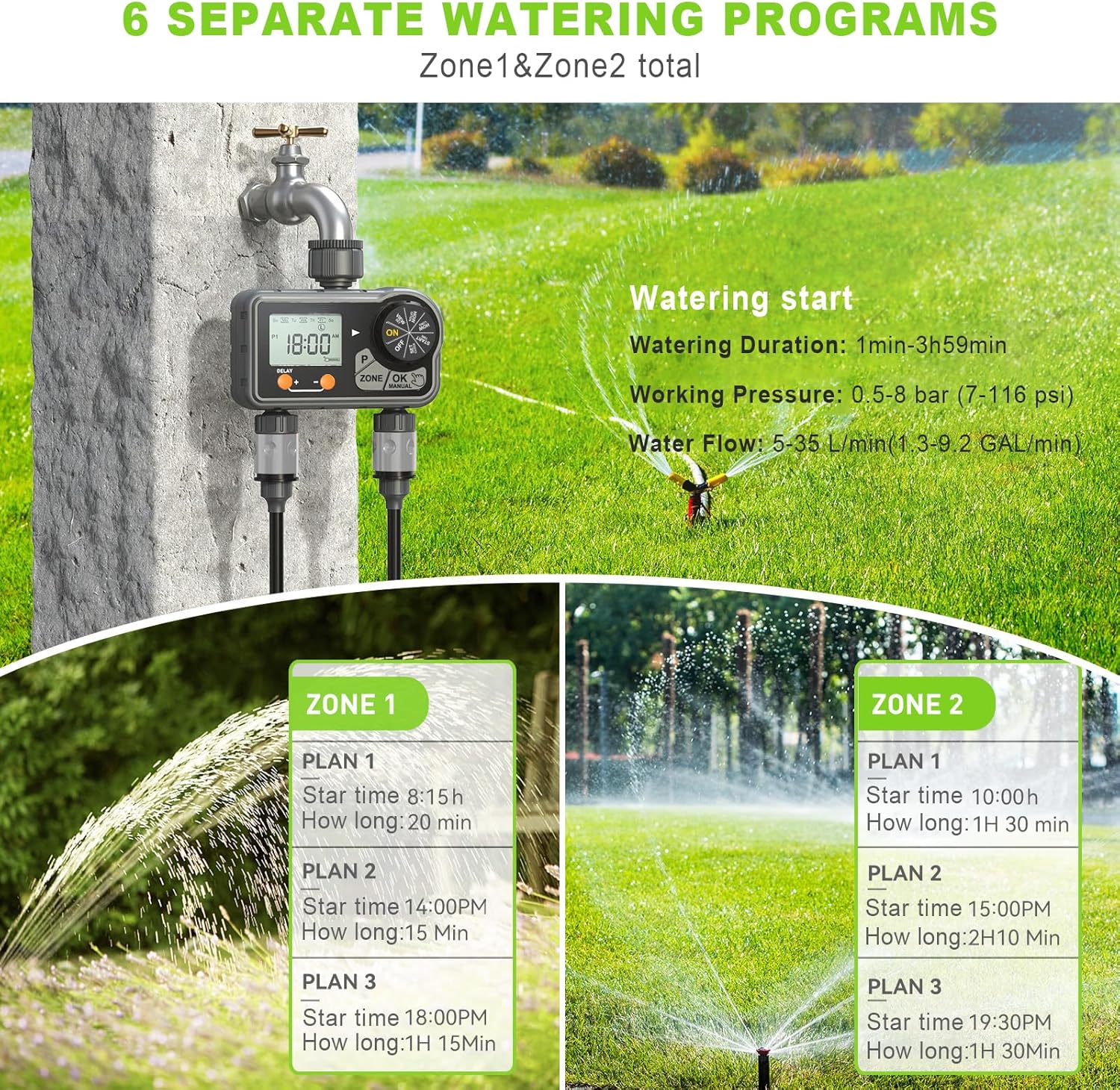
Image: An illustration demonstrating how Zone 1 and Zone 2 can each have three independent watering plans, totaling six programs. Each plan includes a start time and duration.
- Vælg zone: Tryk på ZONE button to switch between Zone 1 and Zone 2. The selected zone will be indicated on the LCD.
- Indstil starttid:
- Drej drejeknappen til STARTTID.
- Bruge + og - to set the desired start time for the program.
- Trykke OK/MANUEL for at bekræfte.
- Indstil vandingsvarighed:
- Drej drejeknappen til HVOR LÆNGE.
- Bruge + og - to set the watering duration (1 minute to 3 hours 59 minutes).
- Trykke OK/MANUEL for at bekræfte.
- Indstil vandingsfrekvens:
- Drej drejeknappen til HVOR OFTE.
- Bruge + og - to select the frequency: every 2 days, every 6 days, or specific days of the week (Monday to Sunday).
- Trykke OK/MANUEL for at bekræfte.
- Indstil yderligere programmer: To set the second or third program for the same zone, press the P button to cycle to the next program (P1, P2, P3) and repeat steps 2-4.

Image: An illustration demonstrating the independent operation of Zone 1 (left) and Zone 2 (right), showing that they can run simultaneously or separately without interference.
Regnforsinkelsesfunktion
The rain delay function allows you to pause your watering schedule for a set period without losing your programmed settings. This is useful during periods of natural rainfall.
- Sørg for, at drejeknappen er i ON position.
- Tryk på FORSINKELSE/+ knap.
- Brug + og - knapperne til at vælge forsinkelsesvarigheden: 24 timer, 48 timer eller 72 timer.
- Trykke OK/MANUEL to activate the rain delay. The timer will resume its schedule automatically after the delay period.

Image: A visual representation of the rain delay feature, showing the timer pausing watering for 24, 48, or 72 hours, with various garden scenes indicating its application.
Manuel vanding
You can initiate manual watering at any time without affecting your programmed schedules.
- Sørg for, at drejeknappen er i ON position.
- Tryk på OK/MANUEL knap.
- Brug + og - knapperne til at indstille den ønskede manuelle vandingsvarighed (1 til 59 minutter).
- Trykke OK/MANUEL again to start manual watering. The timer will stop automatically after the set duration.
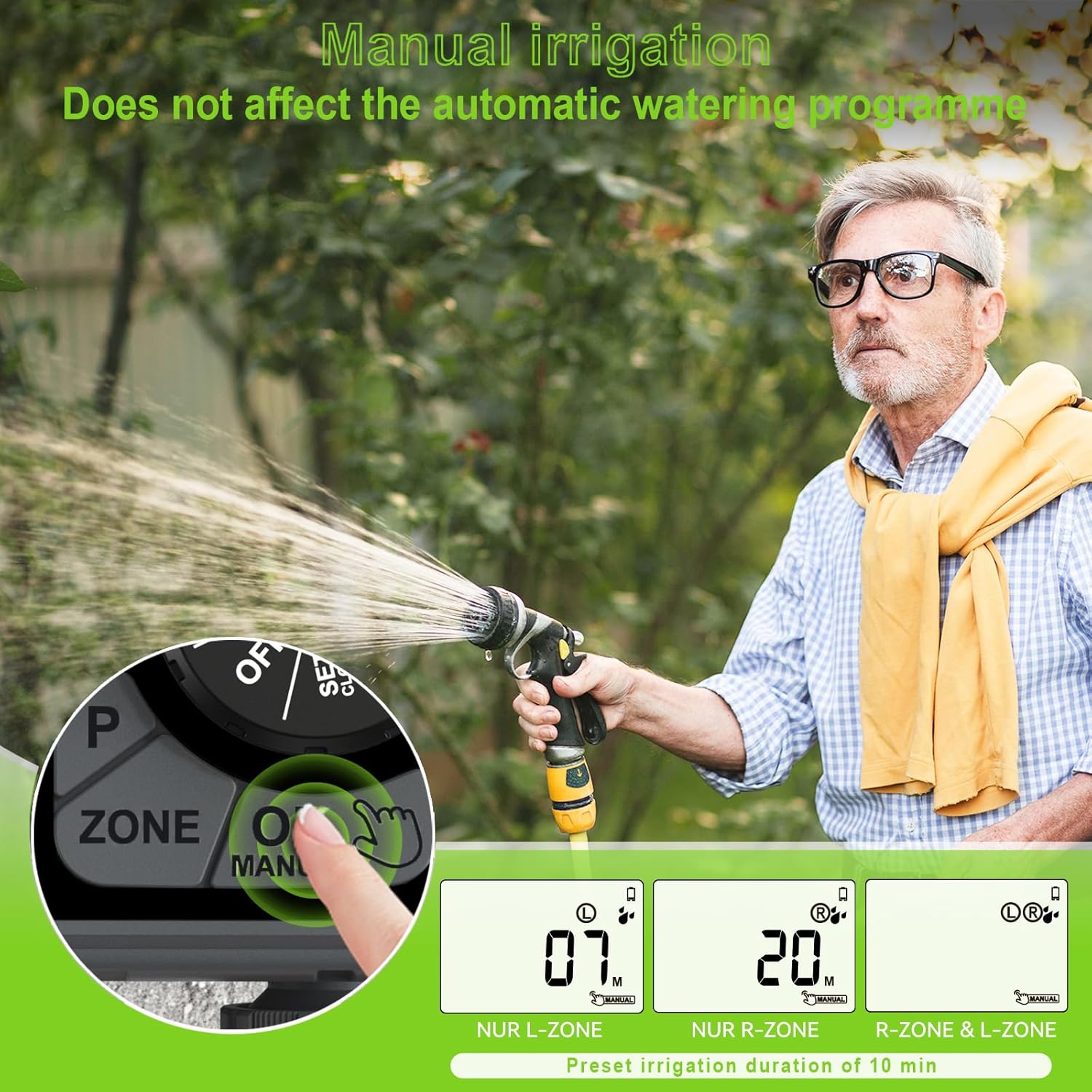
Image: A person demonstrating the manual irrigation feature, holding a hose nozzle while the timer's display shows the manual watering duration. This mode does not interfere with automatic programs.
Turning Off the Timer
To stop all watering, turn the dial to the SLUKKET position.
Opretholdelse
- Udskiftning af batteri: Replace batteries when the low battery indicator appears on the LCD, or approximately every six months.
- Filterrensning: Periodically check and clean the filter located at the hose tap connection to prevent blockages and ensure optimal water flow.
- Vinterisering: Before freezing temperatures, disconnect the timer from the faucet and hoses. Drain any remaining water and store the timer indoors in a dry, frost-free location.
- Generel rengøring: Wipe the exterior of the timer with a damp klud. Brug ikke slibende rengøringsmidler, og nedsænk ikke enheden i vand.
Fejlfinding
| Problem | Mulig årsag | Løsning |
|---|---|---|
| Timeren vander ikke. |
|
|
| Vandlækage fra tilslutninger. |
|
|
| LCD display is blank or dim. |
|
|
Specifikationer
| Vandtud | 2 independent outlets |
| Programmable Programs | 3 programs per spout (total 6) |
| Driftsvandtryk | 0.5-8 bar (7-116 psi) |
| Vandets varighed | 1 min - 3 hours 59 min |
| Vandfrekvens | Every 2 days / Every 6 days / Any day from Monday to Sunday |
| Vandtæt og støvtæt vurdering | IP54 |
| Max flowhastighed | 35 L / min |
| Trådtype | For tap 3/4" or 1" with BSP or NH thread |
| Arbejdstemperatur | 3°C-50°C (37°F-122°F) |
| Strømkilde | 2* AAA Alkaline Batteries (Excluded) |
| Batterilevetid | Approximately half a year |
| Materiale | Plast |
| Dimensioner | 17D x 8.2B x 16.5H Centimeter |
| Varens vægt | 0.53 kilo |
Garanti og support
This product is covered by a standard manufacturer's warranty. For specific warranty details, please refer to the product packaging or contact the retailer where the product was purchased.
For technical support, troubleshooting assistance beyond this manual, or inquiries regarding parts, please contact johgee customer service through their official channels or the platform where you purchased the product.
Gem venligst denne manual til fremtidig reference.


