1. Produktet er slutview
The QIACHIP DC 6V 12V 24V 2 Channel 10A Relay Wireless Remote Control Switch is a versatile RF 433M transmitter and receiver system designed for controlling various electronic devices. It supports Momentary, Toggle, and Latched operating modes, making it suitable for applications such as motor forward and reverse control, garage doors, and curtains. Its wide voltage input (DC 6V~30V) and long-range capability (up to 50 meters in open environments) ensure reliable performance.

Figure 1: QIACHIP 2-Channel Relay Receiver and two 2-button remote controls.
2. Produktfunktioner
- Wide Voltage Indgang: The receiver board operates within a DC 6V to 30V range, ensuring broad compatibility.
- Lang rækkevidde: Features high receive sensitivity, allowing signals to pass through walls, floors, and doors. The maximum control distance is up to 50 meters in open environments.
- Flere arbejdstilstande: Supports Momentary, Toggle, and Latched modes, along with a code clearing function.
- Dobbeltkanalskontrol: Two independent relay channels can work together for polarity forward and reverse control (Latched mode) or control different electronic devices separately (Momentary/Toggle modes).
- Hukommelseskapacitet: The receiver can store up to 15 remote controls.
- Bred anvendelse: Ideal for 12V/24V DC motors, water pumps, LED lamps, telescopic door modifications, electric control locks, access control systems, automotive tail plate modifications, and electric curtain modifications.
3. Pakkens indhold
Pakken indeholder følgende komponenter:
- 1 x 2-Channel (2-CH) Receiver Board (KR2402)
- 2 x 2-Button Transmitters (Remote Controls) (2KT05)
- Batteries for transmitters (1 CR2 battery included per transmitter)

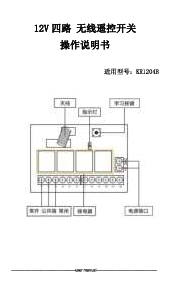
Figur 2: Detaljeret view of the receiver board, remote controls, and included accessories.
4. Opsætnings- og parringsvejledning
This section details how to set up and pair the remote controls with the receiver board for different operating modes. It is crucial to follow these steps carefully for proper functionality.
4.1. Clearing Existing Codes (Reset)
Before setting a new mode or pairing, it is recommended to clear any previously stored codes. This ensures a clean setup.
- Locate the learning button on the receiver board.
- Press the learning button 8 times consecutively. The indicator light on the receiver will flash, indicating that all stored codes have been cleared.
Video 1: Demonstrates the setup process for Momentary, Toggle, and Latched modes, including how to reset the receiver. This video shows the physical interaction with the learning button and remote control for each mode.
4.2. Pairing for Momentary Mode
In Momentary mode, the relay remains active only while the remote button is pressed and held. Releasing knappen deaktiverer relæet.
- Press the learning button on the receiver board 1 time. The indicator light will turn on.
- Press button "A" on the remote control. Wait approximately 3 seconds.
- Press button "B" on the remote control. The pairing is successful.

Figure 3: Visual guide for setting up Momentary, Toggle, and Latched modes.
4.3. Pairing for Toggle Mode
In Toggle mode, pressing a button on the remote activates the corresponding relay, and it remains active until the same button is pressed again to deactivate it.
- Press the learning button on the receiver board 2 times. The indicator light will turn on.
- Press button "A" on the remote control. Wait approximately 3 seconds.
- Press button "B" on the remote control. The pairing is successful.
4.4. Pairing for Latched Mode
In Latched mode, pressing button "A" activates Relay 1 and simultaneously deactivates Relay 2 (if active). Pressing button "B" activates Relay 2 and deactivates Relay 1. This mode is commonly used for motor forward/reverse control.
- Press the learning button on the receiver board 3 times. The indicator light will turn on.
- Press button "A" on the remote control. Wait approximately 3 seconds.
- Press button "B" on the remote control. The pairing is successful.
5. Operating Modes Explained
Understanding the different operating modes is key to utilizing the full functionality of the QIACHIP relay switch.
5.1. Momentantilstand
When configured for Momentary mode, the relay will activate only for the duration that its corresponding button on the remote control is pressed. Once the button is released, the relay deactivates. This is suitable for applications requiring temporary activation, such as a momentary door release.

Figure 4: Visual explanation of Momentary, Toggle, and Latched operating modes.
5.2. Skift tilstand
In Toggle mode, a single press of a remote button activates the relay, and it remains active even after the button is released. To deactivate the relay, the same button must be pressed again. This mode is useful for on/off control of lights or other devices.
5.3. Låst tilstand
Latched mode provides interlocking control between the two relays. Pressing button "A" activates Relay 1 and simultaneously deactivates Relay 2. Conversely, pressing button "B" activates Relay 2 and deactivates Relay 1. This is ideal for controlling the forward and reverse motion of motors, ensuring only one direction is active at a time.
6. Ledningsdiagrammer
Correct wiring is essential for safe and proper operation. Always ensure power is disconnected before making any connections.
6.1. Motor Forward and Reverse Wiring
This diagram illustrates how to wire the receiver for controlling a DC motor's forward and reverse movement, typically used in Latched mode.

Figure 5: Wiring connections for motor forward and reverse operation. Connect the motor to the NO (Normally Open) and COM (Common) terminals of both relays, and the power supply to the IN and GND terminals.
6.2. External Power Supply Wiring
If an external power supply is required for the motor or other connected device, follow this wiring configuration.

Figure 6: Wiring connections when using an external power supply for the controlled device. The receiver itself is powered by DC 6~30V, and the external power is routed through the relay contacts.
Terminaldefinitioner:
- INGEN: Normalt åben pin
- COM: Fælles stift
- NC: Normally Closed pin
- I: Power Input (Positive)
- GND: Jord (negativ)
7. Fejlfinding
If you encounter issues with your QIACHIP wireless remote control switch, consider the following common problems and solutions:
- Remote Not Responding / Relay Not Activating:
- Ensure the receiver board is powered correctly within the 6V-30V DC range.
- Verify that the remote control has a working battery.
- The remote and receiver might not be paired correctly. Perform the "Clearing Existing Codes" (Section 4.1) and then re-pair the remote for the desired operating mode (Sections 4.2-4.4). Some users report that initial pairing is necessary even if instructions don't explicitly state it as a first step.
- Check the distance between the remote and receiver. While it has a long range, obstacles can reduce it.
- Only One Relay Working (in Latched Mode):
- This often indicates incorrect pairing for Latched mode. Ensure you pressed the learning button 3 times, then pressed button "A", waited, and then pressed button "B" during the pairing process.
- Clear all codes (Section 4.1) and re-pair specifically for Latched mode (Section 4.4).
- Enheden tænder/slukker ikke:
- Inspect all wiring connections to ensure they are secure and match the appropriate wiring diagram for your application.
- Confirm that the connected device (motor, light, etc.) is receiving power and is functioning correctly independently of the relay.
- Sørg for strøm og volumentage requirements of your connected device do not exceed the relay's maximum ratings (10 Amps, 30 volt).
8. Specifikationer
| Specifikation | Værdi |
|---|---|
| Mærke | QIACHIP |
| Model | KR2402+2KT05 |
| Receiver Working Voltage | DC 6V ~ 30V |
| Strømstyrke (relæ) | 10 Amps |
| Maksimal switching voltage | 30 volt |
| RF-frekvens | 433M |
| Kontrol afstand | Op til 50 meter (åbent miljø) |
| Driftstilstande | Momentan, vippefunktion, låst |
| Hukommelseskapacitet | Op til 15 fjernbetjeninger |
| Connector Type | Skrueterminaler |
| Kontaktmateriale | Sølvlegering |
| Kontakttype | Normalt åben (NEJ) |
| Varens vægt | 4.2 ounce |
| Batteries (Transmitter) | 1 CR2 batteri påkrævet (medfølger) |

Figure 7: Dimensions of the QIACHIP receiver board.
9. Garanti og support
QIACHIP is committed to providing quality products and customer satisfaction. While specific warranty details are not provided in this manual, if you encounter any problems or have questions regarding your product, please contact the seller directly via email. They are available to assist you with troubleshooting and support.
For further assistance, please refer to the contact information provided with your purchase or on the product listing page.