1. Produktet er slutview
The Gitank Bluetooth 5.0 Adapter is designed to provide seamless wireless audio streaming for compatible Audi, Mercedes, and Volkswagen vehicles equipped with AMI, MMI, or MDI connectors. This adapter features advanced Bluetooth 5.0 technology with AptX HD support, ensuring high-fidelity audio transmission and stable connectivity. It allows users to control music playback directly from their car's screen and steering wheel controls.

Figure 1: Gitank Bluetooth 5.0 Adapter. The image shows the compact black adapter box connected to a cable with a multi-pin AMI/MMI connector.
Nøglefunktioner:
- Bluetooth 5.0 for stabil og hurtig forbindelse.
- Supports AptX HD for high-resolution audio quality.
- Allows control of music playback via car screen and steering wheel buttons.
- Displays song information on the car screen (for compatible devices).
- Compatible with select Audi MMI 2G, Mercedes Media Interface, and Volkswagen MDI systems.
2. Opsætning og installation
Follow these steps to install and set up your Gitank Bluetooth 5.0 Adapter:
- Locate the AMI/MMI/MDI Connector: This connector is typically found in the glove compartment, center console, or armrest of your vehicle.
- Tilslut adapteren: Plug the Gitank Bluetooth adapter into the vehicle's AMI/MMI/MDI connector. Ensure a secure connection.
- Tænd og Bluetooth-parring:
- Turn on your vehicle's ignition. The adapter should power on, indicated by a green light.
- Naviger til Bluetooth-indstillingerne på din smartphone eller Bluetooth-aktiverede enhed.
- Søg efter available devices and select "GITANK" to pair.
- Once paired, the adapter's indicator light may change or remain steady green.
- Select Source on Car System: On your car's infotainment system, select the appropriate audio source (e.g., "Media," "AMI," "Auxiliary Input").
Video 1: Installation and Pairing Demonstration. This video shows the process of plugging the adapter into the AMI connector and then pairing a smartphone via Bluetooth. The video also demonstrates music playback control from the car's interface and steering wheel.
3. Betjeningsvejledning
Once connected and paired, you can control your music playback using your car's native controls.
Music Playback and Control:
- Car Screen Control: Use the car's central control knob or buttons to navigate through playlists, select songs, and control playback (play/pause, next/previous track).
- Ratbetjening: For vehicles with steering wheel audio controls, you can typically use the track skip buttons to change songs.
- Song Information Display: The adapter supports displaying song information (title, artist) on your car's infotainment screen and instrument cluster, depending on your vehicle's capabilities and the connected device.

Figure 2: Multifunctional Control. This image illustrates how the adapter supports both steering wheel controls and the original car head unit radio button control for music playback.
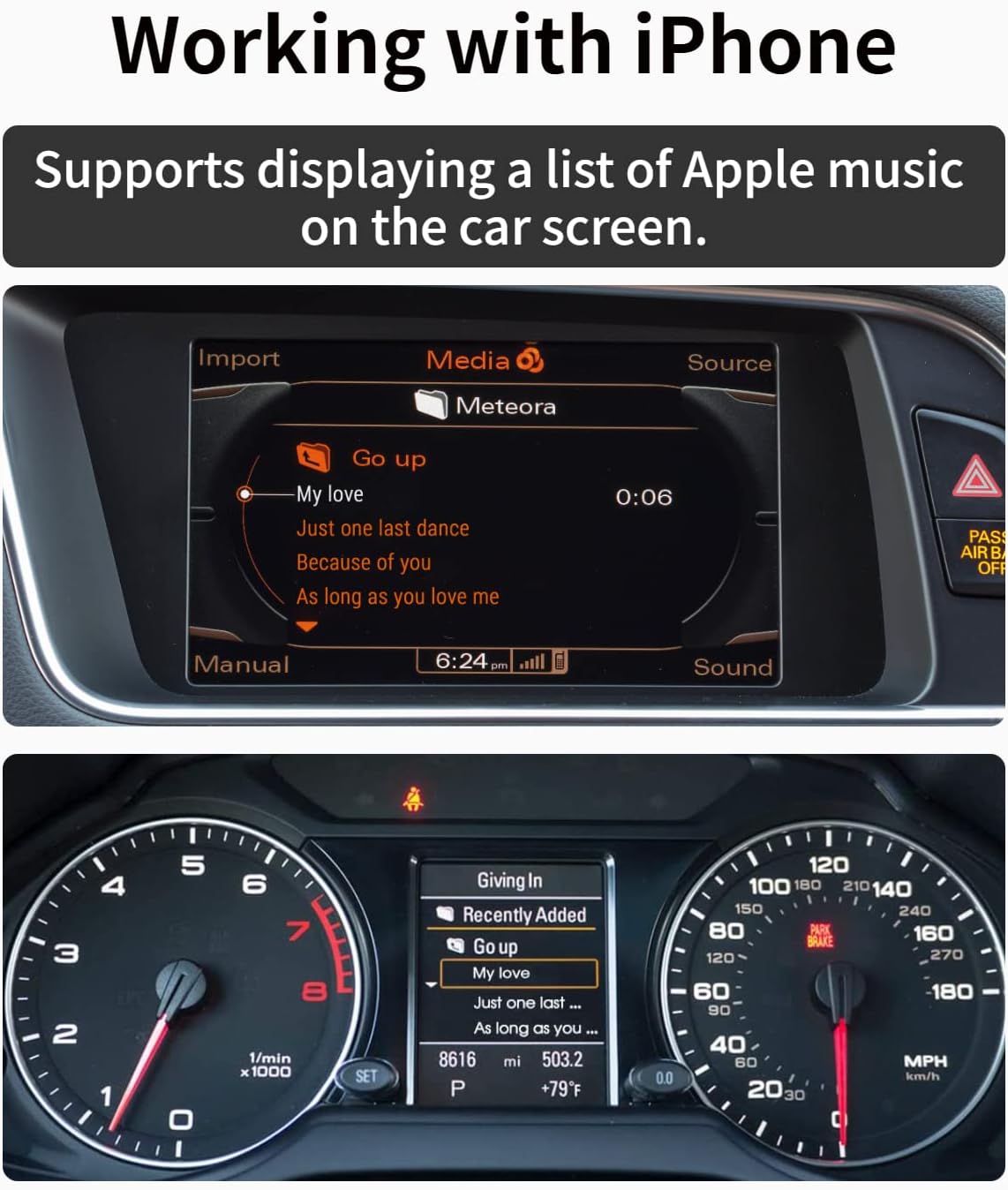
Figure 3: Working with iPhone. This image shows an iPhone connected to the adapter, with the car's display showing a list of Apple Music songs and current track information.
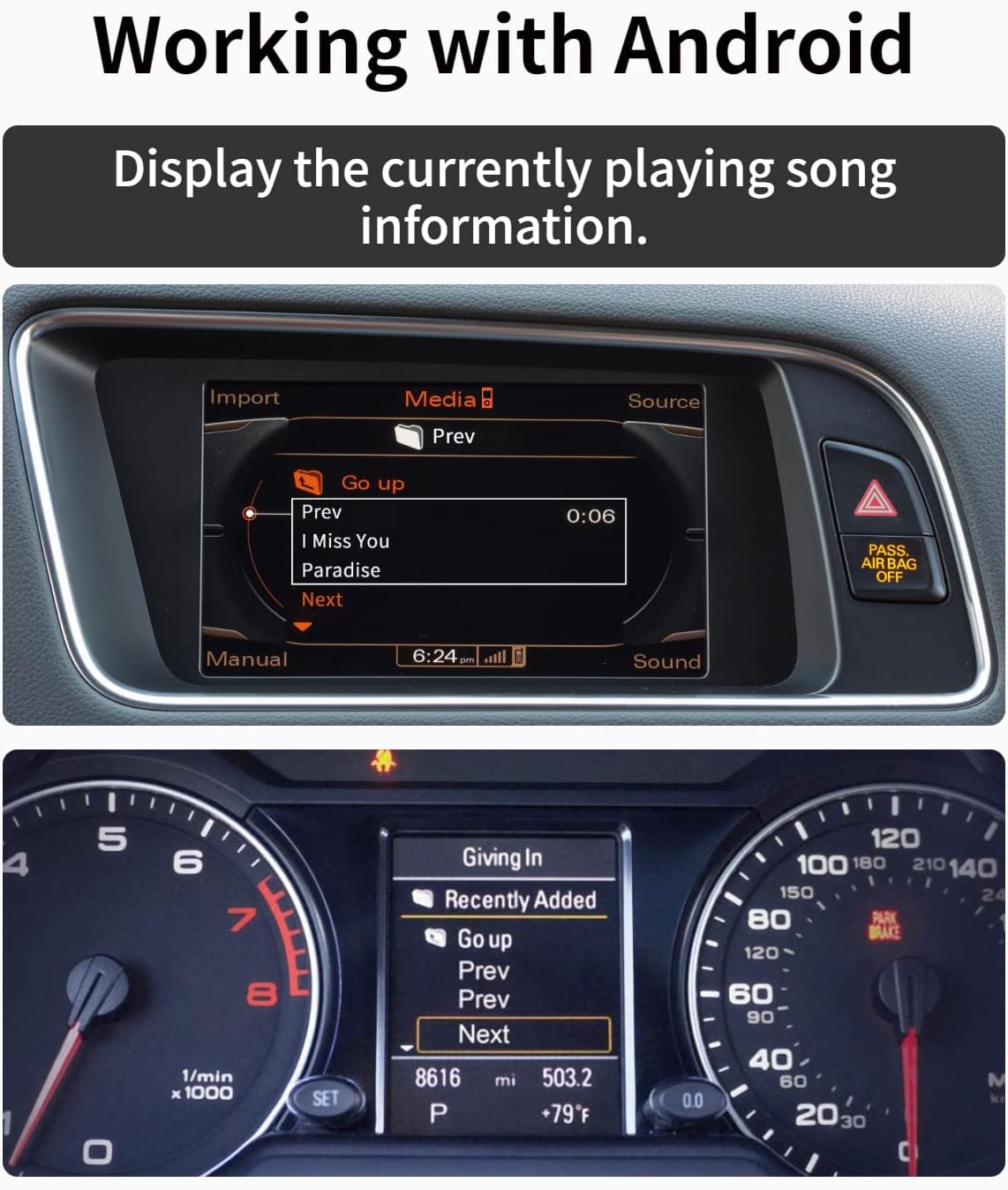
Figure 4: Working with Android. This image demonstrates an Android device connected, with the car's display showing currently playing song information.
4. Vedligeholdelse
To ensure the longevity and optimal performance of your Gitank Bluetooth adapter, follow these simple maintenance guidelines:
- Rensning: Brug en blød, tør klud til at rengøre adapteren. Brug ikke flydende rengøringsmidler eller aerosoler.
- Opbevaring: Når adapteren ikke er i brug i længere perioder, skal den opbevares køligt og tørt, væk fra direkte sollys og ekstreme temperaturer.
- Håndtering: Avoid dropping the adapter or subjecting it to strong impacts. Do not attempt to disassemble the device.
5. Fejlfinding
If you encounter issues with your Gitank Bluetooth adapter, please refer to the following common solutions:
Kompatibilitetskontrol:
Ensure your vehicle's MMI/Media Interface system is compatible with this adapter (Model AUDI-2G). This adapter is primarily designed for Audi MMI 2G systems (2004-2009). It is NOT compatible with Audi MMI 3G systems (2010-2019).
To determine your Audi MMI system version:
- Enter the car menu by pressing the Car Button.
- Press the "Setup" or Menu button on the radio.
- Go to "Settings" and scroll down to Version info.
- Match the prefix with the following list to determine your MMI model:
- MMI 2G SW: XX-XX XX.X.X XXXXX
- MMI 3G Low/Basic: BNav_XX_XXXXX
- MMI 3G High: HNav_XX_XXXXX
- MMI 3G+: HN+_XX_XXXXX or HN+R
- MMI RMC: RMC_XX_XXXXX
- MMI Mib1: MHIG_XX_XXXX
- MMI Mib2: MHIA_XX_XXXX
- MMI MSTD: MSTD_XX_XXXX
If you see the SW version, then you have Audi 2G. MMI 3G, 3G+, etc., systems require the GITANK 300A model.
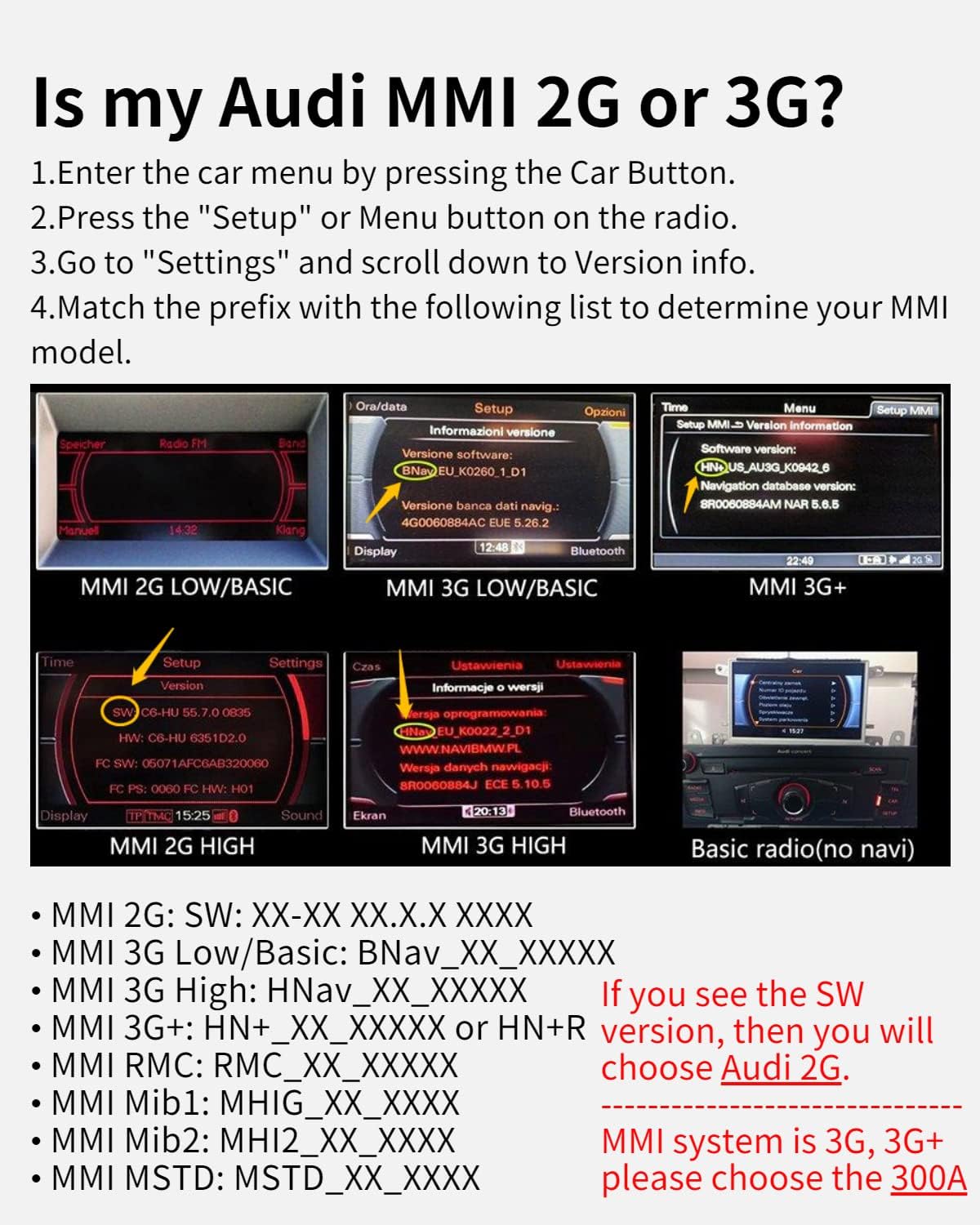
Figure 5: Audi MMI System Identification. This image provides a visual guide and text instructions to help users identify whether their Audi vehicle has an MMI 2G or 3G system, which is critical for compatibility.

Figure 6: Compatibility Guide. This image displays a chart indicating which Gitank adapter model (AUDI-2G or 300A) is suitable for different Audi multimedia systems based on their year and type (2G, 3G, Concert, Symphony).
Almindelige problemer og løsninger:
| Problem | Mulig årsag | Løsning |
|---|---|---|
| No power/Adapter not lighting up | Loose connection, vehicle ignition off, incompatible port. | Ensure adapter is fully plugged in. Turn on vehicle ignition. Verify port is AMI/MMI/MDI. |
| Cannot find "GITANK" in Bluetooth settings | Adapter not in pairing mode, already paired to another device, interference. | Ensure adapter is powered on. Turn off Bluetooth on other nearby devices. Restart adapter by unplugging and replugging. |
| Ingen lydudgang | Incorrect car audio source selected, phone volume low, adapter not fully paired. | Select correct audio source (e.g., AMI, Aux). Increase phone volume. Re-pair Bluetooth. |
| Song information not displaying | Vehicle system limitation, phone OS version, specific app not supported. | This feature depends on your car's system and phone. Ensure latest phone OS. Try different music apps. |
| Controls (steering wheel/car screen) not working | Vehicle system limitation, app incompatibility. | Ensure your car's system supports external device control. Some apps may not fully support remote control. |
6. Specifikationer
| Feature | Detalje |
|---|---|
| Mærke | Gitank |
| Modelnummer | AUDI-2G |
| Produktdimensioner | 9.64 x 1.64 x 0.39 tommer |
| Varens vægt | 2.39 ounce (0.07 kilo) |
| Bluetooth version | 5.0 |
| Audio Codec Support | AptX HD, AptX Low Latency, AptX, AAC, SBC |
| Kompatible enheder | Audi AMI/MMI 2G, Mercedes Media Interface, Volkswagen MDI Connector |
| Antal havne | 1 (AMI/MMI/MDI connector) |

Figure 7: Bluetooth 5.0 Upgrade Details. This image presents a table comparing the features of the newly upgraded Bluetooth 5.0 version (V5.0) with an older version (V3.0), highlighting improvements in maximum code rate, song information display, support codes (aptX-HD, aptX-LL, aptX, AAC, SBC), and audio tuning (DSP, UEQ).

Figure 8: CSR8675 Chip. A close-up image of the CSR8675 chip, indicating the advanced audio processing capabilities of the adapter.

Figure 9: Qualcomm aptX HD Support. This image displays logos for Qualcomm aptX HD, aptX Low Latency, aptX, and AAC, indicating the various high-quality audio codecs supported by the device.
7. Garanti og support
For warranty information or technical support, please contact Gitank customer service through the retailer where you purchased the product or visit the official Gitank website. Please have your product model number (AUDI-2G) and purchase details ready when contacting support.
Du kan finde mere information og kontaktoplysninger på Gitank Store Page.


