1. Introduktion
Welcome to the Nerf Bulls-Eye Digital Target user manual. This guide provides essential information for setting up, operating, maintaining, and troubleshooting your new digital target. The Nerf Bulls-Eye Digital Target is designed to enhance your aiming skills with its interactive features, including 6 flip-back targets, a high-scoring bullseye, and an LCD screen for score tracking. It supports both solo and multiplayer gameplay with three distinct game modes.
2. Sikkerhedsoplysninger
- Aldersanbefaling: This product is suitable for ages 8 years and up. Adult supervision is recommended for younger users.
- Batterisikkerhed: Use only the specified battery type (3 AAA batteries). Do not mix old and new batteries, or different types of batteries. Insert batteries with correct polarity. Remove batteries if the product is not used for an extended period.
- Målanvendelse: Use only official Nerf darts with this target. Do not aim at eyes or face.
- Kvælningsfare: Hold små dele væk fra små børn.
3. Pakkens indhold
Bekræft at alle komponenter er til stede i din pakke:
- One (1) Nerf Bulls-Eye Digital Target unit

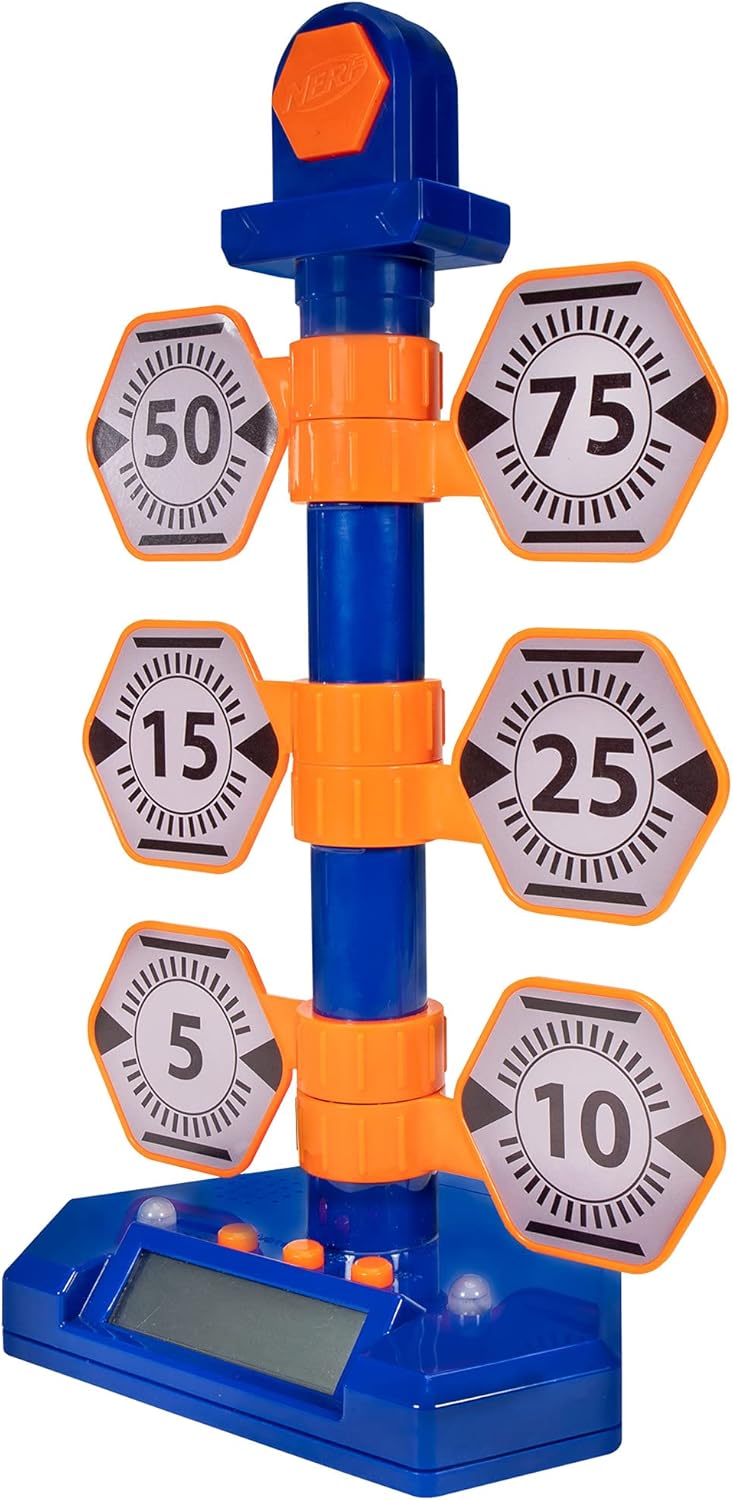
Image: The complete Nerf Bulls-Eye Digital Target, featuring a blue base with an LCD screen, a central blue pole, and six orange and grey hexagonal flip-back targets with various point values.
4. Opsætning
4.1. Batteriinstallation
The Nerf Bulls-Eye Digital Target requires 3 AAA batteries for operation. Batteries are included with the product.
- Find batterirummet på undersiden af målbasen.
- Skru dækslet til batterirummet af med en stjerneskruetrækker.
- Isæt 3 AAA-batterier, og sørg for at polerne (+/-) vender korrekt som angivet inde i batterirummet.
- Sæt batterirummets dæksel på igen og fastgør det med skruen.
4.2. Montering
No assembly is required for the Nerf Bulls-Eye Digital Target. It comes pre-assembled and ready for use after battery installation.

Image: The Nerf Bulls-Eye Digital Target highlighting its key features: a bullseye that lights up and makes sounds for 100 points, six swinging targets, single or multiplayer gameplay, three different game modes, and an LCD screen for score tracking.
5. Betjeningsvejledning
5.1. Tænd/sluk
Press the power button located on the front of the target base to turn the unit on. Press it again to turn it off.
5.2. Spiltilstande
The Bulls-Eye Digital Target features three interactive game modes to test your skills:
- Point Counter: Accumulate points by hitting the targets. Each target has a designated point value (5, 10, 15, 25, 50, 75). Hitting the top bullseye scores 100 points.
- Stack 'Em: This mode challenges players to hit targets in a specific sequence or to achieve a certain score within a time limit.
- Accuracy Test: Focus on precision as you attempt to hit specific targets or the bullseye under varying conditions.
The LCD screen on the base will display scores and game information, allowing you to focus on the competition. The target provides lights and sounds feedback upon hitting targets, especially the bullseye.
Billede: Et nærbillede view of the Nerf Bulls-Eye Digital Target's base, showing the LCD screen displaying scores and game information, along with the control buttons for selecting game modes and power.

Image: A dynamic shot of the Nerf Bulls-Eye Digital Target, illustrating the flip-back mechanism of the hexagonal targets when hit by a dart.
6. Vedligeholdelse
To ensure the longevity and optimal performance of your Nerf Bulls-Eye Digital Target, follow these maintenance guidelines:
- Rensning: Tør måloverfladen af med en blød, tør klud. Brug ikke slibende rengøringsmidler, og nedsænk ikke enheden i vand.
- Opbevaring: Opbevar målet et køligt, tørt sted væk fra direkte sollys og ekstreme temperaturer.
- Batteripleje: Fjern batterierne, hvis målet ikke skal bruges i længere tid, for at forhindre lækage.
7. Fejlfinding
If you encounter issues with your Nerf Bulls-Eye Digital Target, refer to the table below for common problems and solutions:
| Problem | Mulig årsag | Løsning |
|---|---|---|
| Målet tænder ikke. | Døde eller forkert installerede batterier. | Kontroller batteripolariteten. Udskift med nye AAA-batterier. |
| Targets not registering hits. | Darts not hitting targets with enough force; sensor obstruction. | Ensure darts are fired with sufficient velocity. Check for any debris obstructing the target mechanisms. |
| LCD-skærmen er blank eller flimrer. | Low battery power; loose battery connection. | Replace batteries. Ensure batteries are securely seated in the compartment. |
| Sound or lights not working. | Battery issue; internal malfunction. | Udskift batterierne. Kontakt kundesupport, hvis problemet fortsætter. |
8. Specifikationer
| Feature | Detalje |
|---|---|
| Modelnummer | NER0226 |
| Dimensioner (L x B x H) | 22.86 x 33.02 x 50.8 cm |
| Vægt | 531 g |
| Strømkilde | 3 AAA batterier (medfølger) |
| Materiale | Skum |
| Farve | Orange / Blå |
| Driftstilstand | Automatisk |
| Fabrikant | Hasbro |
9. Garanti og support
This product is covered by a standard manufacturer's warranty. For specific warranty terms and conditions, please refer to the documentation included with your purchase or visit the official NERF website. If you require technical assistance or have questions not covered in this manual, please contact NERF customer support through their official channels.
For mere information og produktopdateringer, besøg NERF-butik på Amazon.


