1. Produktet er slutview
The Bell & Howell Director Series Zoomatic Camera is a vintage 8mm movie camera equipped with a Varamat Zoom Lens F/1.8. This manual provides essential information for its setup, operation, and maintenance.
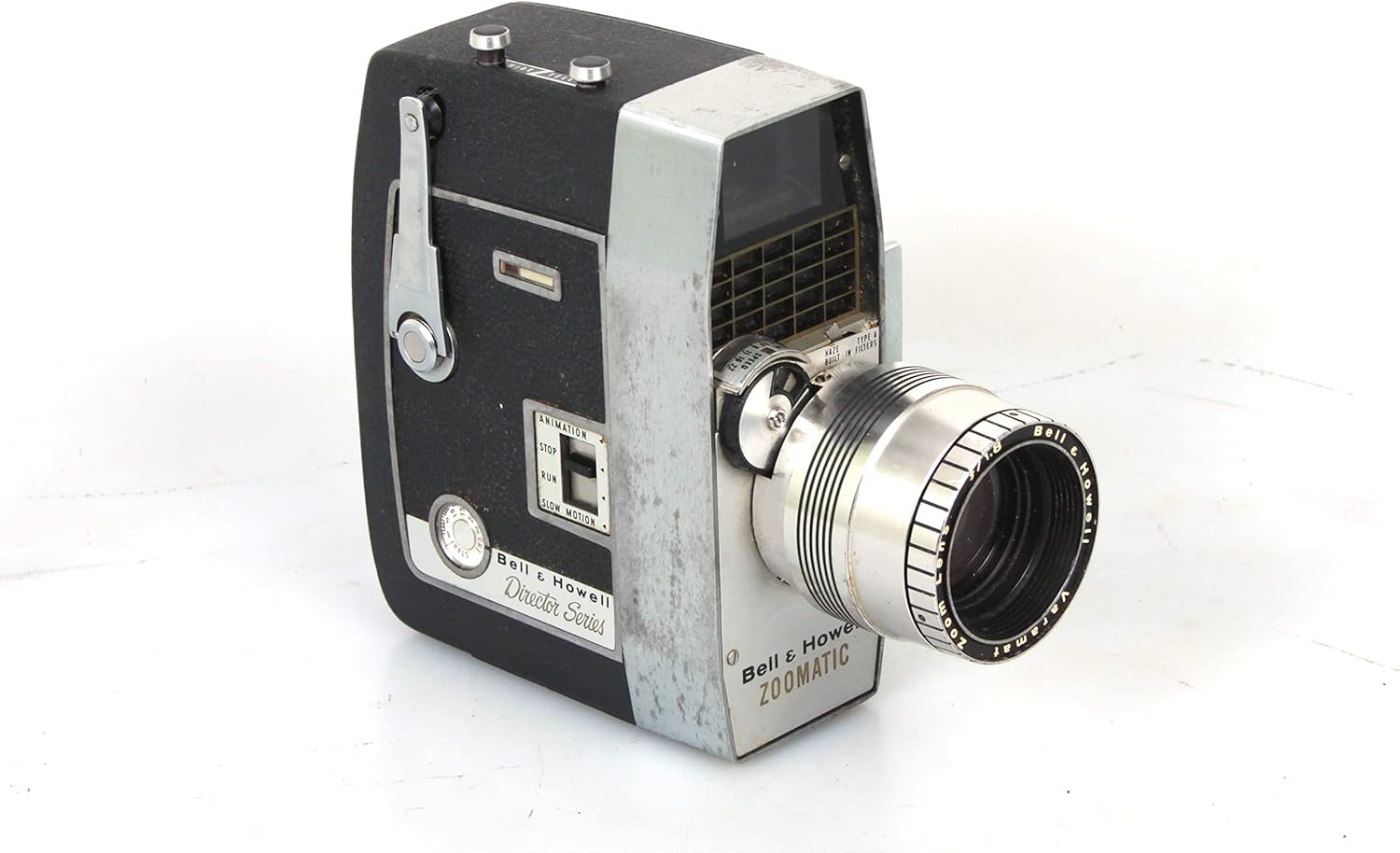
Figur 1.1: Forside view of the Bell & Howell Director Series Zoomatic 8mm movie camera, showcasing its classic design and zoom lens.
Nøglefunktioner:
- DIRECTOR SERIES ZOOMATIC CAMERA with a high-quality F/1.8 zoom lens.
- VINTAGE design, reflecting classic 8mm film technology.
- Equipped with an automatic exposure control type.
- Designed for movie shooting modes.
2. Opsætning
Before operating your Bell & Howell 8mm movie camera, ensure it is properly set up for film loading and power.
2.1 Filmindlæsning
To load film, open the camera's side door. The camera accommodates standard 8mm film reels. Carefully place the film reel onto the supply spindle and thread the film according to the internal diagram, ensuring it passes through the gate and onto the take-up reel. Close the door securely.

Figur 2.1: Intern view of the camera with the side door open, illustrating the film loading area with supply and take-up reels.
2.2 Strømkilde
Denne vintage camera typically operates on internal batteries (not specified, but common for such models). Ensure fresh batteries are installed in the designated compartment, usually located on the side or bottom of the camera. Refer to the battery compartment for specific battery type and polarity.
3. Betjeningsvejledning
Familiarize yourself with the camera's controls for optimal filming.
3.1 Filming
To begin filming, press and hold the trigger or recording button, typically located on the side or front grip. Release the button to stop recording. The camera's motor will activate during recording, indicating film transport.

Figur 3.1: Side view highlighting the film advance mechanism and the lens focus ring.
3.2 Zoomfunktion
The Varamat Zoom Lens F/1.8 allows for optical zoom. Adjust the zoom by rotating the zoom ring on the lens barrel. Rotate clockwise for telephoto (zoom in) and counter-clockwise for wide-angle (zoom out). Ensure smooth rotation for consistent footage.

Figur 3.2: Detaljeret view of the lens area, showing the zoom ring and other operational dials.
3.3 Fokusjustering
To achieve sharp images, adjust the focus ring on the lens. Look through the viewfinder and rotate the focus ring until the subject appears clear and sharp. Some models may feature a "Universal Focus Lock" for simplified operation in certain conditions.

Figur 3.3: Frontal view emphasizing the lens and its focus adjustment capabilities.
4. Vedligeholdelse
Proper maintenance ensures the longevity and optimal performance of your vintage-kamera.
- Rengøring af linser: The lens may accumulate dust and haze over time. Use a soft, lint-free cloth and a specialized lens cleaning solution to gently wipe the lens surfaces. Avoid abrasive materials that could scratch the lens.
- Kropsrensning: Wipe the camera body with a dry, soft cloth to remove dust and fingerprints. For stubborn marks, a slightly damp klud kan bruges, efterfulgt af øjeblikkelig tørring.
- Opbevaring: Store the camera in a cool, dry place, away from direct sunlight and extreme temperatures. It is advisable to remove batteries during long periods of non-use to prevent leakage.
- Viewfinder: De viewfinder may become hazy. While internal cleaning requires professional service, keep the external eyepiece clean with a soft cloth.
5. Fejlfinding
This section addresses common issues you might encounter with your Bell & Howell 8mm movie camera.
| Problem | Mulig årsag | Løsning |
|---|---|---|
| Camera motor not running. | Døde eller forkert installerede batterier. | Kontroller batteripolariteten, og udskift dem med nye batterier. |
| Filmen går ikke videre. | Improper film loading; film jammed. | Re-load film carefully according to instructions. Check for obstructions. |
| Images appear blurry. | Incorrect focus setting; dirty lens. | Adjust the focus ring. Clean the lens as per maintenance instructions. |
| Viewfinder is hazy. | Internal haze or dust. | Clean external eyepiece. For internal haze, professional cleaning may be required. |
6. Specifikationer
| Feature | Detalje |
|---|---|
| Model | DIRECTOR SERIES ZOOMATIC |
| Linse | Varamat Zoom Lens F/1.8 |
| Filmtype | 8 mm film |
| Optagetilstande | Film |
| Eksponeringskontroltype | Automatisk |
| Farve | Sort |
| Varens vægt | 4 pund (ca.) |
| Zoom type | Optisk zoom |
7. Garanti og support
Som en vintage item, this Bell & Howell 8mm movie camera may not come with a manufacturer's warranty. For support regarding operation or repair, it is recommended to consult with vintage camera specialists or authorized repair centers. Online communities and forums dedicated to vintage film equipment can also be valuable resources for troubleshooting and advice.


