1. Introduktion
This manual provides essential information for the safe and effective installation, operation, and maintenance of the Schneider Electric Harmony XB5AS542N Emergency Switching Off Push Button. This device is designed for industrial control applications requiring a reliable emergency stop function. Please read this manual thoroughly before installation and use.
2. Sikkerhedsoplysninger
Vigtig: Failure to follow these safety instructions can result in serious injury or death, and/or equipment damage.
- Always disconnect power to the equipment before installing, servicing, or removing the device.
- Installation og vedligeholdelse bør kun udføres af kvalificeret og autoriseret personale.
- Ensure all local and national electrical codes and safety regulations are strictly followed.
- Verify correct wiring and functionality before returning power to the system.
- Do not modify the device. Use only genuine Schneider Electric parts for replacement.
3. Produktet er slutview
The Harmony XB5AS542N is a robust, plastic modular emergency switching off push button. It features a distinctive red 40mm mushroom head for easy identification and actuation in emergency situations. The device includes one Normally Closed (NC) contact block.
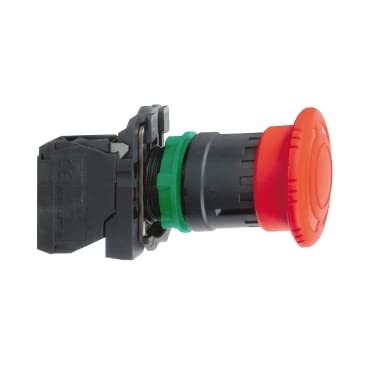
An image showing the Schneider Electric Harmony XB5AS542N emergency stop push button, featuring its red mushroom head, black body, and contact block assembly. The button is designed for panel mounting.
Nøglefunktioner:
- Plastic modular design for easy installation.
- Ergonomic 40mm red mushroom head.
- Latching mechanism with turn-to-release reset.
- Equipped with 1 Normally Closed (NC) contact block.
- IP66 degree of protection, suitable for indoor applications.
- Driftstemperaturområde: -25°C til +70°C.
4. Opsætning og installation
The Harmony XB5AS542N is designed for straightforward installation into standard 22mm diameter panel cut-outs.
Installationstrin:
- Forbered panelet: Ensure a clean, standard 22mm diameter hole is available in the control panel.
- Mount Operator Head: Insert the red mushroom head operator through the front of the panel opening.
- Secure with Nut: From the rear of the panel, thread and tighten the securing nut onto the operator body to firmly hold it in place.
- Vedhæft kontaktblok: Align the 1NC contact block with the operator body and snap it into position. Ensure a secure mechanical connection.
- Ledningsforbindelser: Connect the control circuit wires to the screw-clamp terminals of the contact block. Ensure proper polarity and secure tightening of all connections. Refer to your system's wiring diagram for specific connections.
- Bekræft funktionalitet: Before restoring power, manually actuate and release the button to confirm smooth mechanical operation.
- Gendan strøm: Once installation and checks are complete, restore power to the system and perform a functional test of the emergency stop circuit.
5. Betjeningsvejledning
The Harmony XB5AS542N functions as a latching emergency stop device.
- Aktivering: To activate the emergency stop function, firmly press the red mushroom head. The button will latch in the depressed position, opening the Normally Closed (NC) contact and interrupting the control circuit.
- Frigøre: To reset the button and restore the control circuit, turn the mushroom head clockwise. The button will release from its latched position and return to its original state, closing the NC contact.
6. Vedligeholdelse
The Harmony XB5AS542N is designed for minimal maintenance. Regular inspections are recommended to ensure continued reliable operation.
- Visuel inspektion: Periodically check the button for any signs of physical damage, wear, or contamination.
- Rensning: If necessary, clean the button surface with a soft, damp klæde. Undgå at bruge slibende rengøringsmidler eller opløsningsmidler.
- Funktionstest: Regularly test the emergency stop function by actuating and releasing the button to ensure it operates smoothly and latches/unlatches correctly.
- Tilslutningskontrol: Sørg for, at alle ledningsforbindelser forbliver sikre.
7. Fejlfinding
If you encounter issues with your emergency stop button, consider the following:
- Button Not Latching: Check for obstructions around the button head or damage to the internal latching mechanism. Ensure the contact block is correctly attached.
- Button Not Releasing: Ensure the turn-to-release action is performed correctly (clockwise rotation). Check for any mechanical binding or damage.
- Circuit Not Interrupting/Restoring: Verify wiring connections to the contact block. Check the contact block for damage or wear. Ensure the contact block is securely snapped onto the operator.
- Intermitterende drift: Inspect for loose wiring, damaged insulation, or environmental factors affecting the device.
If problems persist, contact Schneider Electric technical support or a qualified electrician.
8. Specifikationer
| Mærke | Schneider Electric |
| Modelnummer | XB5AS542N |
| Produkttype | Emergency Switching Off Push Button |
| Hoveddiameter | 40mm (Mushroom Head) |
| Monteringsdiameter | 22 mm |
| Aktiveringstype | Push-to-latch |
| Nulstil type | Turn-to-release |
| Kontakt konfiguration | 1 Normally Closed (NC) |
| Beskyttelsesgrad | IP66 |
| Driftstemperatur | -25°C til +70°C |
| Farve | Rød |
| Varens vægt | 400 g |
| Produktmål (LxBxH) | 21 x 12 x 5 cm |
9. Garanti og support
For information om produktgaranti, teknisk support eller service henvises til den officielle Schneider Electric-forhandler. website or contact your local Schneider Electric representative. Keep your purchase receipt for warranty claims.


