1. Introduktion
The SRIHOME SH036 is an advanced 3-megapixel indoor AI WiFi security camera designed for home surveillance, baby monitoring, and general security. It features 1296P resolution for clear images, 360° pan and tilt functionality, AI-powered motion tracking, two-way audio communication, and night vision capabilities. This manual provides detailed instructions to help you maximize the camera's performance and ensure optimal security for your indoor spaces.

Figure 1: SRIHOME SH036 Indoor AI WiFi Security Camera. This image shows the compact, white dome-shaped camera with a black lens housing and a small indicator light.
2. Hvad er der i æsken
Kontroller venligst pakkens indhold ved ankomst for at sikre, at alle varer er til stede:
- IP kamera
- Strømforsyning
- Skruer
- Manual (dette dokument)

Figure 2: Package contents for the SRIHOME SH036 camera. This image displays the IP camera, power supply, screws, and the user manual.
3. Opsætningsvejledning
Follow these steps to set up your SRIHOME SH036 camera:
- Install SD Card (Optional): Hvis du ønsker at optage madtage locally, gently insert a Class 10 or above MicroSD card (4GB to 128GB, formatted to FAT32) into the designated slot on the camera.
- Tænd: Connect the camera to the power supply using the provided adapter. The camera will power on and initiate its self-check.
- Download appen: Søg efter the "SriHome" app on your smartphone's app store (iOS or Android) and install it.
- Registrer/Log ind: Open the SriHome app and create a new account or log in if you already have one.
- Tilføj kamera: Follow the in-app instructions to add your new camera. This typically involves scanning a QR code on the camera or manually entering its ID, and then connecting it to your 2.4GHz Wi-Fi network.
- Placering: Position the camera in your desired indoor location. It can be placed on a flat surface or wall-mounted using the included screws and snap base.
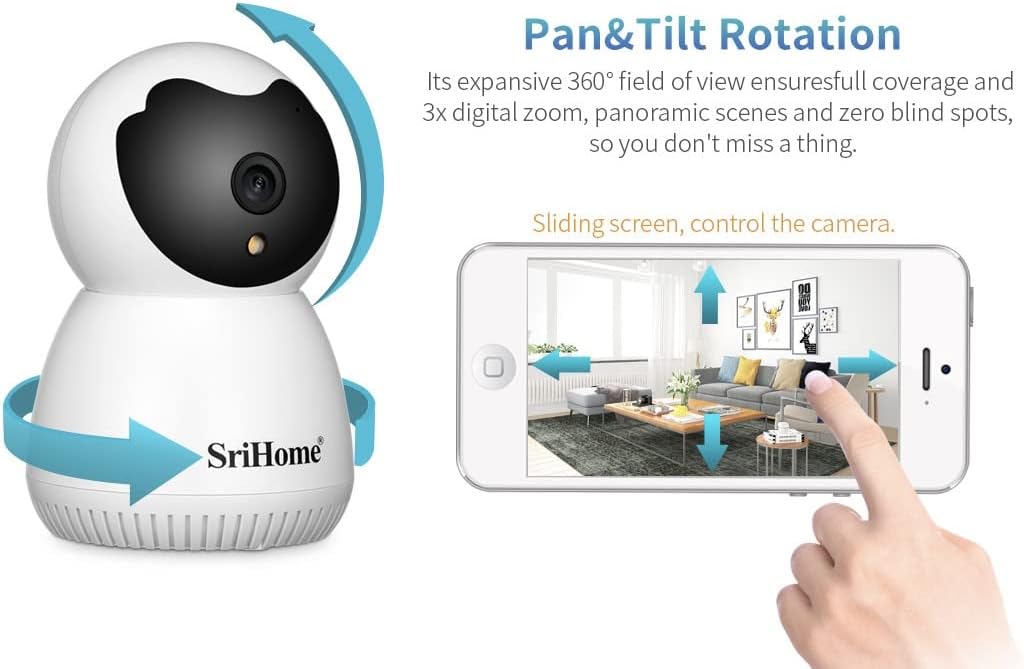
Figure 3: Illustration of inserting a MicroSD card into the camera's external slot. The image shows a hand holding a MicroSD card and inserting it into the camera.
Video 1: SriHome Surveillance Camera SH036 Operation Show. This video demonstrates key operational features including two-way audio, pan/tilt/zoom (PTZ) functionality, humanoid tracking, light adjustment, SD card installation, and alarm notifications.
4. Betjeningsvejledning
The SRIHOME SH036 camera offers a range of features for comprehensive surveillance:
4.1. Lev View and Pan/Tilt/Zoom (PTZ)
Access the live feed through the SriHome app. Use the on-screen controls to remotely pan the camera 355° horizontally and tilt it 90° vertically, providing a 360° field of view. The camera also supports 3x digital zoom.

Figure 4: Demonstrates the camera's pan and tilt rotation controlled via the mobile app. The image shows the camera rotating and a smartphone screen with directional controls.
4.2. Tovejslyd
Utilize the built-in microphone and speaker for real-time two-way communication. This allows you to speak to individuals near the camera and hear their responses directly through the app.

Figure 5: Illustrates the two-way audio feature with speech bubbles and the human detection capability, showing the camera identifying a baby.
4.3. AI Motion Tracking and Human Detection
The camera employs AI technology to detect human activities, reducing false alarms from pets or other objects. When motion is detected, the camera can automatically track the subject and send alarm notifications to your phone.
4.4. Nattesyn
The SH036 features advanced night vision, including spotlight color night vision, to provide clear surveillance even in low-light conditions. You can adjust light settings via the app.

Figure 6: Shows different night vision modes (day, night, full-color night vision) and the privacy masking feature, where specific areas can be blocked from view.
4.5. Local Storage and Privacy Masking
Optag footage directly to a MicroSD card (up to 128GB). The camera also supports privacy masking, allowing you to define up to 4 areas within the camera's view that will not be recorded or monitored, ensuring your privacy.
4.6. Multi-Visitor Authorization
Share access to your camera's live feed with trusted individuals. The app allows for multi-visitor authorization management, enabling you to control who can view dit kamera.
5. Vedligeholdelse
- Rensning: Brug en blød, tør klud til at rengøre kameralinsen og huset. Undgå slibende rengøringsmidler eller opløsningsmidler.
- Firmwareopdateringer: Regularly check the SriHome app for available firmware updates to ensure optimal performance and security.
- SD-kortadministration: Periodisk vedrview and back up important recordings from your MicroSD card. Format the card as needed to maintain recording efficiency.
6. Fejlfinding
- Kameraet opretter ikke forbindelse til Wi-Fi:
- Ensure your Wi-Fi network is 2.4GHz. Check that the camera is within range of your router. Restart both the camera and your router.
- Dårlig billedkvalitet:
- Clean the camera lens. Ensure adequate lighting in the surveillance area. Check your internet connection speed.
- Ingen bevægelsesdetektionsalarmer:
- Verify that motion detection and notification settings are enabled in the SriHome app. Adjust sensitivity levels if necessary.
- Tovejslyd virker ikke:
- Check microphone and speaker permissions for the SriHome app on your phone. Ensure the camera's microphone and speaker are not obstructed.
- Kamera offline:
- Check the power connection and Wi-Fi status. If using AP Hotspot mode, ensure your phone is directly connected to the camera's hotspot.
7. Specifikationer
| Feature | Detalje |
|---|---|
| Modelnummer | SH036 |
| Indendørs/Udendørs brug | Indendørs |
| Videooptagelsesopløsning | 1296p (3 Megapixel) |
| Felt af View | 360 grader (panorering: 355°, hældning: 90°) |
| Forbindelsesprotokol | Wi-Fi (2.4 GHz) |
| Strømkilde | Elektrisk ledning (5 volt) |
| Speciel funktion | HD Resolution, AI Motion Tracking, Night Vision, Two-Way Audio, Privacy Protection |
| Opbevaring | MicroSD Card (4GB-128GB, Class 10+, FAT32) |
| Dimensioner (L x B x H) | 3.31 x 3.31 x 4.33 tommer |
| Varens vægt | 12 ounce |
| Kontrolmetode | App, fjernbetjening |
| Fabrikant | Shenzhen Sricctv |
8. Garanti og support
For warranty information, please refer to the documentation included with your product or visit the official SRIHOME website. For technical support, frequently asked questions, and further assistance, please contact SRIHOME customer service through their official channels or the SriHome mobile application.
Manufacturer: Shenzhen Sricctv


