1. Introduktion
This manual provides essential instructions for the safe and efficient operation of your Crosley CR6252A-YS Portfolio 3-Speed Bluetooth Turntable. Please read this manual thoroughly before using the product and retain it for future reference.
The Crosley Portfolio turntable is designed to play vinyl records at three speeds and features built-in speakers, Bluetooth connectivity for wireless audio streaming, and a moving magnetic cartridge for audio reproduction.

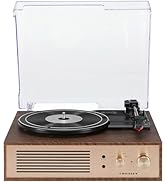
Figure 1.1: Crosley CR6252A-YS Portfolio Turntable (Open View)
2. Sikkerhedsinstruktioner
- Læs alle instruktioner før brug.
- Hold produktet væk fra vand eller fugt.
- Må ikke placeres i nærheden af varmekilder såsom radiatorer, varmeregistre, komfurer eller andre apparater, der producerer varme.
- Rengør kun med en tør klud.
- Brug kun tilbehør/tilbehør specificeret af producenten.
- Træk stikket ud af dette apparat under tordenvejr, eller når det ikke skal bruges i længere perioder.
- Overlad al service til kvalificeret servicepersonale. Service er påkrævet, når apparatet er blevet beskadiget på nogen måde, såsom strømforsyningsledning eller stik er beskadiget, væske er blevet spildt, eller genstande er faldet ind i apparatet, apparatet har været udsat for regn eller fugt, ikke fungerer normalt , eller er blevet droppet.
3. Pakkens indhold
Bekræft, at alle nedenstående varer er inkluderet i din pakke:
- Crosley CR6252A-YS Portfolio Turntable
- Strømadapter
- Brugervejledning (dette dokument)
4. Produktfunktioner og komponenter
The Crosley CR6252A-YS Portfolio Turntable includes the following key features and components:
- 3-hastigheds pladespiller: Understøtter 33 1/3, 45 og 78 RPM plader.
- Built-in Bluetooth Receiver: Allows wireless streaming from compatible devices.
- Adjustable Pitch Control: Fine-tune record speed.
- Moving Magnetic Cartridge: Pre-mounted for optimal sound.
- Hjælpeindgang: Connect external audio sources.
- USB Enabled: Til PC-tilslutning.
- Indbyggede højttalere: Integreret lydudgang.

Figure 4.1: Turntable Mechanism and Controls
Figur 4.2: Detaljer om kontrolpanelet

Figur 4.3: Tilslutninger på bagpanelet
5. Opsætning
5.1 Indledende placering
Place the turntable on a flat, stable surface away from direct sunlight, heat sources, and excessive dust or vibrations.
5.2 Strømtilslutning
- Connect the power adapter to the DC 12V input jack on the rear of the turntable.
- Sæt strømadapteren i en passende stikkontakt.
5.3 Turntable Preparation
- Carefully remove any protective packaging materials from the turntable platter and tonearm.
- Ensure the tonearm is unlocked from its rest.
6. Betjeningsvejledning
6.1 Afspilning af plader
- Drej på ON/OFF knob clockwise to power on the unit.
- Select the desired speed (33 1/3, 45, or 78 RPM) using the speed selector switch. Note: A 78 RPM stylus (not included) is required for 78 RPM records.
- Place a record on the turntable platter. If playing a 45 RPM single, place the 45 RPM adapter (if included) over the spindle.
- Lift the tonearm using the cueing lever and position it over the desired track on the record.
- Sænk langsomt tonearmen ned på pladen ved hjælp af cue-håndtaget. Pladen vil begynde at spille.
- Juster lydstyrken ved hjælp af BIND knop.
- Brug PITCH control knob to fine-tune the playback speed if necessary.
- To stop playing, lift the tonearm, return it to its rest, and turn the ON/OFF knappen mod uret.
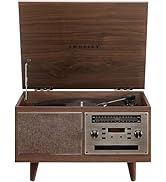
Figure 6.1: Stylus on Record
6.2 Bluetooth-betjening
- Drej på ON/OFF knob clockwise to power on the unit.
- Slide the function switch to the Bluetooth position. The indicator light will flash, indicating pairing mode.
- Enable Bluetooth on your external device (e.g., smartphone, tablet) and search for "Crosley Portfolio".
- Select "Crosley Portfolio" from the list of available devices to pair. Once paired, the indicator light will stop flashing and remain solid.
- You can now stream audio wirelessly from your device to the turntable's built-in speakers.
- Juster lydstyrken ved hjælp af BIND knob on the turntable and/or your external device.
6.3 Ekstraindgang (AUX IN)
- Drej på ON/OFF knob clockwise to power on the unit.
- Tilslut en ekstern lydenhed (f.eks. MP3-afspiller, CD-afspiller) til AUX IN port using a 3.5mm audio cable (not included).
- Pladespilleren skifter automatisk til AUX IN-tilstand.
- Juster lydstyrken ved hjælp af BIND knob on the turntable and/or your external device.
6.4 USB-forbindelse
The turntable features a PC-USB port for connecting to a computer. This allows for digital conversion of your vinyl records using appropriate software (not included). Refer to your chosen software's instructions for recording procedures.
7. Vedligeholdelse
7.1 Rengøring af drejeskiven
- Tag altid stikket ud af stikkontakten til pladespilleren, inden den rengøres.
- Use a soft, dry cloth to wipe the exterior surfaces. Do not use abrasive cleaners or solvents.
- Gently brush the stylus with a soft brush designed for stylus cleaning, moving from back to front.
7.2 Udskiftning af pen
The stylus (needle) is a consumable part and will wear out over time. A worn stylus can damage your records and degrade sound quality. Replace the stylus after approximately 200-300 hours of playback. Consult your retailer or Crosley support for compatible replacement styli.
8. Fejlfinding
| Problem | Mulig årsag | Løsning |
|---|---|---|
| Ingen strøm | Strømadapteren er ikke tilsluttet, eller der er en defekt stikkontakt. | Sørg for, at strømadapteren er korrekt tilsluttet, og at stikkontakten fungerer. |
| Ingen lyd fra højttalerne | Volume too low; function switch in wrong position; Bluetooth not paired. | Increase volume; ensure function switch is set to PHONO or Bluetooth is correctly paired. |
| Spring over rekord | Record is dirty or damaged; stylus is worn; turntable not level. | Clean record; replace stylus; ensure turntable is on a level surface. |
| Bluetooth device won't pair | Turntable not in pairing mode; device too far; device already paired to another unit. | Ensure turntable is in Bluetooth pairing mode; move device closer; disconnect from other Bluetooth devices. |
9. Specifikationer
- Produktdimensioner: 12.4 x 15.28 x 6.5 tommer
- Varens vægt: 13 pund
- Varemodelnummer: CR6252A-YS
- Mærke: Crosley
- Inkluderede komponenter: CR6252A-YS Portfolio Turntable
- Stil: Vintage
- Farve: Yellow Submarine
- Signalformat: Analog
- Strømkilde: Elektrisk med ledning
- UPC: 710244246569
10. Garanti og support
For warranty information and technical support, please refer to the warranty card included with your product or visit the official Crosley webwebsted. Gem din købskvittering som købsbevis i tilfælde af garantikrav.
Fabrikant: Crosley
Dato først tilgængelig: 30. november 2021


