1. Introduktion
This manual provides detailed instructions for the setup, operation, and maintenance of your Loluka Smart Watch JYAW12PROLA. Please read this manual thoroughly to ensure proper use and to maximize the functionality of your device.
1.1 Pakkens indhold
Ved udpakning skal du kontrollere, at alle nedenstående varer er til stede:
- 1x Loluka Smart Watch
- 1x Watch Box
- 1x Brugermanual (dette dokument)
- 1x magnetisk opladningskabel
2. Opsætning
2.1 Opladning af smarturet
Before first use, fully charge your smart watch. Use the provided magnetic charging cable.
- Connect the magnetic end of the charging cable to the charging contacts on the back of the watch. Ensure a secure connection.
- Sæt USB-enden af opladningskablet i en standard USB-strømadapter (medfølger ikke) eller en computers USB-port.
- Urets skærm viser opladningsstatus. En fuld opladning tager typisk cirka 2-3 timer.
Note: A full charge provides approximately 2-5 days of working time and up to 15 days of standby time, depending on usage.
2.2 Tænd/sluk
- For at tænde: Tryk og hold sideknappen nede, indtil skærmen lyser op.
- For at slukke: Naviger til menuen 'Indstillinger' på uret, vælg derefter 'Sluk', eller tryk og hold sideknappen nede, og bekræft slukning.
2.3 Appinstallation og enhedsparring
To unlock the full features of your Loluka Smart Watch, you need to install the companion application on your smartphone and pair the devices.
- Download appen: Scan the QR code provided in the watch's quick start guide or search for the designated app (e.g., 'SZOS' or similar, as mentioned in some product descriptions) in your smartphone's app store (Apple App Store for iOS, Google Play Store for Android).
- Installer og åbn: Installer appen, og åbn den på din smartphone.
- Aktiver Bluetooth: Sørg for, at Bluetooth er aktiveret på din smartphone.
- Par enhed: Within the app, navigate to the 'Device' or 'Add Device' section. The app will search for available devices. Select 'JYAW12PROLA' or the corresponding device name when it appears.
- Bekræft parring: Follow the on-screen prompts on both your phone and watch to confirm the pairing.
Kompatibilitet: The smart watch supports iOS 10.0 or above and Android 5.0 or above smartphones. It is not compatible with PCs, iPads, or tablets.
3. Betjeningsvejledning
The Loluka Smart Watch features a 1.3-inch full touch screen for navigation and interaction.
3.1 Grundlæggende navigation
- Stryg op/ned: Rul gennem menuer eller notifikationer.
- Stryg til venstre/højre: Få adgang til forskellige widgets eller hurtigindstillinger.
- Tryk på: Vælg et element eller bekræft en handling.
- Side knap: Typically used to return to the home screen or access the main menu.
3.2 Bluetooth-opkaldsfunktion
Når den er parret med din smartphone, kan du foretage og modtage opkald direkte fra dit ur.
- Foretage opkald: Access the 'Dialer' or 'Contacts' function on your watch to initiate a call.
- Modtagelse af opkald: When a call comes in, the watch will display the caller ID. You can answer or reject the call directly from the watch screen.
3.3 Beskednotifikationer
The watch can display notifications from your smartphone, including SMS, social media alerts, and other app notifications.
- Sørg for, at notifikationstilladelser er aktiveret for den ledsagende app på din smartphone.
- Notifikationer vises på urskærmen, og uret vibrerer.
3.4 Multi-Sports Modes
The watch includes multiple built-in exercise modes to track your physical activity.
- Access the 'Sports' or 'Workout' menu on your watch.
- Select the desired exercise mode (e.g., running, walking, cycling).
- The watch will track metrics such as steps, calories burned, and distance during your workout.
3.5 Søvnregistrering
The watch monitors your sleep patterns to help you understand and improve your sleep quality.
- Wear the watch while sleeping. It will automatically detect and record different sleep stages, including deep sleep and periods of wakefulness.
- View detailed sleep data in the companion app, which provides a scientific evaluation of your sleep quality over a 7-day period.

Image: The smart watch screen showing sleep monitoring data, including sleep duration and quality metrics. A person is shown sleeping in the background.
3.6 Brugerdefinerede drejeknapper
Personalize your watch face with various pre-installed dials or create custom ones.
- Long-press the watch face on the home screen to access dial options.
- Swipe left or right to browse available dials and tap to select.
- The companion app may offer additional custom dial options, allowing you to upload personal images or designs.
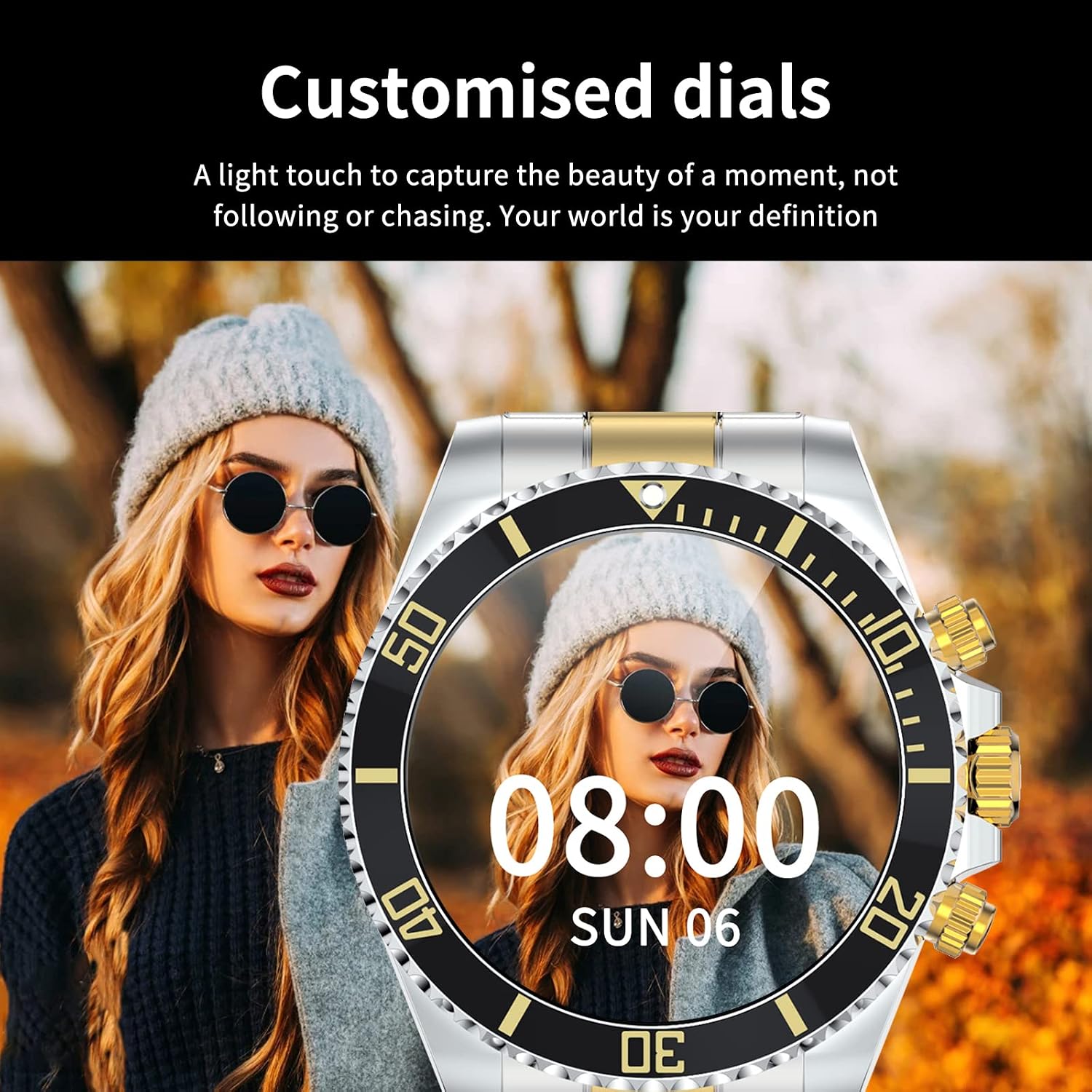
Image: A Loluka Smart Watch displaying a customized digital watch face with time and date, worn by a person.
3.7 Yderligere funktioner
- Skridttæller: Sporer skridt, forbrændte kalorier og distance i løbet af dagen.
- Alarm/Sedentary Reminder: Set alarms and receive reminders to move after periods of inactivity via the companion app.
- Fjernbetjening til kamera: Brug dit ur som fjernbetjent udløser til dit smartphonekamera.
- Musik kontrol: Control music playback on your smartphone (play, pause, skip tracks, adjust volume) directly from the watch.

Image: The smart watch displaying music control options, with a smartphone showing a music playlist in the background.
4. Vedligeholdelse
4.1 Vandtæthed
The Loluka Smart Watch is rated IP67 waterproof.
- It can withstand splashes, hand washing, and rain.
- Vigtig: Uret er IKKE suitable for hot water bathing, diving, swimming, or water-related work where it would be submerged for extended periods or exposed to high-pressure water.

Image: A Loluka Smart Watch partially submerged in water, with text indicating 'IP67 life waterproof' and warnings about unsuitable activities.
4.2 Rengøring
For at bevare dit urs udseende og funktionalitet:
- Wipe the watch and band regularly with a soft, dry, lint-free cloth.
- Brug eventuelt en let damp klud til genstridigt snavs, og tør derefter grundigt.
- Undgå at bruge skrappe kemikalier, rengøringsmidler eller stærke vaskemidler, da disse kan beskadige urets finish og forseglinger.
4.3 Pleje af batterier
- Undgå at aflade batteriet helt ofte.
- Opbevar uret et køligt og tørt sted, når det ikke er i brug i længere perioder.
- Brug kun det medfølgende ladekabel.
5. Fejlfinding
If you encounter issues with your Loluka Smart Watch, refer to the following common solutions:
- Uret tænder ikke: Sørg for, at uret er fuldt opladet. Tilslut det til opladeren i mindst 30 minutter.
- Kan ikke parres med smartphone:
- Sørg for, at Bluetooth er aktiveret på din telefon og uret.
- Sørg for, at uret er inden for din telefons Bluetooth-rækkevidde.
- Genstart både din telefon og uret.
- Sørg for, at den ledsagende app er opdateret til den nyeste version.
- Glem enheden i din telefons Bluetooth-indstillinger, og prøv at parre igen via appen.
- Notifikationer vises ikke:
- Tjek indstillingerne for app-notifikationer på din telefon og i den tilhørende app.
- Sørg for, at uret er forbundet via Bluetooth.
- Unøjagtig aktivitetssporing: Sørg for, at uret sidder tæt på dit håndled. Kalibrer uret via appen, hvis det er muligt.
- Kort batterilevetid: Reduce screen brightness, disable unnecessary features, and ensure the watch is not constantly searching for Bluetooth connections.
Hvis disse trin ikke løser dit problem, bedes du kontakte kundesupport.
6. Specifikationer
| Modelnummer | JYAW12PROLA |
| Skærmstørrelse | 1.3-inch full color screen |
| Opløsning | 240*240 pixels |
| Bluetooth | Dual Bluetooth 3.0/4.0 |
| Batterikapacitet | 380mAh (1 Lithium Metal battery required) |
| Driftstype | Fuld berøringsskærm |
| Opladningstype | Magnetisk opladning |
| Fuld opladningstid | Ca. 2-3 timer |
| Arbejdstid | 2-5 dage (typisk brug) |
| Standby tid | Op til 15 dage |
| Vandtæt vurdering | IP67 |
| Etui materiale | Legering |
| Båndmateriale | Rustfrit stål |
| Spændetype | Fold Clasp |
| Diameter på urskive | 46 mm (1.81") |
| Tykkelse af urskive | 13 mm (0.51") |
| Båndbredde | 22 mm (0.86") |
| Båndlængde | 230 mm (9.05") |
| Understøttede sprog | English, French, Italian, Spanish, Arabic, German, Polish, Portuguese, Malay, Czech, Turkish, Russian, Greek, Persia, Hebrew |
| OS kompatibilitet | iOS 10.0+ / Android 5.0+ |
7. Garanti og support
Your Loluka Smart Watch is designed for reliability and performance. While specific warranty details are not provided in this manual, we are committed to customer satisfaction.
If you have any questions, encounter issues, or require assistance with your product, please do not hesitate to contact our customer support team. We are dedicated to offering the best possible solution to you.
Se venligst din købsdokumentation eller forhandlerens website for contact information and any applicable warranty terms.