Indledning
Thank you for choosing the UrbanX Universal Remote Control. This remote is designed to provide seamless control over your LG Smart TV, including models like 65UN6950ZUA and other LCD, LED, 3D, HDTV, and QLED Smart TVs. It comes with a protective silicone case for enhanced durability and grip. This manual will guide you through the setup, operation, and maintenance of your new remote control.

Image: The UrbanX Universal Remote Control shown alongside its protective black silicone case and a wrist strap.
Nøglefunktioner
- Direct Channel Access: Easily switch channels for digital TVs.
- Comprehensive TV Controls: Includes Power On/Off, Volume Up/Down, Mute, and TV Input.
- Medieafspilningskontrol: Features Play/Pause, Skip Forward, Fast Forward, Skip Back, Fast Back, and Display functions.
- Ergonomisk design: Lightweight, comfortable to hold, and does not require much space.
- Ingen programmering påkrævet: Ready to use immediately after battery insertion.
- Protective Silicone Case: Comes with a perfectly fitted black silicone case for enhanced durability and grip.

Image: Illustration highlighting the features of the premium silicone case: high flexibility, non-toxic material, and lightweight design.
Pakkens indhold
Your UrbanX Universal Remote Control package should contain the following items:
- 1 x UrbanX Universal Remote Control
- 1 x Protective Black Silicone Case
Note: 2 AAA batteries are required for operation and are not included in the package. Please purchase them separately.
Opsætning
Installation af batteri
- Find batterirummet på bagsiden af fjernbetjeningen.
- Skub batterirummets dæksel op.
- Isæt to (2) AAA-batterier, og sørg for, at de positive (+) og negative (-) poler er korrekt justeret med markeringerne inde i batterirummet.
- Luk batterirummets dæksel forsvarligt.
Indledende brug
No programming or setting up is required for this remote control. Once the batteries are correctly installed, the remote is ready for immediate use with your compatible LG Smart TV.
Betjeningsvejledning
The UrbanX Universal Remote Control provides intuitive access to common TV functions. Below are the primary controls:
- Power knap: Located at the top, used to turn your TV On or Off.
- Volume Controls (VOL +/-): Juster lydstyrken.
- Channel Controls (CH +/-): Skift tv-kanaler.
- Mute-knap: Slår lyden fra eller til for TV-lyden.
- TV-indgangsknap: Skifter gennem tilgængelige inputkilder (HDMI, AV osv.).
- Nummerknapper (0-9): For direkte kanaladgang.
- Knapper til medieafspilning: Includes Play/Pause, Skip Forward, Fast Forward, Skip Back, Fast Back for media content.
- Navigation Pad (OK, Up, Down, Left, Right): Bruges til menunavigation og valg.
- Tilbage/Afslut-knapper: Navigate back in menus or exit current functions.
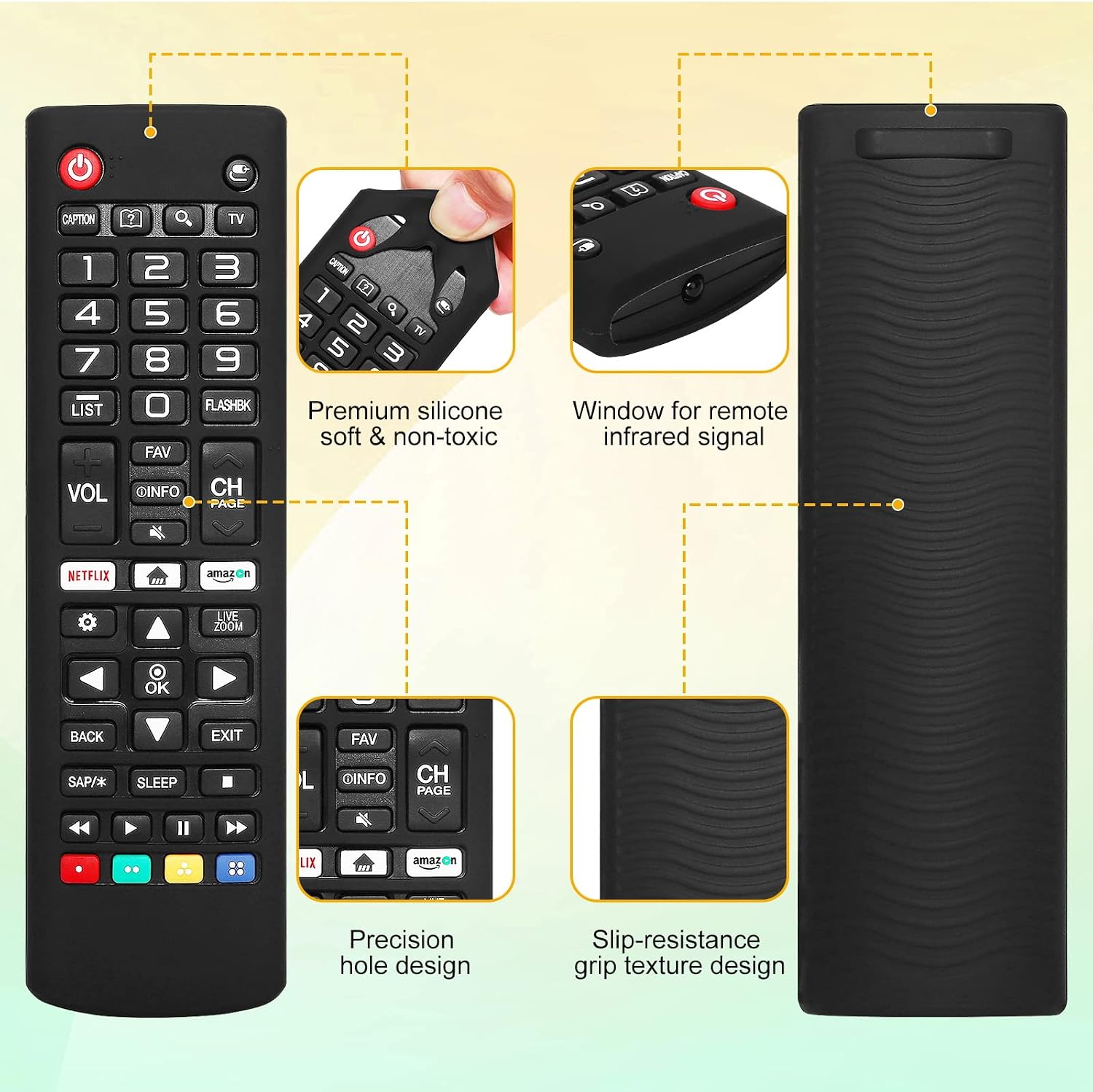
Billede: Detaljeret view of the remote control highlighting features like premium silicone, infrared signal window, precision hole design, and slip-resistance grip texture design of the case.
Using the Protective Case
The included silicone case provides an extra layer of protection against drops and impacts, and enhances grip. It also features a wrist strap to prevent accidental drops and loss.

Image: An illustration showing the remote control with its protective case falling towards the floor, implying protection from impact.

Image: The remote control hanging from a door handle by its wrist strap, demonstrating the anti-lost feature. Smaller images show the remote being held with the strap and the strap attachment point on the case.
Kompatibilitet
This UrbanX Universal Remote Control is compatible with all versions of LG UN 65 inch 4K Smart UHD TV, including model 65UN6950ZUA. It also acts as a replacement for the following LG Remote Control models:
- AKB75375604
- AKB75095307
- AKB75675304
- AKB74915305
It is designed to work with a wide range of LG Smart TV models, including LCD, LED, 3D, HDTV, and QLED Smart TVs.

Image: A grid displaying various LG remote control models (AKB75095307, AKB7509589A, AKB7501315A, BN59-01196F, AA59-00262A, AA59-00471A) with checkmarks, indicating compatibility or replacement capability.
Opretholdelse
Udskiftning af batteri
When the remote control's performance degrades or buttons become unresponsive, it is likely time to replace the batteries. Follow the battery installation steps outlined in the "Setup" section.
Rensning
To clean the remote control and its silicone case, use a soft, dry cloth. For stubborn dirt, a slightly damp cloth with mild soap can be used, ensuring no liquid enters the remote's internal components. Allow to air dry completely before reassembly or use.
Fejlfinding
- Remote not responding or some buttons not working:
First, check the batteries. Ensure they are inserted correctly with the correct polarity (+/-). If the issue persists, replace the batteries with new ones. Weak or depleted batteries are a common cause of unresponsive remote controls.
- Remote does not have a Netflix specific button:
This remote model does not feature a dedicated Netflix button. To access streaming services like Netflix, please navigate through your TV's smart menu using the remote's navigation and OK buttons.
- Slow response time:
Ensure there are no obstructions between the remote control and your TV's infrared receiver. Also, verify that the batteries are not low.
Specifikationer
| Mærke | UrbanX |
| Model | AKB74915305 (Replacement for various LG models) |
| Kompatible enheder | LG Smart TVs (LCD, LED, 3D, HDTV, QLED), including 65UN6950ZUA |
| Strømkilde | 2 x AAA batterier (medfølger ikke) |
| Produktdimensioner | 1 x 1 x 4 tommer |
| Varens vægt | 1 ounce |
| Særlige funktioner | Universal, Ergonomic, Protective Silicone Case |
Garanti og support
For any questions, concerns, or support regarding your UrbanX Universal Remote Control, please refer to the seller's contact information on your purchase platform. While specific warranty details are not provided in this manual, please retain your proof of purchase for any potential warranty claims.
For further assistance, you may visit the UrbanX Store on Amazon: UrbanX Store.
