1. Produktet er slutview
The TrolMaster NFS-1 Aqua-X Controller is an advanced irrigation system controller designed for managing multiple rooms and zones. It offers precise control over up to 30 outputs (24V or 110V) and includes pH, EC, and temperature monitoring capabilities. Users can access a free smartphone app for alerts, historical charts, and data logging.

Figur 1: Forside view of the Aqua-X Controller, showing the LCD display with sensor readings and control buttons.

Figure 2: The retail packaging for the Aqua-X Controller, highlighting the product's branding and model number.
2. Pakkens indhold
Bekræft at alle komponenter er til stede i pakken:
- TrolMaster NFS-1 Aqua-X Controller Unit
- Water Detector Set
- Strømadapter
- Brugervejledning (dette dokument)
- Monteringsudstyr (hvis relevant)
3. Opsætning og installation
3.1 Fysisk installation
The Aqua-X Controller is designed for indoor use. Choose a dry, secure location away from direct sunlight and excessive heat or moisture.
- Montering af controlleren: Use the provided mounting hardware to secure the controller to a wall or suitable surface. Ensure it is easily accessible for operation and cable management.
- Tilslutning af strøm: Connect the power adapter to the DC 12V input port on the controller and then plug it into a standard electrical outlet.
- Connecting Water Detector: Plug the water detector cable into the designated "WATER DETECTOR" port on the back of the controller. Position the water detector in an area where water leaks are most likely to occur.
- Netværks forbindelse: Connect an Ethernet cable from your router to the "INTERNET" port on the controller for smartphone app connectivity and data logging.
- Connecting Control Modules: Connect 24V or 110V control modules (sold separately) to the respective "24V CONTROL" or "110V CONTROL" ports as needed for your irrigation setup.
- Tilslutning af sensorer: Connect pH, EC, and temperature sensors (sold separately) to the "SENSOR/COMBO" port.

Figur 3: Bagside view of the Aqua-X Controller, displaying the various input and output ports for power, internet, control modules, sensors, and water detector.
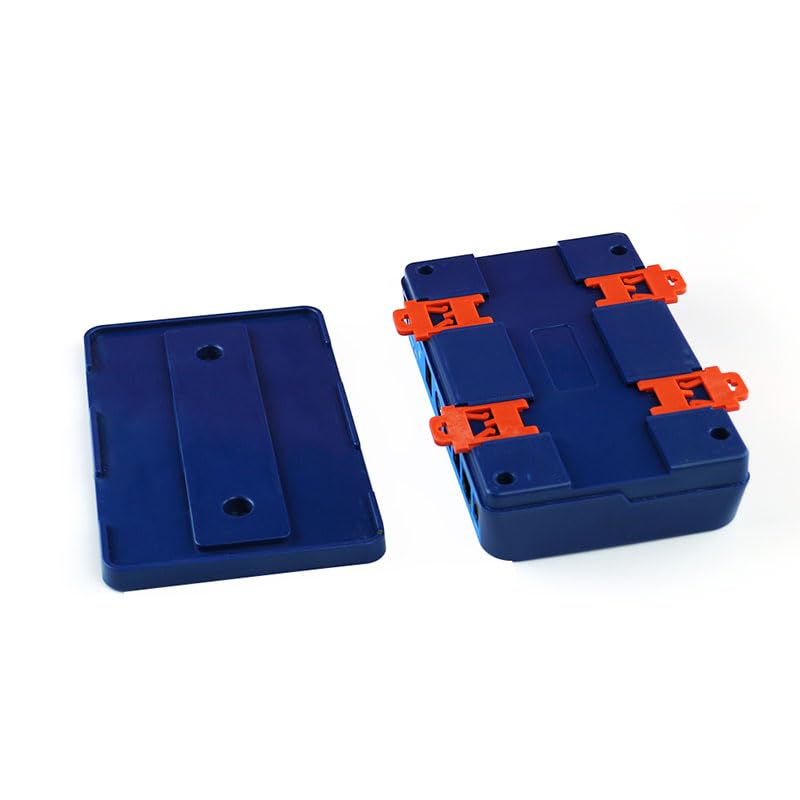
Figure 4: Detached mounting brackets for the Aqua-X Controller, illustrating how the unit can be secured to a surface.
4. Betjeningsvejledning
4.1 Første opstart og display
Once powered on, the LCD display will illuminate, showing current readings for EC, temperature, and pH (if sensors are connected). The date and time will also be displayed.
4.2 Navigation and Settings
Brug navigationsknapperne (UP, NED, VENSTRE, HØJRE, ENTER, TILBAGE) on the front panel to navigate through menus and adjust settings.
- OP NED: Rul gennem menupunkter eller juster værdier.
- VENSTRE HØJRE: Move cursor or change selection within a setting.
- GÅ IND: Bekræft valget, eller åbn en undermenu.
- TILBAGE: Return to the previous menu or cancel an action.
4.3 Integration af smartphone-apps
Download the official TrolMaster app from your device's app store. Follow the in-app instructions to connect your Aqua-X Controller. The app allows for remote monitoring, setting adjustments, viewing historical data, and receiving alerts.
Note: Ensure your controller is connected to the internet for app functionality.
5. Vedligeholdelse
Regular maintenance ensures optimal performance and longevity of your Aqua-X Controller.
- Rensning: Periodically wipe the controller's exterior with a soft, dry cloth. Do not use abrasive cleaners or solvents.
- Sensorkalibrering: Calibrate pH and EC sensors regularly according to their specific instructions to maintain accuracy.
- Firmwareopdateringer: Check the TrolMaster website or smartphone app for available firmware updates. Keep your controller's firmware up-to-date for new features and bug fixes.
- Water Detector Check: Periodically test the water detector by placing it in a small amount of water to ensure it triggers an alert.
6. Fejlfinding
| Problem | Mulig årsag | Løsning |
|---|---|---|
| Controlleren tænder ikke. | Ingen strømforsyning; defekt adapter. | Check power connection; test outlet; replace adapter if necessary. |
| Ingen internetforbindelse. | Ethernet cable disconnected; router issue; network settings. | Ensure Ethernet cable is securely connected; restart router; check network settings on controller. |
| Inaccurate sensor readings. | Sensors need calibration; dirty sensors; faulty sensors. | Calibrate sensors according to manufacturer instructions; clean sensors; replace if damaged. |
| Water detector not alarming. | Detector not connected; faulty detector. | Ensure detector is securely plugged in; test detector manually; replace if faulty. |
7. Specifikationer
| Feature | Detalje |
|---|---|
| Modelnummer | NFS-1 |
| Produktdimensioner | 10.83 x 6.46 x 2.44 tommer |
| Vægt | 1.94 pund |
| Kontrol udgange | Up to 30 (24V or 110V) |
| Overvågning | pH, EC, Temperatur |
| Forbindelse | Ethernet for App/Data Logging |
| Speciel funktion | Plug and Play |
| Indendørs/Udendørs brug | Indendørs |
| UPC | 606795352036 |
8. Garanti og support
8.1 Garantioplysninger
TrolMaster products typically come with a limited manufacturer's warranty covering defects in materials and workmanship. Please refer to the warranty card included with your product or visit the official TrolMaster webwebstedet for specifikke garantivilkår og -betingelser, herunder detaljer om varighed og dækning.
8.2 Kundesupport
For technical assistance, troubleshooting, or warranty claims, please contact TrolMaster customer support through their official website or the contact information provided in your product packaging. Have your model number (NFS-1) and purchase details ready when contacting support.
Online ressourcer: Visit the TrolMaster Store on Amazon for yderligere produktinformation og ressourcer.


