1. Introduktion
Tak for købetasing the Douk Audio H2 HiFi Vacuum Tube Headphone AmpDenne manual indeholder vigtige oplysninger for sikker og effektiv betjening af din enhed. Læs den grundigt inden brug, og gem den til senere brug.
The Douk Audio H2 is designed to deliver a high-fidelity audio experience with its balanced XLR input and classic vacuum tube sound. It features powerful amplification, independent L/R balance adjustment, and adjustable gain settings to optimize performance for various headphones and audio sources.
2. Sikkerhedsinstruktioner
- Udsæt ikke denne enhed for regn, fugt eller ekstreme temperaturer.
- Sørg for ordentlig ventilation omkring ampfor at forhindre overophedning.
- Åbn ikke c'enasing. Overlad al service til kvalificeret personale.
- Use only the provided DC 12V power adapter. Using an incorrect adapter may damage the device and void the warranty.
- Undgå at placere amplifier near strong magnetic fields.
- Sluk altid for amplifier and disconnect the power before cleaning or moving it.
- Opbevares utilgængeligt for børn.
3. Pakkens indhold
Bekræft at alle varer er til stede i pakken:
- 1x Douk Audio H2 Headphone Amplivligere
- 2x 6N3 Vacuum Tubes
- 1x DC 12V strømadapter
- 1x 6.35mm to 3.5mm Headphone Adapter
- 1x Brugermanual (dette dokument)

Image: Contents of the Douk Audio H2 package, showing the amplifier, two 6N3 vacuum tubes, a DC 12V power adapter, and a 6.35mm to 3.5mm headphone adapter.
4. Produktet er slutview
4.1 Frontpanel

Image: Detailed diagram of the H2 amplifier's front panel, highlighting the 6.35mm and Balanced XLR headphone outputs, the LED display showing input and volume, and the multi-function volume/mode knob.
- 6.35 mm hovedtelefonudgang: Standard hovedtelefonstik med én ende.
- Balanced XLR Headphone Output: For balanced headphones, offering superior audio quality.
- LED display: Shows current input channel, volume level, gain setting, and channel balance.
- Power Switch / Volume Knob / Filter Selector / Input Channel Select: Multi-function knob for power, volume adjustment, and navigating settings.
4.2 Bagpanel
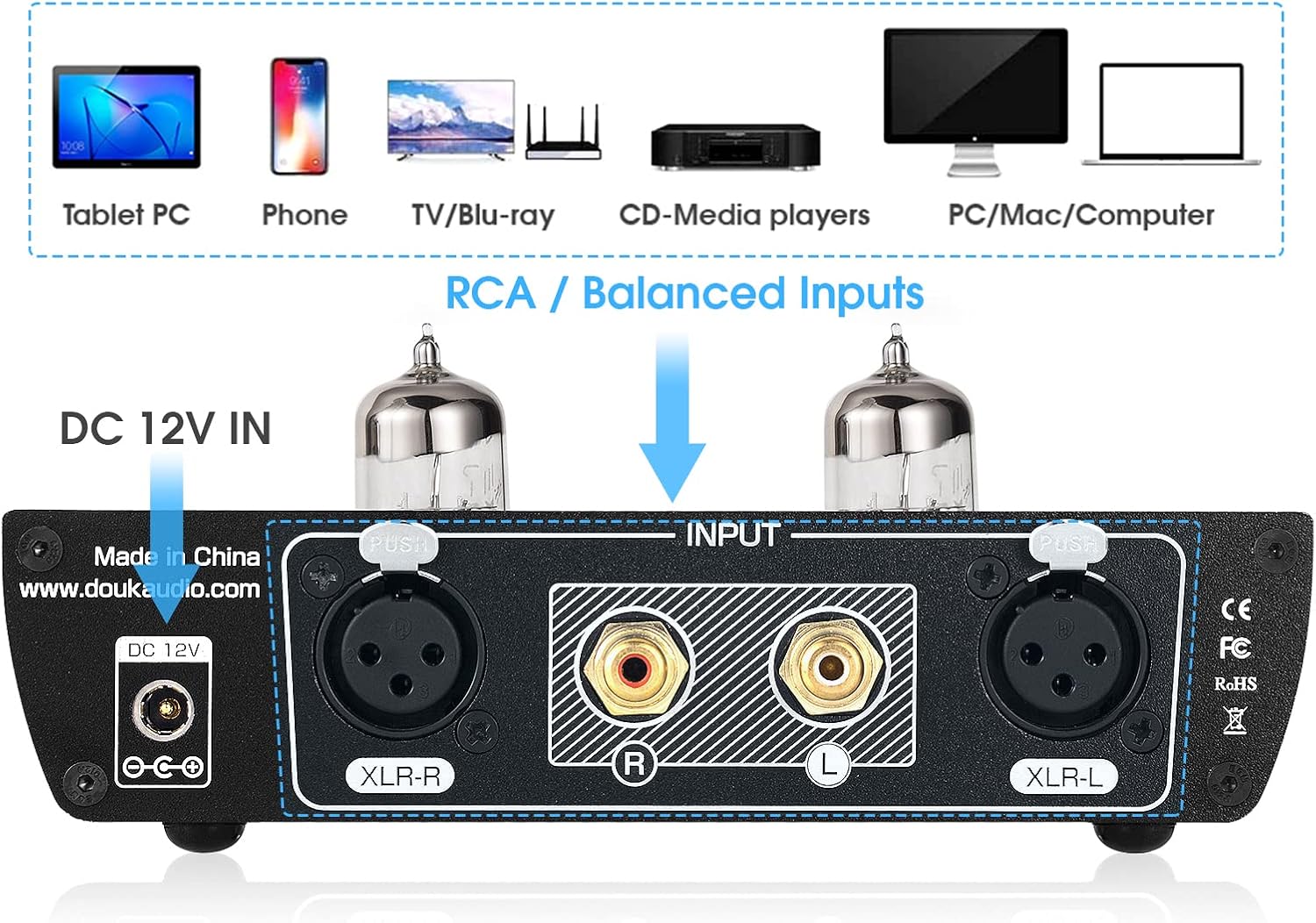
Image: Detailed diagram of the H2 amplifier's rear panel, indicating the RCA (L/R) inputs, Balanced XLR (L/R) inputs, and the DC 12V power input.
- RCA-indgange (V/H): For connecting audio sources via RCA cables.
- Balanced XLR Inputs (L/R): For connecting audio sources via balanced XLR cables.
- DC 12V IN: Power input for the provided DC 12V adapter.
4.3 Nøglefunktioner
- High-Fidelity Balanced XLR Connectivity: Real balanced XLR input for high-quality audio reproduction with excellent sound separation and resolution.
- Classic Tube Sound: Features a pluggable 6N3 vacuum tube for a warm, sweet, and dynamic sound signature.
- Powerful and Efficient Circuit Design: Dual TPA6120 headphone amp chips provide ample power for headphones from 16 to 600 ohms.
- Justerbare indstillinger: Independent L/R balance adjustment and adjustable gain settings (low/medium/high) for optimal performance.
- Sofistikeret æstetik: Black aluminum alloy chassis with vintage tube lighting and an LED display for real-time status feedback.
5. Opsætning
- Rørinstallation: Carefully insert the two 6N3 vacuum tubes into their sockets on the top of the amplifier. Ensure they are seated firmly but do not force them.
- Tilslut lydkilde:
- For Balanceret input: Connect your audio source (e.g., DAC, CD player with XLR output) to the XLR-L and XLR-R inputs on the rear panel using XLR cables.
- For RCA-indgang: Connect your audio source (e.g., computer, DAC, CD player with RCA output) to the RCA L and R inputs on the rear panel using RCA cables.

Image: The Douk Audio H2 amplifier with RCA cables connected to the input, demonstrating a typical audio source connection. A close-up of an illuminated vacuum tube is also shown.
- Tilslut hovedtelefoner: Plug your headphones into either the 6.35mm or Balanced XLR headphone output on the front panel. If your headphones have a 3.5mm jack, use the provided 6.35mm to 3.5mm adapter.
- Tilslut strøm: Tilslut DC 12V-strømadapteren til 'DC 12V IN'-porten på bagpanelet, og sæt derefter adapteren i en stikkontakt.
6. Betjeningsvejledning
- Tænd/sluk: Press the multi-function knob (volume knob) once to turn the amplifier on or off. The LED display will illuminate upon power-on.
- Lydstyrkejustering: Rotate the multi-function knob clockwise to increase volume and counter-clockwise to decrease volume. The volume level will be displayed on the LED screen.
- Valg af input: Double-press the multi-function knob to enter the menu. Rotate the knob to select between 'BAL Input' (Balanced XLR) and 'RCA Input'. Press the knob again to confirm your selection.
- Gevinstvalg: In the menu, navigate to 'Gain Select'. Rotate the knob to choose between 'Low', 'Medium', and 'High' gain settings. Select the appropriate gain based on your headphones' impedance and sensitivity. Lower impedance/higher sensitivity headphones generally require lower gain.
- Channel Balance Adjustment: In the menu, navigate to 'Channel Bal'. Rotate the knob to adjust the left/right channel balance (up to 2.5dB either way) to compensate for any hearing imbalances or source issues.

Image: A musician using the Douk Audio H2 amplifier with headphones and a microphone. The image highlights the amplifier's LED display showing various settings like 'BAL Input', 'Volume 64', 'Gain Select Medium', and 'Channel Bal L 0.5dB R'.
7. Vedligeholdelse
- Rensning: Brug en blød, tør klud til at rengøre ydersiden af ampBrug ikke flydende rengøringsmidler eller opløsningsmidler.
- Udskiftning af rør: The 6N3 vacuum tubes have a finite lifespan. If you notice a degradation in sound quality or if a tube fails, they can be replaced. Ensure the amplifier is powered off and unplugged before attempting to replace tubes. Gently pull the old tubes straight up from their sockets and carefully insert new ones, aligning the pins correctly. Compatible tube models include 6A8Q / 2C51 / 5670 / 5185 / 6385 / 6185 / WE396 (US), 6N3 (Soviet Union), 6H3N / 6H3II (Soviet Union), ECF82 (Germany), 6CC42 (Czech).
- Opbevaring: Hvis du opbevarer amplifier for an extended period, disconnect it from power and store it in a cool, dry place away from direct sunlight.
8. Fejlfinding
| Problem | Mulig årsag | Løsning |
|---|---|---|
| Ingen lydudgang |
|
|
| Forvrænget lyd |
|
|
| Brummende eller summende lyd |
|
|
9. Specifikationer
- Model: H2
- Input: Balanced XLR, RCA
- Produktion: 6.35mm Headphone, Balanced XLR Headphone
- Rør: 6N3 (pluggable)
- Hovedtelefonimpedans: 16-600 ohm
- Strømforsyning: DC 12V (medfølger adapter)
- Dimensioner (L x B x H): Cirka 155 mm x 128 mm x 45 mm (6.10 tommer x 5.04 tommer x 1.77 tommer)
- Nettovægt: Approximately 658g (1.45lb)
- Pakkevægt: Approximately 900g (1.98lb)
Image: Diagram showing the physical dimensions (length, width, height) and weight specifications of the Douk Audio H2 amplifier and its package.
10. Garanti og support
Douk Audio is committed to customer satisfaction. Your Douk Audio H2 amplifier comes with a standard manufacturer's warranty. Please refer to the warranty card included in your package or visit the official Douk Audio webhjemmeside for detaljerede garantivilkår.
For technical support, troubleshooting assistance, or any inquiries regarding your product, please contact Douk Audio customer service through the retailer where you purchased the product or visit the official Douk Audio webwebsted for kontaktoplysninger.
Official Douk Audio Webwebsted: www.douaudio.com


