1. Introduktion
Tak for købetasing the RCA RPJ264 Portable Home Theater Projector. This manual provides essential information for the safe and efficient operation of your device. Please read it thoroughly before use and retain it for future reference.
2. Pakkens indhold
Bekræft, at alle nedenstående varer er inkluderet i din pakke:
- RCA RPJ264 bærbar hjemmebiografprojektor
- Fjernbetjening
- Strømadapter
- Brugervejledning (dette dokument)
3. Produktet er slutview
Familiarize yourself with the projector's components and controls.
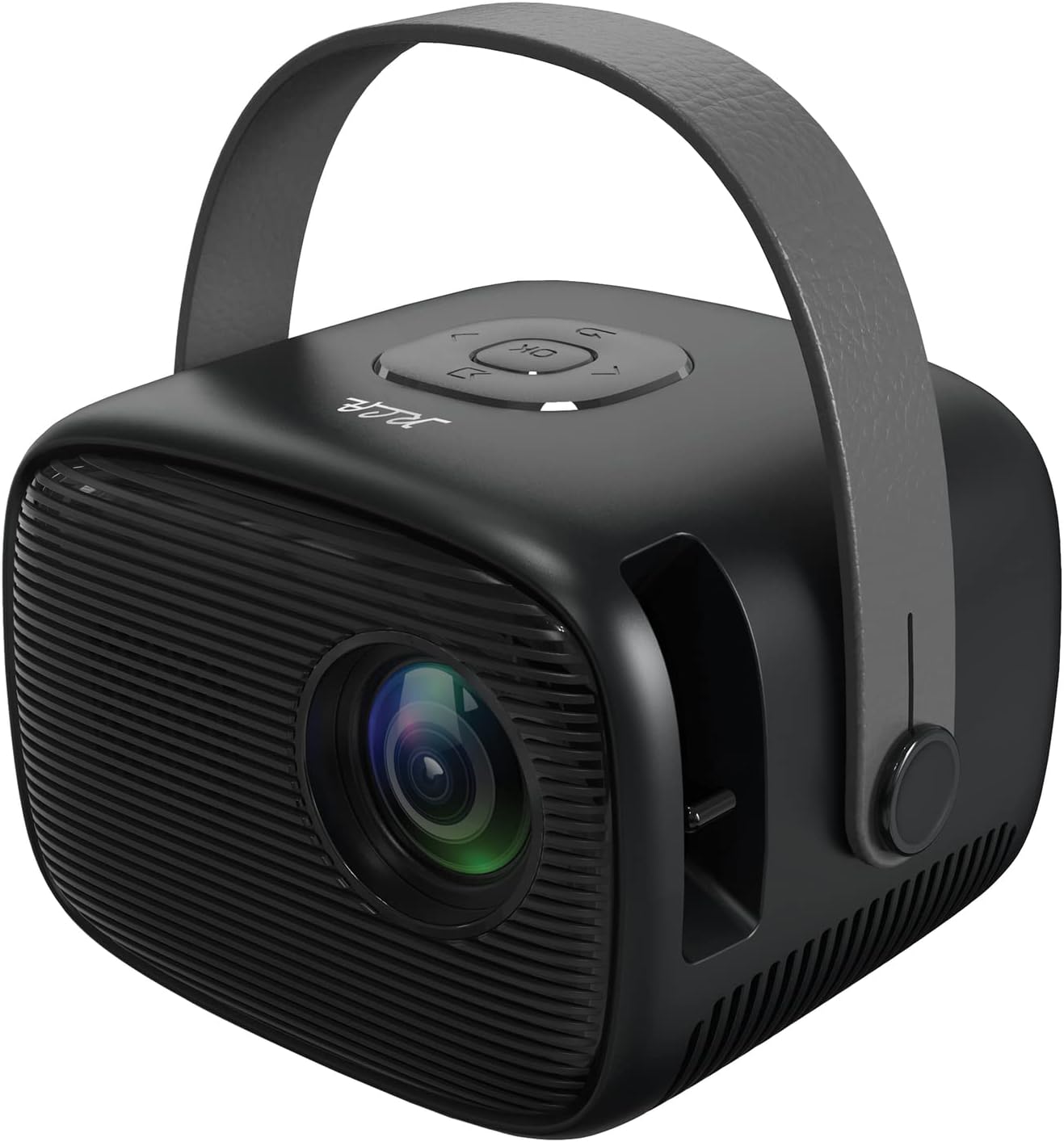
Billede 3.1: Forrest til højre view of the RCA RPJ264 Portable Home Theater Projector, showcasing the lens, speaker grille, and carrying handle.

Image 3.2: Close-up of the top control panel, featuring navigation buttons and an 'OK' button.

Image 3.3: Detail of the built-in focusing wheel, used for adjusting image clarity.

Image 3.4: Diagram illustrating the projector's features including 480p resolution, LED display, 100-inch maximum picture size, HDMI port, USB/Micro SD port, two built-in speakers, leather handle, remote control, AV port, and headphone port.
4. Opsætning
4.1 Placering
Position the projector on a stable, flat surface. Ensure there is adequate ventilation around the unit. For optimal viewing, place the projector at a distance that achieves your desired screen size. The recommended viewing distance for best results is 6.5 feet (approximately 2 meters).
4.2 Strømtilslutning
- Tilslut strømadapteren til DC IN-porten på projektoren.
- Sæt strømadapteren i en almindelig stikkontakt.
4.3 Indgangsforbindelser
Projektoren understøtter forskellige inputkilder:
- HDMI: Connect to devices such as TV boxes, TV sticks, PCs, laptops, gaming consoles (PS3, PS4, Xbox One, Wii), or Blu-ray players.
- USB: Insert a USB drive for media playback.
- VGA: Connect to computers or other VGA-compatible devices.
- AV: Use the AV port for older devices with composite video and stereo audio output.
- Micro SD: Insert a Micro SD card for media playback.

Image 4.1: The projector connected to various multimedia devices, illustrating its HDMI, USB, and other connectivity options for streaming, gaming, and media playback.

Image 4.2: Visual representation of the projector's capability to support 1080p HD playback through its HDMI input, along with other resolutions like 480p, 720p, and 576i.
5. Betjeningsvejledning
5.1 Tænd/sluk
Tryk på tænd/sluk-knappen på projektoren eller fjernbetjeningen for at tænde eller slukke enheden.
5.2 Fokusjustering
Rotate the focusing wheel located near the lens to achieve a clear and sharp image on your projection surface.
5.3 Valg af indgangskilde
Use the 'Source' button on the remote control or the projector's control panel to cycle through available input sources (HDMI, USB, VGA, AV, Micro SD).
5.4 Menunavigation
Use the navigation buttons (up, down, left, right) and the 'OK' button on the projector or remote control to navigate the on-screen menu for settings adjustments.
5.5 Lydudgang
The projector features two built-in speakers. For external audio, connect headphones or external speakers to the 3.5mm headphone jack.

Image 5.1: The projector displaying a large image, demonstrating its capability to project up to a 100-inch picture size for an immersive viewoplevelse.
6. Fejlfinding
Hvis du støder på problemer med din projektor, kan du se følgende almindelige problemer og løsninger:
| Problem | Mulig årsag | Løsning |
|---|---|---|
| Intet billede vises | Power not connected, incorrect input source, loose cable connection | Kontroller strømkablet, vælg den korrekte inputkilde, og sørg for, at kablerne er korrekt tilsluttet. |
| Billedet er sløret | Fokus ikke justeret | Adjust the focusing wheel until the image is clear. |
| Ingen lyd | Volume too low, external audio device not connected, audio settings incorrect | Increase volume, check external audio connections, verify audio settings in the menu. |
| Fjernbetjening virker ikke | Batteries depleted, obstruction between remote and projector | Replace batteries, remove any obstructions, ensure direct line of sight. |
7. Specifikationer
- Model: RPJ264
- Produktdimensioner: 7 x 8 x 6 tommer
- Varens vægt: 1.5 pund
- Skærmopløsning: 800 x 480 (supports 1080p HD playback via HDMI)
- Forbindelse teknologi: HDMI, USB, VGA, AV, Micro SD
- Speciel funktion: Built-in Speakers, Portable with Carrying Handle
- Anbefalede anvendelser: Indoor/Outdoor Home Entertainment
- Projektionsstørrelse: 32" til 170"
- Projektionsafstand: 4.9ft to 16.4ft (Recommended: 6.5ft)
8. Vedligeholdelse
8.1 Rengøring af linsen
Use a soft, lint-free cloth specifically designed for optical lenses to gently wipe the projector lens. Avoid using abrasive cleaners or cloths that could scratch the lens surface.
8.2 Rengøring af projektorhuset
Tør projektorens yderside af med en blød, tør klud. Brug ikke flydende rengøringsmidler eller opløsningsmidler.
8.3 Opbevaring
When not in use, store the projector in a cool, dry place, away from direct sunlight and extreme temperatures. If possible, use the original packaging or a protective case to prevent dust accumulation and damage.
9. Vigtige sikkerhedsoplysninger
ADVARSEL: Dette produkt indeholder kemikalier, som staten Californien kender til at forårsage kræft og fosterskader eller anden reproduktionsskade.
Always operate the projector in a well-ventilated area. Do not block ventilation openings. Avoid direct eye exposure to the projector lens when the lamp is on. Keep the projector away from water or other liquids. Do not attempt to disassemble or repair the projector yourself; refer all servicing to qualified personnel.
10. Garanti og support
For warranty information or technical support, please refer to the documentation provided at the time of purchase or visit the official RCA webwebsted. Behold din købskvittering som købsbevis i tilfælde af garantikrav.


