1. Introduktion
Thank you for choosing the Philips SHE9700BT Wireless Earphones. This manual provides essential information for setting up, operating, and maintaining your earphones to ensure optimal performance and longevity. The SHE9700BT earphones are designed to deliver excellent sound quality with the convenience of wireless connectivity.
Nøglefunktioner omfatter:
- Bluetooth 5.2 for stabil trådløs forbindelse.
- AAC codec support for high-quality audio streaming.
- Op til 22 timers uafbrudt afspilning på en enkelt opladning.
- Integrated inline control and microphone for easy management of music and calls.
- Faithful reproduction of the acclaimed SHE9700 series sound profile.
2. Sikkerhedsoplysninger
Please read all safety instructions before using your earphones. Keep this manual for future reference.
- Hørselssikkerhed: To avoid hearing damage, limit the time you use earphones at high volume and set the volume to a safe level. The louder the volume, the shorter the safe listening time.
- Kørselssikkerhed: Do not use earphones while driving, cycling, or operating machinery. This can be dangerous and is illegal in some areas.
- Kvælningsfare: Dette produkt indeholder små dele, der kan være en kvælningsfare. Opbevares utilgængeligt for børn.
- Batterisikkerhed: Do not expose the battery to excessive heat (sunlight, fire, etc.). Do not disassemble, puncture, or short-circuit the battery.
- Vandtæthed: These earphones are not waterproof. Avoid exposure to rain, moisture, or submersion in water.
3. Pakkens indhold
Bekræft at alle varer er til stede i din pakke:
- Philips SHE9700BT Wireless Earphones
- USB-C ladekabel
- Multiple sizes of ear tips (XS, S, M, L, XL)
- Brugervejledning (dette dokument)
4. Produktet er slutview
Familiarize yourself with the components of your Philips SHE9700BT earphones.

Figur 1: Overview of Philips SHE9700BT Wireless Earphones showing the neckband and inline controls.

Figur 2: Detaljeret view of the inline control unit, featuring volume buttons and a multi-function button.
Komponenter:
- høretelefoner Left (L) and Right (R) earbuds with silicone ear tips.
- Nakkebånd: Flexible cable connecting the earbuds and housing the battery and control units.
- Inline-styreenhed: Contains buttons for power, volume, and call management.
- Mikrofon: Integrated into the inline control unit for hands-free calls.
- USB-C opladningsport: Located on one of the control units for charging.
5. Opsætning
5.1 Opladning af øretelefonerne
Oplad dine øretelefoner helt før første brug.
- Connect the supplied USB-C charging cable to the charging port on the earphone's inline control unit.
- Tilslut den anden ende af USB-C-kablet til en USB-strømkilde (f.eks. en computers USB-port eller en USB-vægadapter).
- The LED indicator will show charging status. It will typically turn off or change color when fully charged. A full charge takes approximately 1.5-2 hours.

Figure 3: Earphones ready for charging or use, highlighting the long battery life of up to 22 hours.
5.2 Parring med en Bluetooth-enhed
To connect your earphones to a smartphone or other Bluetooth-enabled device:
- Sørg for, at høretelefonerne er slukkede.
- Press and hold the Multi-function button (usually the center button on the inline control) for approximately 5 seconds until the LED indicator flashes blue and red alternately. This indicates pairing mode.
- Aktiver Bluetooth på din Bluetooth-enhed, og søg efter tilgængelige enheder.
- Select "Philips SHE9700BT" from the list of found devices.
- Når den er tilsluttet, blinker LED-indikatoren langsomt blåt.
The earphones can remember up to 8 paired devices. If you pair a 9th device, the oldest pairing will be overwritten.
5.3 Sådan tager du øretelefonerne på
For optimal sound quality and comfort, choose the correct ear tip size.
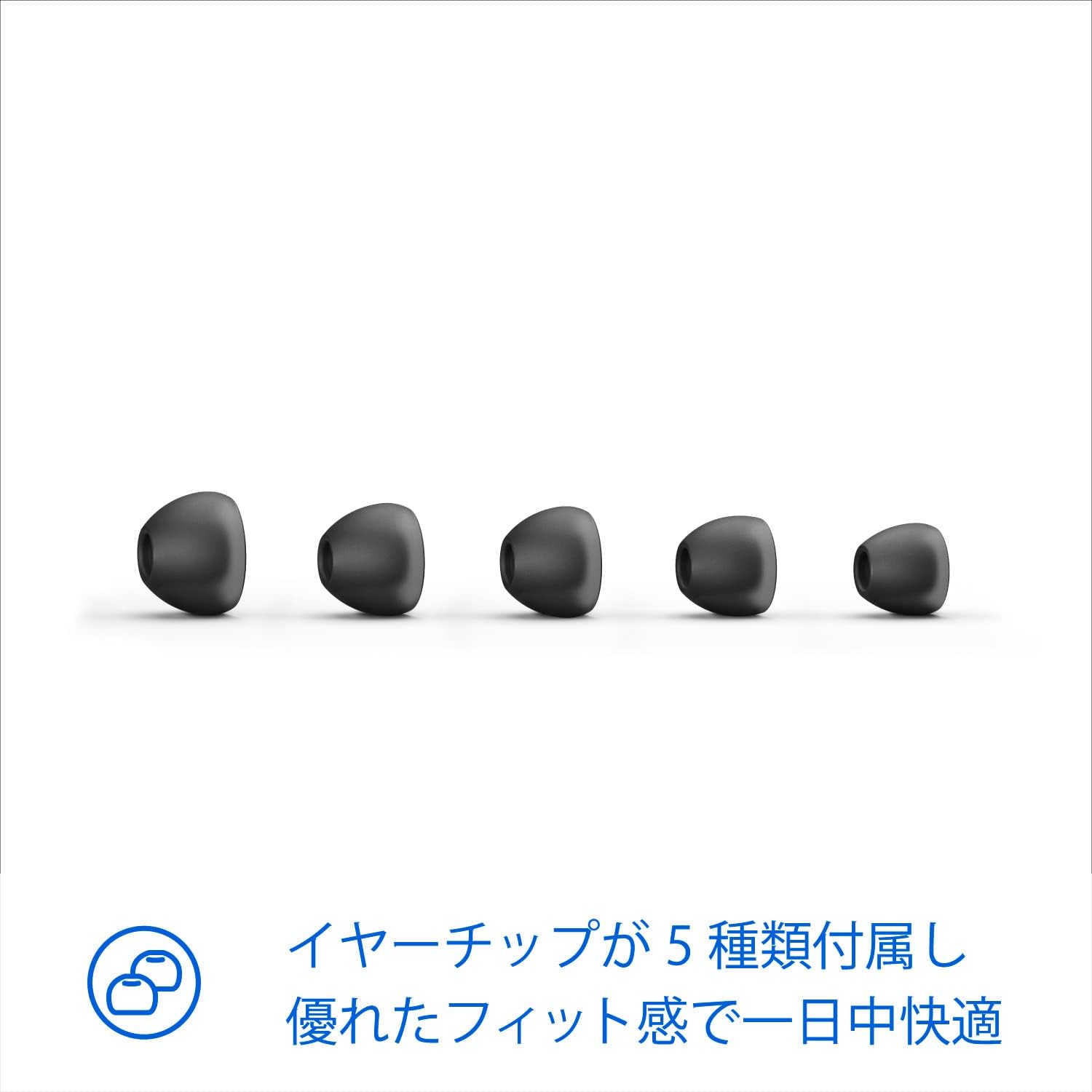
Figure 4: Five different sizes of ear tips are included to ensure a comfortable and secure fit.
- Select the ear tips that provide a snug fit and good seal in your ear canal. Experiment with different sizes for the best experience.
- Insert the earbuds into your ears, ensuring the neckband rests comfortably around your neck.

Figure 5: Proper wearing of the earphones for comfortable listening, even while traveling.
6. Betjeningsvejledning
6.1 Tænd/sluk
- Tænd: Press and hold the Multi-function button for 2 seconds. The LED will flash blue.
- Sluk: Press and hold the Multi-function button for 4 seconds. The LED will flash red and then turn off.
6.2 Musikkontrol
- Afspil/pause: Tryk én gang på multifunktionsknappen.
- Lydstyrke op: Tryk på '+'-knappen.
- Skrue ned for lyden: Tryk på '-' knappen.
- Næste nummer: Tryk på '+'-knappen og hold den nede i 2 sekunder.
- Forrige nummer: Tryk på '-'-knappen og hold den nede i 2 sekunder.
6.3 Opkaldskontrol
- Besvar/afslut opkald: Tryk én gang på multifunktionsknappen.
- Afvis opkald: Tryk og hold multifunktionsknappen nede i 2 sekunder.
- Skift opkald (under et opkald): Tryk to gange på multifunktionsknappen.
6.4 Stemmeassistent
- Aktiver stemmeassistent: Press the Multi-function button twice when not on a call.
7. Vedligeholdelse
Proper care ensures the longevity of your earphones.
- Rensning: Use a soft, dry cloth to clean the earphones. Do not use cleaning agents containing alcohol, ammonia, benzene, or abrasives.
- Ørespidser: Fjern ørepropperne med jævne mellemrum, og rengør dem med mild sæbe og vand. Sørg for, at de er helt tørre, før du sætter dem på igen.
- Opbevaring: When not in use, store the earphones in a clean, dry place, away from extreme temperatures and direct sunlight.
- Undgå skader: Do not pull on the cable excessively. Avoid dropping or subjecting the earphones to strong impacts.
8. Fejlfinding
Hvis du støder på problemer, kan du se følgende almindelige problemer og løsninger:
| Problem | Løsning |
|---|---|
| Høretelefonerne tændes ikke. | Ensure the earphones are charged. Connect them to a power source using the USB-C cable. |
| Kan ikke parres med en Bluetooth-enhed. | Make sure the earphones are in pairing mode (LED flashing blue and red). Ensure Bluetooth is enabled on your device and it's within range (10 meters). Try forgetting the device on your phone and re-pairing. |
| Ingen lyd eller lav lydstyrke. | Check the volume level on both the earphones and your connected device. Ensure the earphones are properly paired and connected. |
| Lydkvaliteten er dårlig. | Ensure the ear tips provide a good seal in your ear canal. Try different ear tip sizes. Check for interference from other wireless devices. |
| Mikrofon virker ikke. | Ensure the earphones are properly connected and selected as the audio input device on your phone during calls. |
9. Specifikationer
Technical details of the Philips SHE9700BT Wireless Earphones:
- Model: SHE9700BT
- Forbindelse: Trådløs (Bluetooth)
- Bluetooth version: 5.2
- Understøttede lydkodeker: AAC
- Batterilevetid: Op til 22 timer (afspilning)
- Opladningsport: USB-C
- Vægt: Cirka 100 g (0.1 kg)
- Produktdimensioner: 5 x 2 x 10 cm
- Farve: Sort
- Formfaktor: In-ear høretelefoner
10. Garanti og support
Philips products are designed and manufactured to the highest standards. In the unlikely event of a product defect, Philips offers a warranty for this product. Please refer to the warranty card included in your package or visit the official Philips webwebstedet for detaljerede garantivilkår og -betingelser, der er specifikke for din region.
For further assistance, technical support, or to register your product, please visit the Philips support website or contact your local Philips customer service center. Contact information can typically be found on the Philips webwebstedet eller i din produktdokumentation.