1. Introduktion
This manual provides essential instructions for the safe and efficient operation of your XIAOMI Soundbar 3.1ch. Please read this manual thoroughly before using the product and retain it for future reference.
The XIAOMI Soundbar 3.1ch is designed to enhance your home theater audio experience with its 3.1 channel configuration and wireless subwoofer, delivering clear sound and powerful bass.
2. Sikkerhedsoplysninger
- Udsæt ikke enheden for regn eller fugt for at forhindre brand eller elektrisk stød.
- Åbn ikke c'enasing. Overlad al service til kvalificeret personale.
- Sørg for tilstrækkelig ventilation omkring enheden. Bloker ikke ventilationsåbninger.
- Place the soundbar and subwoofer on a stable, flat surface.
- Hold enheden væk fra varmekilder såsom radiatorer, varmeapparater, komfurer eller andre apparater (herunder ampløftere), der producerer varme.
- Brug kun tilbehør/tilbehør specificeret af producenten.
- Træk stikket ud af apparatet under tordenvejr, eller når det ikke skal bruges i længere perioder.
3. Pakkens indhold
Bekræft at alle varer er til stede i pakken:
- XIAOMI Soundbar 3.1ch (Main Unit)
- Trådløs subwoofer
- Strømledning(er)
- Fjernbetjening
- Brugervejledning (dette dokument)
- HDMI-kabel (kan variere afhængigt af region)
4. Produktet er slutview
Familiarize yourself with the components of your XIAOMI Soundbar system.

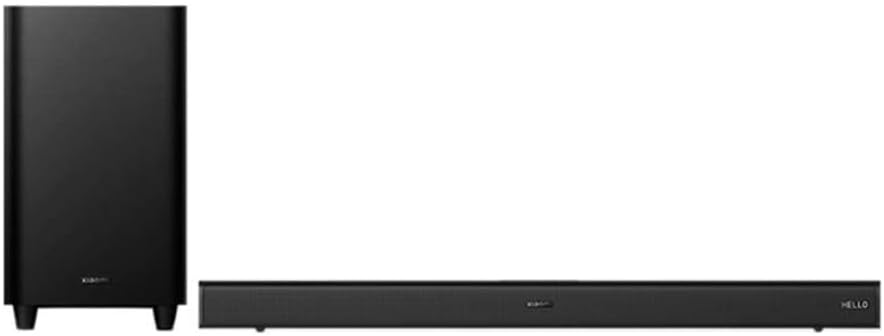
Figur 4.1: Front view of the XIAOMI Soundbar 3.1ch and its accompanying wireless subwoofer. The soundbar is a long, slender unit typically placed in front of a television, while the subwoofer is a larger, rectangular unit designed to provide deep bass sounds.
Figur 4.2: Vinklet view of the XIAOMI Soundbar 3.1ch and wireless subwoofer, showing the compact design of both units. The soundbar features a minimalist design with controls often integrated discreetly.
4.1 Soundbar Front Panel
- Power knap: Tænder/slukker soundbaren.
- Lydstyrke op/ned: Justerer lydstyrken.
- Kilde/Input knap: Switches between input sources (HDMI, Bluetooth, Optical, etc.).
- LED-indikatorer: Display current status or input mode.
4.2 Soundbar Rear Panel
- HDMI eARC-port: Connects to your TV for high-quality audio.
- Optisk indgang: Connects to devices with an optical audio output.
- USB-port: For firmware updates or media playback (if supported).
- Strømindgang: Tilsluttes til netledningen.
4.3 trådløs subwoofer
- Strømindgang: Tilsluttes til netledningen.
- Parringsknap: For manual pairing with the soundbar (if automatic pairing fails).
- Status-LED: Indicates pairing status.
5. Opsætning
5.1 Placering
- Soundbar: Placer soundbaren centralt under dit tv. Sørg for, at der ikke er nogen forhindringer foran soundbaren.
- subwoofer: The wireless subwoofer can be placed anywhere in the room, ideally near a wall or corner for enhanced bass. Avoid placing it directly against a wall or in a cabinet, which can muffle the sound.
5.2 Tilslutning til strøm
- Connect the power cord to the soundbar's power input, then plug it into a wall outlet.
- Connect the power cord to the wireless subwoofer's power input, then plug it into a wall outlet.
- The soundbar and subwoofer will automatically attempt to pair. The subwoofer's status LED will indicate pairing status (e.g., blinking while searching, solid when connected).
5.3 Tilslutning til dit tv
Vælg en af følgende tilslutningsmetoder:
Option 1: HDMI eARC (Recommended)
- Connect one end of an HDMI cable to the HDMI eARC port on your TV.
- Connect the other end of the HDMI cable to the HDMI eARC port on the soundbar.
- On your TV, enable HDMI-CEC (Consumer Electronics Control) and eARC/ARC functions in the audio settings.
Option 2: Optical Cable
- Connect one end of an optical cable to the Optical OUT port on your TV.
- Connect the other end of the optical cable to the Optical IN port on the soundbar.
- On your TV, set the audio output to "Optical" or "PCM".
6. Betjeningsvejledning
6.1 Tænd/sluk
- Tryk på Magt knappen på soundbaren eller fjernbetjeningen for at tænde eller slukke enheden.
6.2 Valg af indgangskilde
- Tryk på Kilde or Input button on the soundbar or remote control repeatedly to cycle through available input sources (e.g., HDMI eARC, Optical, Bluetooth).
- The LED indicators on the soundbar will show the currently selected input.
6.3 Lydstyrkekontrol
- Trykke Lydstyrke op (+) or Skrue ned (-) buttons on the soundbar or remote control to adjust the volume.
- Tryk på Stum button on the remote control to mute or unmute the sound.
6.4 Bluetooth -parring
- Tryk på Bluetooth button on the remote control or cycle through inputs until "Bluetooth" mode is selected. The Bluetooth indicator will blink.
- Aktiver Bluetooth på din mobilenhed, og søg efter tilgængelige enheder.
- Select "XIAOMI Soundbar 3.1ch" from the list.
- Once paired, the Bluetooth indicator on the soundbar will become solid.
6.5 NFC Pairing (Near Field Communication)
Hvis din enhed understøtter NFC:
- Sørg for, at NFC er aktiveret på din mobilenhed.
- Tap your NFC-enabled device gently against the NFC tag area on the soundbar (refer to product diagram for exact location).
- Bekræft parringsanmodningen på din mobilenhed.
7. Vedligeholdelse
7.1 Rengøring
- Tag altid stikket til soundbaren og subwooferen ud af stikkontakten inden rengøring.
- Use a soft, dry, lint-free cloth to wipe the surfaces of the soundbar and subwoofer.
- Brug ikke flydende rengøringsmidler, aerosolspray eller slibende rengøringsmidler, da de kan beskadige overfladen eller de indvendige komponenter.
7.2 Opbevaring
- Hvis enheden opbevares i længere tid, skal den tages ud af stikkontakten og opbevares et køligt, tørt sted, væk fra direkte sollys og ekstreme temperaturer.
8. Fejlfinding
| Problem | Mulig årsag | Løsning |
|---|---|---|
| Ingen strøm | Netledningen er ikke tilsluttet korrekt. | Ensure power cords are firmly plugged into the soundbar/subwoofer and wall outlet. |
| Ingen lyd | Forkert inputkilde valgt. Lydstyrken er for lav eller slået fra. Kabler er ikke tilsluttet korrekt. | Vælg den korrekte inputkilde. Skru op for lydstyrken, og kontroller lydløs status. Reconnect HDMI or Optical cables. |
| Subwooferen parres ikke | Uden for rækkevidde eller interferens. Manual pairing required. | Flyt subwooferen tættere på soundbaren. Press the pairing button on the subwoofer and then on the soundbar (if available, refer to specific product instructions for manual pairing sequence). |
| Problemer med Bluetooth-forbindelse | Enheden er ikke i parringstilstand. Interferens. | Sørg for, at soundbaren er i Bluetooth-parringstilstand. Flyt Bluetooth-enheden tættere på soundbaren. Disconnect and reconnect Bluetooth. |
9. Specifikationer
- Model: Soundbar 3.1ch
- Højttalertype: Soundbar med trådløs subwoofer
- Surround Sound Kanalkonfiguration: 3.1
- Højttalers maksimale udgangseffekt: 430 watt
- Forbindelse teknologi: Bluetooth, NFC, HDMI eARC, Optical
- Subwoofer tilslutning: Trådløs
- Subwoofer diameter: 6.5 tommer
- Kontrolmetode: Fjern
- Strømkilde: Elektrisk med ledning
- Produktdimensioner: 11.02 x 4.33 x 9.06 tommer
- Varens vægt: 24.2 pund
10. Garanti og support
XIAOMI products are manufactured to the highest quality standards. For detailed warranty information, please refer to the warranty card included with your product or visit the official XIAOMI webwebstedet. Behold din købskvittering som købsbevis.
For technical support or service inquiries, please contact XIAOMI customer service through their official channels. Contact information can typically be found on the XIAOMI webwebstedet eller i din produktemballage.


