1. Introduktion
Tak for købetasing the eKids Cocomelon Karaoke Machine, Model CO-550. This portable Bluetooth party speaker is designed to provide hours of musical fun for children, featuring built-in Cocomelon songs, a real working microphone, and versatile connectivity options. This manual provides essential information for safe and optimal use of your new karaoke machine.
2. Produktet er slutview
2.1 Nøglefunktioner
- Bluetooth-forbindelse: Wirelessly stream audio from any compatible Bluetooth device.
- Indbyggede sange: Includes 24 popular Cocomelon songs for immediate entertainment.
- USB Audio Player: Connect a USB drive to play your own MP3 music files.
- Virkelig fungerende mikrofon: Sing along with the included wired microphone.
- Børnevenligt design: Lightweight and portable with a built-in handle.
- Genopladeligt batteri: Enjoy portable use with the integrated rechargeable battery (USB charging cable included).
- Hovedtelefonstik: Til privat lytning.
2.2 Komponenter
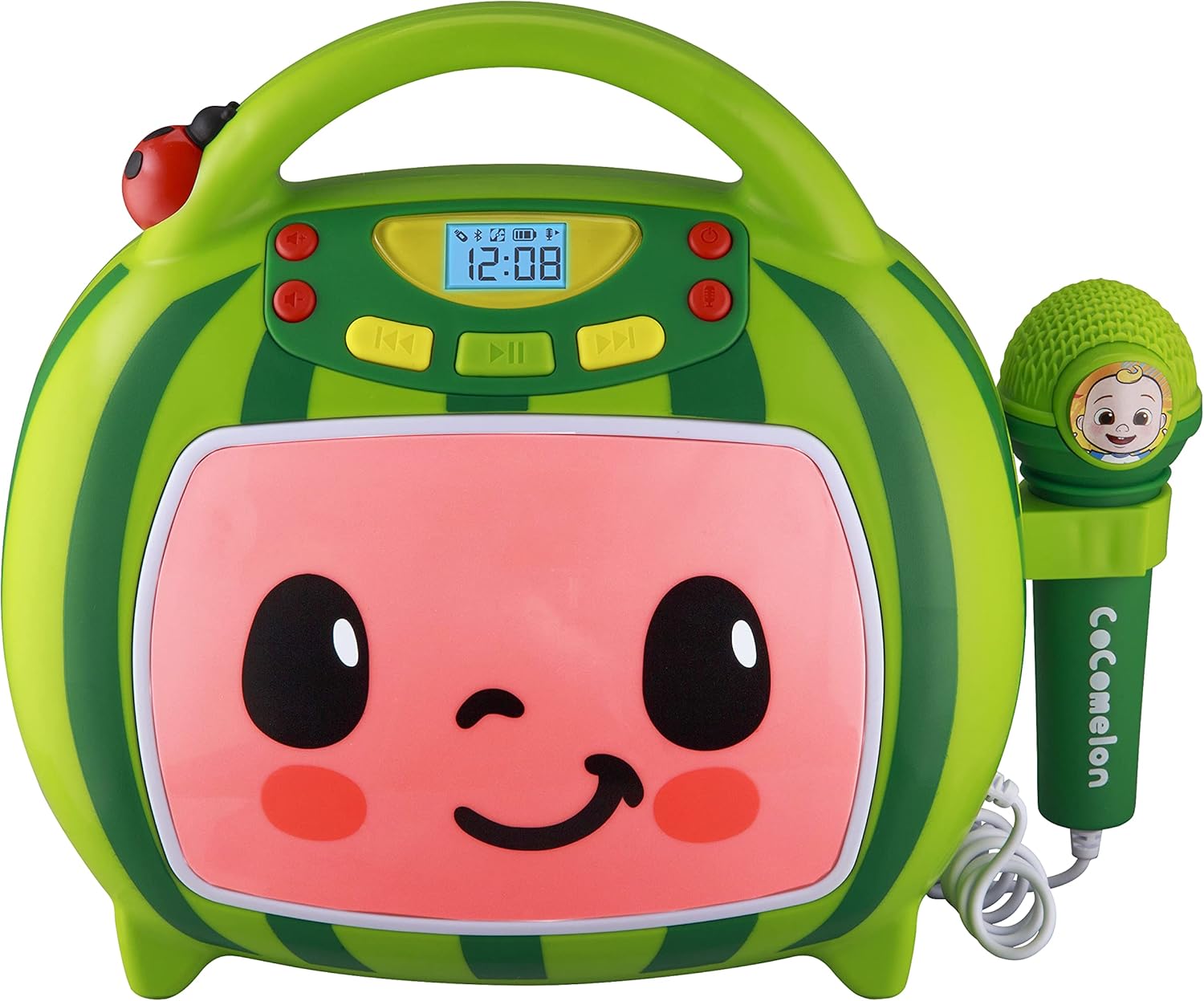
Front view of the eKids Cocomelon Karaoke Machine, featuring the watermelon-themed design and integrated microphone.

An annotated diagram detailing the dimensions, control buttons (volume, play/pause, power), microphone jack, USB port, and battery compartment of the karaoke machine.
Pakken indeholder:
- eKids Cocomelon Karaoke Machine
- Kablet mikrofon
- USB opladningskabel
3. Opsætning
3.1 Batteriinstallation
The karaoke machine requires 1 Lithium Ion battery. Ensure the battery is correctly installed according to the polarity markings in the battery compartment, located on the back of the unit.
3.2 Indledende tænding
- Locate the Power ON/OFF button on the unit.
- Press and hold the Power ON/OFF button to turn on the device. The display will illuminate.
4. Betjeningsvejledning
4.1 Bluetooth -parring
- Turn on the karaoke machine. It will automatically enter Bluetooth pairing mode.
- On your compatible device (e.g., smartphone, tablet), enable Bluetooth and search for available devices.
- Select 'eKids Cocomelon' from the list of devices to pair.
- Once paired, you can stream audio wirelessly from your device to the karaoke machine.

The karaoke machine is shown with icons indicating its compatibility with various Bluetooth-enabled devices such as PCs, smartwatches, tablets, and mobile phones.
This video demonstrates the Bluetooth pairing process for the eKids Cocomelon Karaoke Machine, showing how to connect a mobile device to stream music wirelessly.
4.2 USB-lydafspilning
- Insert a USB drive containing MP3 music files into the USB port located on the back of the unit.
- The machine will automatically detect the USB drive and begin playing music.
- Use the playback controls (Play/Pause, Forward, Reverse) to navigate your music.
4.3 indbyggede sange
The karaoke machine comes pre-loaded with 24 Cocomelon songs. To play these songs, ensure no Bluetooth device is connected and no USB drive is inserted. Use the playback controls to select and play the desired song.

A visual representation of the 24 pre-loaded Cocomelon songs, including popular titles like 'Hello Song' and 'Wheels on the Bus'.
4.4 Brug af mikrofon
- Plug the wired microphone into the microphone jack on the side of the unit.
- Adjust the microphone volume using the dedicated controls.
- Sing along to your favorite tunes!

A young child engaging with the eKids Cocomelon Karaoke Machine, holding the microphone and singing along.
En overview videoshowasing the eKids Cocomelon Karaoke Machine in action, highlighting its portability, microphone, and various functions for children's entertainment.
4.5 Styringer
- Tænd/sluk: Tænder eller slukker for enheden.
- Volume UP/DOWN: Justerer den samlede lydstyrke.
- Afspil/pause: Starter eller sætter afspilning på pause.
- Frem/tilbage: Springer til det næste eller forrige spor.
- Mikrofon TIL/FRA: Activates or deactivates the microphone.
5. Vedligeholdelse
- Rensning: Tør enheden af med en blød, tør klud. Brug ikke slibende rengøringsmidler, og nedsænk den ikke i vand.
- Opbevaring: Opbevar karaokemaskinen et køligt, tørt sted væk fra direkte sollys, når den ikke er i brug.
- Batteripleje: If the unit will not be used for an extended period, remove the battery to prevent leakage.
6. Fejlfinding
| Problem | Løsning |
|---|---|
| Enheden tænder ikke. | Check battery installation and ensure the battery is charged. |
| Ingen lyd fra højttaleren. | Increase volume. Ensure Bluetooth device is connected and playing, or USB is inserted correctly. |
| Bluetooth opretter ikke forbindelse. | Ensure the unit is in pairing mode. Turn off and on Bluetooth on your device. Move closer to the unit. |
| Mikrofon virker ikke. | Ensure the microphone is securely plugged in and the microphone ON/OFF switch is activated. |
7. Specifikationer
| Feature | Detalje |
|---|---|
| Modelnummer | CO-550 |
| Varens vægt | 2.12 pund |
| Produktdimensioner | 12 x 4 x 1 tommer |
| Batterier | 1 Lithium Ion batteri påkrævet |
| Forbindelse | Bluetooth, USB |
| Talertal | 1 |
| Inkluderede komponenter | USB kabel |
8. Garanti og support
For warranty information or technical support, please refer to the contact details provided on the product packaging or visit the official eKids webwebstedet. Behold din købskvittering som købsbevis.
9. Sikkerhedsoplysninger
- This product is intended for children aged 18 months and up.
- Opsyn af voksne anbefales under brug.
- Udsæt ikke enheden for vand eller overdreven fugt.
- Forsøg ikke at adskille eller modificere enheden.
- Keep the USB cable and microphone cord away from young children to prevent choking hazards.
- Bortskaf batterier ansvarligt i henhold til lokale regler.


