Produkt overview
The Cosmic Byte CB-GK-22 Veritas is a Tenkeyless (TKL) membrane keyboard designed for various computing tasks, including gaming. It features RGB LED backlighting with multiple effects, double injection keycaps for durability, and 25-key anti-ghosting capabilities.

Figur 1: Top-down view of the Cosmic Byte CB-GK-22 Veritas TKL Membrane Keyboard with RGB lighting activated.
Opsætningsinstruktioner
Follow these steps to set up your Cosmic Byte CB-GK-22 Veritas keyboard:
- Pak tastaturet ud: Carefully remove the keyboard and any included accessories from the packaging.
- Tilslut til computer: Find en ledig USB-port på din computer. Sæt tastaturets USB-stik i USB-porten.
- Driver installation: The keyboard is plug-and-play. Your operating system (Windows, Linux, macOS) should automatically detect and install the necessary drivers. No additional software installation is typically required.
- Bekræft funktionalitet: Once connected, the keyboard's RGB lighting should illuminate. Test typing in a text editor to ensure all keys are responsive.
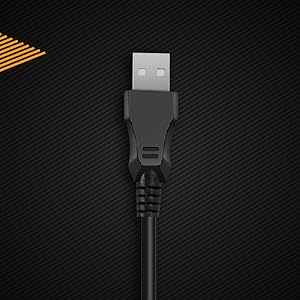
Figur 2: Nærbillede view of the keyboard's USB connector, ready for connection to a computer.

Figure 3: The keyboard is compatible with various operating systems, including Windows, Linux, and macOS.
Betjeningsvejledning
Grundlæggende tastaturfunktioner
The CB-GK-22 Veritas functions as a standard TKL keyboard. All keys perform their labeled functions. The keyboard features 25-key anti-ghosting, allowing multiple key presses to be registered simultaneously, which is beneficial for fast-paced typing and gaming.
RGB-baggrundsbelysningskontrol
The keyboard features 7-color RGB backlighting with various effects. Use the following key combinations to control the lighting:
- Justering af lysstyrke: Trykke Fn + Side op to increase brightness (5 levels). Press Fn + Side ned for at mindske lysstyrken (5 niveauer).
- Baggrundslyseffekter: The keyboard supports 9 backlight effects, including 6 dazzling effects. Specific key combinations for cycling through effects are typically indicated on the keyboard itself or in a quick start guide. Common combinations include Fn + Scroll Lock or Fn + Indsæt.
- Sonic Spectrum Mode: This mode allows the RGB lighting to react to ambient sound. Activate this mode using the designated key combination, often Fn + Hjem or Fn + Slut.

Figure 4: The keyboard features a Tenkeyless layout and includes Sonic Spectrum and sound-reactive LED lighting modes.
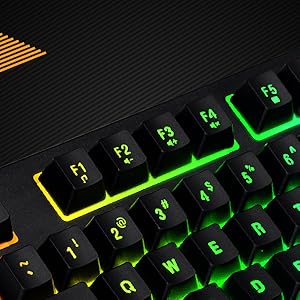
Figure 5: Detail of the function keys (F1-F12) with active RGB backlighting.
Double Injection Keycaps
The keycaps are manufactured using a double injection process, which ensures that the legends (characters on the keys) are scratch-resistant and will not fade over time. This design also makes the keys easier to clean.
Opretholdelse
Proper maintenance helps extend the lifespan of your keyboard:
- Regelmæssig rengøring: Use a soft, dry cloth to wipe down the keycaps and keyboard surface. For dust and debris between keys, use compressed air.
- Dyb rengøring: Til genstridigt snavs, let dampen a cloth with water or a mild, non-abrasive cleaning solution. Ensure no liquid enters the keyboard.
- Undgå spild: Keep liquids away from the keyboard to prevent damage to internal components. If a spill occurs, immediately disconnect the keyboard and allow it to dry completely before reconnecting.
- Opbevaring: When not in use for extended periods, store the keyboard in a clean, dry environment away from direct sunlight or extreme temperatures.
Fejlfinding
Hvis du støder på problemer med dit tastatur, kan du bruge følgende almindelige løsninger:
- Tastaturet reagerer ikke:
- Sørg for, at USB-kablet er korrekt tilsluttet til både tastaturet og computeren.
- Prøv at tilslutte tastaturet til en anden USB-port på din computer.
- Test tastaturet på en anden computer for at afgøre, om problemet er med tastaturet eller den originale computer.
- Genstart din computer.
- Baggrundsbelysning virker ikke eller er forkert:
- Check if the brightness is set to the lowest level. Use Fn + Side op for at øge lysstyrken.
- Cycle through backlight effects using the designated key combinations (e.g., Fn + Scroll Lock or Fn + Indsæt).
- Ensure no software is overriding the keyboard's lighting settings (though this keyboard typically does not require software).
- Nøgler registreres ikke eller ghostes:
- Clean around the affected keys to remove any debris that might be obstructing the key mechanism.
- The keyboard supports 25-key anti-ghosting. If more than 25 keys are pressed simultaneously, some inputs may not register.
Specifikationer
| Feature | Detalje |
|---|---|
| Modelnavn | CB-GK-22 Veritas |
| Mærke | Kosmisk byte |
| Tastaturtype | TKL Membrane Keyboard |
| Baggrundsbelysning | 7-Color RGB Backlit, 9 Effects, Sonic Spectrum Mode |
| Lysstyrkeniveauer | 5 niveauer |
| Anti-Ghosting | 25 nøgler |
| tasterne | Dobbelt injektion |
| Forbindelse | USB |
| Produktdimensioner | 37.2 x 15.1 x 3.7 cm |
| Varens vægt | 629 g |
| Inkluderede komponenter | USB kabel |
| Sprog | engelsk |
| ASIN | B09K5GYWBH |
Garanti & Support
Garantioplysninger
The Cosmic Byte CB-GK-22 Veritas TKL Membrane Keyboard comes with a 1 års begrænset garanti from the date of purchase. This warranty covers manufacturing defects under normal use. It does not cover damage caused by misuse, accidents, unauthorized modifications, or normal wear and tear.
Gem venligst dit købsbevis for garantikrav.
Kundesupport
For technical assistance, warranty claims, or any product-related inquiries, please contact Cosmic Byte customer support:
- Producentkontakt: 1800 31300 7700
- Mærke Webwebsted: Visit the official Cosmic Byte webwebsted for yderligere ressourcer og support.


