Indledning
Tak fordi du valgte Amplicomms BigTel 1582 Cordless Big Button Phone. This system is designed to provide clear and accessible communication, especially for users with hearing or visual impairments, or those who prefer simplified operation. It features large buttons, a loud ringer, amplified audio, and an integrated answering machine. This manual provides detailed instructions for setting up, operating, and maintaining your new telephone system.

Billede: Den Amplicomms BigTel 1582 system, showing the main base station with one handset and an additional charging cradle with a second handset.
Sikkerhedsoplysninger
- Use only the power adapter and batteries supplied with the product.
- Udsæt ikke telefonen for vand eller fugt.
- Avoid placing the base station or charging cradle near heat sources or direct sunlight.
- Hold telefonen væk fra stærke elektromagnetiske felter.
- Forsøg ikke at åbne eller reparere enheden selv. Overlad al service til kvalificeret personale.
- Bortskaf batterier ansvarligt i henhold til lokale regler.
Pakkens indhold
Kontroller venligst, at alle varer er til stede i din pakke:
- 1 x BigTel 1580 Base Station with integrated answering machine
- 2 x Cordless Handsets (one for the base, one for the additional charging cradle)
- 2 x Handset Charging Cradles (one integrated with base, one separate)
- 2 x Power Adapters (for base and additional cradle)
- 1 x telefonledning
- 4 x AAA Rechargeable Batteries (2 per handset)
- 1 x Brugermanual (dette dokument)
Produkt overview
Håndsæt funktioner

Billede: Detaljeret view of the handset highlighting the large backlit display, M1/M2/M3 direct memory buttons, and indicators for increased ring volume and audio amplifikation.
- Stort baggrundsbelyst display: Provides clear visibility of caller ID and menu options.
- Store knapper: Large, easy-to-read keypad for effortless dialing.
- M1, M2, M3 Direct Memory Buttons: For quick dialing of frequently called numbers.
- Volume Boost Button: Increases in-call audio volume by up to +35dB.
- Kompatibel med høreapparater: Reduces interference for hearing aid users.
- Visuel ringindikator: A light on the handset flashes when there's an incoming call.
Basestationsfunktioner

Image: The base station, showing the integrated answering machine controls and the M1/M2/M3 direct call buttons, allowing calls directly from the base.
- Integreret telefonsvarer: Records up to 30 minutes of messages.
- Håndfri højttalertelefon: Allows calls directly from the base unit.
- Direct Call Buttons (M1, M2, M3): Initiate calls to pre-programmed numbers directly from the base.
- Beskedtæller: Digital display shows the number of new messages.
Opsætning
1. Tilslutning af basestationen
- Tilslut den ene ende af telefonledningen til "LINE"-stikket på bagsiden af basestationen.
- Connect the other end of the telephone line cord to your telephone wall socket or router/hub.
- Connect the power adapter to the "POWER" socket on the back of the base station.
- Sæt strømadapteren i en stikkontakt.
2. Installing Handset Batteries
- Åbn batteridækslet på bagsiden af hvert håndsæt.
- Insert the 2 AAA rechargeable batteries, observing the correct polarity (+ and -).
- Luk batterirummets dæksel forsvarligt.
3. Opladning af håndsættene
- Place each handset onto its respective charging cradle (one on the base station, one on the additional cradle).
- Ensure the "Charge" indicator on the handset or base lights up, indicating proper charging.
- For first-time use, charge the handsets for at least 15 hours to ensure full battery capacity.
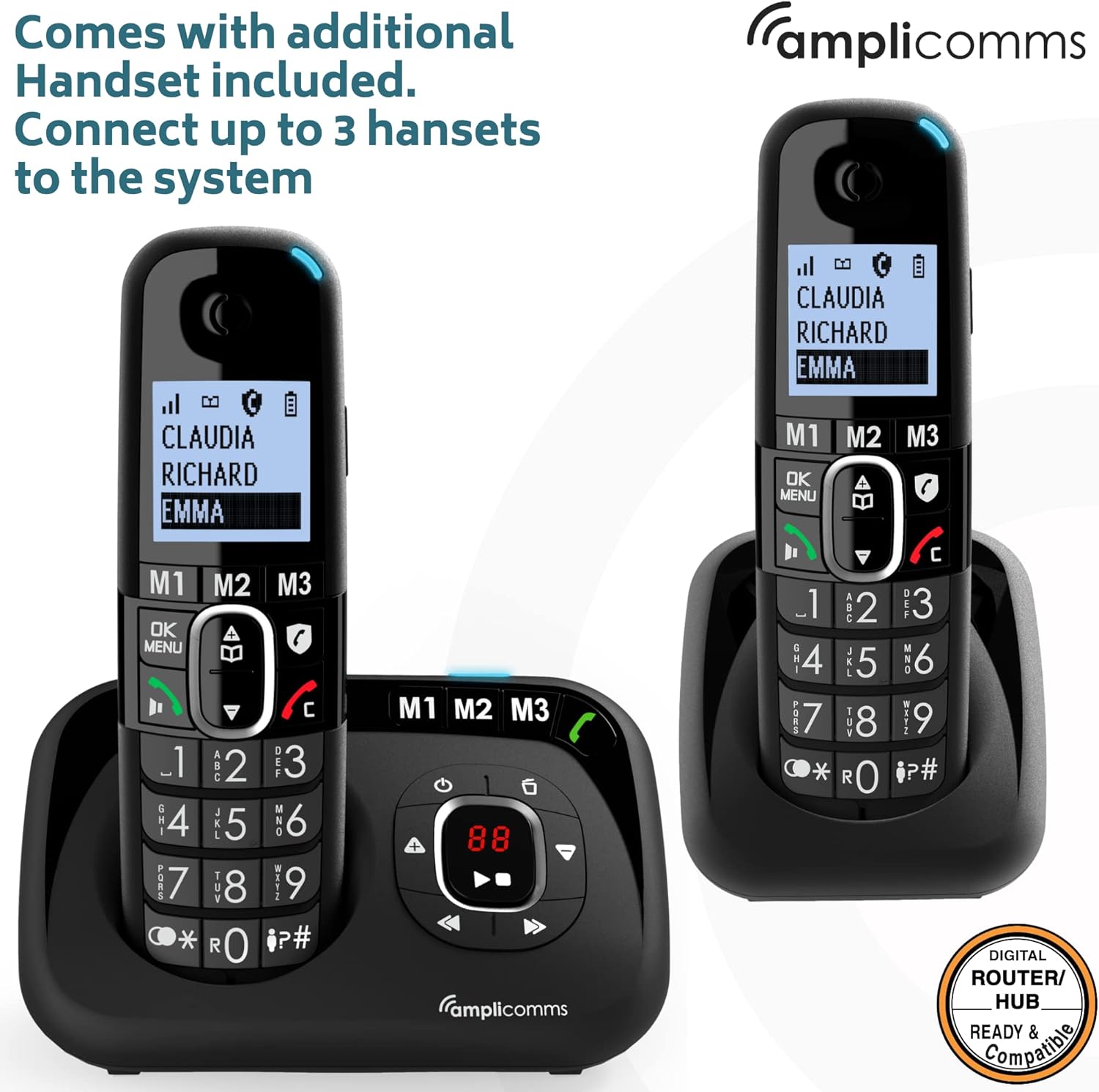
Billede: Den Amplicomms BigTel 1582 system with both the main base and the additional charging cradle, demonstrating the multi-handset capability.
4. Registering Additional Handsets (if necessary)
Your additional handset(s) should be pre-registered. If not, or if you purchase additional handsets (up to 3 total), follow these steps:
- På basestationen skal du trykke på og holde nede SIDE button (usually located on the side or back) until the registration indicator on the base starts flashing.
- Tryk på på håndsættet MENU / OK, then navigate to "Register Handset" (or similar option) and press MENU / OK igen.
- Enter the system PIN (default is 0000) and press MENU / OK.
- The handset will display "Registering..." and then "Handset Registered" once successful.
Betjeningsvejledning
Foretage opkald
- From Handset:
- Dial the desired phone number using the large keypad.
- Tryk på GREEN (Call) knappen for at starte opkaldet.
- Tryk på for at afslutte opkaldet RED (End Call) knap.
- Using Direct Memory Buttons (M1, M2, M3):
- To program: Press and hold M1/M2/M3, enter the number, then press MENU / OK at gemme.
- To call: Simply press the desired M1, M2, or M3 button on the handset or base. The phone will automatically dial the stored number.
Modtagelse af opkald
- When the phone rings, the visual ring indicator on the handset will flash.
- Tryk på GREEN (Call) button on the handset or the Højttalertelefon button on the base to answer.
Justering af lydstyrke
- Earpiece Volume (during a call): Brug OP/NED navigation buttons on the handset.
- Ringelydstyrke: Navigate through the handset menu to "Settings" > "Ringer Volume" to adjust. The ringer can be increased up to 90dB.
- Lydboost: Under et opkald skal du trykke på den dedikerede Boost button (often marked with an ear icon) on the handset to amplify the incoming audio by up to +35dB. Press again to deactivate.
Answering Machine Functions
The integrated answering machine can record up to 30 minutes of messages.
- Tænd/sluk: Tryk på ON/OFF button on the base station.
- Afspiller beskeder: Tryk på SPIL button on the base station. The message counter will display the number of new messages.
- Skipping/Deleting Messages: Brug SPRINGE og SLET buttons on the base during message playback.
- Optagelse af udgående besked (OGM): Access the answering machine settings via the handset menu or base controls to record your personalized greeting.
Intercom (for multiple handsets)
- To call another handset: Press the INT (Intercom) button on your handset, then dial the number of the desired handset (e.g., 2 for handset 2).
- To transfer a call: During an external call, press INT, dial the handset number, wait for them to answer, then hang up to transfer.
Opretholdelse
- Rensning: Tør telefonen og basestationen af med en blød kludamp klæde. Brug ikke slibende rengøringsmidler eller opløsningsmidler.
- Batteripleje:
- Brug altid de medfølgende genopladelige AAA-batterier.
- Hvis telefonen ikke skal bruges i længere tid, skal du fjerne batterierne for at forhindre lækage.
- Udskift batterierne, når de ikke længere holder en opladning effektivt.
- Placering: Place the base station in a central location to maximize cordless range. Avoid placing it near large metal objects or other electronic devices that may cause interference.
Fejlfinding
| Problem | Mulig årsag | Løsning |
|---|---|---|
| Ingen klartone. | Telefonledningen er ikke tilsluttet eller defekt. | Check connections. Try another phone in the same socket. |
| Håndsættet oplader ikke. | Handset not correctly seated in cradle; dirty charging contacts; batteries not inserted or faulty. | Ensure handset is properly seated. Clean contacts with a dry cloth. Check battery insertion and condition. |
| Intet display på håndsættet. | Batteries flat or not inserted. | Charge handset for 15 hours. Check battery insertion. |
| Poor sound quality / static. | Uden for rækkevidde; interferens fra andre elektroniske enheder. | Move closer to the base station. Relocate base station away from other electronics. |
| Kan ikke foretage eller modtage opkald. | Handset not registered; base station not powered. | Register handset (see Setup section). Check base station power connection. |
| Telefonsvareren optager ikke. | Telefonsvareren er slukket; hukommelsen er fuld. | Sørg for, at telefonsvareren er tændt. Slet gamle beskeder for at frigøre plads. |
Specifikationer
- Model: Amplicomms BigTel 1582 (1580 + Additional Handset)
- Telefontype: Trådløs DECT-telefon
- Type svarsystem: Digital, op til 30 minutters optagetid
- Ringelydstyrke: Op til 90 dB
- Lydboost: Op til +35 dB
- Batterier: 4 x AAA genopladelige batterier (inkluderet)
- Farve: Sort
- Materiale: Plast
- Varens vægt: 0.8 kilogram (samlet pakke)
- Pakkedimensioner: 21.2 x 17.3 x 9.1 cm
- Fabrikant: Atlinks
- Oprindelsesland: Hong Kong
- Kompatible enheder: Digital home networks (e.g., routers, home hubs)
Garanti og support
Amplicomms products are designed for reliability and performance. For warranty information, please refer to the warranty card included in your product packaging or visit the official Amplicomms website. For technical support or service inquiries, please contact your retailer or the Amplicomms customer service department.
Fabrikant: Atlinks
Mærke: Amplicomms
Webwebsted: www.amplicomms.com (Bemærk: Dette er en pladsholder URL, please refer to your product documentation for the correct support contact information.)


