Indledning
Velkommen til brugermanualen til din nye Amplicomms BigTel 1500 Cordless Big Button Phone. This phone is designed with enhanced features for ease of use, particularly for individuals who are hard of hearing, visually impaired, or prefer simplified technology. It offers loud ringer volume, increased audio during calls, large buttons, and direct memory dialling for convenience and accessibility.
Pakkens indhold
Markér venligst feltet for følgende elementer:
- Amplicomms BigTel 1500 Handset
- Basisenhed
- Strømadapter
- Telefonledning
- Genopladelige AAA-batterier (2x)
- Brugervejledning (dette dokument)
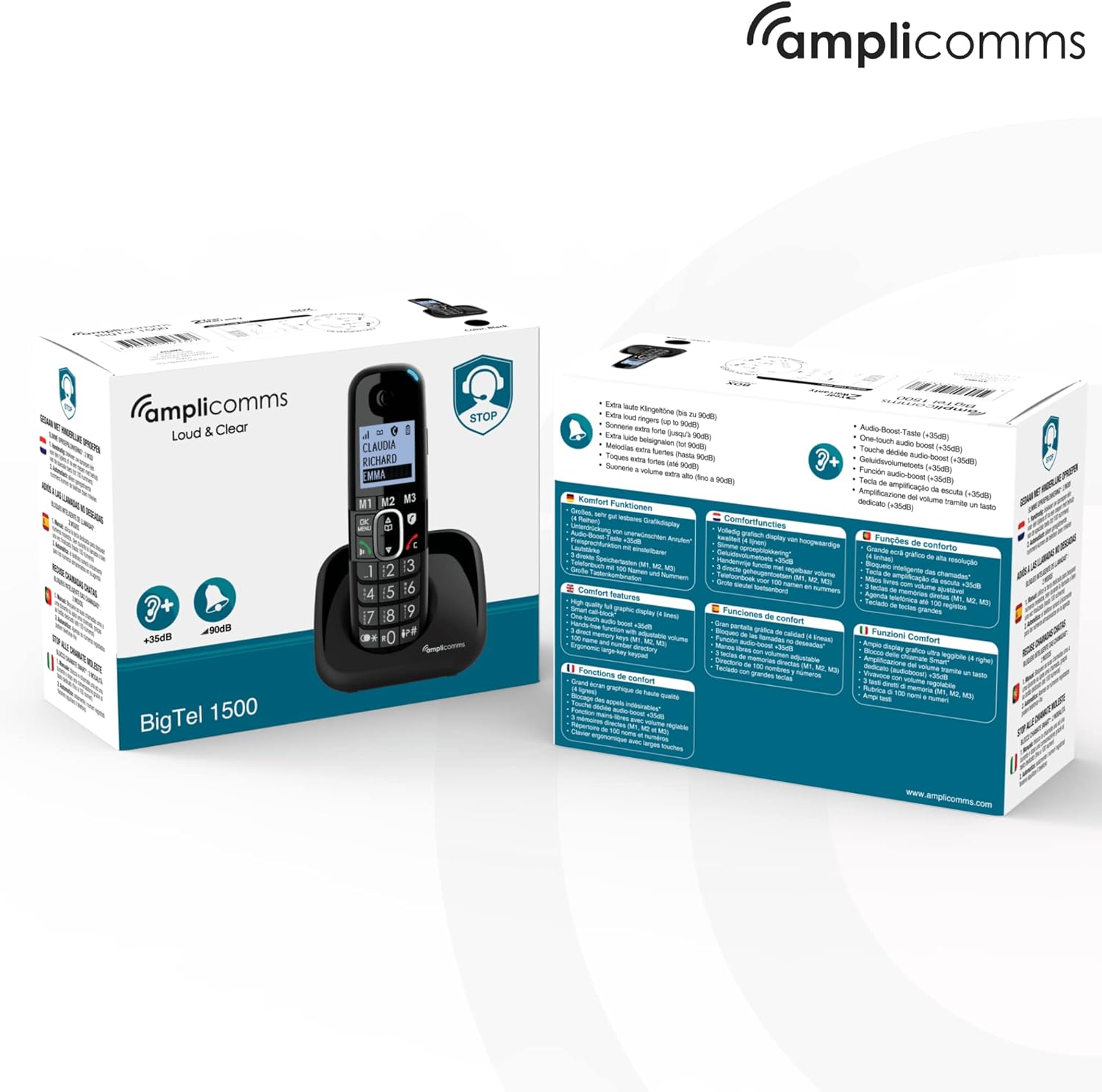
Billede: Den Amplicomms BigTel 1500 phone and its retail packaging, showing the contents and key features.
Produkt overview
De Amplicomms BigTel 1500 is designed for clarity and ease of use. Below are the main components and their functions.

Billede: Forside view af Amplicomms BigTel 1500 cordless phone handset docked in its charging base. The handset features a large backlit display and oversized buttons.
Nøglefunktioner:
- Stort baggrundsbelyst display: For let viewing of caller ID and menu options.
- Store knapper: Oversized dialling keys and memory buttons for improved visibility and tactile feedback.
- Justerbar ringelydstyrke: Ringer can be increased up to 90 dB, with a visual ring indicator.
- Increased Audio Volume: Handset audio can be boosted by up to +35 dB during calls.
- 3 Direct Memory Buttons (M1, M2, M3): For quick dialling of frequently called numbers.
- Håndfri funktion: Built-in speakerphone for convenient conversations.
- Opkaldsblokering: Dedicated button to block up to 100 unwanted numbers.
- Kompatibel med høreapparater: Reducerer interferens for høreapparatbrugere.

Image: Diagram highlighting key features of the Amplicomms BigTel 1500: large backlit screen, 3 memory buttons (M1, M2, M3), increased audio up to +35dB, and adjustable ringer volume up to 90dB.

Image: Infographic showing the target users for the Amplicomms BigTel 1500: individuals with unsteady hands, the visually impaired, non-tech savvy users, and those who are hard of hearing.
Opsætning
1. Batteriinstallation
- Åbn batterirummets dæksel på bagsiden af håndsættet.
- Insert the two supplied AAA rechargeable batteries, observing the correct polarity (+/-).
- Luk batterirummets dæksel forsvarligt.
2. Tilslutning af baseenheden
- Tilslut den ene ende af telefonledningen til LINE-porten på baseenheden.
- Tilslut den anden ende af telefonledningen til din telefonstikkontakt.
- Connect the small plug of the power adapter to the DC IN port on the base unit.
- Plug the power adapter into a mains electrical outlet.
- Place the handset on the base unit to charge. The battery indicator on the handset display will show charging status. Allow at least 15 hours for the initial charge.
3. Registrering af yderligere håndsæt (valgfrit)
The BigTel 1500 system supports up to 3 additional handsets (BigTel 1501, sold separately). To register an additional handset:
- På baseenheden skal du trykke på og holde SIDE button until the registration indicator flashes.
- On the new handset, access the menu and select the "Register Handset" option.
- Enter the system PIN (default is 0000).
- Once registered, the handset will display its assigned number (e.g., Handset 2).

Billede: Den Amplicomms BigTel 1500 base unit and handset, shown alongside three additional BigTel 1501 handsets, illustrating the system's expandability.
Betjeningsvejledning
Foretag et opkald
- Dialling: Enter the phone number using the large keypad.
- Tryk på Grøn opkaldsknap for at starte opkaldet.
- Tryk på for at afslutte et opkald Rød Afslut opkald-knap or place the handset back on the base.
Modtagelse af et opkald
- Når telefonen ringer, tryk på Grøn opkaldsknap at svare.
- The visual ring indicator will flash during an incoming call.
Using Direct Memory Buttons (M1, M2, M3)
You can store up to three important numbers for quick dialling.
- Sådan gemmer du et nummer:
- Press and hold the desired memory button (M1, M2, or M3) until you hear a beep.
- Enter the phone number you wish to store.
- Tryk på OK/MENU knappen for at gemme.
- Sådan ringer du til et gemt nummer:
- Simply press the desired memory button (M1, M2, or M3). The phone will automatically dial the stored number.
Justering af lydstyrke
- Ringelydstyrke: Access the phone's menu to adjust the ringer volume. It can be set up to 90 dB.
- Handset Audio Volume (during call): Under et opkald skal du bruge Op/ned navigationsknapper to increase or decrease the earpiece volume. The volume can be boosted by up to +35 dB.
Using Hands-Free (Speakerphone)
- Under et opkald skal du trykke på Højttalertelefon knap (often indicated by a speaker icon) to activate the hands-free function.
- Press it again to switch back to the earpiece.
Opkaldslåsning
The BigTel 1500 allows you to block unwanted numbers.
- Sådan blokerer du et nummer:
- During an incoming call from an unwanted number, press the dedicated Call Blocker Button (often indicated by a shield icon).
- Alternatively, you can add numbers to the block list via the phone's menu. The phone can block up to 100 numbers.
Opretholdelse
- Rensning: Tør håndsættet og baseenheden af med en blød kludamp klæde. Brug ikke slibende rengøringsmidler eller opløsningsmidler.
- Batteripleje: Use only the supplied rechargeable batteries. If the phone will not be used for an extended period, remove the batteries.
- Placering: Avoid placing the phone in direct sunlight, near heat sources, or in areas with high humidity.
Fejlfinding
| Problem | Mulig årsag/løsning |
|---|---|
| Ingen klartone |
|
| Håndsættet oplades ikke |
|
| Dårlig opkaldskvalitet / Statisk |
|
| Kan ikke foretage/modtage opkald |
|
Specifikationer
- Model: Amplicomms BigTel 1500
- Dimensioner: 5.5 x 3 x 18 cm (Handset)
- Vægt: 216 g (Handset)
- Batterier: 2 x AAA genopladelige batterier (inkluderet)
- Telefontype: Trådløs DECT-telefon
- Ringelydstyrke: Op til 90 dB
- Handset Audio Boost: Op til +35 dB
- Kapacitet for opkaldsblokering: Op til 100 numre
- Fabrikant: Atlinks
- Oprindelsesland: Hong Kong
Garanti og support
Amplicomms products are designed for reliability and performance. For warranty information and technical support, please refer to the warranty card included in your package or visit the official Amplicomms webwebsted. Gem din købsbevis til garantikrav.
For further assistance, you may also contact your retailer or the AmpLicomms kundeserviceafdeling.


